
What is AWS? Amazon Cloud (Web) Services Tutorial
 Editorial Team
⚡ Smart Summary
AWS, or Amazon Web Services, is a comprehensive cloud computing platform from Amazon that delivers on-demand compute, storage, database, analytics, and networking services worldwide, combining IaaS, PaaS, and SaaS models under a flexible pay-as-you-go pricing structure.

What is Cloud Computing?
Cloud computing is a term referred to storing and accessing data over the internet. It does not store any data on the hard disk of your personal computer. In cloud computing, you can access data from a remote server.
What is AWS?
The full form of AWS is Amazon Web Services. It is a platform that offers flexible, reliable, scalable, easy-to-use and, cost-effective cloud computing solutions.
AWS is a comprehensive, easy to use computing platform offered by Amazon. The platform is developed with a combination of infrastructure as a service (IaaS), platform as a service (PaaS) and packaged software as a service (SaaS) offerings.
History of AWS
- 2002: Amazon launched its first web services, allowing developers to access Amazon product and catalog data.
- 2004: Amazon introduced Simple Queue Service, now known as Amazon SQS.
- 2006: Amazon Web Services officially launched its cloud platform with Amazon S3 and Amazon EC2.
- 2012: AWS held its first re:Invent customer and partner conference in Las Vegas.
- 2014: AWS introduced AWS Lambda, helping popularize serverless computing.
- 2015: Amazon began reporting AWS as a separate business segment. AWS generated $7.88 billion in annual net sales.
- 2016: AWS annual net sales reached $12.22 billion. The company also introduced AWS Snowball Edge and AWS Snowmobile.
- 2021: AWS expanded its portfolio to more than 200 fully featured cloud services.
- 2023: Amazon Bedrock became generally available, enabling businesses to build generative AI applications using foundation models.
- 2024: AWS introduced the Amazon Nova family of foundation models through Amazon Bedrock.
- 2025: AWS generated $128.7 billion in annual net sales, representing 20% year-over-year growth.
- 2026: AWS celebrated 20 years of cloud operations and expanded its portfolio to more than 240 cloud and AI services.
Important AWS Services
Amazon Web Services offers a wide range of different business purpose global cloud-based products. The products include storage, databases, analytics, networking, mobile, development tools, enterprise applications, with a pay-as-you-go pricing model.
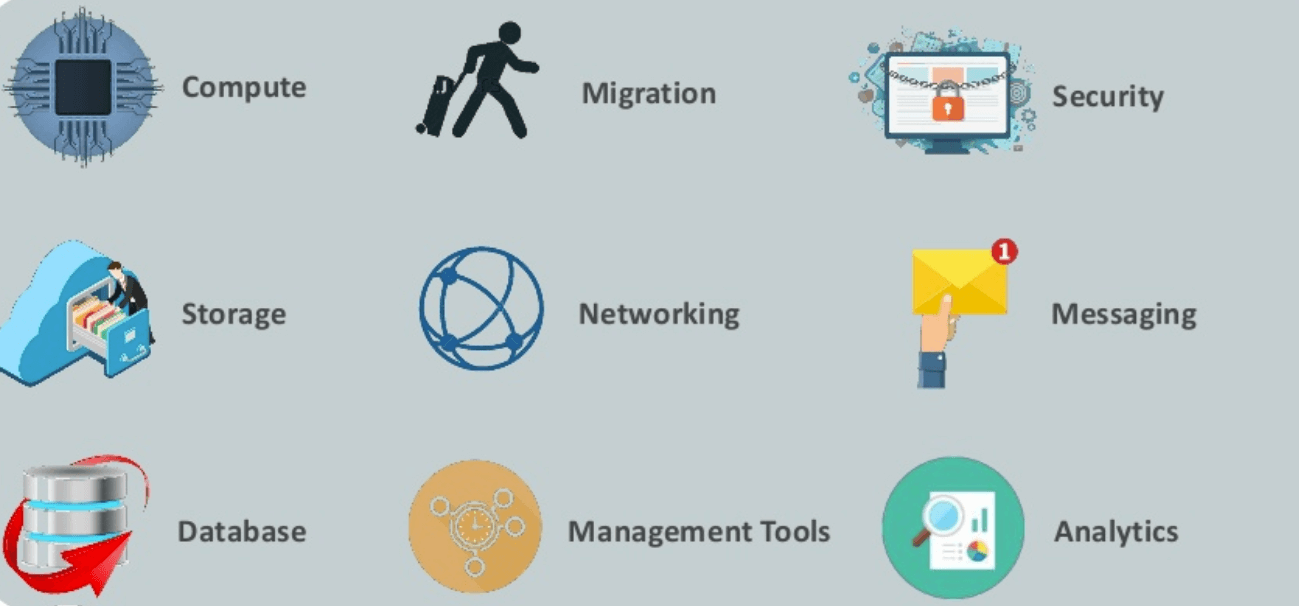
Here, are essential AWS services.
AWS Compute Services
Here, are Cloud Compute Services offered by Amazon:
- EC2(Elastic Compute Cloud)- EC2 is a virtual machine in the cloud on which you have OS level control. You can run this cloud server whenever you want.
- LightSail- This cloud computing tool automatically deploys and manages the computer, storage, and networking capabilities required to run your applications.
- Elastic Beanstalk- The tool offers automated deployment and provisioning of resources like a highly scalable production website.
- EKS (Elastic Container Service for Kubernetes)- The tool allows you to run Kubernetes on the Amazon cloud environment without installation.
- AWS Lambda – This AWS service allows you to run functions in the cloud. The tool is a big cost saver for you as you pay only when your functions execute.
Migration
Migration services used to transfer data physically between your datacenter and AWS.
- DMS (Database Migration Service)– DMS service can be used to migrate on-site databases to AWS. It helps you to migrate from one type of database to another — for example, Oracle to MySQL.
- SMS (Server Migration Service)– SMS migration services allows you to migrate on-site servers to AWS easily and quickly.
- Snowball— Snowball is a small application which allows you to transfer terabytes of data inside and outside of AWS environment.
Storage
- Amazon Glacier- It is an extremely low-cost storage service. It offers secure and fast storage for data archiving and backup.
- Amazon Elastic Block Store (EBS)- It provides block-level storage to use with Amazon EC2 instances. Amazon Elastic Block Store volumes are network-attached and remain independent from the life of an instance.
- AWS Storage Gateway- This AWS service is connecting on-premises software applications with cloud-based storage. It offers secure integration between the company’s on-premises and AWS’s storage infrastructure.
Security Services
- IAM (Identity and Access Management)— IAM is a secure cloud security service which helps you to manage users, assign policies, form groups to manage multiple users.
- Inspector— It is an agent that you can install on your virtual machines, which reports any security vulnerabilities.
- Certificate Manager— The service offers free SSL certificates for your domains that are managed by Route53.
- WAF (Web Application Firewall)— WAF security service offers application-level protection and allows you to block SQL injection and helps you to block cross-site scripting attacks.
- Cloud Directory— This service allows you to create flexible, cloud-native directories for managing hierarchies of data along multiple dimensions.
- KMS (Key Management Service)— It is a managed service. This security service helps you to create and control the encryption keys which allows you to encrypt your data.
- Organizations— You can create groups of AWS accounts using this service to manages security and automation settings.
- Shield— Shield is managed DDoS (Distributed Denial of Service protection service). It offers safeguards against web applications running on AWS.
- Macie— It offers a data visibility security service which helps classify and protect your sensitive critical content.
- GuardDuty— It offers threat detection to protect your AWS accounts and workloads.
Database Services
- Amazon RDS- This Database AWS service is easy to set up, operate, and scale a relational database in the cloud.
- Amazon DynamoDB- It is a fast, fully managed NoSQL database service. It is a simple service which allow cost-effective storage and retrieval of data. It also allows you to serve any level of request traffic.
- Amazon ElastiCache- It is a web service which makes it easy to deploy, operate, and scale an in-memory cache in the cloud.
- Neptune- It is a fast, reliable and scalable graph database service.
- Amazon RedShift- It is Amazon’s data warehousing solution which you can use to perform complex OLAP queries.
Analytics
- Athena— This analytics service allows you to perform SQL queries on your S3 bucket to find files.
- CloudSearch— You should use this AWS service to create a fully managed search engine for your website.
- ElasticSearch— It is similar to CloudSearch. However, it offers more features like application monitoring.
- Kinesis— This AWS analytics service helps you to stream and analyze real-time data at massive scale.
- QuickSight— It is a business analytics tool. It helps you to create visualizations in a dashboard for data in Amazon Web Services. For example, S3, DynamoDB, etc.
- EMR (Elastic Map Reduce)— This AWS analytics service mainly used for big data processing like Spark, Splunk, Hadoop, etc.
- Data Pipeline— Allows you to move data from one place to another. For example from DynamoDB to S3.
Management Services
- CloudWatch— Cloud watch helps you to monitor AWS environments like EC2, RDS instances, and CPU utilization. It also triggers alarms depends on various metrics.
- CloudFormation— It is a way of turning infrastructure into the cloud. You can use templates for providing a whole production environment in minutes.
- CloudTrail— It offers an easy method of auditing AWS resources. It helps you to log all changes.
- OpsWorks— The service allows you to automate Chef/Puppet deployments on AWS environment.
- Config— This AWS service monitors your environment. The tool sends alerts about changes when you break certain defined configurations.
- Service Catalog— This service helps large enterprises to authorize which services user will be used and which won’t.
- AWS Auto Scaling— The service allows you to automatically scale your resources up and down based on given CloudWatch metrics.
- Systems Manager— This AWS service allows you to group your resources. It allows you to identify issues and act on them.
- Managed Services— It offers management of your AWS infrastructure which allows you to focus on your applications.
Internet of Things
- IoT Core— It is a managed cloud AWS service. The service allows connected devices like cars, light bulbs, sensor grids, to securely interact with cloud applications and other devices.
- IoT Device Management— It allows you to manage your IoT devices at any scale.
- IoT Analytics— This AWS IOT service is helpful to perform analysis on data collected by your IoT devices.
- Amazon FreeRTOS— This real-time operating system for microcontrollers helps you to connect IoT devices in the local server or into the cloud.
Application Services
- Step Functions— It is a way of visualizing what’s going inside your application and what different microservices it is using.
- SWF (Simple Workflow Service)— The service helps you to coordinate both automated tasks and human-led tasks.
- SNS (Simple Notification Service)— You can use this service to send you notifications in the form of email and SMS based on given AWS services.
- SQS (Simple Queue Service)— Use this AWS service to decouple your applications. It is a pull-based service.
- Elastic Transcoder— This AWS service tool helps you to changes a video’s format and resolution to support various devices like tablets, smartphones, and laptops of different resolutions.
Deployment and Management
- AWS CloudTrail: The services records AWS API calls and send backlog files to you.
- Amazon CloudWatch: The tools monitor AWS resources like Amazon EC2 and Amazon RDS DB Instances. It also allows you to monitor custom metrics created by user’s applications and services.
- AWS CloudHSM: This AWS service helps you meet corporate, regulatory, and contractual, compliance requirements for maintaining data security by using the Hardware Security Module(HSM) appliances inside the AWS environment.
Developer Tools
- CodeStar— Codestar is a cloud-based service for creating, managing, and working with various software development projects on AWS.
- CodeCommit— It is AWS’s version control service which allows you to store your code and other assets privately in the cloud.
- CodeBuild— This Amazon developer service helps you to automate the process of building and compiling your code.
- CodeDeploy— It is a way of deploying your code in EC2 instances automatically.
- CodePipeline— It helps you create a deployment pipeline like testing, building, testing, authentication, deployment on development and production environments.
- Cloud9— It is an Integrated Development Environment for writing, running, and debugging code in the cloud.
Mobile Services
- Mobile Hub— Allows you to add, configure and design features for mobile apps.
- Cognito— Allows users to signup using his or her social identity.
- Device Farm— Device farm helps you to improve the quality of apps by quickly testing hundreds of mobile devices.
- AWS AppSync— It is a fully managed GraphQL service that offers real-time data synchronization and offline programming features.
Business Productivity
- Alexa for Business— It empowers your organization with voice, using Alexa. It helps you to build custom voice skills for your organization.
- Chime— Can be used for online meeting and video conferencing.
- WorkDocs— Helps to store documents in the cloud
- WorkMail— Allows you to send and receive business emails.
Desktop & App Streaming
- WorkSpaces— Workspace is a VDI (Virtual Desktop Infrastructure). It allows you to use remote desktops in the cloud.
- AppStream— A way of streaming desktop applications to your users in the web browser. For example, using MS Word in Google Chrome.
Artificial Intelligence
- Lex— Lex tool helps you to build chatbots quickly.
- Polly— It is AWS’s text-to-speech service allows you to create audio versions of your notes.
- Rekognition — It is AWS’s face recognition service. This AWS service helps you to recognize faces and object in images and videos.
- SageMaker— Sagemaker allows you to build, train, and deploy machine learning models at any scale.
- Transcribe— It is AWS’s speech-to-text service that offers high-quality and affordable transcriptions.
- Translate— It is a very similar tool to Google Translate which allows you to translate text in one language to another.
AR & VR (Augmented Reality & Virtual Reality)
- Sumerian— Sumerian is a set of tool for offering high-quality virtual reality (VR) experiences on the web. The service allows you to create interactive 3D scenes and publish it as a website for users to access.
Customer Engagement
- Amazon Connect— Amazon Connect allows you to create your customer care center in the cloud.
- Pinpoint— Pinpoint helps you to understand your users and engage with them.
- SES (Simple Email Service)— Helps you to send bulk emails to your customers at a relatively cost-effective price.
Game Development
- GameLift– It is a service which is managed by AWS. You can use this service to host dedicated game servers. It allows you to scale seamlessly without taking your game offline.
Applications of AWS services
Amazon Web services are widely used for various computing purposes like:
- Web site hosting
- Application hosting/SaaS hosting
- Media Sharing (Image/ Video)
- Mobile and Social Applications
- Content delivery and Media Distribution
- Storage, backup, and disaster recovery
- Development and test environments
- Academic Computing
- Search Engines
- Social Networking
Companies using AWS
Many well-known global brands run their platforms on AWS. The following companies rely on Amazon Web Services:
- Netflix
- Twitch
- Turner Broadcasting: $10 million
- Zoopla
- Smugmug
- Dropbox
Advantages of AWS
Following are the pros of using AWS services:
- AWS allows organizations to use the already familiar programming models, operating systems, databases, and architectures.
- It is a cost-effective service that allows you to pay only for what you use, without any up-front or long-term commitments.
- You will not require to spend money on running and maintaining data centers.
- Offers fast deployments
- You can easily add or remove capacity.
- You are allowed cloud access quickly with limitless capacity.
- Total Cost of Ownership is very low compared to any private/dedicated servers.
- Offers Centralized Billing and management
- Offers Hybrid Capabilities
- Allows you to deploy your application in multiple regions around the world with just a few clicks
Disadvantages of AWS
Alongside its many benefits, AWS also carries a few limitations worth noting:
- If you need more immediate or intensive assistance, you will have to opt for paid support packages.
- Amazon Web Services may have some common cloud computing issues when you move to a cloud. For example, downtime, limited control, and backup protection.
- AWS sets default limits on resources which differ from region to region. These resources consist of images, volumes, and snapshots.
- Hardware-level changes happen to your application which may not offer the best performance and usage of your applications.
Best practices of AWS
To get the most value from the platform, keep the following AWS best practices in mind:
- You need to design for failure, but nothing will fail.
- It’s important to decouple all your components before using AWS services.
- You need to keep dynamic data closer to compute and static data closer to the user.
- It’s important to know security and performance tradeoffs.
- Pay for computing capacity by the hourly payment method.
- Make a habit of a one-time payment for each instance you want to reserve and to receive a significant discount on the hourly charge.
