
What is VLAN? Types, Advantages, Example
 Editorial Team
⚡ Smart Summary
VLAN, or Virtual Local Area Network, is a custom network built from one or more local area networks that groups devices into a single logical network. This resource explains how VLANs work, their ranges, types, advantages, disadvantages, and practical applications.
What is VLAN?
VLAN is a custom network that is created from one or more local area networks. It enables a group of devices available in multiple networks to be combined into one logical network. The result becomes a virtual LAN that is administered like a physical LAN. The full form of VLAN is defined as Virtual Local Area Network.
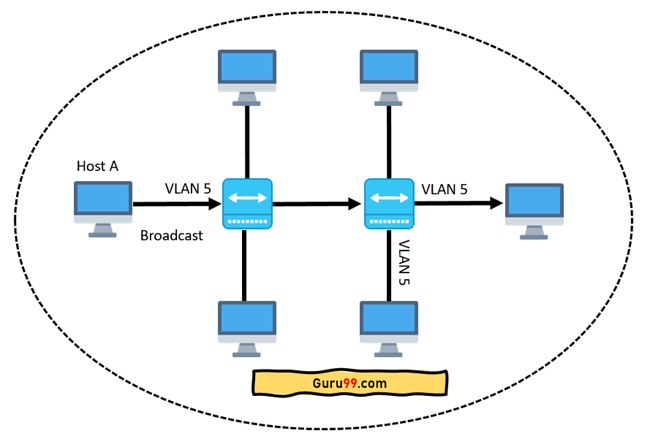
The below topology depicts a network having all hosts inside the same virtual LAN:

Without VLANs, a broadcast sent from a host can easily reach all network devices. Each and every device will process the broadcast frames it receives. This can increase the CPU overhead on each device and reduce overall network security.


In case you place interfaces on both switches into separate VLANs, a broadcast from host A can reach only the devices available inside the same VLAN. Hosts of other VLANs will not even be aware that the communication took place. This is shown in the below picture:
VLAN in networking is a virtual extension of a LAN. A LAN is a group of computers and peripheral devices that are connected in a limited area such as a school, laboratory, home, or office building. It is a widely useful network for sharing resources like files, printers, games, and other applications.
How VLAN works
Here are step-by-step details of how a VLAN works:
- VLANs in networking are identified by a number.
- A valid range is 1-4094. On a VLAN switch, you assign ports with the proper VLAN number.
- The switch then allows data that needs to be sent between various ports having the same VLAN.
- Since almost all networks are larger than a single switch, there should be a way to send traffic between two switches.
- One simple and easy way to do this is to assign a port on each network switch with a VLAN and run a cable between them.
VLAN Ranges
Here are the important ranges of VLAN:
| Range | Description |
|---|---|
| VLAN 0, 4095 | Reserved VLAN, which cannot be seen or used. |
| VLAN 1 | This is the default VLAN of switches. You cannot delete or edit this VLAN, but it can be used. |
| VLAN 2-1001 | It is the normal VLAN range. You can create, edit, and delete it. |
| VLAN 1002-1005 | These ranges are CISCO defaults for token rings and FDDI. You cannot delete this VLAN. |
| VLAN 1006-4094 | It is the extended range of VLANs. |
Example of VLAN
In the below example, there are 6 hosts on 6 switches having different VLANs. You need 6 ports to connect the switches together. It means that if you have 24 different VLANs, you will have only 24 hosts on 45-port switches.

Characteristics of VLAN
Here are the important characteristics of VLAN:
- Virtual LANs offer structure for making groups of devices, even if their networks are different.
- It increases the number of broadcast domains possible in a LAN.
- Implementing VLANs reduces the security risks as the number of hosts connected to the broadcast domain decreases.
- This is performed by configuring a separate virtual LAN for only the hosts having sensitive information.
- It has a flexible networking model that groups users depending on their departments instead of network location.
- Changing hosts/users on a VLAN is relatively easy. It just needs a new port-level configuration.
- It can reduce congestion by sharing traffic, as an individual VLAN works as a separate LAN.
- A workstation can be used with full bandwidth at each port.
- Terminal reallocations become easy.
- A VLAN can span multiple switches.
- The trunk link can carry traffic for multiple LANs.
Types of VLANs
Here are the important types of VLANs:

Port-Based VLAN
Port-based VLANs group a virtual local area network by port. In this type of virtual LAN, a switch port can be configured manually to be a member of a VLAN.
Devices that are connected to this port will belong to the same broadcast domain, because all other ports are configured with a similar VLAN number.
The challenge of this type of network is to know which ports are appropriate for each VLAN. The VLAN membership cannot be known just by looking at the physical port of a switch. You can determine it by checking the configuration information.
Protocol Based VLAN
This type of VLAN processes traffic based on a protocol that can be used to define filtering criteria for tags, which are untagged packets.
In this Virtual Local Area Network, the layer-3 protocol is carried by the frame to determine VLAN membership. It works in multi-protocol environments. This method is not practical in a predominantly IP-based network.
MAC Based VLAN
MAC Based VLAN allows incoming untagged packets to be assigned to a virtual LAN and, thereby, classifies traffic depending on the packet source address. You define a MAC address to VLAN mapping by configuring the mapping entry in the MAC-to-VLAN table.
This entry is specified using the source MAC address and the proper VLAN ID. The configurations of these tables are shared among all device ports.
Difference between LAN and VLAN
Here is an important difference between LAN and VLAN:
| LAN | VLAN |
|---|---|
| LAN can be defined as a group of computer and peripheral devices that are connected in a limited area. | A VLAN can be defined as a custom network that is created from one or more local area networks. |
| The full form of LAN is Local Area Network. | The full form of VLAN is Virtual Local Area Network. |
| The latency of LAN is high. | The latency of VLAN is less. |
| The cost of LAN is high. | The cost of a VLAN is less. |
| In LAN, the network packet is advertised to each and every device. | In VLAN, the network packet is sent to only a specific broadcast domain. |
| It uses a ring and FDDI (Fiber Distributed Data Interface) as a protocol. | It uses ISL and VTP as a protocol. |
Advantages of VLAN
Here are the important pros/benefits of VLAN:
- It solves a broadcast problem.
- VLAN reduces the size of broadcast domains.
- VLAN allows you to add an additional layer of security.
- It can make device management simple and easier.
- You can make a logical grouping of devices by function rather than location.
- It allows you to create groups of logically connected devices that act like they are on their own network.
- You can logically segment networks based on departments, project teams, or functions.
- VLAN helps you to geographically structure your network to support growing companies.
- Higher performance and reduced latency.
- Users may work on sensitive information that must not be viewed by other users.
- VLAN removes the physical boundary.
- It lets you easily segment your network and enhance network security.
- You can keep hosts separated by VLAN.
- You do not require additional hardware and cabling, which helps you save costs.
- It has operational advantages because changing the IP subnet of the user is done in software.
- It reduces the number of devices for a particular network topology and makes managing physical devices less complex.
Disadvantages of VLAN
Here are the important cons/drawbacks of VLAN:
- A packet can leak from one VLAN to another.
- An injected packet may lead to a cyber-attack.
- A threat in a single system may spread a virus through a whole logical network.
- You require an additional router to control the workload in large networks.
- You can face problems in interoperability.
- A VLAN cannot forward network traffic to other VLANs.
Application/Purpose of VLAN
Here are the important uses of VLAN:
- VLAN is used when you have 200+ devices on your LAN.
- It is helpful when you have a lot of traffic on a LAN.
- VLAN is ideal when a group of users needs more security or is being slowed down by many broadcasts.
- It is used when users are not on one broadcast domain.
- It can make a single switch act like multiple switches.
