
SQL Server Data Types with Examples
 Editorial Team
⚡ Smart Summary
SQL Server data types define the kind of value a column or variable can store, such as integer, decimal, character, date, or binary. Choosing the correct type enforces valid data and uses memory efficiently.

What is Data Type?
A data type in MS SQL Server is defined as the type of data that any column or variable can store. It is the kind of data that an object holds, such as integer, character, or string. While creating any table or variable, in addition to specifying the name, you also set the type of data it will store.
How to use MS SQL datatype
You need to define, in advance, the type of data a column or variable can store. Determining the data type also restricts the user from entering any unexpected or invalid data.
You can make efficient use of memory by assigning an appropriate data type to a variable or column, which allocates only the required amount of system memory for that column’s data.
MS SQL offers a broad range of basic data types in SQL to suit user needs, such as date, binary, images, and more.
Why use DataTypes?
Consider the example of a simple sign-up page for a website application. The three input fields are First Name, Last Name, and Contact number.
Here we should note that, in real scenarios:
- “First/Last Name” will always be alphabetic.
- “Contact” will always be numeric.
The example below illustrates these fields on a sign-up form.

From the picture above, it makes sense to define “First/Last Name” as a character and “Contact” as an integer.
It is evident that in any application, all fields have one or another type of data, for example numeric, alphabetic, date, and many more.
Also note that different data types have different memory requirements. Therefore, it makes more sense to define the column or variable with the data type it will hold, for efficient use of memory.
Data type available in MS SQL Server
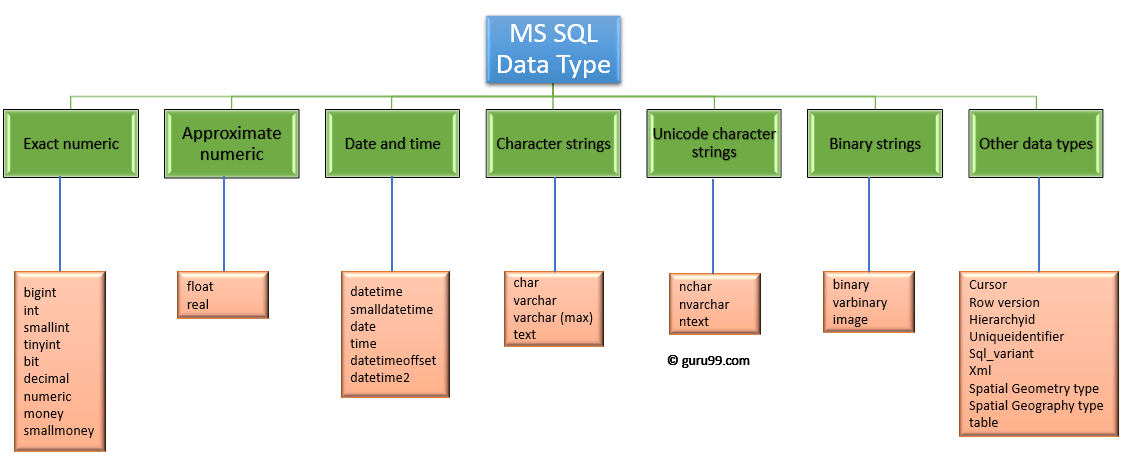
Here is the MS SQL Server data types list. MS SQL Server supports the following categories of data type:
- Exact numeric
- Approximate numeric
- Date and time
- Character strings
- Unicode character strings
- Binary strings
- Other data types
The diagram below groups the MS SQL Server data types into these categories.
Exact Numeric Data Types in SQL
Exact numeric has nine sub data types in SQL Server. Each stores whole or fixed-point numbers within a defined range.
| Data Type | Description | Lower limit | Upper limit | Memory |
|---|---|---|---|---|
| bigint | It stores whole numbers in the range given | −2^63 (−9,223,372,036,854,775,808) | 2^63−1 (9,223,372,036,854,775,807) | 8 bytes |
| int | It stores whole numbers in the range given | −2^31 (−2,147,483,648) | 2^31−1 (2,147,483,647) | 4 bytes |
| smallint | It stores whole numbers in the range given | −2^15 (−32,768) | 2^15−1 (32,767) | 2 bytes |
| tinyint | It stores whole numbers in the range given | 0 | 255 | 1 byte |
| bit | It can take 0, 1, or NULL values. | 0 | 1 | 1 byte / 8-bit column |
| decimal | Used for scale and fixed precision numbers | −10^38+1 | 10^38−1 | 5 to 17 bytes |
| numeric | Used for scale and fixed precision numbers | −10^38+1 | 10^38−1 | 5 to 17 bytes |
| money | Used for monetary data | −922,337,203,685,477.5808 | +922,337,203,685,477.5807 | 8 bytes |
| smallmoney | Used for monetary data | −214,478.3648 | +214,478.3647 | 4 bytes |
Exact Numeric data types in SQL Server with examples:
Query:
DECLARE @Datatype_Int INT = 2
PRINT @Datatype_Int
Output:
2
Syntax:
Decimal (P,S)
Here, P is the precision and S is the scale.
Query:
DECLARE @Datatype_Decimal DECIMAL (3,2) = 2.31
PRINT @Datatype_Decimal
Output:
2.31
Approximate Numeric Data Types in SQL
The SQL approximate numeric category includes floating-point and real values. These data types are mostly used in scientific calculations.
| Data Type | Description | Lower limit | Upper limit | Memory | Precision |
|---|---|---|---|---|---|
| float(n) | Used for a floating precision number | −1.79E+308 | 1.79E+308 | Depends on the value of n | 15 digit |
| real | Used for a floating precision number | −3.40E+38 | 3.40E+38 | 4 bytes | 7 digit |
The float type uses the following syntax:
Syntax: FLOAT [(n)]
Here, n is the number of bits used to store the mantissa of the float number in scientific notation. By default, the value of n is 53.
When you define a data type like float, n should be a value between 1 and 53. SQL Server treats n as one of two possible values: if 1<=n<=24, n is treated as 24; if 25<=n<=53, n is treated as 53.
Example Query:
DECLARE @Datatype_Float FLOAT(24) = 22.1234
PRINT @Datatype_Float
Output:
22.1234
Date and Time Data Types in SQL
This category stores data of the date and time type.
| Data Type | Description | Storage size | Accuracy | Lower Range | Upper Range |
|---|---|---|---|---|---|
| DateTime | Used for specifying a date and time from January 1, 1753 to December 31, 9999. It has an accuracy of 3.33 milliseconds. | 8 bytes | Rounded to increments of .000, .003, .007 | 1753-01-01 | 9999-12-31 |
| smalldatetime | Used for specifying a date and time from January 1, 1900 to June 6, 2079. It has an accuracy of 1 minute. | 4 bytes, fixed | 1 minute | 1900-01-01 | 2079-06-06 |
| date | Used to store only a date from January 1, 0001 to December 31, 9999 | 3 bytes, fixed | 1 day | 0001-01-01 | 9999-12-31 |
| time | Used for storing only time values with an accuracy of 100 nanoseconds. | 5 bytes | 100 nanoseconds | 00:00:00.0000000 | 23:59:59.9999999 |
| datetimeoffset | Similar to datetime but has a time zone offset | 10 bytes | 100 nanoseconds | 0001-01-01 | 9999-12-31 |
| datetime2 | Used for specifying a date and time from January 1, 0001 to December 31, 9999 | 6 bytes | 100 nanoseconds | 0001-01-01 | 9999-12-31 |
Example Query:
DECLARE @Datatype_Date DATE = '2030-01-01'
PRINT @Datatype_Date
Output:
‘2030-01-01’
Character Strings Data Types in SQL
This category relates to character types. It lets you define character data of fixed and variable length. It has four kinds of data types. Below are the character string data types with examples.
| Data Type | Description | Lower limit | Upper limit | Memory |
|---|---|---|---|---|
| char | It is a character string with a fixed width. It stores a maximum of 8,000 characters. | 0 chars | 8000 chars | n bytes |
| varchar | This is a character string with a variable width. | 0 chars | 8000 chars | n bytes + 2 bytes |
| varchar (max) | This is a character string with a variable width. It stores a maximum of 1,073,741,824 characters. | 0 chars | 2^31 chars | n bytes + 2 bytes |
| text | This is a character string with a variable width. It stores a maximum of 2 GB of text data. | 0 chars | 2,147,483,647 chars | n bytes + 4 bytes |
Example Query:
DECLARE @Datatype_Char VARCHAR(30) = 'This is Character Datatype'
PRINT @Datatype_Char
Output:
This is Character Datatype
Unicode Character Strings Data Types in SQL
This category stores the full range of Unicode characters, which use the UTF-16 character encoding.
| Data Type | Description | Lower limit | Upper limit | Memory |
|---|---|---|---|---|
| nchar | It is a Unicode string of fixed width. | 0 chars | 4000 chars | 2 times n bytes |
| nvarchar | It is a Unicode string of variable width. | 0 chars | 4000 chars | 2 times n bytes + 2 bytes |
| ntext | It is a Unicode string of variable width. | 0 chars | 1,073,741,823 chars | 2 times the string length |
Example Query:
DECLARE @Datatype_nChar VARCHAR(30) = 'This is nCharacter Datatype'
PRINT @Datatype_nChar
Output:
This is nCharacter Datatype
Binary String Data Types in SQL
This category contains binary strings of fixed and variable length.
| Data Type | Description | Lower limit | Upper limit | Memory |
|---|---|---|---|---|
| binary | It is a fixed-width binary string. It stores a maximum of 8,000 bytes. | 0 bytes | 8000 bytes | n bytes |
| varbinary | This is a binary string of variable width. It stores a maximum of 8,000 bytes. | 0 bytes | 8000 bytes | The actual length of data entered + 2 bytes |
| image | This is a binary string of variable width. It stores a maximum of 2 GB. | 0 bytes | 2,147,483,647 bytes | — |
Example Query:
DECLARE @Datatype_Binary BINARY(2) = 12;
PRINT @Datatype_Binary
Output:
0x000C
Other Datatypes in SQL
These are the other SQL Server data types, with their descriptions below:
| Data Type | Description |
|---|---|
| Cursor | Its output is a column of sp_cursor_list and sp_describe_cursor. It returns the name of the cursor variable. |
| Rowversion | It version-stamps table rows. |
| Hierarchyid | This data type represents a position in a hierarchy. |
| Uniqueidentifier | Stores a GUID, often converted from a character expression. |
| Sql_variant | It stores values of SQL Server-supported data types. |
| XML | It stores XML data in a column. |
| Spatial Geometry type | It represents data in a flat coordinate system. |
| Spatial Geography type | It represents data in the round-earth coordinate system. |
| table | It stores a result set for later processing. |
Interesting Facts!
- The CHAR data type is faster than the VARCHAR data type while retrieving data, because its fixed width avoids length bookkeeping.
