
SQL Variables: SQL Server Declare, Set & Select Variable
 Editorial Team
⚡ Smart Summary
SQL Server variables are named objects that act as placeholders for a single data value in memory. A variable must be declared with the DECLARE statement before it can be assigned a value and reused.

What is a Variable in SQL Server?
In MS SQL Server, variables are objects that act as placeholders for a memory location. A variable holds a single data value that you can read and reuse across a batch or procedure.
Variable Types in SQL: Local, Global
MS SQL Server has two types of variables:
- Local variable
- Global variable
However, a user can only create a local variable. The figure below explains the two types of variable available in MS SQL Server.

Local variable
- A user declares the local variable.
- By default, a local variable name starts with @.
- Every local variable is scoped to the current batch or procedure within a given session.
Global variable
- The system maintains the global variable; a user cannot declare one.
- A global variable name starts with @@.
- It stores session-related information.
How to DECLARE a variable in SQL
Before using any variable in a batch or procedure in SQL, you must declare it. The DECLARE command creates a variable that acts as a placeholder for a memory location. Only once the declaration is made can the variable be used in the subsequent part of the batch or procedure.
TSQL Syntax:
DECLARE { @LOCAL_VARIABLE[AS] data_type [ = value ] }
Rules:
- Initialization is optional while declaring.
- By default, DECLARE initializes the variable to NULL.
- Using the keyword ‘AS’ is optional.
- To declare more than one local variable, add a comma after the first definition, then give the next variable name and data type.
Examples of Declaring a variable
Query: With ‘AS’
DECLARE @COURSE_ID AS INT;
Query: Without ‘AS’
DECLARE @COURSE_NAME VARCHAR (10);
Query: DECLARE two variables
DECLARE @COURSE_ID AS INT, @COURSE_NAME VARCHAR (10);
Assigning a value to SQL Variable
You can assign a value to a variable in the following three ways:
- During variable declaration using the DECLARE keyword.
- Using SET.
- Using SELECT.
Let us look at all three ways in detail.
During variable declaration using DECLARE keyword
T-SQL Syntax:
DECLARE { @Local_Variable [AS] Datatype [ = value ] }
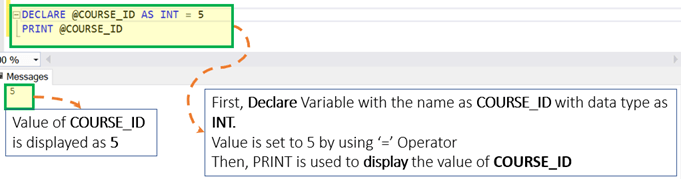
Here, after the datatype you can use ‘=’ followed by the value to be assigned.
Query:
DECLARE @COURSE_ID AS INT = 5
PRINT @COURSE_ID
Running the query prints the value assigned during declaration, as shown below.
Using SQL SET Variable
Sometimes you want to keep declaration and initialization separate. SET assigns a value to the variable after it has been declared. Below are the different ways to assign values using SET.
Example: Assigning a value to a variable using SET
Syntax:
DECLARE @Local_Variable <Data_Type>
SET @Local_Variable =  <Value>
Query:
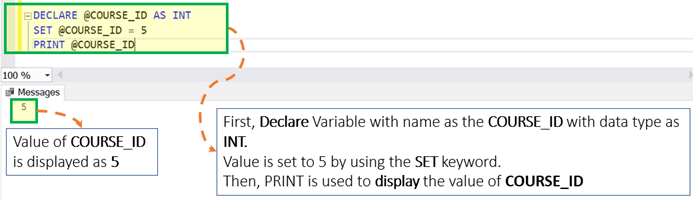
DECLARE @COURSE_ID AS INT
SET @COURSE_ID = 5
PRINT @COURSE_ID
Executing the script returns the value assigned with SET, shown below.
Example: Assign a value to multiple variables using SET
Syntax:
DECLARE @Local_Variable _1 <Data_Type>, @Local_Variable_2 <Data_Type>,
SET @Local_Variable_1 = <Value_1>
SET @Local_Variable_2 = <Value_2>
Rule: One SET keyword can assign a value to only one variable.
Query:
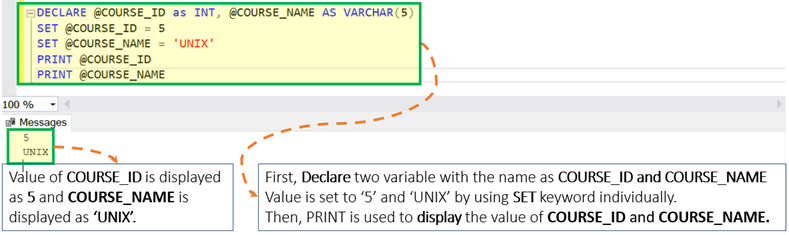
DECLARE @COURSE_ID as INT, @COURSE_NAME AS VARCHAR(5)
SET @COURSE_ID = 5
SET @COURSE_NAME = 'UNIX'
PRINT @COURSE_ID
PRINT @COURSE_NAME
The two PRINT statements return both assigned values, as shown below.
Example: Assigning a value to a variable with a scalar subquery using SET
Syntax:
DECLARE @Local_Variable_1 <Data_Type>, @Local_Variable_2 <Data_Type>,SET @Local_Variable_1 = (SELECT <Column_1> from <Table_Name> where <Condition_1>)
Rules:
- Enclose the query in parentheses.
- The query should be a scalar query, meaning it returns just one row and one column. Otherwise, the query throws an error.
- If the query returns zero rows, then the variable is set to EMPTY, that is, NULL.
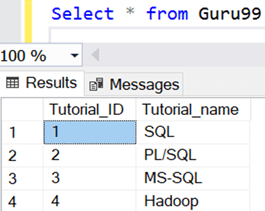
Assume that we have the table named ‘Guru99’ with two columns, as displayed below. This table is used in the following examples.
Example 1: When the subquery returns one row as a result
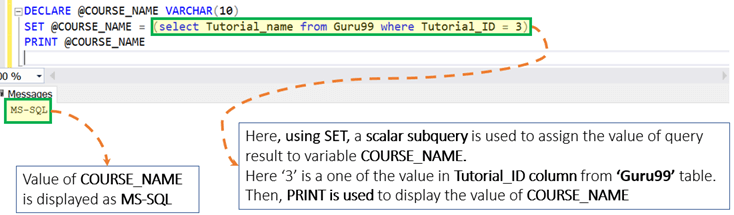
DECLARE @COURSE_NAME VARCHAR (10)
SET @COURSE_NAME = (select Tutorial_name from Guru99 where Tutorial_ID = 3)
PRINT @COURSE_NAME
Because the subquery returns one matching row, the variable receives that value, as shown below.
Example 2: When the subquery returns zero rows as a result
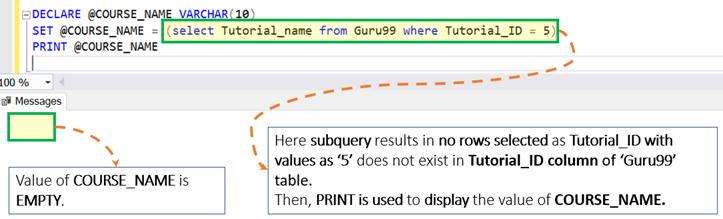
DECLARE @COURSE_NAME VARCHAR (10)
SET @COURSE_NAME = (select Tutorial_name from Guru99 where Tutorial_ID = 5)
PRINT @COURSE_NAME
Because the subquery returns no rows, the variable value is EMPTY, that is, NULL, so nothing prints, as shown below.
Using SQL SELECT Variable
Just like SET, you can also use SELECT to assign values to variables after declaring them with DECLARE. Below are different ways to assign a value using SELECT.
Example: Assigning a value to a variable using SELECT
Syntax:
DECLARE @LOCAL_VARIABLE <Data_Type>
SELECT @LOCAL_VARIABLE = <Value>
Query:
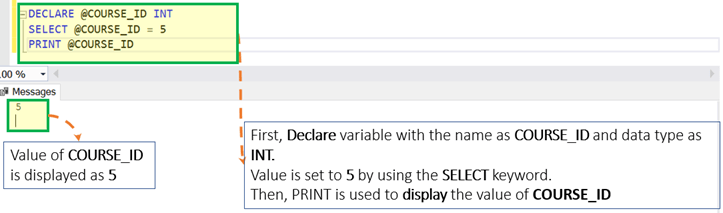
DECLARE @COURSE_ID INT
SELECT @COURSE_ID = 5
PRINT @COURSE_ID
The SELECT assignment prints the value, as shown below.
Example: Assigning a value to multiple variables using SELECT
Syntax:
DECLARE @Local_Variable _1 <Data_Type>, @Local_Variable _2 <Data_Type>,SELECT @Local_Variable _1 = <Value_1>, @Local_Variable _2 = <Value_2>
Rule: Unlike SET, SELECT can assign a value to multiple variables separated by commas.
DECLARE @COURSE_ID as INT, @COURSE_NAME AS VARCHAR(5)
SELECT @COURSE_ID = 5, @COURSE_NAME = 'UNIX'
PRINT @COURSE_ID
PRINT @COURSE_NAME
Both variables are assigned in a single SELECT, as shown below.

Example: Assigning the value to a variable with a subquery using SELECT
Syntax:
DECLARE @Local_Variable_1 <Data_Type>, @Local_Variable _2 <Data_Type>,SELECT @Local_Variable _1 = (SELECT <Column_1> from <Table_name> where <Condition_1>)
Rules:
- Enclose the query in parentheses.
- The query should be a scalar query that returns one row and one column. Otherwise, the query throws an error.
- If the query returns zero rows, then the variable is EMPTY, that is, NULL.
Reconsider our ‘Guru99’ table.
Example 1: When the subquery returns one row as a result
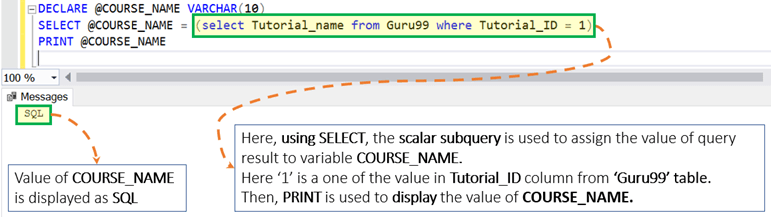
DECLARE @COURSE_NAME VARCHAR (10)
SELECT @COURSE_NAME = (select Tutorial_name from Guru99 where Tutorial_ID = 1)
PRINT @COURSE_NAME
The subquery returns one row, so the variable holds that value, as shown below.
Example 2: When the subquery returns zero rows as a result
DECLARE @COURSE_NAME VARCHAR (10)
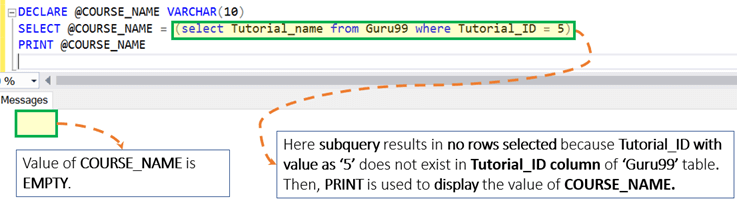
SELECT @COURSE_NAME = (select Tutorial_name from Guru99 where Tutorial_ID = 5)
PRINT @COURSE_NAME
With no matching row, the variable stays EMPTY, that is, NULL, as shown below.
Example 3: Assign a value to a variable with a regular SELECT statement
Syntax:
DECLARE @Local_Variable _1 <Data_Type>, @Local_Variable _2 <Data_Type>,SELECT @Local_Variable _1 = <Column_1> from <Table_name> where <Condition_1>
Rules:
- Unlike SET, if the query returns multiple rows then the variable value is set to the value of the last row.
- If the query returns zero rows, then the variable is set to EMPTY, that is, NULL.
Query 1: The query returns one row
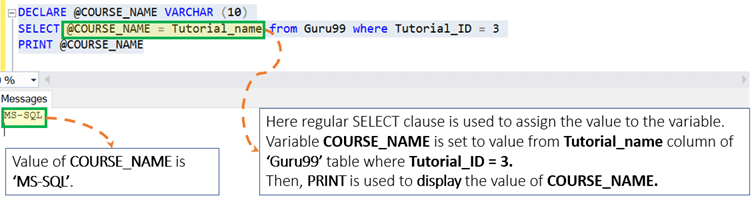
DECLARE @COURSE_NAME VARCHAR (10)
SELECT @COURSE_NAME = Tutorial_name from Guru99 where Tutorial_ID = 3
PRINT @COURSE_NAME
The single matching row sets the variable value, as shown below.
Query 2: The query returns multiple rows
DECLARE @COURSE_NAME VARCHAR (10)
SELECT @COURSE_NAME = Tutorial_name from Guru99
PRINT @COURSE_NAME
When several rows match, the variable keeps the value from the last row, as shown below.

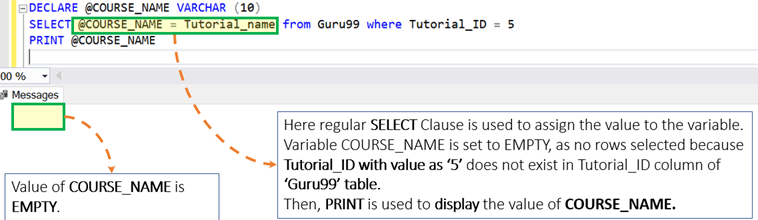
Query 3: The query returns zero rows
DECLARE @COURSE_NAME VARCHAR (10)
SELECT @COURSE_NAME = Tutorial_name from Guru99 where Tutorial_ID = 5
PRINT @COURSE_NAME
When no rows match, the variable is EMPTY, that is, NULL, as shown below.
Other SQL Variable Examples
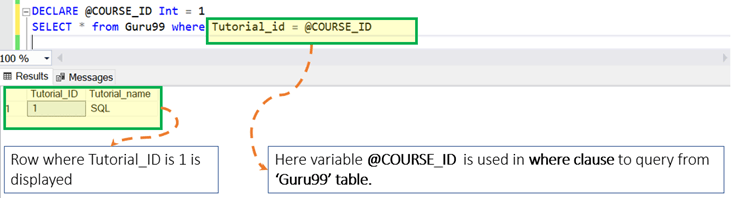
A declared variable can also be used inside a query, for example in a WHERE clause to filter rows.
Query:
DECLARE @COURSE_ID Int = 1
SELECT * from Guru99 where Tutorial_id = @COURSE_ID
The variable filters the query and returns the matching row, as shown below.
Interesting Facts About SQL Server Variables!
- A local variable can be displayed using PRINT as well as the SELECT command.
- The table data type does not allow the use of ‘AS’ during declaration.
- SET complies with ANSI standards, whereas SELECT does not.
- Creating a local variable named @ is also allowed. For example, it can be declared as:
'DECLARE @@ as VARCHAR (10)'
