
SQL Server CREATE, ALTER, DROP Table [T-SQL Examples]
 Editorial Team
⚡ Smart Summary
SQL Server tables store data in rows and columns. Transact-SQL uses CREATE TABLE to build a table, ALTER TABLE to add or change columns, and DROP TABLE to remove the table, its data, and its structure.

What is a Table?
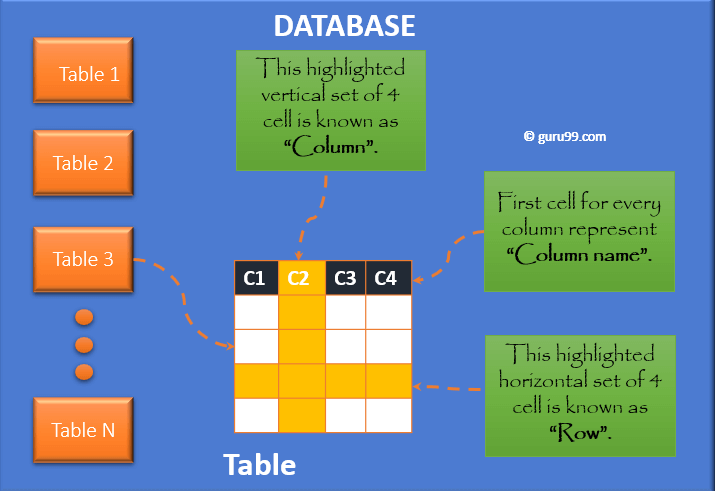
A table is an object in SQL Server that stores data in a row-and-column format. The diagram below shows rows and columns respectively.
How to Create a Table in SQL Server with T-SQL
The first step to storing data is to create a table in the database where the data will reside. After creating the table, you can keep inserting rows into it.
You can create a table in the following ways:
- T-SQL: create a new table by defining all columns and their data type.
- T-SQL: create a new table using an existing table.
- Using Table Designer.
Let us study this in detail.
T-SQL: Create a New Table by defining all columns and their data type
Below is the syntax to create a table in SQL Server.
Syntax:
CREATE TABLE tableName
(
  column_1 datatype [ NULL | NOT NULL ],
  column_2 datatype [ NULL | NOT NULL ],
  ...
);
Here,
- The parameter tableName denotes the name of the table that you are going to create.
- The parameters column_1, column_2… denote the columns to be added to the table.
- A column should be specified as either NULL or NOT NULL. If you do not specify, SQL Server takes NULL as the default.
Let us create a basic table with two columns.
Query:
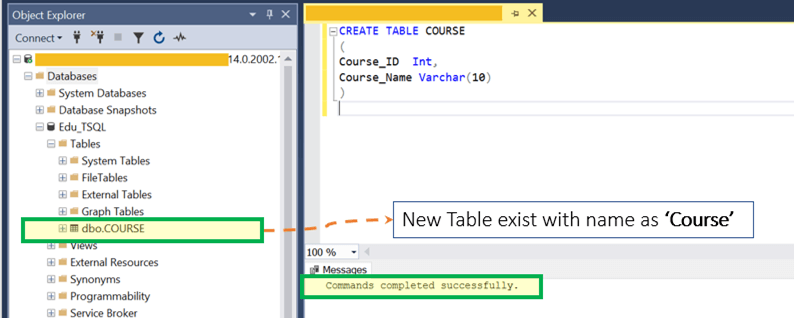
CREATE TABLE COURSE
(
Course_ID Int,
Course_Name Varchar(10)
)
Pre-Requisite: Select the database where you need to create the table.
Step 1) Run the query by clicking Execute. Before running the query, no table exists, as shown below.

After running the query, click the Refresh button; the new table now exists as Course, as shown below.

Step 2) Insert some data. The screenshots below show the newly created Course table ready to receive rows.

Until now the table only exists, but there is no data in it yet.
Transact-SQL provides the INSERT statement to insert data into a table. With this statement, you can insert one or more rows into a table.
Syntax:
INSERT INTO tableName
(column_1, column_2, ... )
VALUES
(expression_1, expression_2, ... ),
(expression_1, expression_2, ... ),
...;
The syntax above shows the basic form of the command when using the VALUES keyword to insert data into a table.
Let us insert four rows using the INSERT command.
Insert into COURSE values (1,'SQL');
Insert into COURSE values (2,'Python');
Insert into COURSE values (3,'SQL');
Insert into COURSE values (4,'C');
The snapshot below shows that the insertion of four rows is successful.

Step 3) Use the SELECT statement to view the data. To view data in SQL Server, use the following syntax:
SELECT expression
FROM tableName
[WHERE condition];
Example Query:
SELECT * FROM COURSE;
The table was created and now holds four records. Note that you can create records with a duplicate value in any of the columns, because there are no constraints.

T-SQL: Create a New Table using an existing table
Suppose you want another table like the COURSE table created above, but you need only the Course_Name column and not Course_ID.
Syntax:
SELECT (Column 1, …) INTO <New Table name> FROM <Old Table name>;
Example Query:
SELECT COURSE_NAME INTO COURSE_NAMES FROM COURSE;
Step 1) Run the query by clicking Execute. A new table named COURSE_NAMES is created with one column and four records copied from the older table, as shown below.

Example Query:
SELECT * FROM COURSE_NAMES;
The result below lists the four Course_Name records in the new COURSE_NAMES table.

Using Table Designer
You can also create a table from the SQL Server Management Studio IDE using Table Designer.
Step 1) Right-click Table > New > Table, as shown below.

Step 2) Enter the column names and data types, and choose whether each column allows nulls.


Step 3) Press CTRL+S to save the table, and enter the name as Course_Title.

After clicking Refresh, the new table appears with the name Course_Title and one column named Course_Name, as shown below.

Alter Table in SQL Server
There are two ways to alter a table in SQL Server:
- T-SQL: alter the table by adding new columns.
- Using Table Designer.
T-SQL: Alter Table by inserting columns
Below is the syntax of the ALTER command in SQL:
Syntax:
Alter TABLE <Table name> ADD Column1 datatype, Column2 datatype;
Query:
ALTER TABLE dbo.Course_Title ADD Course_Duration VARCHAR(20);
Step 1) Run the query by clicking Execute. A new column named Course_Duration now exists within the Course_Title table, as shown below.


Using Table Designer
You can also alter a table from the UI using Table Designer.
Step 1) Right-click the existing table > Design, as shown below.

Step 2) Add the column name as Course_Start_Date and select its data type.

Step 3) Press CTRL+S to save the newly added column. A new column named Course_Start_Date is created in the Course_Title table, as shown below.

Delete Table in SQL Server
You delete a table when it is no longer required.
There are two ways to delete a table in SQL Server:
- Using SQL Server Management Studio.
- T-SQL: delete the table with DROP TABLE.
Using SQL Server Management Studio
Step 1) Right-click the existing table > Delete, for the table named Course_Title, as shown below.

Step 2) On the Delete Object window, click OK.
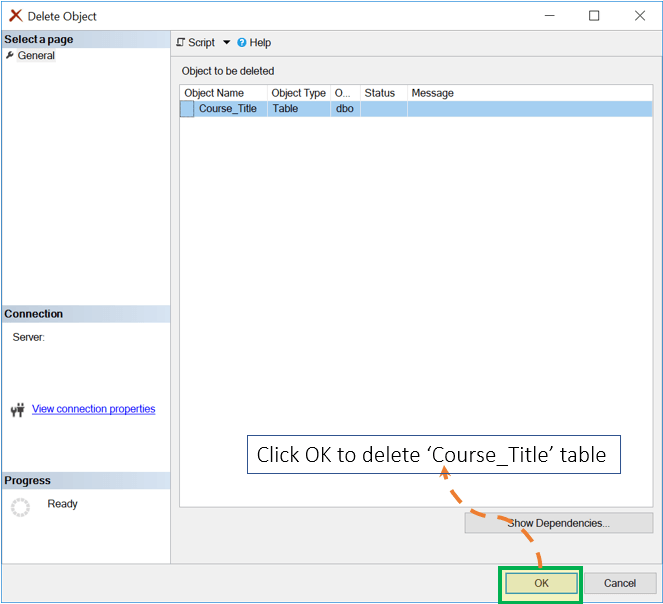
The Course_Title table is now deleted from the table list, as shown below.

T-SQL: Delete Table
Below is the syntax to drop a table.
Syntax:
DROP TABLE <tableName>;
The parameter tableName is the name of the table that is to be deleted.
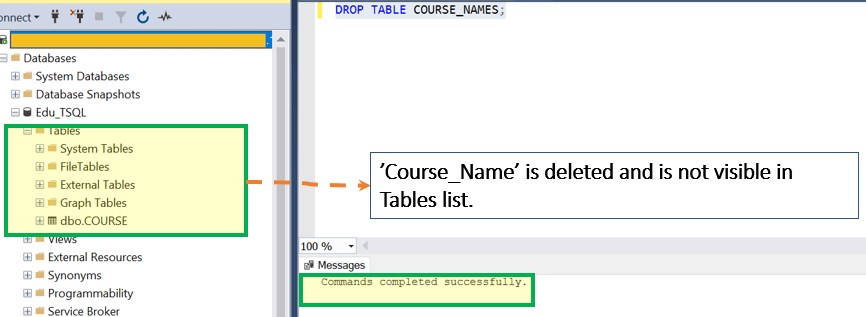
Query:
DROP TABLE COURSE_NAMES;
Step 1) Run the query by clicking Execute. The COURSE_NAMES table is deleted from the table list, as shown below.

Alternatively, the source shows a DELETE TABLE command intended to remove only rows (data) while leaving the table structure intact, so the table can be reused later.
Syntax:
DELETE TABLE <Table name>;
Note: In standard T-SQL, rows are removed with DELETE FROM <table>, and a table is emptied quickly with TRUNCATE TABLE <table>; the whole table is removed with DROP TABLE, shown above.
Interesting Facts!
- Large files such as XML or images can be stored in a column using large-object data types like VARBINARY(MAX), VARCHAR(MAX), or the XML type (SQL Server does not use the Oracle-style BLOB and CLOB names).
- DELETE removes only rows and can be rolled back within a transaction, while DROP removes the whole table structure; in SQL Server, even DROP can be rolled back when it runs inside an explicit transaction.
