
How to Create User in PostgreSQL Using PgAdmin
 Editorial Team
⚡ Smart Summary
Creating a user in PostgreSQL can be done visually in pgAdmin or with the CREATE USER command in the SQL Shell. You can then grant privileges with GRANT, modify roles with ALTER USER, and remove accounts with DROP USER.

How to Create PostgreSQL User in PgAdmin
Following is a step by step process on how to create user in PostgreSQL PgAdmin:
Step 1) Right click on Login
In the first step, Right click on Login Group Role -> Create -> Click on Login Group Role…

Step 2) Create Login/Group Role
Now, Enter the name for the Login

Step 3) Click on Definition & Enter Details
- Enter Password
- An expiry date for the account

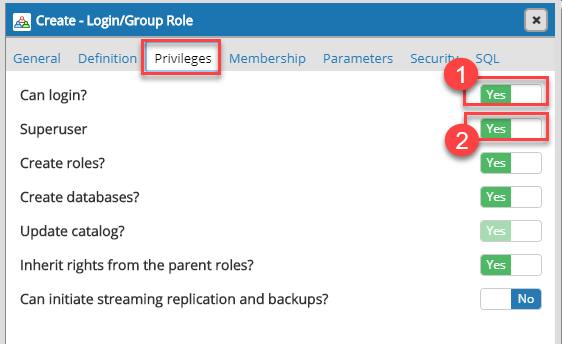
Step 4) The Privilege section
- Toggle Can Login button to YES
- Toggle Superuser to YES
Step 5) The SQL section
- You will see the SQL query to create a user as per the selections made in previous steps
- Click Save button

Step 6) Role is created
Now, Role is reflected in the object tree.

Step 7) Create a Database
Now, assign owner myguru to it as shown in below create user Postgres example.

Step 8) The command line
Now, you can see the owner is myguru.

PostgreSQL Create a User SQLShell (Command Line)
You can create a user by using the command-line command
CREATE USER
This Postgres create user with password method is more convenient for programmers and administrators as they have access to the console of PostgreSQL server. Moreover, they need for Postgres user creation and execute with a single command in place of logging in and using the interface of the PostgreSQL client.
Syntax:
CREATE USER name [ WITH ] option [ ... ]

where option can be:

      SUPERUSER | NOSUPERUSER
    | CREATEDB | NOCREATEDB
    | CREATEROLE | NOCREATEROLE
    | INHERIT | NOINHERIT
    | LOGIN | NOLOGIN
    | REPLICATION | NOREPLICATION
    | BYPASSRLS | NOBYPASSRLS
    | CONNECTION LIMIT connlimit
    | [ ENCRYPTED ] PASSWORD 'password' | PASSWORD NULL
    | VALID UNTIL 'timestamp'
    | IN ROLE role_name [, ...]
    | IN GROUP role_name [, ...]
    | ROLE role_name [, ...]
    | ADMIN role_name [, ...]
    | USER role_name [, ...]
    | SYSID uid
Example:
CREATE USER tom;
will create a user tom
CREATE USER tom WITH SUPERUSER;
Will create a user tom with superuser privileges. Let’s see the following example.
Step 1) We are creating a superuser valid till 3rd April 2025 11:50:38 IST. Enter the following command
CREATE USER mytest WITH
	LOGIN
	SUPERUSER
	CREATEDB
	CREATEROLE
	INHERIT
	NOREPLICATION
	CONNECTION LIMIT -1
	VALID UNTIL '2025-04-03T11:50:38+05:30'
	PASSWORD '123456';

Step 2) Enter command \du into the checklist of users

NOTE: CREATE USER is same as CREATE ROLE command. The difference between the two commands is when the Postgres CREATE user command is written it is by default in the LOGIN state whereas NOLOGIN is assumed when the CREATE ROLE option is used.
Add an existing user to a Database
You can grant a user privileges to access a database.
Example, we grant user “mytest” all privileges on user guru99
GRANT ALL PRIVILEGES ON DATABASE guru99 TO mytest;

After execution of the PostgreSQL add user command, user will able to access the database with the given permissions.
The command GRANT is very powerful. You can give granular privileges like Select, Insert, Update to a user.
PostgreSQL Updating USER
Altering Existing User Permissions
Now that our new user “mytest” exists you can use ALTER USER to change the permissions granted to the librarian.
The format of ALTER USER Postgres includes the name of the user followed by some options to tell PostgreSQL which permissive alterations to make:
ALTER USER role_specification WITH OPTION1 OPTION2 OPTION3;
Revoking Permissions
You need to use this command when you make a mistake and wrongly assign permission which you may want to revoke. You can use ALTER USER command with no prefix before the permissive options.
For example, we can remove the SUPERUSER status from mytest like:
ALTER USER mytest WITH NOSUPERUSER;
Using \du, you will observe that the Superuser privilege is removed.

Assigning Permission
You can use user SUPERUSER permission back “mytest” using the following command
ALTER USER mytest WITH SUPERUSER;
Using \du, you will observe that the Superuser privilege is added.

PostgreSQL Deleting User
You can use delete any user if you are sure that the specific user is no longer for your database. Note that deleting the users will never affect the actual database.
Syntax: DROP USER [user]
To delete any user, you have to make certain that the user is an owner of the database. Otherwise, you may receive an error message.
ERROR: role "username" cannot be dropped because some objects depend on it
Example:
- Account “myguru” is an owner of database “demoDB.”
- Enter command DROP USER myguru
- Error is shown

Once we change the database owner, the user can be deleted

Cheat Sheet
Here are important commands
| Commands | Description |
|---|---|
CREATE USER [user]
|
Command to Create a User |
ALTER USER role_specification
|
Altering Existing User Permissions |
ALTER USER [user]
|
Revoking Permissions |
ALTER USER [user name] WITH SUPERUSER |
Assigning Permission |
DROP USER [user]
|
Command to Delete a User |
