
PostgreSQL BETWEEN Query with Example
 Editorial Team
⚡ Smart Summary
PostgreSQL BETWEEN retrieves values that fall within an inclusive range inside SELECT, INSERT, UPDATE, or DELETE statements. It compares an expression against two boundary values, works with numeric and date data, and supports negation through the NOT operator.

BETWEEN Operator in PostgreSQL
The PostgreSQL BETWEEN Operator helps in retrieving values within a range in a SELECT, UPDATE, INSERT, or DELETE statement. With the BETWEEN operator, it is possible to match a value against a range of values. Because the range is inclusive, both boundary values are treated as part of the match.
PostgreSQL Between Query Syntax
Here is the syntax of the BETWEEN operator in PostgreSQL:
expression BETWEEN value-1 AND value-2;
The expression is simply a column or a calculation. The value-1 and value-2 will create a range for us to compare the expression to.
PostgreSQL Between Query with Numeric
We need to create an example that shows how to apply the BETWEEN operator on numeric values. Consider the Price table given below:
Price:

Let us see the list of all books whose price is between 200 and 280:
SELECT *
FROM Price
WHERE price BETWEEN 200 AND 280;
This will return the following:

Only two items have a price ranging between 200 and 280. Note that the two boundaries are included, that is, 200 and 280.
PostgreSQL Between Query with Date
The BETWEEN operator can be used on date values. This means that we can specify the range of date values that we need to work with. Consider the following Employees table:
Employees:
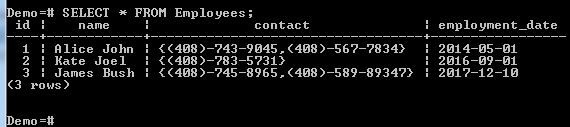
Suppose we want to see all the employees who were employed between 2013-01-01 and 2015-01-01, we can run the following command:
SELECT *
FROM Employees
WHERE employment_date BETWEEN '2013-01-01' AND '2015-01-01';
This returns the following:

Postgres Between Query using NOT Operator
We can combine the BETWEEN operator with the NOT operator. In such a case, the list of values that are not within the specified range will be returned.
For example, to see all the items where the price is not between 200 and 280, we can run the following query:
SELECT *
FROM Price
WHERE price NOT BETWEEN 200 AND 280;
This will return the following:

Two items with a price not ranging between 200 and 280 were found. Hence, their details were returned.
PostgreSQL Between Query using pgAdmin
Now let’s see how these actions can be performed using pgAdmin. The queries are identical to the ones above; only the execution environment changes.
How To Use Between Query with Numeric in PostgreSQL using pgAdmin
Here is how to use the Between query with Numeric values in PostgreSQL using pgAdmin:
Step 1) Login to your pgAdmin account.
Open pgAdmin and login to your account using your credentials.
Step 2) Create a Demo Database.
- From the navigation bar on the left, click Databases.
- Click Demo.

Step 3) Type the below query in the query editor:
SELECT *
FROM Price
WHERE price BETWEEN 200 AND 280;
Step 4) Click the Execute button.

It should return the following:

With Date
To accomplish the same through pgAdmin, do this:
Step 1) Login to your pgAdmin account.
Step 2)
- From the navigation bar on the left, click Databases.
- Click Demo.

Step 3) Type the query in the query editor:
SELECT *
FROM Employees
WHERE employment_date BETWEEN '2013-01-01' AND '2015-01-01';
Step 4) Click the Execute button.

It should return the following:

Using NOT Operator
To accomplish the same through pgAdmin, do this:
Step 1) Login to your pgAdmin account.
Step 2)
- From the navigation bar on the left, click Databases.
- Click Demo.

Step 3) Type the query in the query editor:
SELECT *
FROM Price
WHERE price NOT BETWEEN 200 AND 280;
Step 4) Click the Execute button.

It should return the following:

Download the Database used in this Tutorial
