
How to Create Database in PostgreSQL
 Editorial Team
⚡ Smart Summary
PostgreSQL Create Database operations let you build a new database using either the psql command-line shell or the pgAdmin graphical tool. The CREATE DATABASE statement also accepts options for the owner, template, encoding, collation, tablespace, and connection limit.

The syntax to create database in PostgreSQL is
CREATE DATABASE databasename
Let’s learn setting up PostgreSQL and how to create database in PostgreSQL command line and the GUI
PSQL Create Database Command Line (SQL Shell)
Step 1) Open the SQL Shell

Step 2) Press enter five times to connect to the DB
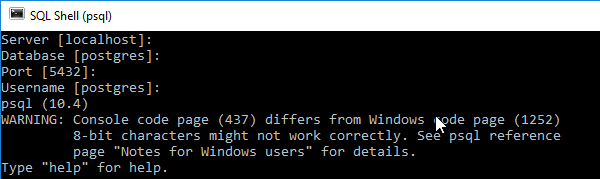
Step 3) Enter the command
CREATE DATABASE guru99;

Step 4) Enter command \l to get a list of all databases

Step 5) To connect to a Database use PostgreSQL database command
\c guru99

Prompt changes to guru99 which signifies that we are connected to database guru99 and can perform operations like create table, trigger, execute SQL on it.
PostgreSQL Create Database using pgAdmin
Step 1) In the Object Tree, right click and select create a database to Postgres create database
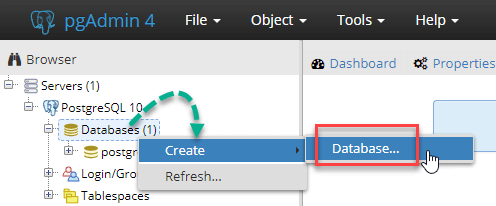
Step 2) In the pop-up,
- Enter Database Name
- Comment if any database – optional
- Click Save

Step 3) DB is created and shown in the Object tree.

Step 4) The right pane gives you the SQL used to create the Database.

Complete syntax to create a database
Here is complete Syntax to create a DB in PostgreSQL
CREATE DATABASE db_name
OWNER =  role_name
TEMPLATE = template
ENCODING = encoding
LC_COLLATE = collate
LC_CTYPE = ctype
TABLESPACE = tablespace_name
CONNECTION LIMIT = max_concurrent_connection
| Option | Description |
|---|---|
| db_name | Use this option to specify the name of the new database that you want to create. Although, you need to make sure that the Database must be unique because If you attempt to create a new database with the same name as an existing database, PostgreSQL will display an error. |
| role_name | Use this parameter to define the the role name for the user who will own the new database. Default is postgres |
| Template | You can specify database template name from which you want to creates the new database. |
| Encoding | This parameter allows specifying character set encoding for the new database. Default is UTF8 |
| Collate | The collation parameter specifies the sort order of strings which affect the result of the ORDER BY clause while using a SELECT statement. |
| Ctype | It specifies the character classification for the new database. It affects the categorization, e.g., digit, lower and upper. |
| tablespace_name | Using this option you can specify the tablespace name for the new database. The default is the template database’s tablespace. |
| max_concurrent_connection | Use this option to specify the maximum concurrent connections to the new database. The default is -1, i.e., unlimited. |
Common Errors while using the createdb command
| Error | Description |
|---|---|
| createdb command not found. | This kind of error may occur when PostgreSQL is not installed correctly. At that time, you need to run createdb command from your PostgreSQL installation path. |
| No such file in the server is running locally and accepting connections on Unix domain socket. | This error occurs when PostgreSQL Server is not started properly, or it was not started where the createdb command wants it to start. |
| FATAL role “usr name” does not exist | This error may occur if the PostgreSQL user account is created which are different from system user accounts. |
| Permission denied to create a database | If the PostgreSQL account is created does not have permission to create a database In this case, you need to grant permission to the associated users to access create command. |
