
PostgreSQL DROP/Delete DATABASE Using Command Line
 Editorial Team
⚡ Smart Summary
PostgreSQL DROP DATABASE permanently removes a database, including all its catalog entries and data files. You can run it from the psql shell, delete a database visually in pgAdmin, or use the dropdb command to remove a database remotely.

Drop Database in PostgreSQL
The DROP DATABASE in PostgreSQL is a statement to permanently remove all catalog entries and data directory. The database owner can only execute this command. It can not be executed while someone is connected with the target database. You need to connect to some other database to execute the DROP DATABASE command.
So, you should be extra cautious when performing this operation.
PostgreSQL DROP DATABASE Syntax:
DROP DATABASE [IF EXISTS] name;
Here:-
- IF EXISTS: This is an optional parameter. In case of the database does not exist, a warning is displayed instead of an error
- name: mention the DB name that you want to drop
Let’s see an PostgreSQL drop database command line example in action
PostgreSQL Drop Database Using SQL Shell(Command Line)
Below is a step by step process to drop database in Postgres command line:
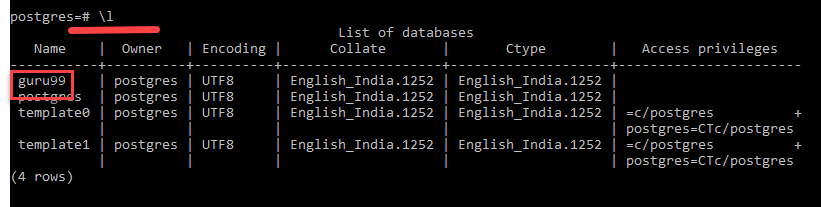
Step 1) Use command \l to determine the currently available database.
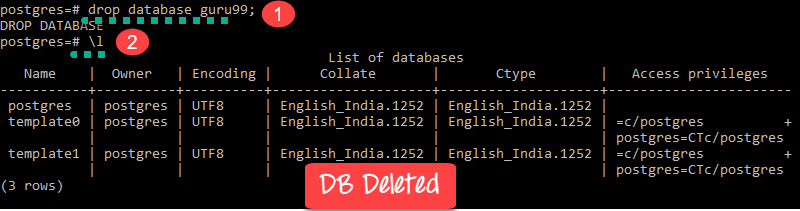
Step 2) To drop database in Postgres, enter command
drop database guru99
Use command \l to check whether DB is deleted
Step 3) Try to drop the same database again, you will get an error.

Step 4) Drop the database with IF exists clause and you get a warning
drop database IF EXISTS guru99

PostgreSQL Drop Database PgAdmin (GUI)
Step 1) Right Click on database “guru99” and click “Delete/Drop.”
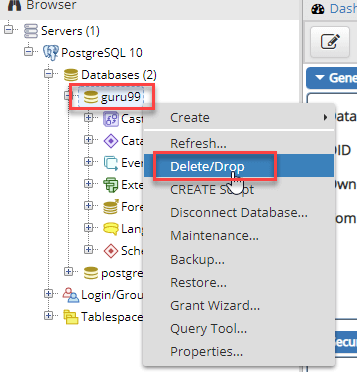
Step 2) Click OK on the confirmation pop-up

Database is deleted.
dropdb command
The dropdb command allows you to delete database in PostgreSQL remotely. But, the user must be the owner of the database in order use PostgreSQL delete database command to delete that database.
Syntax:
dropdb [option...] dbname
| Option | Description |
|---|---|
| -e | Echo commands that dropdb creates and sends to the server. |
| -i | Display a verification prompt before performing any destructive job |
| -V | Use this option to print the dropdb version. |
| –help | Provide help with dropdb command-line arguments. |
| -h host | Helps you to specify the name of the host of the system on which the server is currently running. |
| -p port | Option allows you to specify the TCP port or the local Unix domain socket file extension on which the server is establishing connections. |
| –if-exists | Issues a notice instead of an error if the database does not exist. |
| -U username | User name to connect as. |
| -w | Use this option if you don’t want a password prompt |
| -W | Use this parameter to prompt for a password before dropping the database. |
| –maintenance-db=dbname | Specifies the name of the database to connect to in order to drop the target database. |
PostgreSQL DROP DATABASE Example
We want to destroy a database guru99 with the help of a server on host rome, port 4565, with verification and you need to use following drop database PostgreSQL command:
dropdb -p 4565 -h rome -i -e guru99
Database “guru99” will be permanently deleted.
Are you sure? (y/n) if you select y, then you can
DROP DATABASE guru99;
