
What is Parallel Testing? Method, Approach & Example
 Editorial Team
⚡ Smart Summary
Parallel Testing runs a legacy system and a newly developed system against the same input at the same time, so testers can confirm that migrated data, calculations and business flows still produce identical results.
What is Parallel Testing?
Parallel Testing is a software testing type in which multiple versions or subcomponents of an application are tested with the same input on different systems simultaneously, to reduce test execution time. The purpose of parallel testing is to find out whether the legacy version and the new version behave the same or differently, and to establish whether the new version is more efficient.
The image below demonstrates parallel testing.
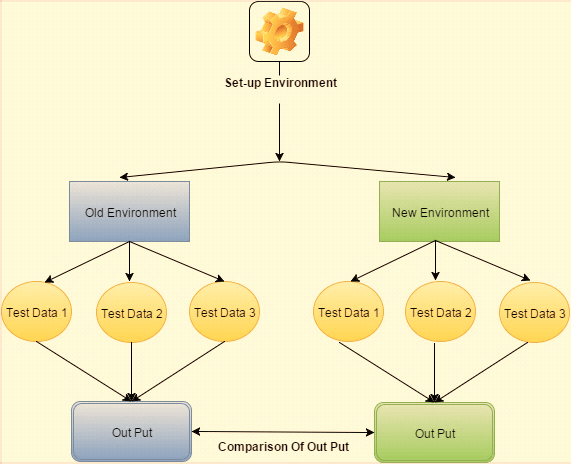
Parallel Testing Example
When an organisation moves to a new system, legacy data is an important part of the move, and transferring it is complex.
In software testing, verifying the compatibility of the newly developed system with the old system is done through parallel testing, as the diagram below shows.

Why to do Parallel Testing
Parallel testing is done for these reasons.
- To make sure the new version of the application performs correctly
- To make sure the results are consistent between the new and the old version
- To check whether the data format between the two versions has changed
- To check the integrity of the new application
For example, users are currently on version 1.0 of an application, and from March they will move to version 1.1, as illustrated below.

In such cases testers run parallel testing to confirm that the data migration completed successfully, and that the changes in the new version affect neither system function nor the output the user expects.
When to do Parallel Testing
Parallel testing is used extensively when:
- The company is moving from an old system to a new system
- Synchronisation is performed between two systems
- Legacy data is imported from one system into another
- All outcomes must be defined precisely — for example the financial or insurance domain, where calculation is a major functionality of the system
How to do Parallel Testing: Complete Approach
For parallel testing you create several projects that each test a different part of the application (slave projects) and one project (the master project) that runs them.
Parallel testing has two levels of criteria.
- Parallel test entry criteria — define the tasks that must be satisfied before parallel testing can be executed efficiently.
- Parallel test exit criteria — define the successful conclusion of the parallel testing stage.
A few pre-conditions must be satisfied first.
- Parallel testing cannot begin until the test environment setup is done
- All pre-conditions and scenarios should be defined first
- Legacy data and new data must be migrated successfully
- Parallel testing is not complete until all of the exit criteria have been satisfied
Perform parallel testing in five steps.
- Run the old system against the newly developed system.
- Understand the differences between the two systems.
- Go through a complete cycle using the same input.
- Measure the output of the newly developed system against the output of the old system.
- Report the cause of any bug found.
Good Practices for Parallel Testing
Here are a few useful tips.
Typical bugs identified in Parallel Testing
- Internal logic is changed
- Flow of the product is changed
- Major functionalities are modified
How many cycles should be required
The number of testing cycles depends upon the complexity of the module. Run multiple scenario cycles using pre-defined test data that passed on the previous system.
Categorizing differences
Results of the new and the legacy system should be measured line by line with differences highlighted, and every difference classified by the type of error.
Type of error occurred during cycles
For each difference, the tester should note which applies.
- Entry error
- Error caused by the old system
- Explainable or acceptable difference
- Unexpected error
What is not a Parallel Testing
The table draws the boundary.
| It is Parallel Testing | It is not Parallel Testing |
| Testing the updated application against the previous application. | Testing one software only. |
| Running the old scenario with the new software under the same input conditions. | Cross-browser or cross-platform testing. |
| The aim is to find out the outcome as per the previous system. | The aim is to find out a design issue. |
| Knowledge of both the old and the newly developed system is required. | Knowledge of the difference is not required. |
Challenges of Parallel Testing
- Complete product knowledge is required
- Every outcome should be tested
- Data input and product flow need constant attention
