
SAP PP (Production Planning) Module & Process
 Editorial Team
⚡ Smart Summary
SAP PP (Production Planning) aligns demand with manufacturing capacity, tracks planned and actual costs, and orchestrates goods movements from raw material to finished product. It integrates with SD, MM, QM, FICO, and PM modules through a shared organisation and master-data backbone.
What is Production Planning?
Production Planning is the process of aligning demand with manufacturing capacity to create production and procurement schedules for finished products and the components that make them.
SAP PP is the SAP module that supports this process. It tracks the manufacturing flow end to end — including planned and actual costs and the goods movements that convert raw materials into semi-finished and finished goods. SAP PP is fully integrated with the other core SAP modules: SD, MM, QM, FICO, and PM.
Organisation Structure in SAP PP
Any live SAP PP implementation needs the location of manufacturing plants and the storage locations inside each plant to be configured first.
Why plants and storage locations matter in PP:
- All Production master data is created at plant level.
- Planning activities are also performed at plant level.
- Production confirmation and the related goods movements happen at plant and storage-location level.
Master Data in SAP PP
Master data is generally static for a company and changes only when business requirements demand it. Five master-data objects must be maintained in the Production Planning module.

1) Material Master
The Material Master contains information about every material a company procures, produces, stores, and sells. A unique material number identifies each master record. Materials with the same basic attributes are grouped by material type — for example, finished, semi-finished, or raw material.
It is used for:
- Procuring materials.
- Goods movement postings such as goods issue, goods receipt, and physical inventory.
- Invoice verification.
- Sales and distribution for the sales-order fulfilment process.
- Production planning and control — material requirements planning, scheduling, and production confirmation.
2) Bill of Material (BOM)
A Bill of Material is a formally structured list of the components and quantities required to produce a finished product or assembly. BOMs are used in material requirements planning and product costing.
You can create up to 99 alternative BOMs for a single product. For products with variants, a Super BOM contains every possible component, and the right component is selected based on the characteristic chosen in the sales order. For example, a bicycle Super BOM might list every frame colour and size, and the production order picks the variant chosen by the customer.
3) Work Center
A Work Center is a machine or group of machines where production operations are performed. Work centres are referenced in task-list operations (routings) and carry data for:
- Scheduling.
- Capacity.
- Costing.
4) Routing
Routing is the sequence of operations performed at the Work Center. It records machine time, labour time, and other resource consumption, and is used both for scheduling operations and for the standard cost calculation of the product.
5) Production Version
The Production Version is the combination of BOM and Routing data for a given manufacturing process. It links a specific BOM with a specific Routing and tells SAP PP which combination to use during production.
A material may have multiple production versions if it can be manufactured by different routes — for example, a primary line and a backup line.
Production Planning Cycle
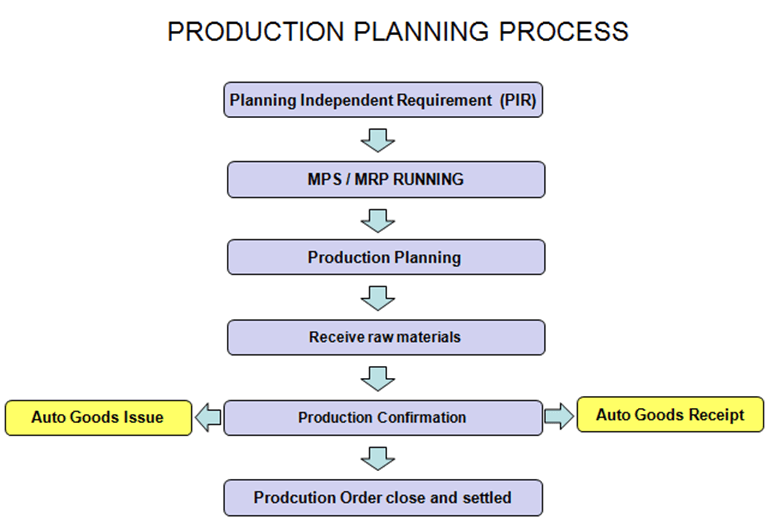
The Production Planning and Control process splits into two phases: Planning and Execution.
Planning
Production planning typically starts from the budgeted sales plan. Demand for a product is captured through Demand Management as Planned Independent Requirements (PIR). PIRs feed into Material Requirements Planning (MRP), which checks the availability of every raw material at each BOM level using master data such as the Bill of Material and current plant stock.
When MRP detects a shortage, it creates purchase requisitions for externally procured materials and planned orders for in-house produced materials. These trigger the Procurement Cycle and the Execution Cycle respectively.
Because MRP works with infinite capacity, capacity leveling is required to remove bottlenecks before execution.
Execution
Planned orders are converted to production orders and scheduled using master data such as routings. The Production Supervisor releases the order on the shop floor, and a material availability check confirms that no components are missing.
Production is carried out through the operations defined in the Routing, with the relevant Work Center referenced for each operation. Once production finishes, confirmations are posted and goods movements record material consumption and goods receipt. The order moves to DLV (Delivered) status and the finished material is booked into the planned storage location.
At month-end, before settlement, the production order is usually set to technically complete (TECO) so the Controlling team can calculate production variances.
Demand Management
Demand Management estimates the required quantities and delivery dates for finished products and important assemblies. It works with PIRs (planned independent requirements) and customer requirements.
A planning strategy must be defined for each product — it captures the manufacturing approach for planning and execution. The two most common strategies are:
- Make to Stock: production runs independently of sales orders. Stock is built and held for later demand.
- Make to Order: production runs against a specific sales order or line item.
Material Requirements Planning (MRP)
MRP identifies shortages and creates the matching procurement elements. Specifically, MRP:
- Performs the net-requirement calculation.
- Generates planned orders for in-house produced materials and purchase requisitions for raw materials.
- Runs lead-time scheduling and calculates production dates for planned orders.
- Explodes the BOM and generates procurement proposals at every BOM level.
Capacity Planning and Leveling
Capacity Planning analyses overload at each Work Center and shifts orders to avoid bottlenecks. Because MRP plans with infinite capacity, the planner must level the load at each Work Center through the capacity planning table. This produces a realistic, constraint-based production plan that the shop floor can actually deliver.
Production Orders
The output of MRP is a list of planned orders. Each planned order must be converted to a production order before execution. Unlike planned orders, a production order is a firmed receipt element and is not changed by subsequent MRP runs.
- A production order specifies what material to produce, how much, when, and where.
- It carries the BOM components and the routing operations to be performed at each Work Center.
- When released, a material-availability check flags any missing components.
Production Order Confirmation
When goods are produced on the shop floor, the production order must be confirmed. During confirmation:
- Component materials can be consumed automatically through the back-flush mechanism.
- Goods receipt of the finished material can be posted automatically through the Operation Control Key in the Routing.
- Manual goods issue and receipt are also supported if back-flush is not appropriate.
- Any failed goods movement caused by a shortage of component stock can be reprocessed manually.
- Activity costs such as machine and labour hours are updated on the production order based on the actuals reported.
After the final confirmation and goods receipt, the order moves to CNF (Confirmed) and DLV (Delivered) status. A wrong confirmation can be cancelled and re-posted with the correct data.
Production Order Close
When a production order is delivered in full — or the business decides not to execute it further — the order should be set to technically complete (TECO). After TECO, the order is removed from the stock/requirement list, ignored by subsequent MRP runs, and all dependent reservations are deleted from the system.
SAP PP Integration with Other Modules
SAP PP exchanges data with several SAP modules during the planning and execution cycle. The table summarises the most important integrations.
| Module | What it shares with PP |
|---|---|
| SD (Sales & Distribution) | Sales orders that feed Make-to-Order strategies and demand. |
| MM (Materials Management) | Purchase requisitions, purchase orders, inventory levels, and goods movements. |
| QM (Quality Management) | Inspection lots triggered by production confirmations and goods receipts. |
| FICO (Finance & Controlling) | Cost centres, activity types, and order-settlement postings. |
| PM (Plant Maintenance) | Work Center availability and machine maintenance schedules. |
| WM/EWM (Warehouse Management) | Storage-location moves and staging during production. |
