
Groovy Script Tutorial for Beginners
 Editorial Team
⚡ Smart Summary
Groovy Script is an object-oriented language for the Java platform that compiles to JVM bytecode. It adds dynamic typing, closures, and concise syntax to Java, and it powers Jenkins pipelines, Gradle builds, and SoapUI assertions.
What is a Groovy Script?
Apache Groovy is an object-oriented, Java syntax-compatible programming language built for the Java platform. This dynamic language has many features that are similar to Python, Ruby, Smalltalk, and Perl. Groovy source code is compiled into Java bytecode, so it runs on any platform where a Java Virtual Machine is installed. Groovy also performs a lot of work behind the scenes, which makes it feel more agile and dynamic than plain Java.
A Groovy script is simply a .groovy file containing statements that Groovy wraps in a generated class before running it. That is why you can execute a one-line file without writing a class or a main method. Groovy can therefore be used as a scripting language for the Java platform while still offering the enterprise capabilities of Java. It adds productivity features such as DSL support, closures, and optional dynamic typing. Unlike some other languages, it is designed as a companion to Java, not a replacement for it.
💡 Tip: Groovy 5.0 is the current stable release line and targets JDK 11 and above. Groovy 4.0 remains available for JDK 8 projects, and Groovy 6.0 is still in alpha for JDK 17. Always check the system requirements table on the official download page before you pick a version.
Why Groovy?
Here are the major reasons why you should use and learn Groovy:
- Groovy is an agile and dynamic language.
- It integrates seamlessly with all existing Java objects and libraries.
- It feels easy and natural to Java developers.
- The code is more concise and more meaningful than the equivalent Java code.
- You can use it as much or as little as you like inside Java applications.
- It runs on the standard Java Virtual Machine, so no separate runtime is required.
Groovy History
- 2003: Started by James Strachan and Bob McWhirter.
- 2004: Submitted to the Java Community Process as JSR 241, which was later withdrawn.
- 2005: Brought back on track by Jeremy Rayner and Guillaume Laforge.
- 2007: Groovy 1.0 released.
- 2012: Groovy 2.0 released.
- 2014: Groovy 2.3 released with official support for JDK 8.
- 2015: Groovy became a top-level project at the Apache Software Foundation.
- 2022: Groovy 4.0 released, with Maven coordinates moving to
org.apache.groovy. - 2025: Groovy 5.0 released for JDK 11 and above.
Features of Groovy
- List, map, range, and regular expression literals.
- Multimethods (runtime method dispatch) and metaprogramming.
- Groovy classes and scripts are usually stored in
.groovyfiles. - Scripts contain Groovy statements without any class declaration.
- Scripts can also contain method definitions outside of class definitions.
- Groovy code can be compiled and fully integrated with a traditional Java application.
- Language-level support for maps, lists, and regular expressions.
- Support for closures, dynamic typing, and the meta-object protocol.
- Support for both static and dynamic typing, plus operator overloading.
- Optional static type checking through the
@TypeCheckedand@CompileStaticannotations.
How to Install Groovy
Step 1) Ensure you have Java installed.
Step 2) Go to https://groovy.apache.org/download.html and click the Windows installer link.
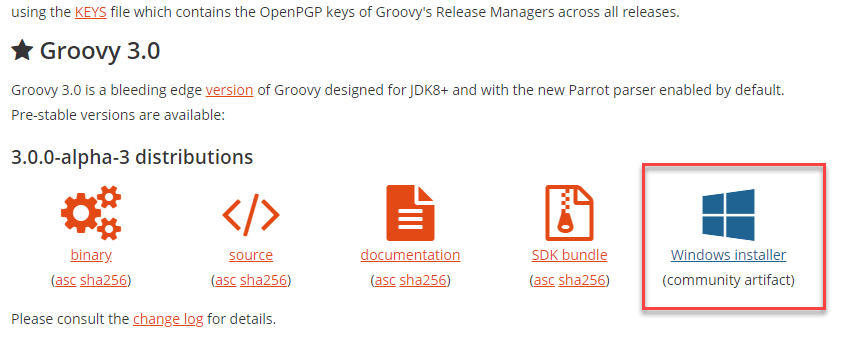
Note: You can also install Groovy from the binary Zip file, through a package manager such as SDKMAN!, Homebrew, Scoop, or Chocolatey, or as a plugin for your Java IDE. In this Groovy walkthrough we will stick to the Windows installer.
Step 3) Launch the downloaded installer. Select the language and click OK.

Step 4) On the welcome screen, click NEXT.

Step 5) Agree with the license terms.

Step 6) Select the components you want to install and click NEXT.

Step 7) Select the installation directory and click NEXT.
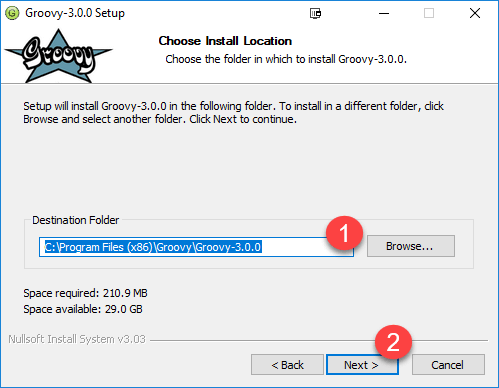
Step 8) Choose the Start Menu folder and click NEXT.

Step 9) Once the install is done, leave the paths at their defaults and click NEXT.

Step 10) Confirm the file association options and click NEXT.

Step 11) In the Start Menu, search for Groovy Console to confirm the installation.

⚠️ Warning: The Windows installer is a community-contributed artifact, not an official Apache release. If your organisation requires signed Apache downloads, use the binary Zip distribution and verify its .asc signature and .sha256 checksum instead.
Groovy Hello World Example
Suppose you want to print the simple string “Hello World” in Java. The code would look like this.
public class Demo {
    public static void main(String[] args) {
        System.out.println("Hello World");
    }
}
Output:
Hello World
The code above is valid in both Java and Groovy, because Groovy accepts almost all Java syntax. The advantage with Groovy is that you can do away with the class declaration, the public method, and the fully qualified print call, and achieve the same output with a single line.
println "Hello World"
Output:
Hello World
- There is no need for a semicolon.
- There is no need for a class or a
mainmethod. System.out.printlnis reduced toprintln.
Groovy Variables
In Java, static binding is compulsory, which means the type of a variable has to be declared in advance.
public class Demo {
    public static void main(String[] args) {
        int x = 104;
        System.out.println(x);
        //x = "Guru99";
    }
}
Output:
104
In the example above, the type of the variable is declared in advance using the keyword int. If you were to declare a floating point number, you would use the keyword float or double.
If you try to assign a String value to an int (uncomment line 5), you will get the following compile error.
Demo.java:5: error: incompatible types: String cannot be converted to int
x = "Guru99";
In contrast, Groovy supports dynamic typing. Variables are defined using the keyword def, and the type does not need to be declared in advance. The runtime figures out the variable type, and you can even change that type later.
def x = 104
println x.getClass()
x = "Guru99"
println x.getClass()
Output:
class java.lang.Integer
class java.lang.String
In Groovy you can also create multiline strings. Just ensure that you enclose the string in triple quotes.
def x = """Groovy
at
Guru99"""
println x
Output:
Groovy
at
Guru99
Note: You can still use explicit types such as byte, short, int, and long in Groovy. But once you declare the type explicitly, you cannot change it dynamically.
int x = 104
println x
x = "Guru99"
Output:
104
Caught: org.codehaus.groovy.runtime.typehandling.GroovyCastException: Cannot cast object 'Guru99' with class 'java.lang.String' to class 'int'
org.codehaus.groovy.runtime.typehandling.GroovyCastException: Cannot cast object 'Guru99' with class 'java.lang.String' to class 'int'
    at jdoodle.run(jdoodle.groovy:3)
Command exited with non-zero status 1
Groovy Operators
An operator is a symbol that tells the compiler to perform a specific mathematical or logical manipulation. Groovy supports the following five families of operators.
- Arithmetic operators: add (+), subtract (-), multiply (*), divide (/), modulus (%), increment (++), decrement (–).
- Relational operators: equal to (==), not equal to (!=), less than (<), less than or equal to (<=), greater than (>), greater than or equal to (>=).
- Logical operators: and (&&), or (||), not (!).
- Bitwise operators: and (&), or (|), exclusive-or (^), complement (~).
- Assignment operators: assign (=) and the compound forms (+=), (-=), (*=), (/=), (%=).
Groovy adds a few operators that Java does not have, and they remove a lot of null-check boilerplate.
| Operator | Description |
|---|---|
| ?. | Safe navigation. Returns null instead of throwing a NullPointerException when the left side is null. |
| ?: | Elvis operator. Returns the left side if it is truthy, otherwise the right side. |
| <=> | Spaceship operator. Delegates to compareTo and is useful inside sort closures. |
| ==~ | Regex match. Returns true only when the whole string matches the pattern. |
Groovy Loops
In Java, you would define a counting loop as follows.
public class Demo {
    public static void main(String[] args) {
        for (int x = 0; x <= 5; x++) {
            System.out.println(x);
        }
    }
}
Output:
0
1
2
3
4
5
You can achieve the same output in Groovy with the upto method, which is inclusive of both bounds.
0.upto(5) { println "$it" }
Output:
0
1
2
3
4
5
Here it is the implicit parameter of the closure, and it holds the value of the current iteration. Consider the following code.
2.upto(4) { println "$it" }
Output:
2
3
4
You can also use the times method. It always starts at 0 and stops one short of the number you call it on, so you need 6 to print 0 through 5.
6.times { println "$it" }
Output:
0
1
2
3
4
5
Now suppose you want to print 0, 2, and 4 with a Java for loop.
public class Demo {
    public static void main(String[] args) {
        for (int x = 0; x <= 5; x=x+2) {
            System.out.println(x);
        }
    }
}
Output:
0
2
4
You can use the step method for the same result. The second argument is the increment, and the first argument is an exclusive upper bound.
0.step(5, 2) { println "$it" }
Output:
0
2
4
Groovy Decision Making
Groovy reuses the Java conditional statements and adds a far more flexible switch. The table below summarises the options.
| Statement | Description |
|---|---|
| if statement | As in Java, the body of the if statement is executed when the condition is true. |
| if/else statement | The condition in the if statement is evaluated first. If it is true, the statements in the if block run and the else block is skipped. If it is false, the statements in the else block run instead. |
| Nested if statement | Used when you need to test a further condition inside an if block. |
| switch statement | A nested if-else chain becomes unreadable when you have many conditions. The switch statement makes the same logic easier to read. In Groovy, a case label can be a value, a class, a range, a regular expression, or a closure. |
| Nested switch statement | Groovy also allows one switch statement to be placed inside another. |
Groovy List
A list structure allows you to store a collection of data items. In Groovy, a List holds a sequence of object references and preserves the position of each element in that sequence. A list literal is written as a series of objects separated by commas and enclosed in square brackets.
Examples of Groovy lists:
- A list of strings:
['Angular', 'Nodejs'] - A list of mixed object references:
['Groovy', 2, 4, 2.6] - A list of integer values:
[16, 17, 18, 19] - An empty list:
[]
The following list methods are available in Groovy.
| Method | Description |
|---|---|
| add() | Appends a new value to the end of the List. |
| contains() | Returns true if the List contains a certain value. |
| get() | Returns the element at the given position. |
| isEmpty() | Returns true if the List contains no elements. |
| minus() | Creates a new List made of the elements of the original, excluding those specified in the given collection. |
| plus() | Creates a new List made of the elements of the original together with those in the given collection. |
| pop() | Removes the last item from the List and returns it. |
| remove() | Removes the element at the given position. |
| reverse() | Creates a new List that reverses the elements of the original List. |
| size() | Returns the number of elements in the List. |
| sort() | Returns a sorted copy of the List. |
Consider the following Groovy script example.
def y = ["Guru99", "is", "Best", "for", "Groovy"]
println y
y.add("Learning")
println(y.contains("is"))
println(y.get(2))
println(y.pop())
Output:
[Guru99, is, Best, for, Groovy]
true
Best
Learning
The first line prints the original five-element list, because add() has not run yet. get(2) returns “Best” since Groovy lists are zero-indexed, and pop() returns “Learning” because that item was appended last.
Groovy Maps
A Groovy Map is a collection of key-value pairs. Keys do not need quotes when they are simple identifiers, which keeps map literals very compact.
Examples of Groovy maps:
[tutorial: 'Java', language: 'Groovy']is a collection of two key-value pairs.[:]represents an empty map.
Here is a list of the map methods available in Groovy.
| Method | Description |
|---|---|
| containsKey() | Checks whether the map contains the given key. |
| get() | Looks up the key in the Map and returns the matching value. If no entry is found, it returns null. |
| keySet() | Returns the set of keys in the Map. |
| put() | Associates the specified value with the given key. If the Map already contained a mapping for that key, the old value is replaced. |
| size() | Returns the number of key-value mappings. |
| values() | Returns a collection view of the values. |
Groovy example:
def y = [fName:'Jen', lName:'Cruise', sex:'F']
print y.get("fName")
Output:
Jen
Groovy Closures
A Groovy closure is a block of code wrapped as an object. It behaves like a method or a function, but it can be stored in a variable and passed around like any other value.
Example of a simple closure:
def myClosure = {
    println "My First Closure"
}
myClosure()
Output:
My First Closure
A closure can accept parameters. The list of identifiers is comma separated, with an arrow (->) marking the end of the parameter list.
def myClosure = {
    a, b, c ->
    y = a + b + c
    println y
}
myClosure(1, 2, 3)
Output:
6
A closure can also return a value.
def myClosure = {
    a, b, c ->
    return (a + b + c)
}
println(myClosure(1, 2, 3))
Output:
6
When you do not declare a parameter list, Groovy supplies a single implicit parameter named it. Closures can also be passed to other closures, which is exactly how collection methods such as each, collect, and findAll work.
Groovy Tools
We will look at three important tools that ship with the Groovy distribution:
- groovysh: executes code interactively from the command line.
- groovyConsole: a graphical window for interactive code execution.
- groovy: executes Groovy script files, in the same way you would run a Perl or Python script.
Groovysh
- A command-line shell.
- Helps you execute Groovy code interactively.
- Allows you to enter single statements or whole scripts.
The screenshot below shows groovysh evaluating expressions one line at a time.

Groovy Console
- A Swing interface that acts as a minimal Groovy development editor.
- Allows you to write and run Groovy code interactively.
- Helps you load and run Groovy script files.
In the Groovy Console below, the script is typed in the upper pane and the result appears in the lower pane.

Groovy
The groovy command is the processor that runs Groovy programs and scripts. It compiles the source to bytecode in memory and executes it in one step, so no separate build stage is needed. It can also be used to test simple Groovy expressions straight from the terminal, as shown below.

Where Groovy Is Used in Real Projects
Most developers meet Groovy not as a standalone language but as the scripting layer inside a tool they already run. Knowing where it appears makes the syntax above far easier to place.
| Tool | How Groovy is used |
|---|---|
| Jenkins | Declarative and scripted pipelines are written in a Groovy DSL, and shared libraries are plain Groovy classes. |
| Gradle | The classic build.gradle file is a Groovy script, which is why it reads more compactly than a Maven POM or an Ant build file. |
| SoapUI | Groovy script steps and script assertions drive dynamic request data and custom response checks. |
| Spock | A Groovy testing framework whose given-when-then blocks and data tables are widely used for JVM unit tests. |
| Elasticsearch and Grails | Grails builds full web applications on Groovy, and several data tools accept Groovy for custom scripting. |
In automation testing teams this matters twice over: the CI job that runs the suite and the tests themselves may both be Groovy, so a single language covers pipeline glue and assertion logic.
Groovy Vs. Java
| Groovy | Java |
|---|---|
| The default access modifier is public, so a method without a modifier is accessible outside its class and package. | The default access modifier is package-private, so fields, methods, and classes without a modifier are visible only within their package. |
| Getters and setters are generated automatically for class properties. | You have to define getter and setter methods for fields yourself. |
| Groovy allows variable substitution inside double-quoted strings. | Java does not support string interpolation. |
| Type information is optional. | Type information is mandatory. |
| Statements do not need to end with a semicolon. | Every statement ends with a semicolon. |
| Groovy automatically wraps every script in a generated Script class. | You need a main method to make a class executable. |
Everything is public and dynamic by default, but @CompileStatic restores Java-level speed and checking. |
Everything is statically compiled and checked at build time. |
Myths about Groovy
| Myth | Reality |
|---|---|
| Groovy can only be used for scripting. | It is excellent for scripting, but it also compiles to ordinary classes that you can ship inside any JVM application. |
| Groovy is all about closures, so it is just a functional programming language. | Groovy borrows ideas from functional languages such as Lisp and Clojure, but it remains an object-oriented language at heart. |
| Groovy is only worth using for test-driven development. | Groovy is a strong fit for TDD with Spock, but that is certainly not the only reason to use it. |
| You only need Groovy if you want to use Grails. | Grails is a powerful web development framework, but Gradle, Jenkins, and Spock all use Groovy without it. |
Cons of Using Groovy
- JVM and Groovy script start-up time is slow, which limits its use for quick OS-level scripting.
- Groovy is not widely adopted outside JVM-centric communities.
- It is inconvenient to use Groovy without an IDE that understands its dynamic features.
- Dynamic dispatch can make Groovy code slower than the equivalent Java code unless you apply
@CompileStatic. - Groovy programs may need more memory than plain Java programs.
- Knowledge of Java is effectively a prerequisite.
Once you are comfortable with Groovy syntax, the natural next step is the ecosystem around it. Strengthen the fundamentals with the Java tutorial, then see how Groovy scripts drive builds and deployments in Jenkins, compare build tools with Maven and Apache Ant, and explore how Groovy assertions fit into Selenium and API test suites.
