
What is Data Mart in Data Warehouse? Types & Example
 Editorial Team
⚡ Smart Summary
Data Mart design delivers a focused subset of data-warehouse information to one department, spanning the three data mart types, the five phases from design through management, and the best practices that keep delivery fast, secure, and cost-effective.
A data mart brings the analytical power of a data warehouse to a single team. By focusing on one subject area, it lets a department analyze its own data quickly without waiting behind enterprise-wide workloads. The sections below explain what a data mart is, why organizations use one, the three types available, and how to implement and manage one.
What is Data Mart?
A data mart is focused on a single functional area of an organization and contains a subset of the data stored in a Data Warehouse. It is a condensed version of a data warehouse, designed for use by a specific department, unit, or group of users — for example, Marketing, Sales, HR, or Finance.
Because it serves one function, a data mart is usually controlled by a single department within the organization. That focus keeps its scope narrow and its ownership clear.
A data mart also draws data from only a few sources, unlike a data warehouse that integrates many. As a result, data marts are small in size and far more flexible than a full data warehouse.
Why do we need Data Mart?
Organizations rely on data marts for several practical reasons:
- A data mart improves users’ response time by reducing the volume of data they query.
- It provides easy access to frequently requested data.
- A data mart is simpler and cheaper to implement than a corporate data warehouse.
- It is agile: when the model changes, a smaller data mart can be rebuilt quickly.
- A data mart is defined by a single subject-matter expert, whereas a data warehouse is defined by an interdisciplinary team, so a mart is more open to change.
- Data is partitioned, allowing very granular access-control privileges.
- Data can be segmented and stored on different hardware or software platforms.
In short, because a data mart handles a smaller, well-defined slice of data, it is quicker to build, cheaper to run, and easier to secure than an enterprise data warehouse.
Data marts are not all built the same way, though. The source a mart draws from determines which of three types you are working with.
Types of Data Mart
There are three main types of data mart, distinguished by where they source their data:
- Dependent: Dependent data marts draw data directly from operational sources, external sources, or both.
- Independent: An independent data mart is created without a central data warehouse.
- Hybrid: A hybrid data mart can take data from data warehouses or operational systems.
Dependent Data Mart
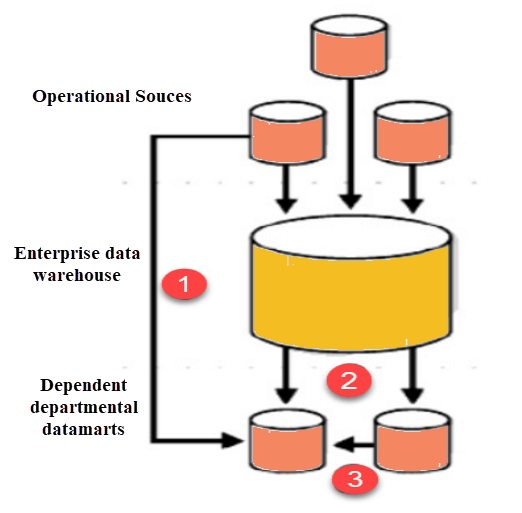
A dependent data mart sources an organization’s data from a single Data Warehouse, which gives it the benefit of centralization. If you need to build one or more physical data marts, you configure them as dependent data marts.
A dependent data mart can be built in two ways: one where users access both the data mart and the data warehouse depending on need, and one where access is limited to the data mart only. The second approach is not optimal, because it can produce a “data junkyard” — data that begins from a common source but is then scrapped and largely unused.

Independent Data Mart
An independent data mart is created without a central data warehouse. This kind of data mart is an ideal option for smaller groups within an organization.
An independent data mart has no relationship with an enterprise data warehouse or with any other data mart. Its data is loaded and analyzed on its own. This approach runs counter to the main reason for building a data warehouse in the first place: a consistent, centralized store of enterprise data that many users with different interests can analyze.

Hybrid Data Mart
A hybrid data mart combines input from sources beyond the data warehouse. This helps when you need ad-hoc integration — for example, after a new group or product is added to the organization.
It is well suited to multiple-database environments and offers a fast implementation turnaround with the least data-cleansing effort. A hybrid data mart also supports large storage structures and works well for smaller, data-centric applications.
Steps in Implementing a Datamart

Implementing a data mart is a rewarding but detailed process. It moves through five phases — designing, constructing, populating, accessing, and managing — each described below.
Designing
Designing is the first phase of data mart implementation. It covers every task from the initial request for a data mart to gathering requirements, and it ends with the logical and physical data mart design.
The design step involves the following tasks:
- Gathering the business and technical requirements and identifying data sources.
- Selecting the appropriate subset of data.
- Designing the logical and physical structure of the data mart.
Data can be partitioned based on the following criteria:
- Date
- Business or functional unit
- Geography
- Any combination of the above
Data can be partitioned at the application or DBMS level, though partitioning at the application level is recommended because it allows a different data model each year as the business environment changes. Most data marts are built on a dimensional model, such as a star schema, to keep queries fast.
What products and technologies do you need?
A simple pen and paper will suffice at this stage. Tools that help you create UML or entity-relationship diagrams can also append metadata to your logical and physical designs.
Constructing
Constructing is the second phase of implementation. It involves creating the physical database and the logical structures.
This step involves the following task:
- Implementing the physical database designed in the earlier phase — for instance, creating schema objects such as tables, indexes, and views.
What products and technologies do you need?
You need a relational database management system (RDBMS) to construct a data mart. An RDBMS provides several features that are essential to a data mart’s success:
- Storage management: An RDBMS stores and manages data, letting you create, add, and delete records.
- Fast data access: With a SQL query you can easily retrieve data based on specific conditions or filters.
- Data protection: The RDBMS can recover from system failures such as power outages and restore data from backups if a disk fails.
- Multiuser support: It offers concurrent access, so multiple users can read and modify data without overwriting one another’s changes.
- Security: It regulates which users can access which objects and which operations they can perform.
Populating
In the third phase, data is populated into the data mart.
The populating step involves the following tasks:
- Mapping source data to target data.
- Extracting the source data.
- Cleaning and transforming the data.
- Loading the data into the data mart.
- Creating and storing metadata.
What products and technologies do you need?
You carry out these tasks with an ETL (Extract, Transform, Load) tool. It examines the data sources, performs source-to-target mapping, and then extracts, transforms, cleanses, and loads the data into the data mart.
Along the way, the tool also creates metadata — details such as where the data came from, how recent it is, what changes were made, and what level of summarization was applied.
Accessing
Accessing is the fourth step, and it puts the data to use: querying data, building reports and charts, and publishing them. End users submit queries and view the results, often through OLAP tools.
The accessing step involves the following tasks:
- Setting up a meta layer that translates database structures and object names into business terms, so non-technical users can access the data mart easily.
- Setting up and maintaining the database structures.
- Setting up APIs and interfaces if required.
What products and technologies do you need?
You can access the data mart using the command line or a GUI. A GUI is usually preferred because it generates graphs easily and is more user-friendly than the command line.
Managing
Managing is the final phase of the data mart implementation process. Using either a GUI or the command line, teams handle ongoing management tasks such as:
- Ongoing user access management.
- System optimization and fine-tuning for better performance.
- Adding and managing fresh data in the data mart.
- Planning recovery scenarios to keep the system available if it fails.
- Recovering from hardware and software failures while preserving data.
Best practices for Implementing Data Marts
Follow these best practices throughout the data mart implementation process:
- Structure the source of a data mart by department.
- Measure the implementation cycle in weeks rather than months or years.
- Involve all stakeholders in the planning and design phase, because a data mart implementation can be complex.
- Budget accurately for data mart hardware, software, networking, and implementation costs.
- Even when a data mart shares hardware, it may need different software to handle user queries; assess the extra processing power and storage needed for fast responses.
- When a data mart sits in a different location from the data warehouse, ensure enough network capacity to move the required data volumes.
- Budget for load time, which grows as the complexity of the transformations increases.
Advantages and Disadvantages of a Data Mart
Like any architecture choice, a data mart brings clear benefits along with a few trade-offs.
Advantages
- A data mart holds a subset of organization-wide data that is valuable to a specific group of users.
- It is a cost-effective alternative to a data warehouse, which can be expensive to build.
- A data mart allows faster access to data.
- It is easy to use, because it is designed for the specific needs of its users, which can accelerate business processes.
- A data mart needs less implementation time than a data warehouse, since you focus on only a subset of the data.
- It contains historical data that helps analysts identify trends.
Disadvantages
- Enterprises sometimes create too many disparate, unrelated data marts, which become difficult to maintain.
- A data mart cannot provide company-wide data analysis, because its data set is limited.
