
Keyspace in Cassandra: Create, Alter & Drop Example
 Editorial Team
⚡ Smart Summary
Keyspace in Cassandra is the outermost data container, equivalent to a database in a relational system, and it fixes how every table inside it replicates. This page covers creating, altering, and dropping a keyspace, plus its properties and system keyspaces.
What is Keyspace in Cassandra?
A Keyspace in Cassandra is a data container, similar to a database in RDBMS (Relational Database Management Systems). Cassandra Keyspace determines how data replicates on nodes.
Because replication is set on the keyspace rather than on individual tables, every table created inside it inherits the same strategy and replication factor. That makes the keyspace the first decision in any schema.
How to Create Keyspace in Cassandra
A keyspace is an object that holds the column families, user defined types. In Cassandra, Keyspace is similar to RDBMS Database. Keyspace holds column families, indexes, user defined types, data center awareness, strategy used in keyspace, replication factor, etc.
Command “Create Keyspace” is used to create keyspace in Cassandra.
Syntax
CREATE KEYSPACE KeyspaceName WITH replication = {
    'class': 'StrategyName',
    'replication_factor': 3
};
Various Components of Cassandra Keyspace
- Strategy: While declaring strategy name in Cassandra. There are two kinds of strategies declared in Cassandra Syntax.
- Simple Strategy: Simple strategy is used when you have just one data center. In this strategy, the first replica is placed on the node selected by the partitioner. Remaining nodes are placed in the clockwise direction in the ring without considering rack or node location.
- Network Topology Strategy: Network topology strategy is used when you have more than one data centers. In this strategy, you have to provide replication factor for each data center separately. Network topology strategy places replicas in nodes in the clockwise direction in the same data center. This strategy attempts to place replicas in different racks.
- Replication Factor: Replication factor is the number of replicas of data placed on different nodes. For no failure, 3 is good replication factor. More than two replication factor ensures no single point of failure. Sometimes, the server can be down, or network problem can occur, then other replicas provide service with no failure.
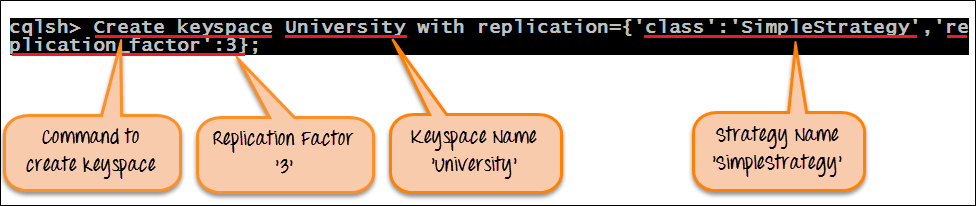
- Example: Here is the snapshot of the executed command “Create Keyspace” that will create keyspace in Cassandra.
CREATE KEYSPACE University WITH replication = {
    'class': 'SimpleStrategy',
    'replication_factor': 3
};
After successful execution of command “Create Keyspace”, Keyspace University will be created in Cassandra with strategy “SimpleStrategy” and replication factor 3. Note that the strategy name must be quoted; an unquoted value is rejected as a syntax error.
Alter Keyspace Cassandra
Command “Alter Keyspace” alters the replication factor, strategy name and durable writes properties in created keyspace in Cassandra.
Syntax
ALTER KEYSPACE KeyspaceName WITH replication = {
    'class': 'StrategyName',
    'replication_factor': 3
}
AND DURABLE_WRITES = true;
Key aspects while altering Keyspace in Cassandra
- Keyspace Name: Keyspace name cannot be altered in Cassandra.
- Strategy Name: Strategy name can be altered by specifying new strategy name.
- Replication Factor: Replication factor can be altered by specifying new replication factor.
- DURABLE_WRITES: DURABLE_WRITES value can be altered by specifying its value true or false. By default, it is true. If set to false, no updates will be written to the commit log and vice versa.
- Execution: Here is the snapshot of the executed command “Alter Keyspace” that alters the keyspace strategy from ‘SimpleStrategy’ to ‘NetworkTopologyStrategy’ and replication factor from 3 to 1 for DataCenter1.

ALTER KEYSPACE University WITH replication = {
    'class': 'NetworkTopologyStrategy',
    'DataCenter1': 1
};
After successful execution of the command “Alter Keyspace”, strategy name will be changed from ‘SimpleStrategy’ to ‘NetworkTopologyStrategy’ and replication factor will be changed from 3 to 1 for ‘DataCenter1.’
Important: raising a replication factor does not copy existing data by itself. Run nodetool repair on the affected keyspace afterwards, otherwise the new replicas stay empty until a read repair happens to touch each row.
Cassandra Drop Keyspace
Command ‘Drop Keyspace‘ drops keyspace including all the data, column families, user defined types and indexes from Cassandra. Before dropping the keyspace, Cassandra takes a snapshot of the keyspace. If keyspace does not exist in the Cassandra, Cassandra will return an error unless IF EXISTS is used.
Syntax
DROP KEYSPACE IF EXISTS KeyspaceName;
Example
Here is the snapshot of the executed command ‘Drop Keyspace’ that will drop keyspace University.

DROP KEYSPACE University;
After successful execution of the command ‘Drop keyspace University’, keyspace University will be dropped from Cassandra with all the data and schema.
Here is the snapshot where the error is returned when tried to access keyspace that does not exist.

Note: There is no difference in drop keyspace and delete keyspace. Drop keyspace is equal to delete keyspace.
Keyspace Properties and System Keyspaces
Beyond creating and dropping, three commands cover almost all day-to-day keyspace work in cqlsh.
DESCRIBE KEYSPACES;
DESCRIBE KEYSPACE University;
USE University;
The first lists every keyspace on the cluster, the second prints the full schema of one keyspace including its tables, and the third sets the current keyspace so table names no longer need a prefix.
Alongside user keyspaces, Cassandra ships several of its own. They appear in DESCRIBE KEYSPACES output and are worth recognising rather than deleting.
- system: Local node state, including its token ranges and the peers it knows about.
- system_schema: The definitions of every keyspace, table, column, and index on the cluster.
- system_auth: Roles, permissions, and credentials when authentication is enabled.
- system_distributed: Repair history and other cluster-wide bookkeeping.
- system_traces: Query traces captured when tracing is switched on.
Two of these deserve attention in production. The system_auth keyspace is created with a replication factor of one by default; if that node is lost, nobody can log in, so it should be raised to match the cluster. The system_schema keyspace explains why schema changes must be applied one at a time, since concurrent changes can produce conflicting schema versions across nodes.
Common Keyspace Errors and Fixes
Most keyspace failures produce a short, recognisable message.
| Error | Cause and fix |
|---|---|
| Unknown keyspace | No keyspace is selected. Run USE KeyspaceName, or prefix the table as Keyspace.Table. |
| Syntax error at ‘SimpleStrategy’ | The strategy name is unquoted. Write ‘class’: ‘SimpleStrategy’ with quotes. |
| Unrecognized strategy option {replication_factor} | replication_factor was used with NetworkTopologyStrategy. That strategy takes a factor per data centre name instead. |
| Cannot add existing keyspace | The keyspace already exists. Add IF NOT EXISTS, or drop the old one first. |
| Data missing after raising the replication factor | Expected. Run nodetool repair on the keyspace so the new replicas are populated. |
Once a keyspace exists, the next step is defining storage inside it, covered in the Cassandra table tutorial.
