
7 Best AI CRM Software & Tools (2026)
 Editorial Team
AI CRM software often promises smarter customer management, yet many users end up wrestling with clunky dashboards, inaccurate data insights, automation that breaks at the worst moment, and integrations that refuse to cooperate. Teams waste hours fixing what should have been seamless, miss follow-ups due to unreliable triggers, or struggle to make sense of overly complex features. The result is lost leads, frustrated workflows, and decisions based on incomplete information. What most people overlook are the subtle differences that actually drive efficiency. Once those are clear, everything becomes more predictable, streamlined, and far less stressful.
I spent over 180 hours researching and testing 19 different platforms, digging into real-world usability, automation depth, and long-term reliability. After rigorous testing, I shortlisted 7 Best AI CRM software options based on firsthand evaluation of features, pros and cons, and backed by performance across different business needs. If you want clarity without the overwhelm, keep reading. Read more…
AI CRM Software for Business Growth: Top Picks!
| Tool Name | Best For | Top Features | Free / Trial Plans | Link |
|---|---|---|---|---|
| Zoho CRM | SMBs needing affordable AI CRM | AI assistant, workflow automation, multichannel CRM | Free plan (3 users) + 15-day free trial | Learn More |
| Monday.com CRM | Teams combining CRM + project workflows | Visual pipelines, automation, integrations | 14-day free trial | Learn More |
| Salesforce | Enterprises needing deep customization | AI insights, advanced automation, scalability | 14–30 day free trial | Learn More |
| HubSpot CRM | Startups wanting a free all-in-one CRM | Marketing automation, contact management, analytics | Free plan + 14-day trial (premium tools) | Learn More |
| Pipedrive | Sales teams focused on deal tracking | Sales pipeline, email tracking, automation | 14-day free trial | Learn More |
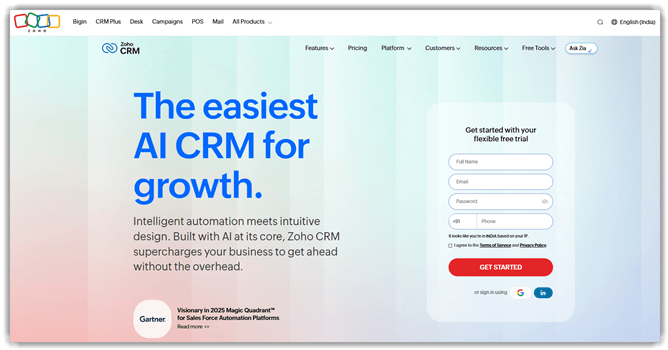
1) Zoho CRM
Zoho CRM is an AI-powered CRM platform for managing customer relationships efficiently. It supports sales automation, lead tracking, and workflow-based process testing. The built-in AI assistant helps analyze data and predict outcomes reliably. Its testing-friendly integrations make validating automation flows straightforward for teams. Zoho CRM also offers a free plan, useful for beginners exploring CRM tools.
I have noticed that its automation workflows execute smoothly during repeated validation cycles. For example, you can test lead assignment rules before deploying updates. This helps confirm workflows behave correctly across different input scenarios. It fits well when teams validate CRM logic during frequent product changes.
Features:
- Contact Management: Zoho CRM stores detailed customer profiles with interaction history and notes. It helps users track conversations and preferences easily. This improves relationship continuity and avoids missing important follow-ups.
- Lead Tracking: This feature captures leads from forms, emails, and campaigns automatically. Users can organize and prioritize leads based on predefined criteria. It helps focus efforts on prospects most likely to convert.
- Sales Pipeline: Zoho CRM visualizes deals across different sales stages clearly. You can move deals forward as progress happens in real time. I often rely on this to identify bottlenecks quickly.
- Workflow Rules: This functionality automates repetitive tasks like sending emails or updating fields. It reduces manual effort during routine sales processes. Users save time while maintaining consistent actions across workflows.
- Email Integration: Zoho CRM connects with email platforms to track conversations within the system. It allows users to send, receive, and log emails directly. This keeps communication organized without switching between tools.
- Reporting Tools: This feature generates reports on sales performance and customer behavior trends. Users can analyze metrics to understand what is working. I have noticed this helps teams adjust strategies based on real data.
- Task Scheduling: Zoho CRM allows users to assign tasks, set reminders, and track deadlines. It helps manage daily activities without missing important actions. This keeps teams aligned and improves accountability.
- AI Insights: Zoho CRM includes AI suggestions for lead scoring and deal predictions. It highlights which opportunities need attention first. This helps users make faster decisions with better confidence.
Pros
Cons
Pricing:
Zoho CRM offers a free forever plan for up to 3 users, plus a 15-day free trial on all paid plans — no credit card required.
| Plan | Pricing |
|---|---|
| Free | $0 (free for up to 3 users) |
| Standard | $14/user/month (billed annually) • $20/user/month (billed monthly) |
| Enterprise | $40/user/month (billed annually) • $50/user/month (billed monthly) |
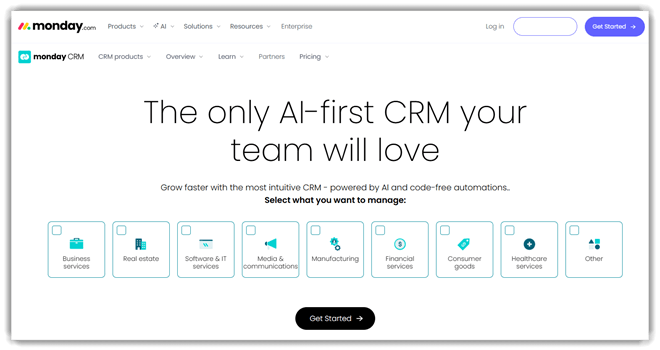
2) Monday.com CRM
Monday.com is a work management platform supporting CRM workflows and testing coordination. It helps teams track test cases, automate updates, and manage releases. The platform offers automation, integrations, and dashboards for reliable visibility. Its flexibility makes it useful for organizing QA processes alongside development tasks.
I found its boards intuitive, especially when mapping structured testing workflows. For example, a team can manage regression testing before a product release. They can assign tasks, track bugs, and monitor progress in real time. Its free plan helps beginners explore structured CRM and testing workflows easily.
Features:
- Custom Workflows: Monday.com lets you build workflows using boards, columns, and status triggers. This helps structure tasks clearly and reduces confusion during project execution across teams.
- Task Tracking: You can assign tasks, set deadlines, and track progress in real time. It helps users stay accountable and quickly identify delays before they impact overall timelines.
- Automation Rules: This feature allows users to automate repetitive actions like status updates or notifications. I have noticed it significantly reduces manual follow-ups and keeps workflows moving consistently.
- Data Views: Monday.com provides multiple views, like Kanban, timeline, and calendar layouts. This helps users visualize work in different formats depending on their planning or reporting needs.
- Collaboration Tools: Users can comment directly on tasks and tag teammates for quick updates. It keeps all communication tied to work items, reducing scattered messages across different platforms.
- Dashboards: This feature aggregates data from multiple boards into one centralized view. In my experience, it helps track performance metrics without switching between different project spaces constantly.
- File Management: You can attach files directly to tasks and organize them within boards. It simplifies access to documents and avoids searching through external storage during active projects.
- Time Tracking: Monday.com includes built-in time tracking for tasks and projects. I often rely on this to understand effort distribution and improve future planning accuracy.
Pros
Cons
Pricing:
Monday CRM starts at $12/seat/month billed annually ($18 monthly), has no free plan, and includes a 14-day free trial.
| Plan | Pricing |
|---|---|
| Basic | USD $12/seat/month billed annually; $18 monthly |
| Standard | USD $17/seat/month billed annually; $25 monthly |
| Pro | USD $28/seat/month billed annually; $41 monthly |
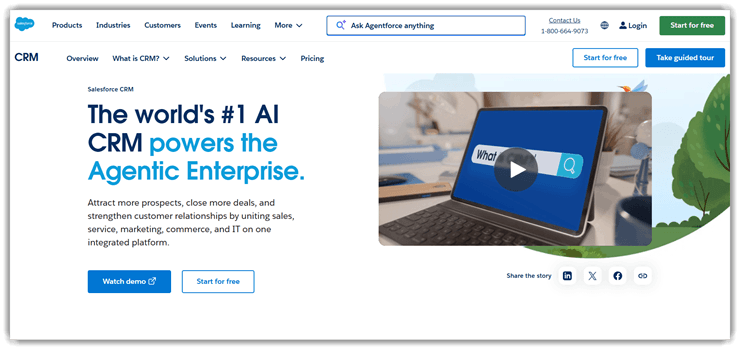
3) Salesforce
Salesforce is the heavyweight choice when teams need CRM depth. It supports sales, service, and broader customer lifecycle management workflows. Its reputation comes from scale, ecosystem depth, and Einstein AI. That combination makes it common in complex, fast-growing sales operations.
From my view, Salesforce shines when processes span several teams. Before quarterly forecasting, managers can centralize pipeline data and signals. Predictive insights help prioritize deals instead of chasing everything equally. New users face a learning curve, but the platform is serious.
Features:
- Contact Tracking: Salesforce stores detailed customer profiles with interaction history and activity logs. It helps users understand past conversations quickly. This makes follow-ups more relevant and less repetitive.
- Pipeline View: You can visualize deals across different sales stages using a structured pipeline. It helps track progress without spreadsheets. This improves visibility into which opportunities need attention.
- Task Automation: This feature automates routine actions like follow-ups and reminders based on triggers. It reduces manual work during busy sales cycles. In my experience, this prevents important tasks from slipping through.
- Lead Scoring: Salesforce assigns scores to leads based on engagement and predefined criteria. It helps prioritize high-potential prospects efficiently. Users can focus efforts where conversions are more likely.
- Email Logging: Using this feature, emails are automatically captured and linked to contact records. It removes the need for manual updates after conversations. I often rely on this to keep communication organized without extra effort.
- Report Builder: Users can generate custom reports by selecting metrics and filters relevant to goals. It helps identify trends in sales performance. This makes it easier to adjust strategies based on actual data.
- Workflow Rules: This specific functionality allows users to define conditions that trigger actions across processes. It helps standardize repetitive workflows across teams. This reduces inconsistencies in how tasks are handled.
- Mobile Access: Salesforce provides access to customer data and tasks through its mobile app. It helps users update deals while on the move. I have noticed this is especially useful during client meetings or travel.
Pros
Cons
Pricing:
Salesforce CRM (AI-powered CRM suite) offers a free plan ($0), paid plans from $25/month, and a 30-day free trial.
| Plan | Pricing |
|---|---|
| Free Suite | $0 USD/user/month |
| Starter Suite | $25 USD/user/month (billed monthly or annually) |
| Pro Suite | $100 USD/user/month (billed annually) |
4) HubSpot CRM
HubSpot CRM keeps things simple while still layering in useful AI. It covers contact management, deal tracking, and sales activity organization. Many teams trust it because adoption feels fast, not forced. It also includes free CRM access and built-in AI tools.
That ease matters when a team needs cleaner follow-ups immediately. I have seen beginners settle into HubSpot without much friction. For daily prospecting, Breeze Assistant helps summarize records and prep. It is a comfortable starting point that still leaves room.

Features:
- Contact Tracking: HubSpot records every interaction with contacts across emails, calls, and forms. It helps users understand relationship history quickly. This reduces missed context during follow-ups and improves communication consistency.
- Pipeline Management: You can organize deals into visual stages that reflect your sales process. It helps track progress and identify stalled opportunities. This makes forecasting and prioritization much easier for growing teams.
- Email Logging: This feature automatically logs sent and received emails into contact timelines. I have noticed this reduces manual updates significantly. It ensures all communication stays visible without extra effort.
- Task Automation: HubSpot allows users to create workflows that trigger actions based on behavior. It helps automate follow-ups and reminders. This reduces repetitive tasks and keeps important activities from being overlooked.
- Lead Capture: Using this feature, forms and chat tools collect visitor information directly into the CRM. It helps convert website traffic into actionable leads. This removes the need for manual data entry.
- Activity Insights: Users can track email opens, link clicks, and interaction frequency. In my experience, this reveals which leads are actively engaged. It helps prioritize outreach based on real user behavior.
- Meeting Scheduler: This specific functionality lets users share booking links synced with calendars. It helps prospects schedule meetings without back-and-forth emails. I often rely on this to save time during busy weeks.
- Data Organization: HubSpot groups contacts, companies, and deals into structured records automatically. It helps keep information clean and searchable. This improves team collaboration and reduces confusion across shared data.
Pros
Cons
Pricing:
HubSpot CRM (Smart CRM / Core CRM platform) offers a free plan, with paid tiers starting at $15/month per seat and no clearly stated free trial duration.
| Plan | Pricing |
|---|---|
| Free | $0 (free forever) |
| Starter | Starts at $15/month per seat (annual billing) |
| Professional | Starts at $50/month per seat |
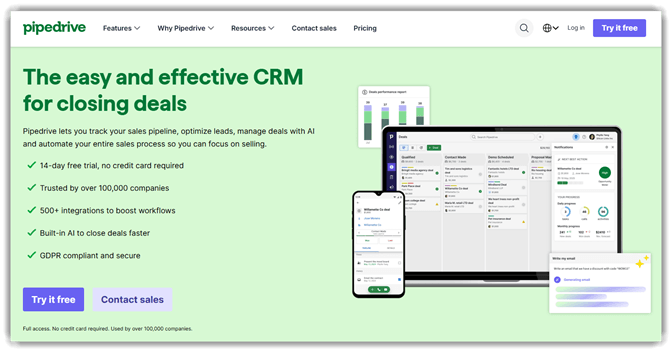
5) Pipedrive
Pipedrive focuses tightly on selling, which gives it immediate clarity. It supports pipeline management, activity tracking, and AI-guided sales workflows. Teams often choose it because the interface stays highly visual. That simplicity helps keep momentum during fast-moving deal cycles.
I like Pipedrive most when sales reps need fewer distractions. During follow-up heavy weeks, it keeps next actions visible and obvious. Automation handles admin work, while AI supports smarter prioritization decisions. It feels especially practical for smaller teams building repeatable habits.
Features:
- Deal Tracking: Pipedrive lets users move deals across customizable pipeline stages visually. It shows exactly where each opportunity stands. This helps users prioritize actions and avoid missing important follow-ups.
- Activity Scheduling: You can assign calls, meetings, and tasks directly to deals. It keeps all upcoming actions tied to specific opportunities. This makes daily planning clearer and reduces scattered task management.
- Email Sync: This feature connects your inbox and links emails to relevant deals automatically. It keeps the communication history organized without manual copying. I have noticed this reduces the time spent searching for past conversations.
- Lead Inbox: Pipedrive separates new leads from active deals using a dedicated inbox. It helps users qualify prospects before adding them to pipelines. This prevents clutter and keeps the sales workflow more structured.
- Workflow Automation: Users can create rules that trigger actions like moving deals or sending emails. It reduces repetitive manual updates during the sales process. In my experience, this keeps pipelines consistently up to date.
- Insights Reporting: Pipedrive generates reports based on deal progress, conversion rates, and activities. It highlights patterns that affect sales performance. This helps users identify bottlenecks and improve their closing strategies.
- Contact Timeline: This feature shows a chronological view of all interactions with a contact. It includes emails, calls, and notes in one place. I often rely on this when preparing for follow-up conversations quickly.
- Goal Tracking: Users can set revenue or activity targets and track progress visually. It provides a clear benchmark for performance over time. This keeps teams focused and accountable to measurable outcomes.
Pros
Cons
Pricing:
Pipedrive CRM (AI-powered sales CRM) offers paid plans starting from ~$14/user/month (annual) with a 14-day free trial and no free plan.
| Plan | Pricing |
|---|---|
| Lite | $14/user/month (annual) or $19/user/month (monthly) |
| Growth | $24/user/month (annual) or $34/user/month (monthly) |
| Premium | $49/user/month (annual) or $64/user/month (monthly) |
6) Creatio
Creatio stands out by combining CRM with a no-code workflow platform. It supports sales, service, and operational process automation across teams. What makes it credible is its strong automation focus. Its AI-native design also helps reduce manual steps in workflows.
I see Creatio fitting teams that tweak processes more than once. When approvals, routing, and follow-ups change often, flexibility matters. No-code customization helps operations teams adapt without waiting on developers. That makes Creatio attractive for organizations balancing CRM needs and workflows.

Features:
- Workflow Designer: Creatio lets users visually map business processes using drag-and-drop elements. You can define steps, conditions, and approvals clearly. This reduces reliance on developers and speeds up process changes.
- Lead Routing: This feature assigns incoming leads based on rules like location or priority. It ensures each lead reaches the right salesperson quickly. Faster assignment helps reduce response delays and missed opportunities.
- Unified Profiles: Creatio builds a single customer view by combining interactions, history, and data. Users can access everything from one place. This helps teams avoid context switching and improve conversation relevance.
- No-Code Automation: Users can automate repetitive tasks without writing any code. You can trigger actions like emails or updates based on events. I have noticed this reduces manual work significantly in daily operations.
- Sales Pipeline: Creatio provides structured stages to track deals from first contact to closure. You can monitor progress and identify stalled deals early. This helps maintain momentum and improve forecasting accuracy.
- Service Case Management: This feature organizes customer issues into trackable cases with priorities and deadlines. It helps teams respond consistently and resolve problems faster. In my experience, this improves customer satisfaction noticeably.
- Analytics Builder: Creatio allows users to create custom reports using real-time business data. You can track metrics like conversion rates or response times. This helps identify patterns and make more informed decisions.
- Task Coordination: Users can assign, track, and manage tasks linked to deals or cases. It keeps responsibilities clear across teams and departments. I often rely on this to avoid miscommunication during complex workflows.
Pros
Cons
Pricing:
Creatio AI-Native CRM starts at $25/user/month via its platform pricing; no free plan, 14-day free trial, and demo available.
| Plan | Pricing |
|---|---|
| Growth | $25/user/month |
| Enterprise | $55/user/month |
| Unlimited | $85/user/month |
7) Insightly CRM
Insightly CRM leans into relationship management with modern, practical AI support. It handles contacts, leads, pipeline movement, and connected follow-up tasks. Its reliability comes from usability, integrations, and productivity-focused automation. The platform also adds AI summaries and guided assistance.
What I notice first is how quickly context becomes accessible. Before a customer call, summaries can surface emails, notes, and history. That saves time when reps jump between accounts all afternoon. For growing teams, Insightly offers structure without feeling unnecessarily heavy.

Features:
- Contact Tracking: Insightly lets users store detailed contact profiles with interaction history. It helps track emails, calls, and notes in one place. This keeps communication organized and prevents missed follow-ups.
- Pipeline Management: This feature organizes deals into visual stages for easier tracking. You can move opportunities across stages as progress changes. It helps users identify stalled deals and focus on closing tasks.
- Task Linking: Users can attach tasks directly to contacts, projects, or opportunities. This ensures every action stays tied to a specific context. It reduces confusion when managing multiple deals or clients.
- Email Integration: Insightly connects with your email to sync conversations automatically. It logs messages under the right contact or deal record. I have found that this reduces manual data entry significantly.
- Project Conversion: You can convert closed deals into active projects with one click. This keeps all related data and timelines intact during handoff. It helps teams transition smoothly from sales to execution.
- Workflow Automation: This feature triggers actions based on defined rules and conditions. For example, it can assign tasks when a deal reaches a stage. It saves time and ensures consistent process execution.
- Custom Fields: Users can create custom data fields tailored to their workflow needs. This allows tracking of industry-specific or business-specific information. In my experience, this improves reporting accuracy and relevance.
- Reporting Insights: Insightly generates reports based on sales activity and performance data. You can analyze conversion rates, pipeline health, and team output. I often rely on this to spot bottlenecks early.
Pros
Cons
Pricing:
Insightly CRM pricing starts at $29/user/month (annual billing), with a 14-day free trial and no free plan available.
| Plan | Pricing |
|---|---|
| Plus | $29 per user/month (billed annually) |
| Professional | $49 per user/month (billed annually) |
| Enterprise | $99 per user/month (billed annually) |
Link: https://www.insightly.com/
What is AI CRM software and how does it work?
AI CRM software uses artificial intelligence to improve customer relationship management processes. It collects customer data from multiple touchpoints and analyzes it automatically. The system identifies patterns, predicts behavior, and suggests next actions. Businesses use these insights to improve sales, marketing, and support outcomes. Unlike traditional CRMs, AI-powered tools reduce manual work and increase accuracy. They can automate tasks like lead scoring, email responses, and customer segmentation. This helps teams focus more on strategy and less on repetitive work.
How does AI CRM software improve sales and customer engagement?
AI CRM software improves sales by analyzing customer interactions and identifying opportunities. It helps sales teams prioritize high-value leads and follow up effectively. The system can recommend the best time to contact prospects. It also suggests personalized messaging based on customer preferences. For engagement, AI tracks behavior across channels and tailors communication accordingly. This creates a more relevant experience for each customer. As a result, businesses see higher conversion rates and stronger relationships with their audience.
How does AI CRM software integrate with other business tools?
AI CRM software integrates with various tools to create a seamless workflow. It connects with email platforms, marketing automation tools, and analytics systems. Integration ensures data flows smoothly across departments. This helps teams access real-time information without switching platforms. Many CRMs also support API connections for custom integrations. This flexibility allows businesses to build tailored solutions. Strong integration capabilities improve collaboration and overall productivity across the organization.
What are the latest trends in AI CRM software?
The latest trends in AI CRM software focus on deeper automation and smarter insights. Tools now include generative AI for content creation and communication. Voice assistants and conversational AI are becoming more common. Predictive analytics is improving with better machine learning models. Integration with customer data platforms is also increasing. Privacy and data security features are gaining importance. These trends show that AI CRM is evolving rapidly to meet modern business needs.
How Do We Select the Best AI CRM Software?
At Guru99, we carefully evaluate tools using real-world testing and expert analysis. We focus on accuracy, usability, and performance to recommend only the most reliable AI CRM solutions for users.
- Feature Evaluation: We analyze advanced AI capabilities like automation, predictive analytics, and personalization to ensure they deliver real business value.
- Ease of Use: We test interfaces and workflows to confirm tools are beginner-friendly and efficient for teams.
- Integration Capability: We check compatibility with popular business tools to ensure smooth workflow connections.
- Pricing and Value: We compare pricing models to ensure affordability without compromising essential features.
- Customer Support: We evaluate support quality, including response time and available resources for troubleshooting.
- User Feedback Analysis: We study real user reviews to understand practical challenges and benefits experienced by customers.
This structured approach ensures that our recommendations meet both technical and business requirements effectively.
What are common issues in AI CRM software, and how can you troubleshoot them?
Users may face challenges when using AI CRM tool, especially during setup and daily operations. Identifying issues early helps maintain smooth performance and accurate results.
- Issue: Data synchronization fails between CRM and integrated marketing platforms frequently.
Solution: The integration settings should be reviewed, and API connections reconfigured carefully. Ensuring proper authentication and permissions often resolves syncing inconsistencies effectively. - Issue: AI predictions are inaccurate due to incomplete or inconsistent customer data.
Solution: Data quality must be improved by cleaning duplicate records and standardizing inputs. Regular audits help maintain reliable and accurate AI-driven insights over time. - Issue: Users struggle with the complex interface and feature navigation during initial setup.
Solution: Training sessions and onboarding resources should be provided to users. Guided tutorials and documentation help improve understanding and system usability significantly. - Issue: Automation workflows fail to trigger actions under specific, predefined conditions.
Solution: Workflow rules should be reviewed and tested thoroughly for logic errors. Ensuring correct triggers and conditions helps automation function as expected consistently.
How does AI CRM software compare with marketing automation tools?
AI CRM software and marketing automation tools serve different but overlapping purposes. CRM focuses on managing customer relationships and sales pipelines. Marketing tools focus on campaign execution and lead generation. AI CRM combines both by offering automation with customer insights. It allows better coordination between sales and marketing teams. While marketing tools handle outreach, CRM ensures follow-up and retention. Using both together creates a complete customer lifecycle management system.
Verdict
After testing several AI CRM platforms hands-on, I found a few that consistently delivered smarter automation, cleaner workflows, and real business impact without unnecessary complexity.
- Zoho CRM: I found Zoho CRM offered the best balance of AI insights and affordability. Its automation felt practical, and setup was surprisingly smooth for growing teams.
- Monday.com: What stood out to me was its visual pipeline and flexibility. I could customize workflows quickly, and the AI suggestions actually improved task prioritization.
- Salesforce: I noticed Salesforce delivered unmatched depth. Its AI capabilities were powerful, though it required more time to configure properly for maximum value.
