
Array in Data Structure (Operations)
 Editorial Team
⚡ Smart Summary
Array in Data Structure stores multiple items of the same data type at contiguous memory locations, each reachable by an index. This tutorial explains the concept, why arrays matter, and how to create and operate on them in Python, C++, and Java with examples.
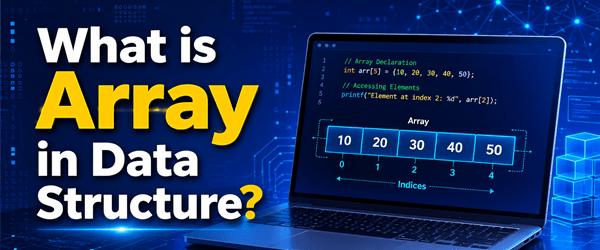
What is Array in Data Structure?
An array is a data structure for storing more than one data item of a similar data type. The items of an array are allocated at adjacent memory locations, and these locations are called the elements of the array. The total number of elements in an array is its length.
Each element is accessed by its position, and this reference is called the index or subscript.
Concept of Array
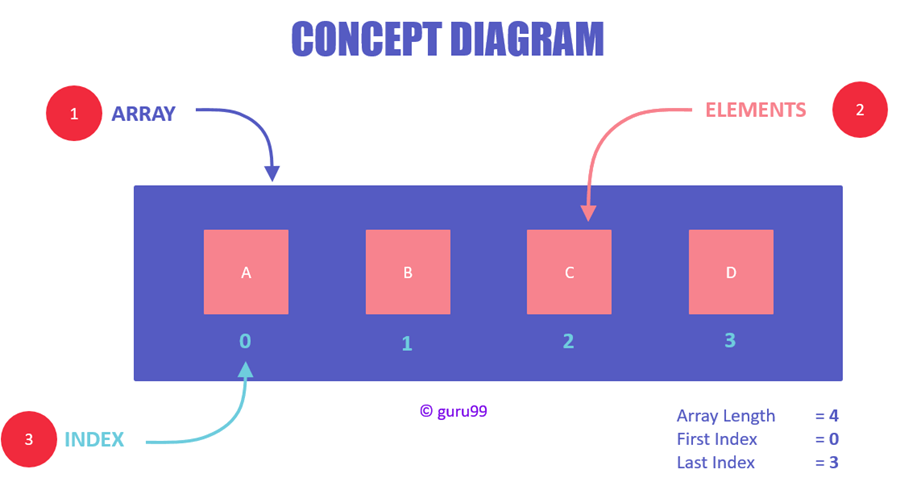
Concept Diagram of Arrays
The diagram above illustrates that:
- An array is a container of elements.
- Elements have a specific value and data type, such as “ABC”, TRUE, or FALSE.
- Each element has its own index, which is used to access it.
Note:
- Elements are stored at contiguous memory locations.
- An index is always less than the total number of array items.
- Any variable declared as an array can store multiple values.
- Almost all languages share the same concept of arrays but differ in how they declare and initialize them.
- Three parts remain common across all initializations: the array name, the elements, and the data type of the elements.
The following diagram shows the syntax for declaring an array in Python and C++, demonstrating that the concept stays the same even though syntax varies slightly between languages.

Understand Syntax of Arrays
- Array name: needed for easy reference to the collection of elements.
- Data type: needed for type checking and data integrity.
- Elements: the data values present in the array.
Why Do We Need Arrays?
- Arrays are ideal for storing multiple values in a single variable.
- They process many values easily and quickly.
- Sorting and searching values is easier with arrays.
Creating an Array in Python
In Python, arrays differ from lists: a list can hold items of different data types, whereas an array can only hold items of the same data type. Python has a separate module for handling arrays, called array, which you must import before using it.
Note: The array must contain real numbers such as integers and floats; strings are not allowed.
The following code creates an integer array in Python to store account balances:
import array
balance = array.array('i', [300, 200, 100])
print(balance)
Ways to Declare an Array in Python
You can declare an array in Python while initializing it using the following syntax:
arrayName = array.array(typecode, [array_items])
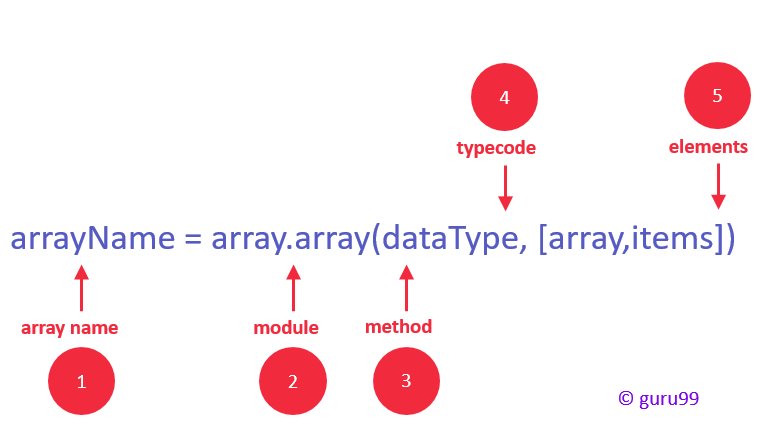
Syntax of Array in Python
- Identifier: specify a name as you usually do for variables.
- Module: Python has a special module called “array” that you must import first.
- Method: the array module has a method for initializing the array, taking two arguments — typecode and elements.
- Type code: specify the data type using the available typecodes (see the table below).
- Elements: specify the array elements within square brackets, for example [130, 450, 103].
The table below lists the typecodes available for supported data types.
| Type code | C Type | Python Type | Minimum size (bytes) |
|---|---|---|---|
| ‘b’ | signed char | int | 1 |
| ‘B’ | unsigned char | int | 1 |
| ‘u’ | Py_UNICODE | Unicode character | 2 |
| ‘h’ | signed short | int | 2 |
| ‘H’ | unsigned short | int | 2 |
| ‘i’ | signed int | int | 2 |
| ‘I’ | unsigned int | int | 2 |
| ‘l’ | signed long | int | 4 |
| ‘L’ | unsigned long | int | 4 |
| ‘f’ | float | float | 4 |
| ‘d’ | double | float | 8 |
How to Access a Specific Array Value?
You can access any array item using its index.
Syntax:
arrayName[indexNum]Example:
balance[1]
Access an Array Element
Here, we accessed the second value of the array using index 1. The output is 200, which is the second value of the balance array.
import array
balance = array.array('i', [300, 200, 100])
print(balance[1])
Output:
200Array Operations in Python
The Python array module provides separate functions for array operations. These are destructive methods, meaning the modification is saved in the array variable.
Insert
This operation inserts one or more items into an array at the beginning, end, or any given index. It expects two arguments: index and value.
arrayName.insert(index, value)Example: To insert a new value right after index 1 (the value 200), reference index 2 in the insert method.
import array
balance = array.array('i', [300, 200, 100])
balance.insert(2, 150)
print(balance)
Output:
array('i', [300, 200, 150, 100])Delete
This operation deletes one item from an array by value, accepting a single argument. After it runs, the items are re-arranged and indices are re-assigned.
arrayName.remove(value)Example:
import array
balance = array.array('i', [300, 200, 150, 100])
balance.remove(150)
print(balance)
Output:
array('i', [300, 200, 100])Search
This operation searches for an item by value and returns its index. It is a non-destructive method, so it does not change the array values.
arrayName.index(value)Example:
import array
balance = array.array('i', [300, 200, 150, 100])
print(balance.index(150))
Output:
2Update
Updating replaces the existing value at a given index using a simple assignment operator. (Python arrays do not have an update() method.)
arrayName[index] = valueExample: To replace 150 (at index 2) with 145:
import array
balance = array.array('i', [300, 200, 150, 100])
balance[2] = 145
print(balance)
Output:
array('i', [300, 200, 145, 100])Traverse
You can traverse a Python array using a loop:
import array
balance = array.array('i', [300, 200, 100])
for x in balance:
    print(x)
Output:
300
200
100
Creating an Array in C++
C++ is more flexible than Python when creating arrays. You can create C++ arrays in three ways. The following code creates an integer array in C++ to store account balances:
#include <iostream>
using namespace std;

int main()
{
  int balance[3] = { 300, 200, 100 };
  for (int i = 0; i < 3; i++)
    {
      cout << "value of i: " << balance[i] << endl;
    }
  return 0;
}
Ways to Declare an Array in C++
You can declare an array in three ways, depending on your program’s requirements.
Declaration by size:
dataType arrayName[arraySize]; // e.g. int balance[3];Declaration with array items only:
dataType arrayName[] = {array_items}; // e.g. int balance[] = { 300, 200, 100 };Declaration by size and items:
dataType arrayName[arraySize] = {array_items}; // e.g. int balance[3] = { 300, 200, 100 };How to Access a Specific Array Value in C++?

Accessing an Array Element
#include <iostream>
using namespace std;

int main()
{
  int balance[3] = { 300, 200, 100 };
  cout << balance[1];
  return 0;
}
Output:
200Array Operations in C++
Unlike Python, in C++ you must program the logic yourself for insert, delete, search, update, and traverse operations.
Insert
The insertion logic is: loop through the array items, shift them to a greater index, then add a new item at the given index. The example below has five items and inserts 150 right after the value 200.
#include <iostream>
#include <stdio.h>

main() {
   int pos = 2;
   int size = 4;
   int balance[] = {300, 200, 100, 50, 0};

   printf("BEFORE INSERT:\n");
   for(int i = 0; i < 5; i++) {
      printf("%d\n", balance[i]);
   }

   /* SHIFT ITEMS TO A GREATER INDEX */
   for(int i = size; i >= pos; i--) {
       balance[i+1] = balance[i];
   }

   /* INSERT VALUE AT THE DESIRED INDEX */
   balance[pos] = 150;

   printf("AFTER INSERT:\n");
   for(int i = 0; i < 6; i++) {
      printf("%d\n", balance[i]);
   }
}
Array Operations in Java
Let us create a program in Java that accepts the size and the values of the array elements from the user.
import java.util.Scanner;

public class AddElements {
    public static void main(String[] args) {
        Scanner sc = new Scanner(System.in);

        System.out.println("Enter the size of the array");
        int n = sc.nextInt();

        int arr[] = new int[n];

        System.out.println("Enter Elements in the array");
        for(int i = 0; i < n; i++) {
            arr[i] = sc.nextInt();
        }
        System.out.println("Elements in the array");
        for(int j = 0; j < n; j++) {
            System.out.print(arr[j] + " ");
        }
    }
}
Modify an Element in a Java Array
Update an element by its index.
import java.util.Scanner;

public class ModifyElement {
    public static void main(String[] args) {
        int arr[] = {1, 2, 3, 4, 5};
        int length = arr.length;
        Scanner sc = new Scanner(System.in);

        System.out.println("Array Elements Before modify");
        for(int i = 0; i < length; i++) {
            System.out.print(arr[i] + " ");
        }

        System.out.println("\nEnter the position to change");
        int pos = sc.nextInt();
        System.out.println("Enter the value");
        int val = sc.nextInt();

        arr[pos] = val;

        System.out.println("Array Elements After modify");
        for(int j = 0; j < length; j++) {
            System.out.print(arr[j] + " ");
        }
    }
}
Access Elements in a Java Array
Print all array elements by traversing the array.
public class AccessElements {
    public static void main(String[] args) {
        int arr[] = {1, 2, 3, 4, 5};
        int length = arr.length;

        System.out.println("Array Elements are:-");
        for(int i = 0; i < length; i++) {
            System.out.print(arr[i] + " ");
        }
    }
}
