
B Tree in Data Structure: Search, Insert, Delete
 Editorial Team
⚡ Smart Summary
B Tree in Data Structure is a self-balancing tree that keeps data sorted for fast search, insert, and delete operations on disk. It explains B-Tree rules, its history, and the search, insertion, and deletion algorithms with examples.
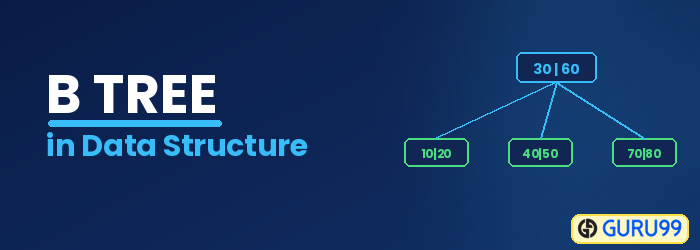
What is a B Tree?
B Tree is a self-balancing data structure based on a specific set of rules for searching, inserting, and deleting the data in a faster and memory-efficient way. In order to achieve this, the following rules are followed to create a B Tree.
A B-Tree is a special kind of tree in a data structure. In 1972, this method was first introduced by McCreight and Bayer, who named it Height Balanced m-way Search Tree. It helps you to preserve data sorted and allows various operations like insertion, searching, and deletion in less time.
Rules for B-Tree
Here are important rules for creating a B-Tree:
- All leaves will be created at the same level.
- A B-Tree is determined by a number of degree, which is also called “order” (specified by an external actor, like a programmer), referred to as
monwards. The value ofmdepends upon the block size on the disk on which data is primarily located. - The left subtree of the node will have lesser values than the right side of the subtree. This means that the nodes are also sorted in ascending order from left to right.
- The maximum number of keys a root node, as well as its child nodes, can contain is calculated by this formula:
m − 1. For example:m = 4 max keys: 4 − 1 = 3

- Every node, except the root, must contain a minimum number of keys of
[m/2] − 1. For example:m = 4 min keys: 4/2 − 1 = 1
- The maximum number of child nodes a node can have is equal to its degree, which is
m. - The minimum children a node can have is half of the order, which is m/2 (the ceiling value is taken).
- All the keys in a node are sorted in increasing order.
Why use B-Tree
Here are reasons for using a B-Tree:
- Reduces the number of reads made on the disk.
- B-Trees can be easily optimized to adjust their size (that is, the number of child nodes) according to the disk size.
- It is a specially designed technique for handling a bulky amount of data.
- It is a useful algorithm for databases and file systems.
- A good choice to opt for when it comes to reading and writing large blocks of data.
History of B Tree
- Data is stored on the disk in blocks. This data, when brought into main memory (or RAM), is called a data structure.
- In the case of huge data, searching for one record on the disk requires reading the entire disk; this increases time and main memory consumption due to high disk access frequency and data size.
- To overcome this, index tables are created that save the record reference of the records based on the blocks they reside in. This drastically reduces the time and memory consumption.
- Since we have huge data, we can create multi-level index tables.
- A multi-level index can be designed by using a B Tree for keeping the data sorted in a self-balancing fashion.
Search Operation
The search operation is the simplest operation on a B Tree. The following algorithm is applied:
- Let the key (the value) to be searched be “k”.
- Start searching from the root and recursively traverse down.
- If k is lesser than the root value, search the left subtree; if k is greater than the root value, search the right subtree.
- If the node has the found k, simply return the node.
- If the k is not found in the node, traverse down to the child with a greater key.
- If k is not found in the tree, we return NULL.
Insert Operation
Since a B Tree is a self-balancing tree, you cannot force insert a key into just any node. The following algorithm applies:
- Run the search operation and find the appropriate place of insertion.
- Insert the new key at the proper location, but if the node has a maximum number of keys already:
- The node, along with a newly inserted key, will split from the middle element.
- The middle element will become the parent for the other two child nodes.
- The nodes must re-arrange keys in ascending order.
💡 TIP: The following is not true about the insertion algorithm: “Since the node is full, therefore it will split, and then a new value will be inserted.” The key is inserted first, and only then does the node split if it exceeds the maximum keys.

In the above example:
- Search the appropriate position in the node for the key.
- Insert the key in the target node, and check for rules.
- After insertion, does the node have more than or equal to the minimum number of keys, which is 1? In this case, yes, it does. Check the next rule.
- After insertion, does the node have more than the maximum number of keys, which is 3? In this case, no, it does not. This means that the B Tree is not violating any rules, and the insertion is complete.

In the above example:
- The node has reached the max number of keys.
- The node will split, and the middle key will become the root node of the rest of the two nodes.
- In case of an even number of keys, the middle node will be selected by left bias or right bias.

In the above example:
- The node has less than max keys.
- 1 is inserted next to 3, but the ascending order rule is violated.
- In order to fix this, the keys are sorted.
Similarly, 13 and 2 can be inserted easily in the node as they fulfill the “less than max keys” rule for the nodes.

In the above example:
- The node has keys equal to max keys.
- The key is inserted into the target node, but it violates the rule of max keys.
- The target node is split, and the middle key by left bias is now the parent of the new child nodes.
- The new nodes are arranged in ascending order.
Similarly, based on the above rules and cases, the rest of the values can be inserted easily in the B Tree.

Delete Operation
The delete operation has more rules than the insert and search operations. The following algorithm applies:
- Run the search operation and find the target key in the nodes.
- Three conditions are applied based on the location of the target key, as explained in the following sections.
If the target key is in the leaf node
- Target is in the leaf node, more than min keys. Deleting this will not violate the property of the B Tree.
- Target is in the leaf node, and it has min key nodes. Deleting this will violate the property of the B Tree.
- The target node can borrow a key from the immediate left node or immediate right node (sibling).
- The sibling will say yes if it has more than the minimum number of keys.
- The key will be borrowed from the parent node, the max value will be transferred to the parent, the max value of the parent node will be transferred to the target node, and the target value is removed.
- Target is in the leaf node, but no siblings have more than the min number of keys: search for the key, merge with siblings and the minimum of parent nodes, total keys will now be more than min, and the target key will be replaced with the minimum of a parent node.
If the target key is in an internal node
- Either choose an in-order predecessor or in-order successor.
- In the case of an in-order predecessor, the maximum key from its left subtree will be selected.
- In the case of an in-order successor, the minimum key from its right subtree will be selected.
- If the target key’s in-order predecessor has more than the min keys, only then can it replace the target key with the max of the in-order predecessor.
- If the target key’s in-order predecessor does not have more than min keys, look for the in-order successor’s minimum key.
- If the target key’s in-order predecessor and successor both have less than min keys, then merge the predecessor and successor.
If the target key is in a root node
- Replace with the maximum element of the in-order predecessor subtree.
- If, after deletion, the target has less than min keys, then the target node will borrow the max value from its sibling via the sibling’s parent.
- The max value of the parent will be taken by the target, but with the nodes of the max value of the sibling.
Now, let’s understand the delete operation with an example.

The above diagram displays different cases of the delete operation in a B-Tree. This B-Tree is of order 5, which means that the minimum number of child nodes any node can have is 3, and the maximum number of child nodes any node can have is 5. Whereas the minimum and maximum number of keys any node can have are 2 and 4, respectively.

In the above example:
- The target node has the target key to delete.
- The target node has keys more than minimum keys.
- Simply delete the key.

In the above example:
- The target node has keys equal to minimum keys, so we cannot delete it directly as it will violate the conditions.
Now, the following diagram explains how to delete this key:

- The target node will borrow a key from an immediate sibling, in this case, the in-order predecessor (left sibling), because it does not have any in-order successor (right sibling).
- The maximum value of the in-order predecessor will be transferred to the parent, and the parent will transfer the maximum value to the target node (see the diagram below).
The following example illustrates how to delete a key that needs a value from its in-order successor.

- The target node will borrow a key from an immediate sibling, in this case, the in-order successor (right sibling), because its in-order predecessor (left sibling) has keys equal to minimum keys.
- The minimum value of the in-order successor will be transferred to the parent, and the parent will transfer the maximum value to the target node.
In the example below, the target node does not have any sibling that can give its key to the target node. Therefore, merging is required. See the procedure of deleting such a key:
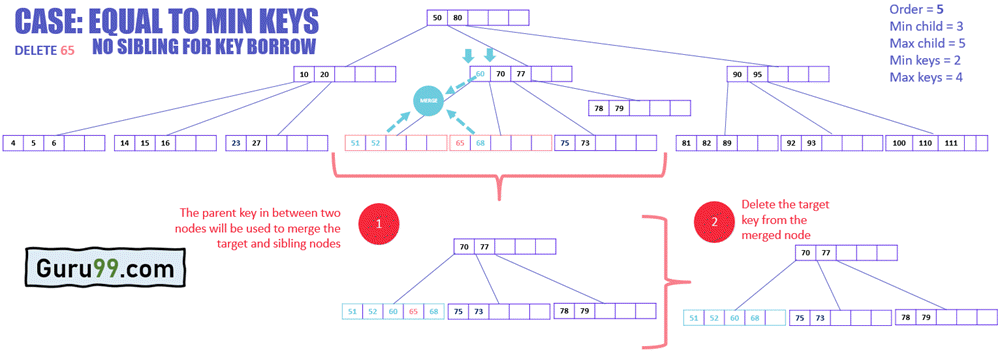
- Merge the target node with any of its immediate siblings along with the parent key.
- The key from the parent node is selected that sits in between the two merging nodes.
- Delete the target key from the merged node.
Delete Operation Pseudo Code
private int removeBiggestElement()
{
    if (root has no child)
        remove and return the last element
    else {
        answer = subset[childCount-1].removeBiggestElement()
        if (subset[childCount-1].dataCount < MINIMUM)
            fixShort (childCount-1)
        return answer
    }
}
Output: The biggest element is deleted from the B-Tree.
