
AngularJS ng-view with Example
 Editorial Team
⚡ Smart Summary
Views in AngularJS let one page swap its content instead of navigating away, which is what makes a single page application feel instant. The ng-view directive marks the region that each route replaces with its own template and controller.
Well-known sites such as Gmail use the concept of Single Page Applications. When a user requests a different page, the application does not navigate away; it displays the view of the new page inside the existing page, so it feels as though the user never left. The same is achieved in AngularJS using views together with routes.
⚠️ Support notice: AngularJS reached end of life on 31 December 2021 and receives no further patches or security fixes. The directive below remains accurate for maintaining existing AngularJS 1.x applications; in modern Angular the equivalent is <router-outlet>.
What is a View?
A view is the content shown to the user. Whatever the user wants to see, the matching view of the application is displayed.
Combining views and routes divides an application into logical views and binds each to a controller, which makes the application more manageable.
Assume an ordering application in which a customer can view orders and place new ones. The diagram below shows how it becomes a single page application.
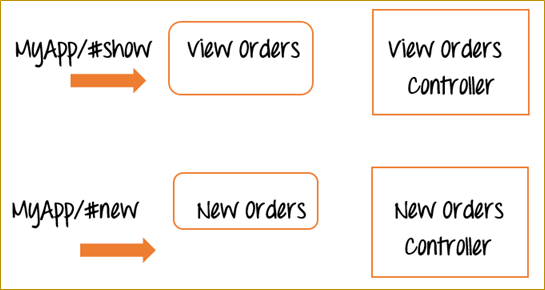
Instead of two separate web pages, one for “View Orders” and one for “New Orders”, AngularJS uses two views on the same page, reached through two reference links, #show and #new:
- Navigating to
MyApp/#showdisplays the View Orders view without leaving the page. Only that section of the existing page refreshes. - Navigating to
MyApp/#newdoes the same for the New Orders view.
Separating an application into views this way keeps it manageable and easy to change, and each view has a corresponding controller holding the business logic for that function.
ng-view Directive in AngularJS
The ngView directive complements the $route service by including the rendered template of the current route into the main layout file, normally index.html.
Each time the current route changes, the included view changes with it according to the $route configuration, without the page itself reloading. Routes are covered separately; here the focus is adding multiple views.
The flowchart below shows the whole process, which the example then walks through step by step.

How to Implement ng-view in AngularJS
This example presents two options to the user: display an event, and add an event. Clicking Add an Event shows the Add Event view, and the same applies to Display Event.
Step 1) Include the angular-route file as a script reference. This file is required to use multiple routes and views, and is available from the AngularJS site.

Step 2) Add the href tags and the div tag.
- Add href tags linking to “Add New Event” and “Display Event”.
- Add a div carrying the
ng-viewdirective to mark the view region. The matching view is injected there whenever either link is clicked.

Step 3) In the AngularJS script tag, add the routing configuration.
- When the user clicks the NewEvent link, AngularJS loads
add_event.html, injects its markup into the view, and usesAddEventControllerfor the business logic. - When the user clicks the DisplayEvent link, it loads
show_event.htmland usesShowDisplayController. - The
otherwiseclause sets the default view shown to the user, which here is DisplayEvent.

Step 4) Add controllers to process the business logic for both functions. Each simply sets a message on its scope object, displayed when the matching view is shown.

<!DOCTYPE html>
<html>
<head>
    <meta charset="UTF-8">
    <title>Event Registration</title>
    <script src="https://code.angularjs.org/1.8.3/angular.min.js"></script>
    <script src="https://code.angularjs.org/1.8.3/angular-route.js"></script>
</head>
<body ng-app="sampleApp">

<h1>Guru99 Global Event</h1>

<div class="container">
    <ul>
        <li><a href="#!/NewEvent">Add New Event</a></li>
        <li><a href="#!/DisplayEvent">Display Event</a></li>
    </ul>
    <div ng-view></div>
</div>

<script>
    var app = angular.module('sampleApp', ["ngRoute"]);

    app.config(function($routeProvider) {
        $routeProvider
            .when("/NewEvent", {
                templateUrl: "add_event.html",
                controller: "AddEventController"
            })
            .when("/DisplayEvent", {
                templateUrl: "show_event.html",
                controller: "ShowDisplayController"
            })
            .otherwise({
                redirectTo: '/DisplayEvent'
            });
    });

    app.controller("AddEventController", function($scope) {
        $scope.message = "This is to Add a new Event";
    });

    app.controller("ShowDisplayController", function($scope) {
        $scope.message = "This is to display an Event";
    });
</script>

</body>
</html>
⚠️ Three corrections to the original listing. First, the links read #!NewEvent without a slash while the routes are declared as /NewEvent, so nothing matched. From AngularJS 1.6 the default hash prefix is !, which makes the correct address #!/NewEvent — a slash after the exclamation mark. Second, ShowDisplayController set the message to “This is display an Event”, missing the word to that the surrounding text quotes. Third, lib/bootstrap.js was loaded from a relative path that resolves nowhere and is never used, so it has been removed.
Step 5) Create the pages add_event.html and show_event.html. Each holds a header and an expression that displays the message injected by its controller.
- add_event.html
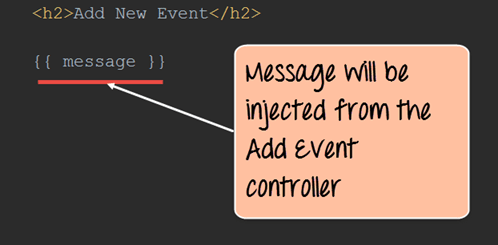
<h2>Add New Event</h2>

{{message}}
- show_event.html

<h2>Show Event</h2>

{{message}}
If the code is executed successfully, the following output is shown in the browser.
Output:


Common ng-view Errors and How to Fix Them
Almost every ng-view failure comes from the module wiring, the address format, or the way the page is being served rather than from the directive itself.
- The view region stays empty: the
ngRoutemodule was not listed as a dependency, orangular-route.jswas not loaded. Both are required, and the script must come afterangular.min.js. - Links change the address but nothing renders: the href does not match the route. From AngularJS 1.6 the address needs
#!/Route; older code written for 1.5 used#/Route. - Templates fail to load with a CORS error: the page was opened directly from disk. Serve it over HTTP, because
templateUrlis fetched by an AJAX request the file protocol blocks. - Only the last view ever appears: more than one element carries ng-view. AngularJS honours a single view region per page.
- Nothing shows on first load: no
otherwiseclause is configured, so an empty address matches no route.
