
What is $scope in AngularJS? Tutorial with Example
 Editorial Team
⚡ Smart Summary
$Scope in AngularJS is the built-in object that binds a controller to its view. This page explains scope creation, behavior functions, parent and child hierarchy, the difference from $rootScope, and how digest cycles refresh bindings.
What is $scope in AngularJS?
$scope in AngularJS is a built-in object which basically binds the “controller” and the “view”. One can define member variables in the scope within the controller which can then be accessed by the view.
Every controller in an AngularJS application receives its own $scope instance through dependency injection. Whatever you attach to that object becomes visible to the template the controller governs, so $scope behaves as the shared data model that sits between your JavaScript logic and your HTML markup.
Consider example below:

angular.module('app',[]).controller('HelloWorldCtrl',
	function($scope)
	{
		$scope.message = "Hello World"
	});
Code Explanation:
- The name of the module is “app”
- The name of the controller is “HelloWorldCtrl”
- Scope object is the main object which is used to pass information from the controller to the view.
- Member variable added to scope object
⚠️ Syntax warning: The .controller() method takes two arguments, the controller name and the factory function, so a comma is required between 'HelloWorldCtrl' and function($scope). Leaving the comma out throws an Uncaught SyntaxError before AngularJS ever bootstraps.
A single controller and a single view are only half the picture. Real applications nest controllers, repeat lists and reuse widgets, which means several scopes exist at once.
How Scope Hierarchy and Inheritance Work in AngularJS
Every AngularJS application has exactly one root scope and may have any number of child scopes. Directives create those child scopes and attach them to the DOM element they decorate, so the scope tree mirrors the structure of the rendered page.
When AngularJS evaluates an expression such as {{siteName}}, it first looks for that property on the scope attached to the element. If the property is missing, the lookup moves to the parent scope, and keeps climbing until it reaches the root scope. JavaScript developers know this behaviour as prototypal inheritance, and child scopes inherit from their parents in exactly that way.
The example below nests one controller inside another so you can watch inheritance happen.
<div ng-app="scopeDemo">
    <div ng-controller="ParentCtrl">
        Parent scope value: {{siteName}}
        <div ng-controller="ChildCtrl">
            Child reads parent value: {{siteName}}
            Child own value: {{lesson}}
        </div>
    </div>
</div>

<script type="text/javascript">
    var app = angular.module("scopeDemo", []);

    app.controller("ParentCtrl", function($scope) {
        $scope.siteName = "Guru99";
    });

    app.controller("ChildCtrl", function($scope) {
        $scope.lesson = "AngularJS Scope";
    });
</script>
Code Explanation:
ParentCtrldefinessiteNameon its own scope.ChildCtrlnever definessiteName, yet the inner div still prints Guru99 because the lookup walks up to the parent scope.lessonlives only on the child scope, so the parent div cannot read it.
Which directives create a new scope?
- ng-controller: creates a child scope for the element it is placed on.
- ng-repeat: creates one child scope per iteration, which is why each row can hold different values for the same expression.
- Custom directives: may request a child scope, or an isolate scope that deliberately does not inherit from its parent.
- Component directives: anything registered with the
.component()helper always receives an isolate scope.
Because child scopes read upward, developers often wonder where the top of that chain sits. That top level object is called $rootScope.
$scope vs $rootScope: What is the Difference?
The AngularJS $rootScope is the scope for the entire application. An application can only have one $rootScope and it is used like a global variable. Every $scope is a child scope, and $rootScope is the parent at the top of the tree. The table below compares the two objects.
| Aspect | $scope | $rootScope |
|---|---|---|
| Instances per application | Many, one per controller or scope-creating directive | Exactly one |
| Created by | Directives such as ng-controller and ng-repeat | The injector during application bootstrap |
| Visibility | Its own element and all descendants | Every scope in the application |
| Typical use | Data and behavior for one view or one list row | Application wide values, such as a logged in user |
| Main risk | Values become unreachable outside the branch | Name collisions and hidden coupling, like global variables |
Use $rootScope sparingly. Anything placed there lives for the whole application and is readable everywhere, so a shared service is usually a safer home for global state. The official $rootScope reference lists the full API.
Knowing where data lives is one half of the job. The other half is teaching the scope how to respond when the user does something.
Setting up or adding Behavior in AngularJS
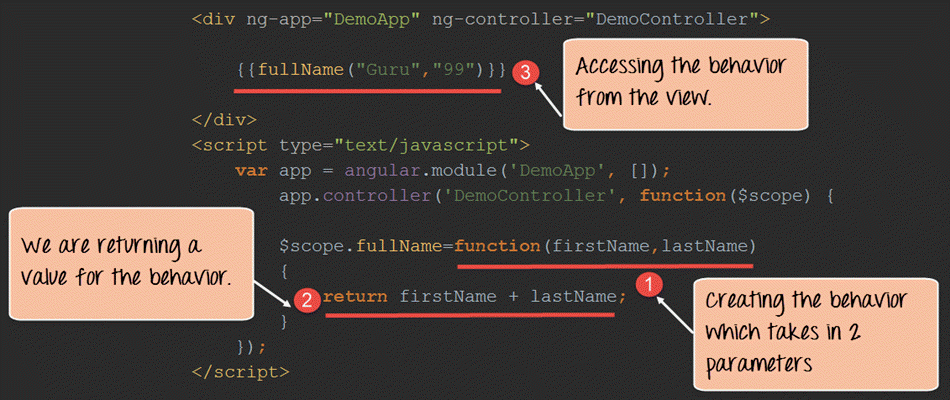
In order to react to events or execute some sort of computation/processing in the View, we must provide behavior to the scope.
Behaviors are added to scope objects to respond to specific events that may be triggered by the View. Once the behavior is defined in the controller, it can be accessed by the view.
Let’s look at an example of how we can achieve this.
<!DOCTYPE html>
<html lang="en">
<head>
    <meta chrset="UTF 8">
    <title>Guru99</title>
</head>
<body ng-app="DemoApp">
<h1> Guru99 Global Event</h1>
<script src="https://code.angularjs.org/1.6.9/angular.js"></script>
<div ng-controller="DemoController">
	{{fullName("Guru","99")}}
</div>
<script type="text/javascript">
	var app = angular.module("DemoApp", []);
	app.controller("DemoController", function($scope) {

    $scope.fullName=function(firstName,lastname){
		return firstName + lastname;
		}
	} );
</script>

</body>
</html>
Code Explanation:
- We are creating a behavior called “fullName”. This behavior is a function which accepts 2 parameters (firstName,lastname).
- The behavior then returns the concatenation of these 2 parameters.
- In the view we are calling the behavior and passing in 2 values of “Guru” and “99” which gets passed as parameters to the behavior.
If the command is executed successfully, the following Output will be shown when you run your code in the browser.
Output:
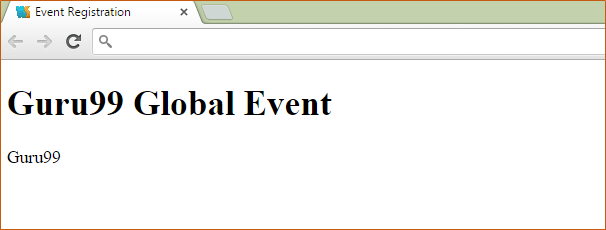
In the browser you will see a concatenation of both the values of Guru & 99 which were passed to the behavior in the controller.
Bindings like the one above refresh on their own, and the machinery that makes that happen is worth understanding before an application grows large.
Why Scope Watchers and the Digest Cycle Matter
AngularJS keeps the view in step with the scope through dirty checking rather than through change events. Three scope APIs drive that process:
- $watch: registers a listener for an expression. Interpolations such as
{{fullName}}register watchers for you during template linking. - $apply: enters the AngularJS execution context, evaluates your code and then triggers a digest. It is needed only inside custom event callbacks or third party library callbacks, because built in directives call it already.
- $digest: walks every watcher on $rootScope and its children, comparing the current value with the previous one, and repeats until the model stops changing.
Because a digest can run several passes, watch expressions must stay cheap. Avoid DOM access inside them, since reading the DOM is orders of magnitude slower than reading a JavaScript property.
Watch depth also affects cost. Watching by reference is the fastest and only notices when the whole value is replaced. $watchCollection notices items added, removed or reordered inside an array or object. Watching by value traverses a nested structure on every digest and is the most expensive option, so reach for it last.
