
What is ALM? Full Form, Process of Application Lifecycle Management
 Editorial Team
⚡ Smart Summary
ALM, or Application Lifecycle Management, governs a software application from initial specification through design, development, testing, deployment, and long-term user experience. Governance, development, and operations form its three elements, and seven defined stages carry an idea into a maintained product.
What is ALM?
ALM is a process of specification, design, development, and testing of a software application. It covers the entire lifecycle from the idea of the application through to development, testing, deployment, support, and ultimately the user experience phase. The full form of ALM is Application Lifecycle Management.
Depending on the software development methodology (for example, waterfall, agile, or DevOps), ALM might be split into various phases. The ALM process is mainly broken down into three elements: governance, development, and operations.
ALM Process
Here are the key areas of ALM:
Governance
It includes requirements management, resource management, data security, user access, review, audit, deployment control, and rollback.
Benefits of governance:
- Aligned business strategy
- Developing a business case
- Offers continuous monitoring
- Funding projects which deliver the highest value
- Clear accountability and control
Application development
It includes identifying current problems, planning, design, building, testing, and deploying the application. This area covers the traditional developer and app maker roles.
Application operation
This area includes deployment of the app and maintenance of the technology stack. In the waterfall software development method, operation is a separate stage from development. A DevOps team brings operations and development together into a fully integrated, continuous process.
Why ALM is important?
The following are the main reasons for using ALM:
- You gain good visibility into project status.
- Teams are able to communicate effectively.
- Requirements are easy to define and track.
- The software is tested adequately.
- The cost of maintaining and operating the solution remains limited.
ALM vs SDLC: How They Differ
ALM and the Software Development Life Cycle are frequently treated as synonyms, which causes confusion when teams try to adopt one. SDLC sits inside ALM rather than alongside it.
| Aspect | SDLC | ALM |
|---|---|---|
| Scope | Building the software | The whole product life, from idea to retirement |
| Starts at | Requirements for a build | The initial business case |
| Ends at | Deployment of that release | Decommissioning of the application |
| Covers governance | No | Yes — funding, access, audit, compliance |
| Number of cycles | One per release | Many SDLC cycles across one application life |
An application typically passes through many SDLC iterations while remaining inside a single ALM lifecycle. Understanding that nesting explains why the stages below extend well past the point where code ships.
Stages of ALM (Application Lifecycle Management)
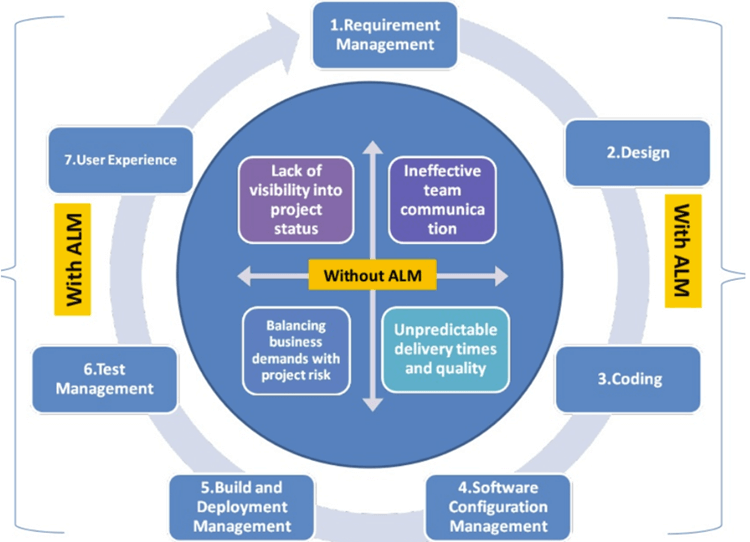
Here are the different stages of ALM:
1) Requirement management
Requirement management is the first ALM stage. It helps you document, analyse, track, prioritize, and agree on requirements. It is a continuous process that runs throughout the project life cycle. Also see our list of the best requirements management software.
2) Design
Design management is a process that helps enhance customer satisfaction and loyalty by improving usability. It also shapes the interaction between the customer and the product.
3) Build Management
Build management, also known as code management, is the process of converting source code files into a standalone software component. In this stage, an application idea transforms into an actual application.
During this stage the application is built, tested, and deployed, and the tester begins preparing test cases and writing test scripts for the testing phase.
4) SCM
Software Configuration Management (SCM) is the ALM stage where the development team systematically organizes, manages, and controls changes to documents, code, and other entities during the application development life cycle.
5) Operations and Maintenance
In this phase, monitoring, management, and ongoing development of the application begin. In DevOps, this phase covers “release”, “config”, and “monitor”.
In this stage you find and resolve bugs. The phase helps you plan and prioritize the next updates to the product.
6) Test management
In the testing phase, testers verify that the application complies with the requirements defined in the initial steps of the process.
They also ensure the application meets user expectations and the needs of all other stakeholders who will support it throughout its lifecycle, even where those expectations were not properly captured during the requirements phase.
7) User experience
Maintenance, or user experience, is traditionally the longest stage of ALM, yet it is also the stage where participation from the testing and development teams is usually lowest.
Once the application is developed, the role of the users comes into play. They exercise the entire application and share their experience through feedback, and the final application is delivered.
Advantages of ALM
Here are the benefits of using ALM:
- ALM helps you control the system by organizing and tracking work.
- Defects can be shared across projects, which reduces duplicated risk.
- ALM offers integration with other testing tools.
- It provides a clear direction for an app before it is built.
- Without ALM, it is hard for a software development team to produce software at the speed and agility needed to stay competitive.
- ALM delivers software efficiently with minimum overhead on the team.
ALM Tools
Here are some important ALM tools:
1) Kovair ALM Studio
Kovair is one of the most comprehensive Application Lifecycle Management products. It can handle end-to-end development lifecycle stages from requirements to release.

Features:
- Adopt a fully web-based solution with no client-side software, reducing the support burden
- Practise any development methodology: waterfall, agile, or hybrid
- Implement a configurable task-based workflow engine for increased efficiency and productivity
- Get real-time notifications at every actionable stage
- Provide complete coverage of every development step, enabling compliance with standards
- Allow real-time viewing of artifact status, which increases transparency and release predictability
Link: https://www.kovair.com/alm-studio/
2) OpenText Application Quality Management (formerly Micro Focus ALM)
This tool supports lean, agile, and DevOps delivery, helping organizations release software faster. It allows teams of all sizes to deliver high-quality apps with greater speed. The product has changed hands several times: it was originally developed by Mercury, acquired by HP, transferred to Micro Focus, and since OpenText acquired Micro Focus in January 2023 it has been sold as OpenText Application Quality Management.

Features:
- Delivers apps with speed, quality, and scale
- Allows stakeholders to interact and coordinate to achieve project goals
- Provides robust tracking and reporting, and seamless integration of project-related tasks
- Allows detailed project analysis and effective management
- Connects to email systems and notifies team members about changes
Link: https://www.opentext.com/products/application-quality-management
3) Digital.ai Agility (formerly VersionOne)
Agility simplifies product planning with easy backlog management. It is built for DevOps and provides end-to-end continuous delivery through a drag-and-drop interface. The product was launched as VersionOne, moved to CollabNet, and now ships as Digital.ai Agility.

Features:
- Allows users to prioritize stories and defects using drag and drop
- Manage business initiatives with portfolio items
- Allows items to be grouped by theme
- Provides results according to business goals
- Captures all feature requests in one place
- Helps ensure alignment between corporate objectives and product deliverables
- Provides insights and end-to-end visibility to the project manager
Link: https://digital.ai/products/agility/
Tool choice matters less than how the process is used day to day, which the two scenarios below illustrate.
Use case scenario of ALM from a Developer perspective
- The developer starts work and checks the task list assigned to them.
- They review tasks by priority and pick one up.
- They change the status of the task to In Progress.
- They check out code from the source code repository.
- They implement a unit test with the testing framework.
- They execute the test with the standard build script. Code inspection reports illegal naming conventions or potential bugs.
- They fix the code and re-run the test.
- Once the coverage rate meets the target, they commit the code with the task ID.
- They then check out the code and run the build script.
- The code is compiled and deployed to the staging machine.
- The test case runs. If it breaks, a notification is sent automatically to the developer and project manager.
- The developer rolls back the code in the source repository and on the staging machine.
- If the test passes, code inspection and coverage analysis are invoked. Any problem is reported; otherwise the developer is notified that all implementations completed successfully.
- They record their work history in the task management system.
- The project manager is notified that the task is resolved and reviews the result.
Use case scenario of ALM from a Project leader perspective
- The project leader opens a web browser and goes to the ALM dashboard page.
- Each project has its own dashboard page.
- It displays the number of open tasks, the number of pending tasks, and all critical tasks that are open.
- The dashboard notifies the project leader of potential risks and shows overall project health.
- Every commit and change is reported automatically.
- The ALM process therefore removes the need for a meeting or phone call to check the continuous integration status of critical tasks.
