
SAP Transport Request: How to Import & Export TR
 Editorial Team
⚡ Smart Summary
SAP Transport Request packages every change made in the development system into a portable container that moves to QA and production. The standard flow is Create → Release (Export) → Import → Verify logs and return codes through STMS and SE01.
What is a Transport Request?
A Transport Request (TR) — also called a Change Request — is a container or collection of changes made in the SAP development system. It records the type of change, the purpose of the transport, the request category, and the target system to which the change will be promoted.
Each TR contains one or more change jobs called Tasks — the smallest unit of transportable change. A TR can be released only after every task inside it has been completed, released, or deleted. Think of a TR as a folder and the tasks as the files inside it.
A Task is itself a list of objects modified by a single user. Each task is assigned to exactly one user, but a single TR can contain tasks belonging to many users. Tasks cannot be transported on their own — they always move as part of a TR.



Transport Request naming convention
Transport Requests use a fixed pattern that administrators cannot edit:
<SID>K<Number>- SID — System ID (for example,
DEV). - K — fixed keyword/letter.
- Number — a sequence starting at 900001.
Example: DEVK900030. Tasks inside that TR follow the same convention, numbered consecutively: DEVK900031, DEVK900032, and so on.

Who owns a Transport Request?
- The project manager or designated lead creates the TR and assigns each project member a task within it.
- The TR owner controls every change recorded in the TR — only the owner can release the TR itself.
- Each assigned project member can release their own task once their portion of work is complete.

Types of Transport Request
Workbench Request — contains repository objects and cross-client customising objects. These TRs carry changes to ABAP Workbench objects such as programs, function modules, dictionary objects, and screens.
Customizing Request — contains client-specific customising objects. These TRs are recorded automatically when users perform customising settings, and a target system is assigned automatically based on the transport layer (if one is defined).
SE01 — Transport Organizer (Extended View)

Create a Change Request
A change request can be created two ways:
- Automatic — when a user creates or modifies an object, or performs customising settings, SAP displays a dialog asking the user either to create a new request or to attach the change to an existing request.
- Manual — open the Transport Organizer (SE01 or SE09), create the request with the required attributes, and insert the objects to be transported.

Release the Transport Request (export process)
- Position the cursor on the TR name (or a Task name) in SE01 and click the Release icon (the truck icon).
- SAP automatically adds a record of the released TR to the import queues of every target system defined in TMS.
- Releasing and importing the request automatically generates export and import logs that the Basis team can inspect later.

The Import Process
Importing a TR moves the change into the target system (typically QAS, then PRD).
- Releasing a TR does not automatically promote it to QA or production — an explicit import step is required.
- When export finishes, SAP writes the corresponding Cofiles and Data files into the common transport directory at the OS level, and adds an entry to the Import Buffer (OS view) / Import Queue (SAP application view) of the target systems.
- To import, open transaction STMS → Import button, or pick Overview → Imports.
- STMS lists every system in the current transport domain, with the number of requests waiting in each Import Queue and their status.
Import Queue — the list of TRs available in the common directory and ready to be imported into the target system. The SAP application calls it the Import Queue; at the OS level it is called the Import Buffer.

The Import Status
The Import Queue shows standard status icons in the last column. The icons cover states such as “ready to be imported”, “imported with warnings”, “imported successfully”, and “error during import”.

If a request is not added to the Import Queue automatically — even though the Cofile and Data file are present on the OS — you can add it manually if you know the TR name. The path is STMS → Import Queue → Extras → Other Requests → Add.

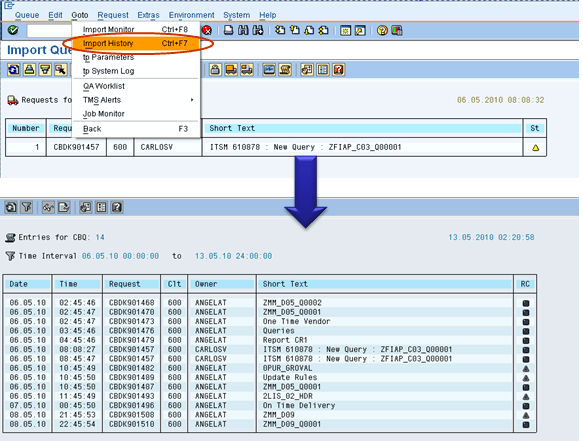
Import History
You can review every previous import on a system via STMS → Import Overview → Import History. The history shows when each TR was imported, by whom, and with what return code — useful for audit and incident investigation.
Transport Logs and Return Codes
After a transport runs, the Basis administrator should confirm that everything moved correctly. SAP exposes two log types under SE01 → GOTO → Transport Logs:
- Action Log — lists the actions that ran: export, test import, import, distribution, and so on.
- Transport Logs — record the contents of each transport log file produced during a step.
The most important piece of information in the logs is the return code:
| Return code | Meaning |
|---|---|
| 0 | The export or import was successful. |
| 4 | Warnings were issued but every object transported successfully. |
| 8 | Warnings were issued and at least one object failed to transport. |
| 12 or higher | A critical error occurred — usually outside the request itself (system-level issue, missing role, network glitch). |
Key SAP Transport T-codes
The table below summarises every transaction code you are likely to use while working with Transport Requests.
| T-code | Purpose |
|---|---|
| SE01 | Transport Organizer — extended view with full search and release functions. |
| SE09 | Transport Organizer — user-centric view of “your” requests and tasks. |
| SE10 | Transport Organizer — overview by user, status, or date range. |
| STMS | Transport Management System — overview, import, distribution. |
| STMS_IMPORT | Direct access to the Import Queue of a system. |
| SE03 | Transport Organizer Tools — system change options, deletes, repairs. |
Best Practices for Working with Transport Requests
The habits below keep TR pipelines clean and auditable:
- One TR per logical change: bundle related objects together but avoid mixing unrelated functional areas.
- Descriptive request text: use the short text to record the ticket number, business reason, and target system.
- Release tasks before releasing the TR: the TR can only be released after every task inside it is released or deleted.
- Test in QAS before PRD: always import to QAS, validate, and only then import to PRD.
- Inspect return codes: treat any return code higher than 4 as a defect to investigate before moving on.
- Keep the import sequence: import TRs in the order they were released to avoid sequence-dependent errors.
