SAP Wage Types Tutorial: Primary, Secondary, Dialog, Time
 Editorial Team
⚡ Smart Summary
SAP Wage Types store payment data such as allowances and deductions in payroll. They fall into two prime categories: primary (master) wage types, which include dialog and time wage types, and secondary (technical) wage types generated during the payroll run.
What are Wage Types in SAP?
Payment data (allowances or deductions) is stored using Wage Types. Wage types are the building blocks of SAP payroll, holding every amount that is paid to or deducted from an employee.
There are two prime categories of Wage Types in SAP:
- Primary / Master Wage Types
- Secondary / Technical Wage Types
Primary Wage Types
Primary (or Master) Wage Types are further divided into two kinds: Dialog Wage Types and Time Wage Types.
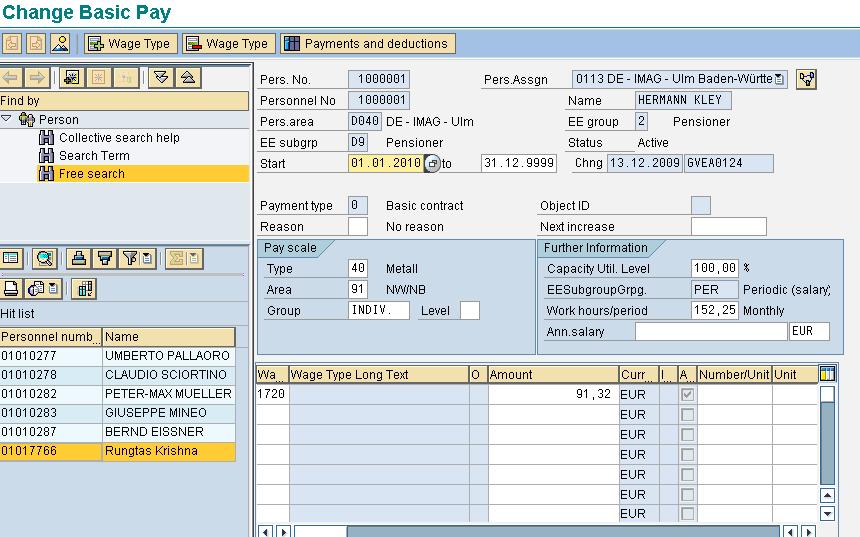
Dialog Wage Types
These are Wage Types that you can enter online while maintaining Master Data in your SAP system. For example: Basic Pay (IT0008), Additional Payments (IT0015), and Recurring Payments/Deductions (IT0014).
Time Wage Types
Time Wage Types are created by the system once time evaluation is completed. They cannot be maintained online and are system generated. For example: Paid Leave 75%.

Secondary Wage Types
Secondary Wage Types are system generated and cannot be maintained online. They are created during the Payroll run. Secondary Wage Types are also used as a container to accumulate several other Wage Types or to store wage type information on a temporary basis. The technical names of the secondary Wage Types begin with “/”. For example: /559 Bank Transfer.

Primary vs. Secondary Wage Types
The table below summarizes the key differences between primary and secondary wage types:
| Aspect | Primary Wage Types | Secondary Wage Types |
|---|---|---|
| Also called | Master wage types | Technical wage types |
| Created by | Entered by the user (dialog) or generated after time evaluation | Generated by the system during the payroll run |
| Maintained online | Dialog: yes; Time: no | No |
| Technical name | Numeric or customer-defined | Begins with “/” |
| Example | Basic Pay (0008), Paid Leave 75% | /559 Bank Transfer |