
Bank Transfer using SAP DME File
 Editorial Team
⚡ Smart Summary
Bank Transfer using SAP DME (Data Medium Exchange) converts executed payroll results into bank-compliant payment files. This process transfers employee salaries directly to their bank accounts through two sequential programs: the Preliminary DME program and the DME file creation program.
After Payroll is executed, the SAP DME process transfers payment amounts to each employee’s bank account. To execute a bank transfer, you need to complete two steps: run the Preliminary DME program and then create the DME file.
What is SAP DME (Data Medium Exchange)?
SAP DME stands for Data Medium Exchange. It is a standard SAP process that converts finalized payroll results into an electronic payment file that banks can read and process. Instead of preparing manual payment instructions for each employee, the DME process automatically formats salary, deduction, and net-pay data according to the paying bank’s technical requirements.
The DME process sits at the final stage of the payroll cycle. Once a payroll run is completed and the results are stored, DME reads the relevant infotypes and payroll tables to build a structured file. This file contains the employee bank details, the payment amounts, and the company’s house bank information.
DME is used across countries, and each country uses its own version identified by the Molga (country) code. This country-specific design ensures that the generated file always complies with local banking formats and regulations, making salary disbursement faster, more accurate, and fully automated.
How to do Bank Transfer using SAP DME
Step 1) Run the Preliminary DME Program.
Transaction: PC00_MXX_CDTA , XX = Country Molga
Overview:
- This program prepares the payroll results for the DME (Data Medium Exchange) process.
- It uses information from the HR Master Data (infotype 0001, 0002, 0006, 0009) and information from the payroll results (payroll program tables WPBP and BT).
- It creates a file that contains data which complies with bank regulations.
- If the values are inaccurate, you will need to correct the errors and re-run the preliminary DME program.
- If the values are accurate, you will use the file as input for creating the bank transfer txt files.
Program Input Screen
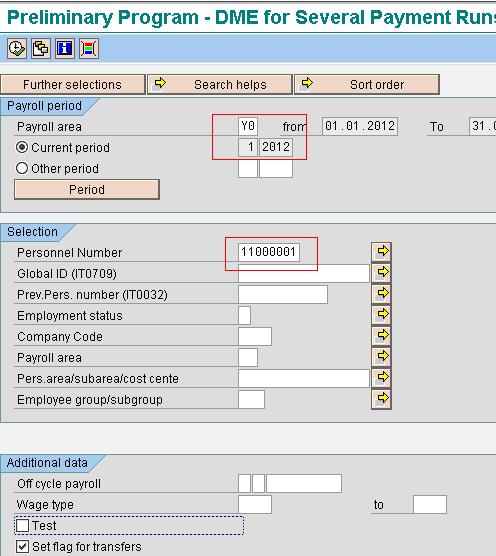
Enter the Payroll area and Personnel Number. The rest of the Selection Criteria can be kept as default. Click Execute.
Output

Note down the Program Run Date and Identification Feature.
Step 2) Create the DME file.
Transaction: PC00_MXX_FFOT , XX = Molga
Overview:
- This program uses the successful file created by the preliminary DME program.
- It produces a Payment Summary, a DME Accompanying Sheet, and a DME File (per company code) for each paying bank.
- The DME File may need to be uploaded into designated software that enables a bank transfer between your company and your paying bank.
Program Input Screen

Enter the Program run date and Identification feature obtained from the pre-DME program, Paying Company Code, Payment method, House bank, Account ID, and Currency. Execute.
Output:

Double click on the spool number.

Select a line item and click on it.

Review the output.
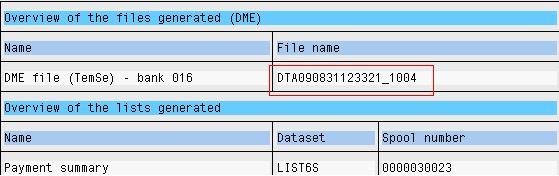
Go back to the Output overview screen and double click on the TEMSE file.

Review the Output. The generated DME file is now ready to be handed over to the paying bank for salary disbursement.
Benefits of Using SAP DME for Bank Transfer
Using SAP DME for bank transfers offers several advantages for payroll and finance teams:
- Automation: DME removes manual payment preparation by generating a ready-to-use bank file directly from payroll results.
- Accuracy: Payment data is pulled straight from validated payroll tables, reducing the risk of transposition or data-entry errors.
- Compliance: Country-specific DME formats ensure every file meets the paying bank’s technical and regulatory requirements.
- Efficiency: A single program run can process an entire payroll area, transferring hundreds or thousands of salaries at once.
- Traceability: Each run produces a payment summary and DME accompanying sheet, giving a clear audit trail for finance and reconciliation.
By standardizing the way payment files are created, DME helps organizations pay employees on time while keeping the process auditable and secure. It also integrates cleanly with the broader SAP HR and FI modules, so bank details, company codes, and house bank data stay consistent across the system.
