
Types of Computer Network: PAN, LAN, MAN, WAN
 Bryce Leo
⚡ Smart Summary
Types of Computer Network describe how interconnected systems are classified by size and purpose, from a single person’s devices to networks spanning the globe. This tutorial explains PAN, LAN, MAN, and WAN, plus other network types, with characteristics, advantages, and disadvantages of each.
What is a Computer Network?
A Computer Network is a group of two or more interconnected computer systems that use common connection protocols to share resources and files. You can establish a computer network connection using either cable or wireless media. Every network involves the hardware and software that connect computers and tools.


Different Types of Computer Networks
There are various types of computer networking options available. Networks can be classified according to their size as well as their purpose.
The size of a network is expressed by the geographic area it covers and the number of computers that are part of it. This ranges from devices housed in a single room to millions of devices spread across the world. The popular types of computer network are listed below.

Types of Computer Networks
- PAN (Personal Area Network)
- LAN (Local Area Network)
- MAN (Metropolitan Area Network)
- WAN (Wide Area Network)
Let us study each of these types of networking in detail.
What is PAN (Personal Area Network)?
PAN (Personal Area Network) is a computer network formed around a single person. It generally consists of a computer, mobile, or personal digital assistant. PAN can be used to establish communication among these personal devices and to connect to a digital network and the internet.
Characteristics of PAN
- It is mostly a network of personal devices within a limited area.
- It handles the interconnection of IT devices around a single user.
- PAN includes mobile devices, tablets, and laptops.
- It can be wirelessly connected to the internet, which is called WPAN.
- Appliances used in a PAN include cordless mice, keyboards, and Bluetooth systems.
Advantages of PAN
- PAN networks are relatively secure and safe.
- They offer a short-range solution of up to about ten meters.
- They are strictly restricted to a small area.
Disadvantages of PAN
- It may form a poor connection with other networks that use the same radio bands.
- It has distance limits.
What is a LAN (Local Area Network)?
A Local Area Network (LAN) is a group of computers and peripheral devices connected within a limited area such as a school, laboratory, home, or office building. It is widely used for sharing resources like files, printers, games, and other applications. The simplest LAN connects a few computers and a printer in a home or office. A LAN generally consists of fewer than 5,000 interconnected devices across one or several buildings.
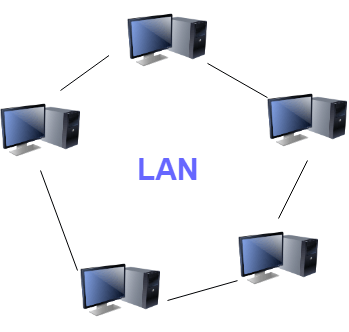
Local Area Network (LAN)
Characteristics of LAN
- It is a private network, so no outside regulatory body controls it.
- LAN operates at a relatively higher speed compared to WAN systems.
- It uses media access control methods such as token ring and Ethernet.
Advantages of LAN
- Computer resources like hard disks, DVD-ROMs, and printers can be shared, which significantly reduces hardware costs.
- The same software can be used over the network instead of buying a licensed copy for each client.
- Data of all network users can be stored on a single hard disk on the server.
- You can easily transfer data and messages over networked computers.
- Managing data in one place makes it more secure and easier to handle.
- A single internet connection can be shared among all LAN users.
Disadvantages of LAN
- Although shared resources save cost, the initial cost of installing a LAN is quite high.
- The LAN admin can view the personal data files of every user, so privacy is limited.
- Unauthorized users can access an organization’s critical data if the admin fails to secure the centralized repository.
- A LAN requires constant administration to handle software setup and hardware failures.
What is WAN (Wide Area Network)?
WAN (Wide Area Network) is a computer network spread across a large geographical area. A WAN can be a connection of LANs that link to other LANs using telephone lines and radio waves. It is mostly used by an enterprise or organization.

Wide Area Network (WAN)
Characteristics of WAN
- Software files are shared among all users, so everyone can access the latest files.
- Any organization can form its own global integrated network using a WAN.
Advantages of WAN
- WAN covers a larger geographical area, so offices at long distances can easily communicate.
- It supports devices like mobile phones, laptops, tablets, computers, and gaming consoles.
- WLAN connections work using radio transmitters and receivers built into client devices.
Disadvantages of WAN
- The initial setup cost is very high.
- It is difficult to maintain and needs skilled technicians and network administrators.
- There are more errors and issues because of wide coverage and the use of different technologies.
- It takes more time to resolve issues due to multiple wired and wireless technologies.
- It offers lower security compared to other types of network.
Also Check: LAN vs WAN: What’s the Difference?
What is MAN (Metropolitan Area Network)?
A Metropolitan Area Network (MAN) consists of a computer network spread across an entire city, college campus, or small region. It is larger than a LAN, which is usually limited to a single building or site. Depending on the configuration, a MAN can cover an area from several miles to tens of miles.
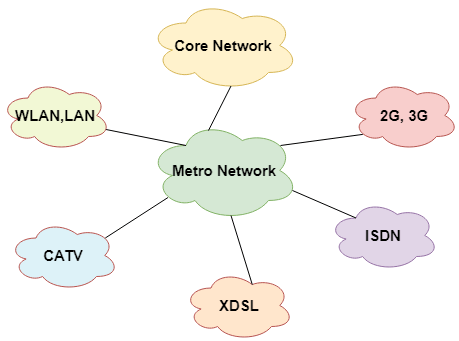
Metropolitan Area Network (MAN)
Characteristics of MAN
- It mostly covers towns and cities within a maximum range of about 50 km.
- The most commonly used medium is optical fiber and cables.
- Its data rates are adequate for distributed computing applications.
Advantages of MAN
- It offers fast communication using high-speed carriers such as fiber optic cables.
- It provides excellent support for large networks and greater access to WANs.
- The dual bus in a MAN supports transmitting data in both directions concurrently.
- A MAN can cover some areas of a city or an entire city.
Disadvantages of MAN
- More cable is needed to establish a MAN connection from one place to another.
- It is difficult to secure a MAN from hackers.
LAN vs MAN vs WAN
The three size-based networks are easiest to understand side by side. The table below compares them across the most important attributes.
| Attribute | LAN | MAN | WAN |
|---|---|---|---|
| Coverage | Single building or site | City or campus (up to ~50 km) | Country or global |
| Ownership | Private | Private or public | Private or public |
| Speed | High | Moderate to high | Lower than LAN |
| Medium | Ethernet, Wi-Fi | Optical fiber, cables | Telephone lines, radio waves |
| Setup cost | Moderate | High | Very high |
| Maintenance | Easy | Moderate | Difficult |
Other Types of Computer Networks
Apart from the networks above, here are several other important types.
- WLAN (Wireless Local Area Network)
- Storage Area Network
- System Area Network
- POLAN (Passive Optical LAN)
- Home Area Network
- Enterprise Private Network
- Campus Area Network
- Virtual Private Network
1) WLAN
WLAN (Wireless Local Area Network) links one or more devices using wireless communication within a limited area such as a home, school, or office building. It lets users move around a local coverage area while staying connected. Most modern WLAN systems are based on IEEE 802.11 standards.
2) Storage-Area Network (SAN)
A Storage Area Network allows consolidated, block-level data storage. It is mainly used to connect storage devices such as disk arrays, optical jukeboxes, and tape libraries.
3) System-Area Network
A System Area Network is used for a local network. It offers high-speed connections in server-to-server and processor-to-processor applications, with connected computers operating as a single high-speed system.
4) Passive Optical Local Area Network (POLAN)
POLAN is a networking technology that integrates into structured cabling and resolves issues of supporting Ethernet protocols and network apps. It uses an optical splitter to separate an optical signal from a single-mode fiber, converting one signal into multiple signals.
5) Home Area Network (HAN)
A Home Area Network is built using two or more interconnected computers to form a LAN within the home. For example, in the United States, about 15 million homes have more than one computer. A HAN lets owners share files, programs, printers, and other peripherals.
6) Enterprise Private Network (EPN)
Enterprise private networks are built and owned by businesses that want to securely connect numerous locations to share various computer resources.
7) Campus Area Network (CAN)
A Campus Area Network is an interconnection of LANs within a specific geographical area. For example, a university campus can link a variety of buildings to connect all academic departments.
8) Virtual Private Network (VPN)
A VPN is a private network that uses a public network to connect remote sites or users. It routes “virtual” connections through the internet from the enterprise’s private network or a third-party VPN service to the remote site. It is a free or paid service that keeps web browsing secure and private over public Wi-Fi hotspots.
