
9 BEST Test Management Tools (2026)
 Krishna Rungta
Disclosure: Guru99 is reader-supported. We may earn a commission when you buy through links on this page. Learn more.

Test management tools should simplify QA workflows, yet choosing the wrong one can create more problems than it solves. Poor reporting can hide critical defects, unreliable integrations waste valuable testing time. Also, confusing interfaces slow team adoptio. Many teams also overlook factors such as traceability, automation support, and collaboration until problems surface. The right solution brings testing into one clear workflow, improves visibility across projects, and gives teams greater confidence as releases move forward.
I spent over 180 hours researching and evaluating 24 test management platforms through firsthand evaluation of their features, workflows, usability, integrations, pros and cons. My assessment combines practical testing with backed-by documentation and product capabilities. After rigorous testing, I shortlisted 10 Best Test Management Tools options that address different team sizes, testing needs, and development workflows. Continue reading to find the option that fits your requirements.
Best Test Management Software and Tools: Top Picks!
| Name | Best for | Key Specs | Free Trial | Link |
|---|---|---|---|---|
 PractiTest |
Mid to Enterprise | • Unlimited Projects • REST API for Automation Integration |
14 Day Free Trial | Learn More |
 Testpad |
Small, medium, or agile teams | • Fast and light test management • Spreadsheet/checklist style layout |
30 Day Free Trial | Learn More |
 TestMu AI |
Enterprise & Full-Stack QA | • AI test authoring with KaneAI • 10,000+ real devices |
Lifetime Free Basic Plan | Learn More |
 TestCaseLab |
Startups, SMBs | • Unlimited projects and users • Test Management |
14 Days Free Trial | Learn More |
 SpiraTest |
Agile QA Teams | • Test management & traceability • Defect and issue tracking |
30 Day Free Trial (No Credit Card Required) | Learn More |
 Testiny |
Small to Enterprise, Cloud and On-Premises | • Test management with plans & milestones • Integration with Jira, Linear, GitLab,… for issue tracking |
21 Day Free Trial (No Credit Card Required) | Learn More |
 Global App Testing |
Enterprise & Mobile Testing | • Global Crowd Testing Network • Real Device Testing on 1000+ Devices |
Contact Sales for Free Trial | Learn More |
 Testsigma |
Scriptless and AI-powered test automation | • Built-in test management, planning, and execution, dashboards • Jira and CI/CD integrations |
7 Day Free Trial | Learn More |
 TestMonitor |
QA/UAT Teams | • Built-in issue tracker • Simplify milestone and software test planning |
14 Day Free Trial | Learn More |
1) PractiTest
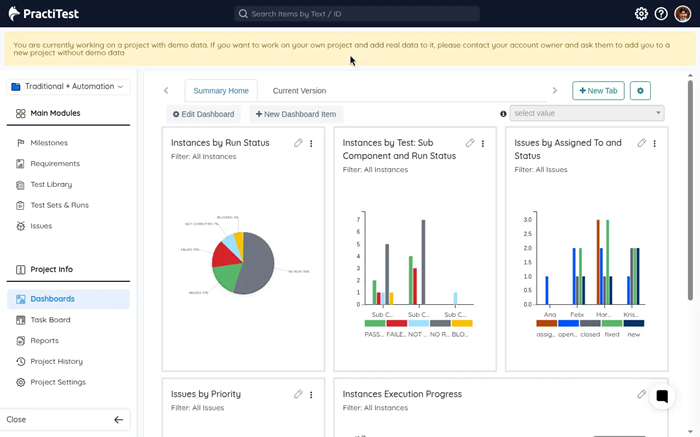
PractiTest gives QA teams one place for complex testing work. Its QA intelligence, flexible filters, and SmartFox AI – reveal release risks clearly. Teams can connect Jira, automation frameworks, and delivery pipelines without scattered updates. A live dashboard shows coverage, failures, and readiness across several projects.
During a regression review, I quickly traced one failure to its requirement. The 14-day free trial offers enough time for realistic evaluation. You gain a clearer view when stakeholders ask whether release feels safe.
Features
- SmartFox AI: PractiTest turns requirements into draft tests grounded in existing project context. This reduces blank-page work while preserving reviewer control throughout.
- Risk Prioritization: Users can rank testing by recent changes, history, and known risks. This directs limited time toward areas most likely to fail.
- Dynamic Views: Dynamic filters turn large repositories into focused views for each role. I have found this useful when projects contain thousands of reusable artifacts.
- Live Traceability: Teams can link requirements, tests, runs, and defects across projects. Every change stays visible, helping reviewers understand coverage gaps quickly.
- Release Intelligence: PractiTest converts execution activity into current coverage, risk, and readiness signals. Stakeholders receive clearer answers before approving a planned release.
- Stack Sync: Integrations synchronize ticketing, automation, BDD, and delivery pipeline information. In my experience, this prevents duplicate updates across disconnected testing systems.
- Pattern Alerts: Real-time alerts identify duplicate tests, blind spots, and unusual result patterns. Analysts can investigate problems earlier instead of discovering them during reporting.
Pros
Cons
Pricing
PractiTest starts at $49 per user monthly with yearly billing and includes a 14-DAY FREE TRIAL.
| Plan | Pricing |
|---|---|
| Team Plan | $54/user/month monthly; $49/user/month billed yearly |
| Corporate Plan | Custom pricing; yearly billing with a 10-license minimum |
14-Day Free Trial
2) Testpad
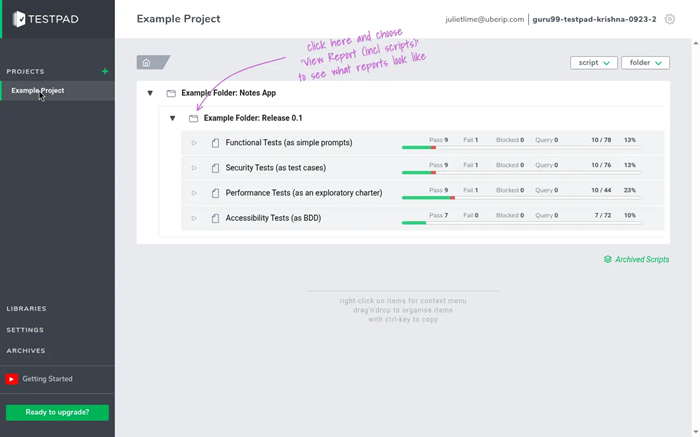
Testpad replaces rigid case forms with fast, checklist-style manual testing. Its plain-text plans stay simple while supporting structure and reusable templates. Guest links allow clients to complete acceptance checks without creating accounts. Clear reports show passed, failed, and untouched areas at a glance.
During my evaluation, I drafted a release checklist and adjusted it mid-run. A 30-day free trial gives teams room to test actual workflows. You keep useful coverage without turning every check into administrative work.
Features
- Plain-Text Plans: Testpad stores each check as one editable line inside structured plans. Users can add coverage quickly without completing lengthy case forms.
- Checklist Runs: Test runs place results beside every prompt in readable columns. This makes passed, failed, and untouched coverage immediately visible to everyone.
- Exploratory Notes: Testers can add prompts while exploring unexpected behavior or edge cases. I often rely on this flexibility when requirements remain incomplete.
- Guest Testing: Guest links let clients run acceptance checks without creating accounts. Their comments and results flow directly into the shared plan.
- Keyboard Editing: Testpad supports rapid additions, deletions, indentation, and quick branch rearrangement. This keeps evolving regression plans current without disruptive maintenance work.
- Shared Reports: Managers can share live progress through links or printable summaries. In my experience, this simplifies release conversations with occasional stakeholders.
- Mobile Handover: Responsive runs let testers continue checks while switching between devices. Teams preserve context when field testing moves away from desks.
Pros
Cons
Pricing
Testpad starts at $49 monthly with annual billing; the free trial lasts 30 days and includes all features.
| Plan | Pricing |
|---|---|
| Essential | $59/month monthly; $49/month billed annually |
| Team | $119/month monthly; $99/month billed annually |
| Team 15 | $179/month monthly; $149/month billed annually |
30-Day Free Trial
3) TestMu AI
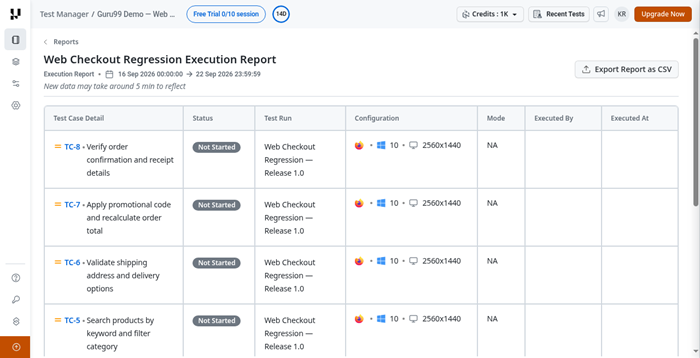
TestMu AI brings test planning, creation, execution, and analysis together. Its AI-generated cases turn requirements or prompts into structured testing steps. Jira links keep issues connected, while dashboards surface results and trends. The platform supports manual work, browser testing, mobile devices, and automation.
While testing a signup flow, I watched failed steps collect useful context. A free forever plan covers centralized cases, projects, runs, and folders. Central histories keep repeated work stable as several testers contribute. Your testers stay involved while AI handles repetitive preparation and organization.
Features
- AI Test Manager: TestMu AI generates test cases and organizes execution within one workspace. This reduces manual preparation while keeping teams connected to outcomes.
- Multimodal Planning: Kane AI reads tickets, documents, images, diffs, and spoken instructions. Users can create relevant scenarios without rewriting source information manually.
- Natural Authoring: Plain-language prompts become executable browser or mobile testing steps. I have noticed this helps non-coders describe workflows with fewer translation gaps.
- Real Devices: Teams can execute manual and automated checks on physical mobile devices. Device logs and debugging tools expose behavior emulators might miss.
- Test Intelligence: Analytics classify errors, detect flaky behavior, and surface execution trends. This helps teams separate product defects from unstable testing infrastructure.
- HyperExecute: TestMu AI orchestrates parallel runs across supported operating systems and browsers. In my experience, retry controls shorten investigation after widespread failures.
- AI Assurance: Autonomous evaluators test chatbots and voice agents for harmful responses. Reviewers receive evidence about bias, toxicity, hallucinations, and compliance issues.
Pros
Cons
Pricing
TestMu AI offers a Free Forever plan without a trial deadline; Premium costs $49 per user monthly, billed annually.
| Plan | Pricing |
|---|---|
| Free | $0; Free Forever |
| Test Manager Premium | $59/user/month monthly; $49/user/month billed annually |
| Test Manager Enterprise | Custom pricing; contact sales |
Lifetime Free Plan Available
4) TestCaseLab
TestCaseLab keeps manual test case management approachable for growing teams. Its unlimited users, custom fields, and activity stream encourage open collaboration. Teams can build plans, launch runs, and inspect smart reports centrally. GitHub connections and an API help testing fit existing daily workflows.
For one feature review, I reorganized cases without rebuilding the entire plan. Activity records preserve every change, so shared runs remain dependable. A 14-day free trial includes every feature without restricted access. Your team gets structure and visibility without carrying unnecessary process overhead.
Features
- Case Library: TestCaseLab stores manual cases in organized projects with reusable structures. Users can find and update existing coverage instead of recreating work.
- Plan Templates: Test plans become reusable templates for repeated release or regression runs. This saves setup time while preserving an agreed testing sequence.
- Checklist View: Testers can include, exclude, reorder, or bulk-edit cases before execution. I have found this useful when release scope changes suddenly.
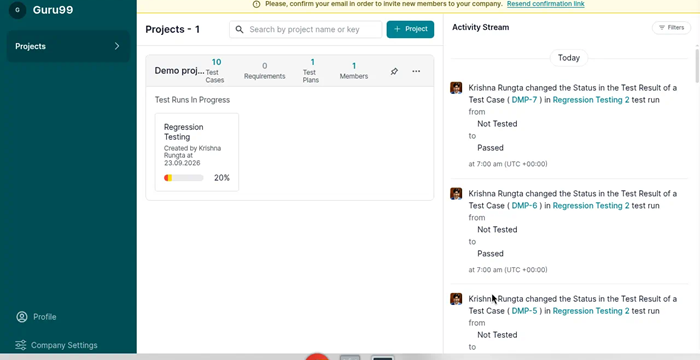
- Activity Stream: Every important project action appears inside a chronological activity stream. Leads can review changes and resolve confusion without separate status messages.
- Custom Fields: Teams can adapt case templates with fields matching their workflow. This captures needed context without forcing everyone into rigid default formats.
- Smart Reports: Reports summarize testing progress and individual activity across current projects. In my experience, these views quickly reveal stalled work and ownership gaps.
- GitHub API: GitHub connectivity links development activity with manual quality work. The API also lets teams exchange plans, runs, and results automatically.
Pros
Cons
Pricing
TestCaseLab starts at $10 monthly when billed annually and includes a 14 Days Free Trial.
| Plan | Pricing |
|---|---|
| Prebasic | $12/month monthly; $10/month billed annually |
| Basic | $48/month monthly; $40/month billed annually |
| Essential | $99/month monthly; $83/month billed annually |
14-Day Free Trial
5) SpiraTest
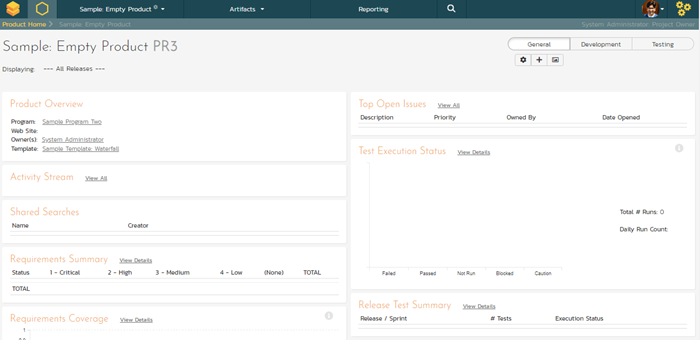
SpiraTest combines requirements, tests, defects, and reporting inside one workspace. Its requirements traceability helps teams see exactly what each case covers. Real-time bug tracking keeps evidence, screenshots, and reproduction details together. Managers can review quality dashboards before approving a complicated release.
Recently, I followed a requirement through execution into linked defects. That connected history makes regulated or documentation-heavy projects easier to audit. The 30-day free trial supports a meaningful run using actual processes. You finish with evidence that explains both progress and remaining release risk.
Features
- Requirement Links: SpiraTest connects requirements directly with cases, runs, and detected defects. Teams can identify untested requirements before they threaten release scope.
- Case Repository: Reusable cases support custom steps, parameters, datasets, and shared components. This reduces rewriting when several releases follow similar validation paths.
- Bug Tracking: Testers can log defects with screenshots, files, and reproduction details. I have found this context directly reduces back-and-forth with developers.
- Quality Dashboards: Dashboards summarize execution health, outstanding work, and current defect status. Managers can focus reviews on blocked areas instead of raw totals.
- Change Impact: Requirement changes show which linked tests may need attention or reruns. This helps teams update coverage before altered behavior reaches production.
- Exploratory Capture: Exploratory sessions record observations alongside formal cases and issue records. In my experience, this preserves discoveries that ordinary scripts rarely document.
- Deployment Choice: Organizations can use cloud hosting or maintain an on-premises installation. Security teams retain deployment control while testers keep consistent workflows.
Pros
Cons
Pricing
SpiraTest starts at $134.26 monthly for three concurrent users and includes a Free 30-Day Trial.
| Plan | Pricing |
|---|---|
| 3 Concurrent Users | $134.26/month; $1,450.01/year |
| 5 Concurrent Users | $215.24/month; $2,324.59/year |
| 10 Concurrent Users | $389.49/month; $4,206.49/year |
30-Day Free Trial (No Credit Card Required)
6) Testiny
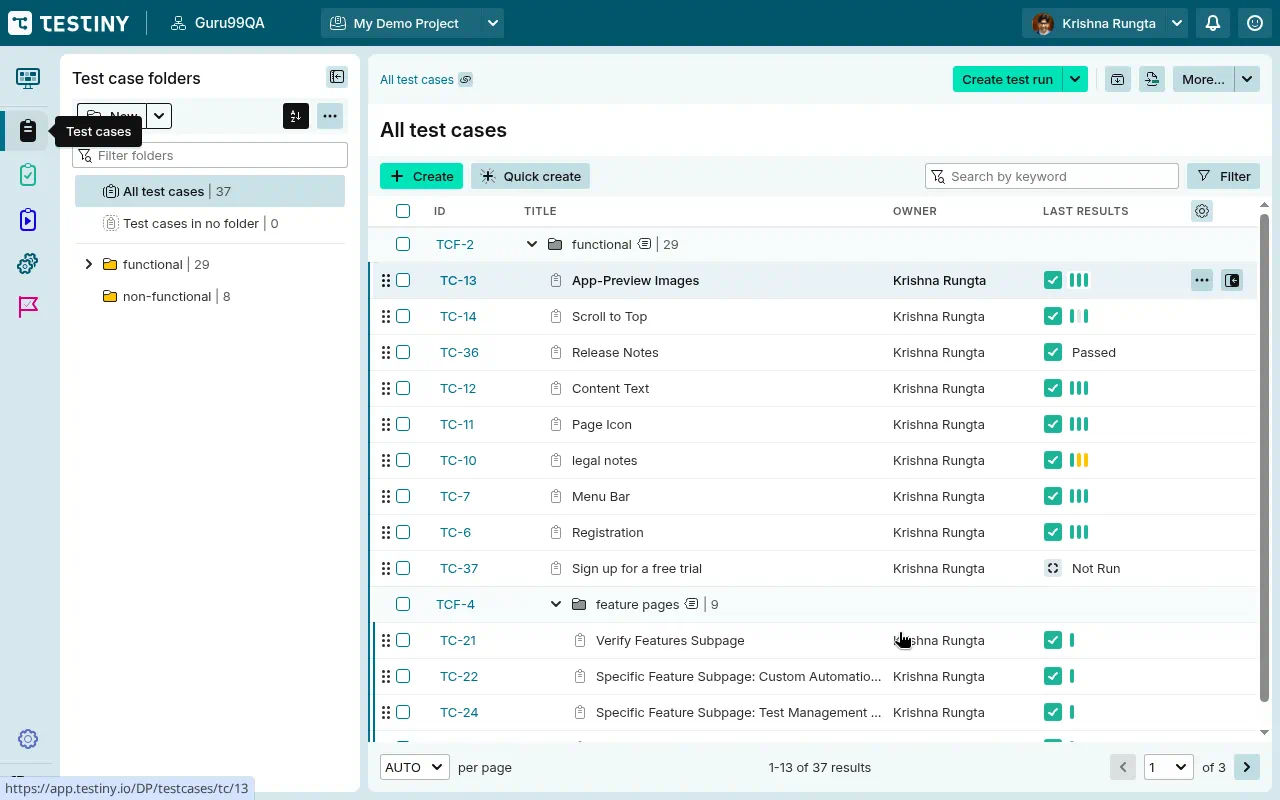
Testiny puts manual cases and automated results side by side. Its real-time dashboard updates runs, assignments, and charts without noticeable delays. Teams can easily import Playwright, Cypress, Selenium, or JUnit results. Jira, GitHub, GitLab, and Azure DevOps connections reduce duplicate updates.
On a mixed regression run, I compared manual findings against automation failures. MCP support also connects familiar AI assistants without forcing another ecosystem. The 21-day free trial allows serious testing without credit card details. You get a quick workspace that still accommodates controlled or self-hosted environments.
Features
- Unified Results: Testiny combines manual cases and automated outcomes inside one project. Users can compare failures without switching between separate reporting systems.
- Framework Imports: Teams can import Playwright, Cypress, Selenium, and JUnit execution results. Logs and screenshots remain attached for faster failure investigation later.
- Dynamic Plans: Queries automatically update test plans whenever matching cases change. I have found this prevents carefully prepared scopes from becoming stale.
- Live Reporting: Charts and result states refresh while team members complete assigned runs. Stakeholders can export shareable PDF reports without rebuilding summaries manually.
- MCP Access: Testiny directly connects supported AI assistants through its MCP server. Natural-language commands can create cases, run tests, and update outcomes.
- Migration Tools: Imports preserve formatted text, requirements, custom fields, images, and attachments. In my experience, this lowers risk when replacing an established repository.
- Hosting Control: Organizations can choose EU cloud hosting or self-hosted server deployment. Regulated teams keep infrastructure control without changing everyday test workflows.
Pros
Cons
Pricing
Testiny offers a three-user free plan, while paid plans include a 21-day free trial without a credit card.
| Plan | Pricing |
|---|---|
| Free | $0/user/month |
| Starter | $18.50/user/month monthly; $15.42/user/month billed yearly |
| Business | $20.50/user/month monthly; $17.08/user/month billed yearly |
21-Days Free Trial
7) Global App Testing
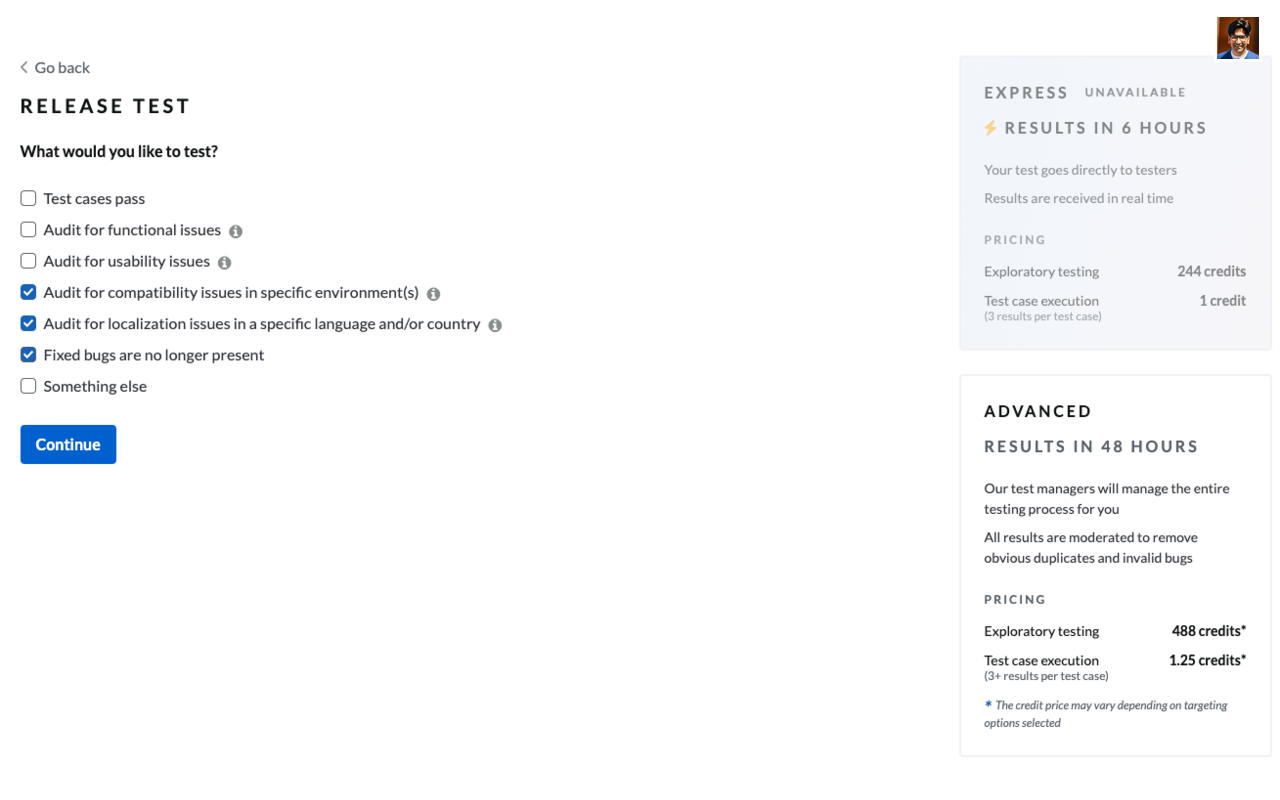
Global App Testing provides real-world feedback from testers across 190-plus countries. Its crowdtesting network covers localization, usability, payments, and functional checks. Teams can target specific devices, environments, regions, or payment methods. Detailed reports include reproduction steps, bug videos, and tester evidence.
When checking a regional checkout, I could see failures due to local conditions. Results typically arrive within 48 hours, supporting urgent international launches. Slack and email connections keep internal teams close to outside testers. You clearly see how actual customers experience software before its wider release.
Features
- Tester Targeting: Global App Testing selects testers by country, device, environment, and profile. Teams receive feedback matching the customers they actually intend to serve.
- Device Coverage: Tests can run across thousands of real device and browser combinations. This exposes hardware-specific problems that controlled laboratory setups may overlook.
- Local Payments: Specialist testers validate regional payment methods using locally available instruments. I have found this valuable when checkout failures resist remote reproduction.
- Localization Checks: Native-market testers assess translated content, cultural fit, and regional usability. Product teams can correct confusing experiences before broader international launches.
- Video Evidence: Each reported issue can include reproduction steps, screenshots, and videos. Developers receive enough context to recreate problems without lengthy clarification.
- Rapid Results: Crowd capacity supports focused testing when internal teams face tight deadlines. In my experience, this supplies broad feedback without permanent hiring overhead.
- Team Contact: Slack and email connections keep testers accessible during active engagements. Internal teams can clarify unusual findings before deciding their priority.
Pros
Cons
Pricing
Contact sales for custom trial options.
| Plan Name | Price |
|---|---|
| On-Demand Testing | Contact Sales |
| Annual Packages | Contact Sales |
Contact Sales for Free Trial
8) Testsigma
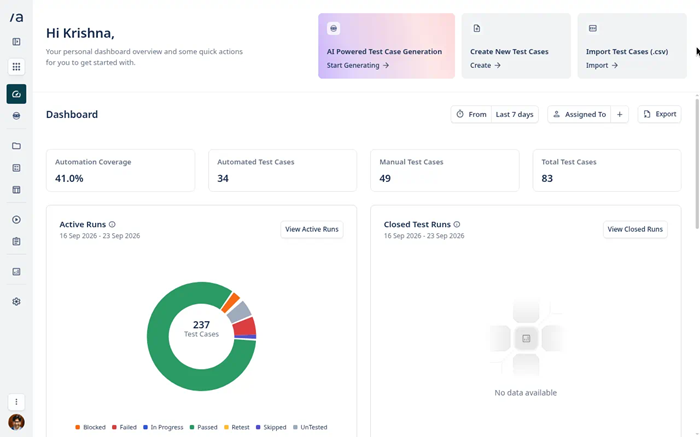
Testsigma uses specialized AI agents for planning, writing, running, and reporting. Its Sprint Planner pulls Jira stories into organized testing work automatically. The Generator creates editable cases from prompts, documents, images, or videos. Live browser execution captures step evidence and prepares detailed bug reports.
Reviewing a sprint, I saw story coverage before development finished. Two-way Jira syncing keeps linked requirements, cases, and defects aligned. A free forever plan follows the seven-day free trial period. You spend less time moving information and more time checking behavior.
Features
- Sprint Detection: Testsigma detects new Jira sprints and imports each related story automatically. Teams gain testing visibility before manual planning meetings begin.
- Case Generator: AI builds editable positive, negative, and edge-case scenarios from requirements. Users receive structured steps, test data, and clear expected validations.
- Story Mapping: Generated cases stay linked to their source Jira stories. I have noticed this makes coverage gaps easier to explain during reviews.
- Human Control: Testers can pause, edit, rerun, or carefully refine agent-generated work. This keeps automation helpful without surrendering judgment over important outcomes.
- Visual Execution: Live browser runs capture visual evidence for every completed step. Reviewers can watch failures and confirm whether actions matched expectations.
- Defect Writer: The Bug Reporter drafts summaries, descriptions, and reproduction instructions automatically. In my experience, this speeds logging while preserving final human review.
- Jira Sync: Two-way syncing updates linked cases, stories, and issues from either system. Teams avoid stale records while keeping their existing development workflow.
Pros
Cons
Pricing
Testsigma provides a Free Forever plan, while Standard and Pro include a 7-day free trial.
| Plan | Pricing |
|---|---|
| Free Forever | $0 |
| Standard | $100/month monthly; $1,000/year billed yearly |
| Pro | $300/month monthly; $3,000/year billed yearly |
7-Days Free Trial
9) TestMonitor
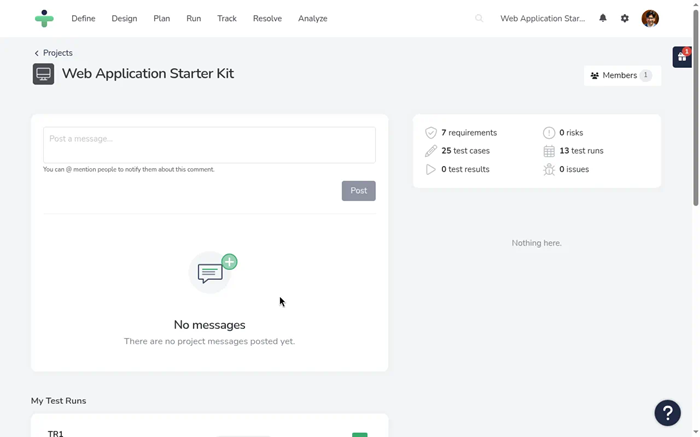
TestMonitor makes structured test management welcoming for less technical participants today. Its milestone planning turns releases, sprints, and iterations into visible work. Built-in requirements and risk controls explain what needs attention first. Backups and reports preserve progress, defects, team activity, and automation results.
While preparing acceptance testing, I assigned cases without confusing occasional testers. Jira, Azure DevOps, Slack, and Asana integrations preserve familiar workflows. The 14-day free trial includes core planning, reporting, and issue tracking. Your broader project group can discuss quality using shared evidence confidently.
Features
- Milestone Planning: TestMonitor organizes sprints, iterations, and releases into visible testing milestones. Teams can assign runs and monitor completion against planned delivery dates.
- Risk Mapping: Requirements can carry risks that guide priorities across test planning. This helps reviewers focus effort where failure would matter most.
- Structured Cases: Reusable cases capture repeatable procedures, expected behavior, and supporting details. I have found this useful when occasional testers join formal reviews.
- Run Tracking: Testers record results and issues while completing their assigned runs. Managers can see progress immediately without requesting separate status updates.
- Issue Workflow: Built-in issue tracking connects failures with owners, evidence, and resolution status. This keeps investigation history beside the tests that revealed problems.
- Custom Reports: Reports filter progress, defects, team activity, and automation outcomes. In my experience, tailored views keep stakeholder discussions grounded in evidence.
- Access Controls: Role-based permissions limit which actions each participant can perform. Organizations support broad collaboration without exposing sensitive settings or test data.
Pros
Cons
Pricing
TestMonitor starts at $11 per user monthly with annual billing and includes a 14-day free trial.
| Plan | Pricing |
|---|---|
| Starter | US 11/user/month billed annually |
| Professional | US 16/user/month billed annually |
| Enterprise | Custom pricing |
14-Day Free Trial
Comparison Between Top Test Management Tools
| Tool | AI-Assisted Test Creation | No-Code Core Workflow | Free Plan Available | Direct Support Included | SSO Available | Integrations & Team Scalability |
|---|---|---|---|---|---|---|
| PractiTest | ✅ | ✅ | ❌ | ✅ | ✅ | ✅ |
| Testpad | ❌ | ✅ | ❌ | ✅ | ❌ | ✅ |
| TestMu AI | ✅ | ✅ | ✅ | ✅ | ✅ | ✅ |
| TestCaseLab | ✅ | ✅ | ❌ | ✅ | ✅ | ✅ |
| SpiraTest | ✅ | ✅ | ❌ | ✅ | ✅ | ✅ |
What Are Test Management Tools and Why Are They Important?
Test management tools organize test cases, plans, executions, defects, and reports. They create one reliable workspace for testers, developers, and project leaders. Teams can connect requirements with results and identify missing coverage quickly. Clear ownership keeps repeated work from delaying important software releases. Shared dashboards also help stakeholders understand quality without reading technical logs. Modern platforms support manual, automated, exploratory, and risk-based testing workflows. This structure becomes essential when projects, environments, and teams expand. Without it, evidence becomes scattered, outdated, and difficult to trust.
How Do Test Management Tools Work Across the Testing Lifecycle?
Teams first capture requirements, risks, releases, environments, and expected testing outcomes. Testers then create reusable cases with steps and expected results. Managers group those cases into plans for specific releases or milestones. During execution, assigned testers record outcomes, evidence, defects, and comments. Automated pipelines can submit results through integrations, APIs, or webhooks. Dashboards summarize progress, failure patterns, coverage gaps, and release risks. Traceability links requirements, cases, runs, and defects throughout every cycle. Teams review these insights before deciding whether software can safely ship.
What Features Should You Look for in Test Management Tools?
Strong tools should support daily testing without creating unnecessary administrative work. The best shortlist balances practical features with security, usability, and scale.
- Test planning: Reusable cases and structured runs keep release testing consistently organized.
- Traceability: Requirement links should reveal coverage, failures, and affected business risks.
- Automation support: APIs and CI integrations should collect results without manual copying.
- Reporting: Flexible dashboards must serve testers, managers, auditors, and executives clearly.
- Administration: Permissions, audit trails, templates, and bulk editing simplify ongoing governance.
What Is the Difference Between Test Management and Test Automation Tools?
Test management tools organize testing work, evidence, priorities, and accountability. Test automation tools execute scripted checks against applications without manual intervention. Management platforms answer what requires testing, ownership, timing, and outcomes. Automation frameworks answer how repeatable checks run across different environments. Many modern products connect both functions without completely replacing either. Integrated reporting combines automated results with manual and exploratory evidence. Teams usually need management first, then automation as repetition increases. The right combination depends on workflows, skills, coverage, and release frequency.
How Do Test Management Tools Integrate With CI/CD Pipelines?
CI/CD integration sends automated test results directly into management dashboards. Teams connect pipelines using native plugins, APIs, webhooks, or result files. Each run should retain build, branch, environment, and commit information. That context helps developers reproduce failures and identify affected changes. Reliable mappings connect automated checks with requirements and existing test cases. Status rules can then block deployments when critical checks fail. Useful integrations also prevent duplicate runs and fragmented reporting records. Teams should test retry behavior, permissions, and synchronization before rollout.
Should You Choose Cloud or Self-Hosted Test Management Software?
Cloud platforms reduce installation work and receive updates automatically regularly. Vendors handle availability, backups, infrastructure security, and performance monitoring continuously. Self-hosted tools provide stronger control over data location and upgrades. They may suit regulated environments with strict network isolation requirements. However, internal teams must maintain servers, patches, backups, and capacity. Cloud subscriptions usually scale faster when distributed teams need immediate access. Buyers should compare residency, encryption, recovery, identity, and export controls. The final choice should match compliance needs and administrative resources.
Are Free Test Management Tools Worth Using?
Free test management tools can suit individuals and very small teams. They provide basic case storage, execution tracking, and simple reporting. Limits often affect users, projects, integrations, history, storage, or support. Open-source options remove license fees but require technical maintenance skills. Growing teams may quickly outgrow restricted permissions and reporting capabilities. A free plan remains useful for validating workflows before purchasing. Teams should test exports carefully, preventing difficult future vendor lock-in. Paid plans become worthwhile when governance, automation, and support matter.
How Much Do Test Management Tools Cost?
Pricing commonly follows per-user, bundled-user, concurrent-user, or flat-rate models today. Entry prices rarely represent the complete cost of long-term ownership. Advanced reporting, integrations, storage, security, and support may cost extra. Implementation also requires migration, configuration, training, and administration time initially. Small teams may prefer bundled plans with several included seats. Enterprises should examine minimum licenses, renewal terms, and contract length. Trials reveal whether promised productivity offsets subscription and onboarding expenses. A fair comparison calculates yearly costs using realistic growth scenarios.
How Are AI-Powered Test Management Tools Changing QA Workflows?
AI-powered platforms can generate test cases from requirements and user stories. They also identify duplicates, coverage gaps, risky changes, and failure patterns. These features accelerate drafting but still require thoughtful human review. Sensitive requirements should never reach unapproved models or external services. Teams should examine data retention, training policies, permissions, and auditability. Useful AI explains recommendations instead of producing unexplained confident answers. Credit limits and premium tiers can also change expected value. Pilots should measure accuracy, editing time, adoption, and escaped defects.
How Do You Migrate Test Cases From Spreadsheets Successfully?
Begin by removing duplicate, obsolete, and incomplete spreadsheet records carefully. Define consistent fields for ownership, priority, status, requirements, and environments. Map those columns against the destination tool before importing anything. Run a small trial import and inspect every transformed field. Preserve identifiers when external systems reference existing test cases directly. Archive unused records separately instead of polluting the new repository. Train users on naming, folders, permissions, and update responsibilities early. Finally, compare totals and samples before closing spreadsheet access permanently.
What Security and Compliance Features Should Test Management Tools Include?
Security matters because test repositories often contain sensitive product information. Regulated teams also need evidence proving controlled access and accountability.
- Identity controls: SSO, MFA, and automated provisioning reduce unmanaged account risks substantially.
- Access permissions: Role-based controls should restrict projects, exports, administration, and sensitive fields.
- Audit evidence: Immutable logs must record changes, approvals, executions, and user activity.
- Data protection: Encryption should cover stored information, network traffic, backups, and exports.
- Compliance coverage: Buyers should verify certifications, residency options, retention, and deletion controls.
- Recovery planning: Backups need tested restoration procedures and documented recovery objectives regularly.
What Future Trends Will Shape Test Management Software?
Test management software is moving toward connected, intelligence-driven quality operations. AI assistants will draft cases, prioritize risk, and summarize failures. Agentic systems may eventually coordinate planning, execution, triage, and reporting. Open integration standards will connect repositories with development assistants directly. Predictive analytics should highlight release risks before critical defects escape. Governance features will track AI decisions, inputs, permissions, and corrections. Hybrid deployments may expand for regulated or privacy-sensitive testing environments. Human review will remain essential for context, ethics, and accountability.
How Do We Select the Best Test Management Tools?
Guru99 helps readers choose confidently through careful research and testing. Our reviewers compare real workflows, pricing, support, integrations, and security. Every recommendation reflects transparent evidence, practical experience, and lasting value.
- Research scope: We examine leading platforms across varied team sizes and testing approaches. We include cloud, self-hosted, manual, automated, enterprise, and lightweight options.
- Hands-on testing: Our team creates projects, imports cases, runs tests, and reviews dashboards. The researchers record setup time, usability barriers, errors, and workflow delays.
- Feature evaluation: The team checks planning, traceability, reporting, permissions, reusable components, and automation. Our testers confirm whether important capabilities work reliably in realistic scenarios.
- Integration testing: Our testers connect common issue trackers, pipelines, frameworks, and collaboration services. We examine synchronization accuracy, setup effort, permissions, and failure handling.
- Pricing analysis: Our experts compare monthly, annual, minimum-seat, usage-based, and enterprise pricing structures. The experts identify trials, free plans, add-ons, limits, and renewal conditions.
- Security review: The researchers verify authentication, permissions, encryption, audit trails, compliance, and hosting. Our team checks whether protections match regulated and distributed team needs.
- Support assessment: The team evaluates documentation, response channels, onboarding resources, and service quality. Our testers note whether beginners can resolve problems without prolonged delays.
- Scalability checks: Our testers expand repositories, users, projects, runs, and reporting volumes. We observe performance, administration effort, search speed, and cross-team visibility.
- Review synthesis: Our experts compare firsthand findings with professional reviews and customer patterns. The researchers separate repeated concerns from isolated complaints or outdated feedback.
- Final ranking: The experts score overall value, fit, reliability, innovation, and long-term usefulness. Our team recommends tools only when evidence supports clear user benefits.
How Can You Troubleshoot Common Test Management Tool Problems?
Most test management problems come from configuration, permissions, or synchronization. Structured checks usually reveal causes before teams replace their platform.
- Issue: Imported test cases lose fields, formatting, or ownership mappings during migration unexpectedly.
Solution: Administrators should test a small batch, map fields carefully, and review import logs before migrating everything. - Issue: CI/CD results appear duplicated or disconnected from their corresponding requirements and releases.
Solution: Teams should verify unique identifiers, webhook settings, branch mappings, and retry behavior within each pipeline. - Issue: Users cannot access projects despite receiving correct roles and invitation emails successfully.
Solution: Administrators should inspect group permissions, identity-provider assignments, license availability, and cached sessions before changing roles. - Issue: Dashboards show stale totals after testers update executions, defects, or statuses recently.
Solution: Teams should review filters, refresh schedules, timezone settings, indexing delays, and archived project exclusions carefully. - Issue: Large repositories become slow when searches, filters, and reports process excessive data.
Solution: Administrators should archive obsolete cases, simplify filters, schedule heavy reports, and request vendor performance analysis. - Issue: Notification overload causes important failures, assignments, and release warnings to disappear unnoticed.
Solution: Teams should narrow triggers, route alerts by severity, and create separate channels for urgent events. - Issue: Integrations stop syncing after token expiration, endpoint changes, or permission updates occur.
Solution: Administrators should rotate credentials, confirm scopes, test endpoints, and monitor integration logs for recurring authorization failures.
Verdict
After testing these platforms across real QA workflows, I found three tools that balanced usability, dependable test organization, integrations, and practical team value particularly well.
- PractiTest: I preferred its flexible dashboards, strong traceability, and mature integrations, which kept complex testing work organized without sacrificing visibility.
- Testpad: During hands-on use, I appreciated its checklist-driven workflow because it made exploratory and manual testing remarkably easy for mixed-skill teams.
- TestMu AI: What impressed me most was its AI-assisted case creation, generous free plan, and smooth connection between manual and automated testing.
