
Priority Scheduling Algorithm: Preemptive, Non-Preemptive
 Editorial Team
⚡ Smart Summary
Priority Scheduling is a CPU scheduling method that selects processes based on priority, running higher-priority tasks first. It can be preemptive or non-preemptive, and processes with equal priority are handled on a first-come, first-served or round-robin basis.
What is Priority Scheduling?
Priority Scheduling is a method of scheduling processes that is based on priority. In this algorithm, the scheduler selects the tasks to work as per the priority.
The processes with higher priority should be carried out first, whereas jobs with equal priorities are carried out on a round-robin or FCFS basis. Priority depends upon memory requirements, time requirements, etc.
Types of Priority Scheduling
Priority scheduling is divided into two main types:
Preemptive Scheduling
In Preemptive Scheduling, the tasks are mostly assigned with their priorities. Sometimes it is important to run a task with a higher priority before another lower priority task, even if the lower priority task is still running. The lower priority task holds for some time and resumes when the higher priority task finishes its execution.
Non-Preemptive Scheduling
In this type of scheduling method, the CPU has been allocated to a specific process. The process that keeps the CPU busy will release the CPU either by switching context or terminating. It is the only method that can be used for various hardware platforms. That is because it does not need special hardware (for example, a timer) like preemptive scheduling.
Characteristics of Priority Scheduling
- A CPU algorithm that schedules processes based on priority.
- It is used in Operating systems for performing batch processes.
- If two jobs having the same priority are READY, it works on a FIRST COME, FIRST SERVED basis.
- In priority scheduling, a number is assigned to each process that indicates its priority level.
- The lower the number, the higher is the priority.
- In this type of scheduling algorithm, if a newer process arrives that has a higher priority than the currently running process, then the currently running process is preempted.
Example of Priority Scheduling
Consider the following five processes P1 to P5. Each process has its unique priority, burst time, and arrival time.
| Process | Priority | Burst time | Arrival time |
|---|---|---|---|
| P1 | 1 | 4 | 0 |
| P2 | 2 | 3 | 0 |
| P3 | 1 | 7 | 6 |
| P4 | 3 | 4 | 11 |
| P5 | 2 | 2 | 12 |
Step 0) At time = 0, Process P1 and P2 arrive. P1 has higher priority than P2. The execution begins with process P1, which has burst time 4.

Step 1) At time = 1, no new process arrives. Execution continues with P1.

Step 2) At time 2, no new process arrives, so you can continue with P1. P2 is in the waiting queue.

Step 3) At time 3, no new process arrives, so you can continue with P1. The P2 process is still in the waiting queue.

Step 4) At time 4, P1 has finished its execution. P2 starts execution.
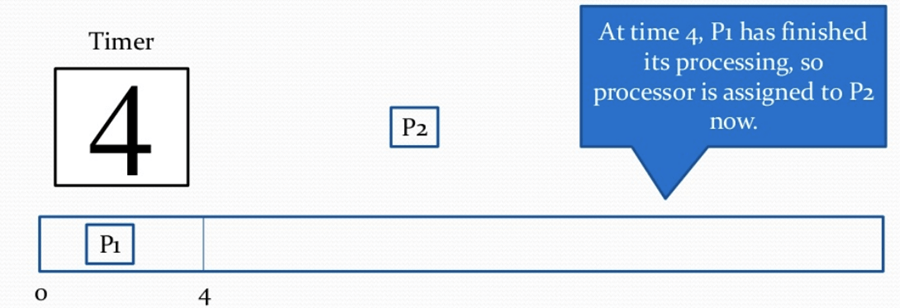
Step 5) At time = 5, no new process arrives, so we continue with P2.

Step 6) At time = 6, P3 arrives. P3 is at higher priority (1) compared to P2 having priority (2). P2 is preempted, and P3 begins its execution.
| Process | Priority | Burst time | Arrival time |
|---|---|---|---|
| P1 | 1 | 4 | 0 |
| P2 | 2 | 1 out of 3 pending | 0 |
| P3 | 1 | 7 | 6 |
| P4 | 3 | 4 | 11 |
| P5 | 2 | 2 | 12 |

Step 7) At time 7, no new process arrives, so we continue with P3. P2 is in the waiting queue.

Step 8) At time = 8, no new process arrives, so we can continue with P3.

Step 9) At time = 9, no new process comes, so we can continue with P3.

Step 10) At time interval 10, no new process comes, so we continue with P3.
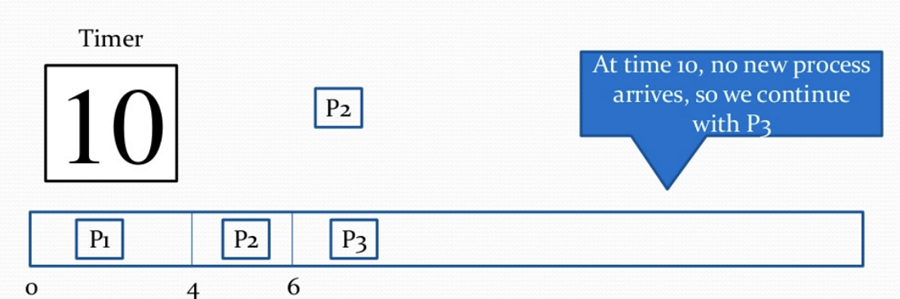
Step 11) At time = 11, P4 arrives with priority 4. P3 has higher priority, so it continues its execution.
| Process | Priority | Burst time | Arrival time |
|---|---|---|---|
| P1 | 1 | 4 | 0 |
| P2 | 2 | 1 out of 3 pending | 0 |
| P3 | 1 | 2 out of 7 pending | 6 |
| P4 | 3 | 4 | 11 |
| P5 | 2 | 2 | 12 |

Step 12) At time = 12, P5 arrives. P3 has higher priority, so it continues execution.
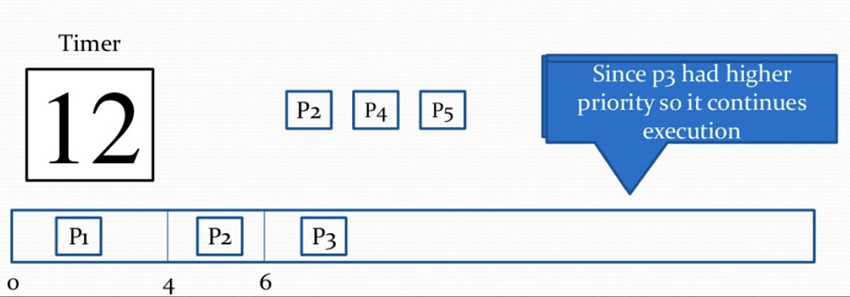
Step 13) At time = 13, P3 completes execution. We have P2, P4, P5 in the ready queue. P2 and P5 have equal priority. The arrival time of P2 is before P5, so P2 starts execution.
| Process | Priority | Burst time | Arrival time |
|---|---|---|---|
| P1 | 1 | 4 | 0 |
| P2 | 2 | 1 out of 3 pending | 0 |
| P3 | 1 | 7 | 6 |
| P4 | 3 | 4 | 11 |
| P5 | 2 | 2 | 12 |

Step 14) At time = 14, the P2 process has finished its execution. P4 and P5 are in the waiting state. P5 has the highest priority and starts execution.

Step 15) At time = 15, P5 continues execution.

Step 16) At time = 16, P5 is finished with its execution. P4 is the only process left. It starts execution.

Step 17) At time = 20, P4 has completed execution and no process is left.

Step 18) Let us calculate the average waiting time for the above example.
Waiting Time = start time – arrival time + wait time for next burst
P1 = 0 - 0 = 0
P2 = 4 - 0 + 7 = 11
P3 = 6 - 6 = 0
P4 = 16 - 11 = 5
Average Waiting time = (0 + 11 + 0 + 5 + 2)/5 = 18/5 = 3.6
Advantages of priority scheduling
Here are the benefits/pros of using the priority scheduling method:
- Easy to use scheduling method.
- Processes are executed on the basis of priority, so high priority does not need to wait for long, which saves time.
- This method provides a good mechanism where the relative importance of each process may be precisely defined.
- Suitable for applications with fluctuating time and resource requirements.
Disadvantages of priority scheduling
Here are the cons/drawbacks of priority scheduling:
- If the system eventually crashes, all low priority processes get lost.
- If high priority processes take lots of CPU time, then the lower priority processes may starve and will be postponed for an indefinite time.
- This scheduling algorithm may leave some low priority processes waiting indefinitely.
- A process will be blocked when it is ready to run but has to wait for the CPU because some other process is running currently.
- If a new higher priority process keeps on coming in the ready queue, then the process which is in the waiting state may need to wait for a long duration of time.
