
While Loop in Oracle PL/SQL with Example
 Editorial Team
⚡ Smart Summary
Oracle PL/SQL WHILE Loop repeats a block of code while a condition remains true. It is an entry-checking loop, testing the exit condition before each iteration, so the block may run zero times, and it needs no explicit EXIT keyword.

What is a PL/SQL While Loop?
The While Loop in PL/SQL works similarly to the basic loop statement, except that the exit condition is at the very beginning of the loop. It works like an entry-checking loop, where the execution block runs only if the condition is satisfied, because the exit condition is checked before execution.
It does not explicitly require the ‘EXIT’ keyword to exit the loop, since it validates the condition implicitly each time.
PL/SQL While Loop Syntax
WHILE <EXIT condition>
LOOP
<execution block starts>
.
.
.
<execution_block_ends>
END LOOP;
- The keyword ‘WHILE’ marks the beginning of the loop and ‘END LOOP’ marks the end.
- The exit condition is evaluated each time before the execution part starts executing.
- The execution block contains all the code that needs to run.
- The execution part can contain any executable statement.
Example of Oracle PL/SQL While Loop
In this example, we print numbers from 1 to 5 using a WHILE loop statement.
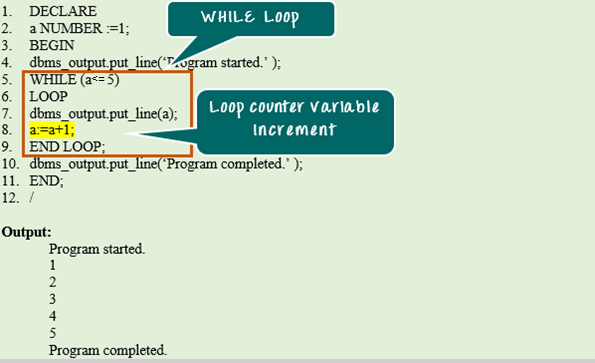
DECLARE
a NUMBER := 1;
BEGIN
dbms_output.put_line('Program started');
WHILE (a <= 5)
LOOP
dbms_output.put_line(a);
a:= a+1;
END LOOP;
dbms_output.put_line('Program completed');
END;
/
Code Explanation:
- Code line 2: Declaring the variable ‘a’ as ‘NUMBER’ and initializing it with value ‘1’.
- Code line 4: Printing the statement “Program started”.
- Code line 5: The keyword ‘WHILE’ marks the beginning of the loop and checks whether the value of ‘a’ is less than or equal to 5.
- Code line 7: Prints the value of ‘a’.
- Code line 8: Increments the value of ‘a’ by 1.
- Code line 9: The keyword ‘END LOOP’ marks the end of the execution block.
- Lines 7 and 8 continue to execute until ‘a’ reaches the value 6, at which point the condition returns FALSE and control exits the loop.
- Code line 10: Printing the statement “Program completed”.
WHILE Loop vs FOR Loop vs Basic Loop
PL/SQL offers three loop types, and choosing the right one keeps code clear. The WHILE loop suits a condition-driven repeat, while the other two suit a fixed count or an explicitly controlled exit.
| Loop | Exit criteria | Best used when |
|---|---|---|
| WHILE loop | Condition at the top becomes false | The iteration count is unknown |
| FOR loop | Counter reaches the range end | The iteration count is known |
| Basic loop | Explicit EXIT in the block | The exit is controlled manually |
Because the WHILE loop tests its condition at the top, the body may run zero times if the condition is false from the start. This is the key difference from a basic loop, whose body always runs at least once.
Avoiding an Infinite While Loop
A WHILE loop depends entirely on the controlling variable moving toward the exit condition. If it never does, the loop runs forever and the session hangs. Three habits prevent this:
- Change the counter every iteration. The example increments ‘a’ inside the loop; removing that line would loop forever.
- Test the boundary. Confirm the condition can actually become false for the starting value, not just for an ideal case.
- Add a safety EXIT WHEN. For a data-driven loop, an EXIT WHEN on a maximum iteration count acts as a guard against an unexpected value.
When the number of repetitions is genuinely fixed, a FOR loop removes the risk entirely, because its counter is managed automatically.
