
Master Inspection Characteristics (MIC) in SAP QM: QS21
 Editorial Team
⚡ Smart Summary
SAP QM master data defines what every quality inspection measures. Master inspection characteristics, inspection methods, sampling procedures, inspection plans and quality info records must all exist before the system can create and process an inspection lot.
Within the SAP Quality Management module, and for the other SAP applications that read from it, you maintain the data used for inspection planning and inspection lot processing. This master data must be in place before an inspection lot is created and results are recorded.
The following SAP QM master data should be set up before any material is inspected.
Master Inspection Characteristics (MIC) in SAP QM
Master inspection characteristics describe the inspection specifications for a material, such as length, width or viscosity.
You create master inspection characteristics at plant level to simplify and standardize inspection planning, and to keep the characteristics organized so the same specification is not created twice.
These characteristics can be used in routings, master recipes, inspection plans and maintenance task lists, and you can create several versions of a single MIC. An inspection method and a catalog can also be attached to a characteristic.
The following types of master inspection characteristic are available in SAP.
a) Quantitative
Quantitative characteristics record the results of a quantitative inspection, so measured values are entered directly during results recording. Specification limits such as the upper limit, the lower limit and the target value can be defined for each characteristic at master level or while creating an inspection plan.
An inspection method can also be attached at inspection characteristic level.
b) Qualitative
Qualitative characteristics record the results of an attribute inspection, such as “OK” or “Not OK”.
Code groups and selected sets from catalog type 1 are used to record the result against a qualitative characteristic, and an appropriate inspection method can be attached to it.
Inspection Methods in SAP
An inspection method describes the procedure used to carry out an inspection.
You can assign an inspection method to a master inspection characteristic, or directly to an inspection characteristic inside an inspection plan.
An inspection method can also be created in one plant and reused in the inspection plan of another plant by referencing the original plant of the inspection method.
SAP QM Sampling Procedure
The sampling procedure determines the sample size for an inspection lot, and it is assigned in the inspection plan.
The sampling procedure can use a fixed sample, a percentage sample, 100 percent inspection, or a sampling scheme, which is a collection of sampling plans.
A sampling plan defines the sample size for a specific inspection lot quantity and the criteria that decide whether the sample is accepted or rejected.
The sample size depends on the business requirement. For example, if a batch of a drug has to be tested, the sampling for inspection is planned according to the quantity of the drug manufactured.
SAP Inspection Plan
An inspection plan is required whenever you want to capture a quality result. It defines the inspection methodology, in particular:
- The materials to be inspected
- How the inspection of those materials is carried out
- Which characteristics are inspected, together with the work center and the inspection specifications
In the inspection plan you define the sequence of inspection operations, the range of specifications available for the master inspection characteristics, the sampling procedure that calculates the sample size, and the inspection method used for each MIC.
The status and the usage of a plan show whether it is active or inactive. A plan is identified by its group number (client level) and group counter (plant level), both generated by the SAP system, and several materials can be attached to one plan as long as the parameters to be inspected are the same.
Quality Info Record in SAP
A quality info record is maintained for a material–vendor relationship and holds the quality agreement for that combination. It is used to block a material from procurement through a particular vendor when the quality supplied by that vendor is compromised.
The record becomes mandatory only when QM in Procurement is active in the material master, with a QM control key stored at plant level.
When a quotation or purchase order is created, the SAP system checks whether a Q-info record is required and available for that material and vendor combination, and whether the purchase order may be released on the basis of that record.
A quality info record is also needed for source inspection, where the material is inspected before it reaches the plant for Goods Receipt (GR).
The source inspection is based purely on the purchase order created for a material, vendor and plant combination, and no goods receipt inspection follows once the material is cleared. The record is therefore also useful when inspection is restricted to some vendors and not others.
How to Create Master Inspection Characteristics in SAP QM (QS21)
The material master and the inspection plan both reference this characteristic, so create it first.
Step 1) From the SAP Easy Access menu, open transaction code QS21.
- Enter the Plant code.
- Enter the master inspection characteristic code that has to be created.
- Enter the Key date (valid from), which is the date from which the MIC is valid.
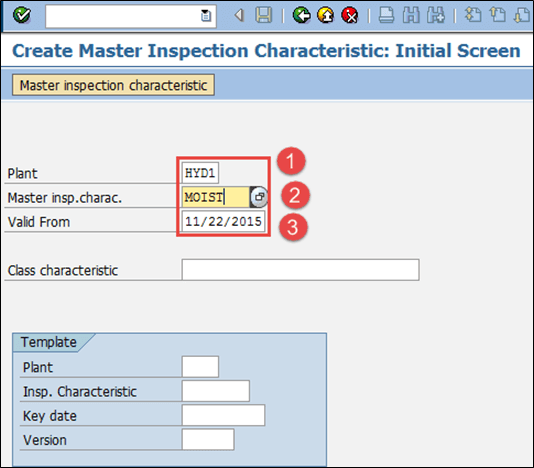
After filling in all the fields, click  or press Enter to go to the next screen.
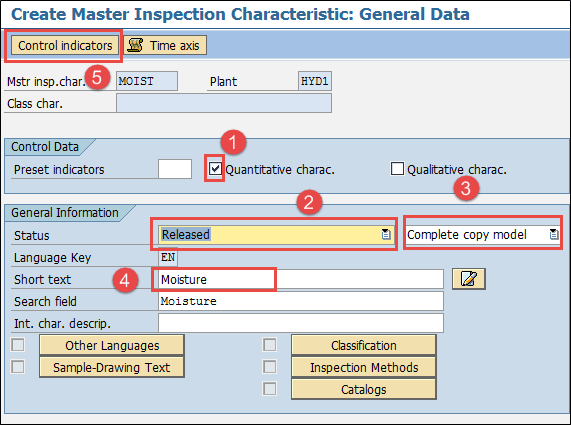
Step 2) Maintain the master inspection characteristic general data.
- Tick the Quantitative checkbox if you are creating a quantitative characteristic that can be measured.
- Enter the Status as “Released”.
- Enter “Complete copy model”, because the MIC data has to be maintained completely.
- Enter a Short text of your choice.
- Press the Control indicators button to maintain further data such as the lower and upper limits, that is, the specification range in which the material is accepted.
Step 3) Maintain the upper and lower limits.
After you press Control indicators, a small pop-up opens for the limit data.
- Flag the checkbox for the Lower specification limit.
- Flag the checkbox for the Upper specification limit.
- Flag the checkbox for the sampling procedure, because a sampling procedure is used for this MIC.

Press Enter to move to the next SAP screen.
Step 4) Maintain the absolute lower and upper limit data.
- Input the number of decimal places and the unit of measurement for the MIC.
- Input the lower specification limit as 4.
- Input the upper specification limit as 4.5.

Press Enter to return to the initial SAP screen and save the data. The status bar then shows the message  .
.
How to Create Inspection Methods in SAP (QS31)
Step 1) From the SAP Easy Access menu, open transaction code QS31.
- Enter the Plant code.
- Enter the inspection method code that has to be created.
- Enter the valid-from date, which is the date from which the inspection method is valid.
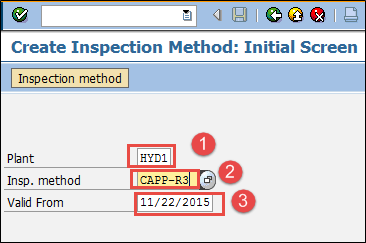
Press Enter to move to the next SAP QM screen.
Step 2) In this SAP QM screen:
- Enter the Status as “Released”.
- Enter the short text of the inspection method and the search field used to look it up.

Press the Save button to save the inspection method.
How to Create a Sampling Procedure in SAP (QDV1)
Step 1) From the SAP Easy Access screen, open transaction QDV1.
- Input the sampling procedure code that has to be created.
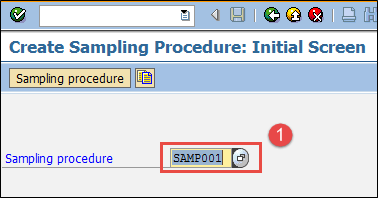
Step 2) After filling in all the fields, click the check mark  in the top menu to go to the next SAP screen.
- Choose the sampling type as “Fixed sample”. You can also select 100 percent inspection or a sampling scheme.
- Select the Valuation mode “Attributive inspection nonconforming units”, which defines the rules for accepting and rejecting the characteristic.
- Press the next button to move to the next SAP screen.

Step 3) In this SAP screen:
- Press the “Sample” button, which opens a small pop-up screen used to define the sample size.
- Define the sample size as “5”.

Press the Save button to save the sampling procedure.
How to Create an Inspection Plan in SAP QM (QP01)
Step 1) From the SAP Easy Access screen, open transaction QP01.
- Input the material code for which the inspection plan is created.
- Enter the Plant code.
- Enter the key date (valid from) from which the inspection plan is valid.
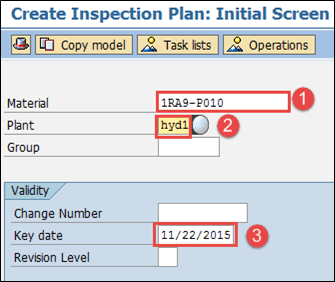
Press Enter to move to the next screen.
Step 2) In this SAP screen, maintain the header data.
- Input the Usage as “5”, which makes the plan valid for goods receipt, and the Status as “4”, which means the plan is released.
- Enter the Lot size as “99999999”, so the plan is valid for an inspection lot quantity up to 99999999.
- Press the “Operations” button to move to the next screen.

Step 3) In this SAP screen, maintain the operation data in which the inspection characteristics are held.
- Input the quality lab work center.
- Enter the control key as “QM01”, which means the operation is meant for a quality check.
- Press the “Inspection Characteristics” button to move to the next SAP screen.

Step 4) In this SAP screen, maintain the inspection characteristics for the operation.
- Input the master inspection characteristic name “MOIST”.
- Enter the inspection method.
- Input the sampling procedure that determines the sample.

Once all the fields are entered, the lower and upper limits are populated automatically from the MIC. Press the Save button to save the inspection plan for the material.
How to Create Quality Info Records in SAP (QI01)
Step 1) From the SAP Easy Access screen, open transaction QI01.
- Input the material code for which the quality info record is created.
- Enter the vendor code.
- Input the plant code.

Press Enter to move to the next screen.
Step 2) In this SAP screen, maintain the release data.
- Input “Release until” date, up to which the material may be ordered from this vendor.
- Enter the Block function if you want to block this material from being ordered from this particular vendor.

Press the Insp. Control tab to move to the next screen.
Step 3) In this SAP screen, maintain the inspection control data.
- Input the Inspection control as “No Inspection” if you do not want to inspect the material for this particular vendor.
- If you want to use source inspection, flag the checkbox for source inspection and enter the source inspection type as “01”, otherwise leave it blank.

Press the Save button to save the quality info record. The status bar confirms the entry:

Troubleshooting SAP QM Master Data Errors
- Before an inspection plan or a quality info record is created, the master inspection characteristic, sampling procedure, inspection method, material master and vendor master must already exist in the SAP system.
- If an inspection lot finds no plan, check that the plan Status is 4 (released), that its Usage matches the inspection type, that the key date falls inside the validity period, and that the material is assigned to the plan.
- If a characteristic is rejected in QP01, its status is usually still “created” rather than “released”, or its valid-from date is later than the key date of the plan.
- A sampling procedure can only be entered against a characteristic whose control indicators allow one, which is the flag set in Step 3 above.
- If a quality info record is ignored during procurement, QM in Procurement is probably not active in the Quality Management view of the material master.
