Pipe, Grep and Sort Command in Linux/Unix with Examples
 Editorial Team
⚡ Smart Summary
Pipe, grep, and sort commands in Linux and Unix chain and filter text: a pipe feeds one command’s output into the next, grep searches for patterns, and sort arranges lines, while filters transform the data between them.
Pipes, grep, and sort are among the most-used tools on the Linux command line, because they let you connect small commands into one powerful workflow. This page explains each one with worked examples, then shows how filters tie them together.
What is a Pipe in Linux?
The pipe is a command in Linux that lets you use two or more commands such that the output of one command serves as input to the next. In short, the output of each process feeds directly as input into the next one, like a pipeline. The symbol ‘|’ denotes a pipe.
Pipes help you mash up two or more commands at the same time and run them consecutively. You can use powerful commands that perform complex tasks in a jiffy.
Let us understand this with an example.
When you use the ‘cat’ command to view a file that spans multiple pages, the prompt quickly jumps to the last page of the file, and you do not see the content in the middle.
To avoid this, you can pipe the output of the ‘cat’ command to ‘less’, which shows you only one scroll length of content at a time.
cat filename | less
An illustration would make it clear. The diagram below shows how a pipe passes the output of one command into the next.

‘pg’ and ‘more’ commands
Instead of ‘less’, you can also use the pg or more command:
cat Filename | pg
or
cat Filename | more
You can then view the file in digestible bits and scroll down by simply hitting the enter key. The screenshot below shows a file paged with the more command.

The ‘grep’ command
Suppose you want to search for particular information, such as a postal code, in a text file.
You may manually skim the content yourself to trace the information. A better option is to use the grep command. It scans the document for the desired information and presents the result in the format you want.
Syntax:
grep search_string
Let us see it in action. The screenshot below shows the result of the search.

Here, the grep command has searched the file ‘sample’ for the strings ‘Apple’ and ‘Eat’. The following options can be used with this command.
| Option | Function |
|---|---|
| -v | Shows all the lines that do not match the searched string |
| -c | Displays only the count of matching lines |
| -n | Shows the matching line and its number |
| -i | Matches both upper and lower case |
| -l | Shows just the name of the file with the string |
Let us try the ‘-i’ option on the same file used above. The screenshot below shows the case-insensitive result.

Using the ‘-i’ option, grep has filtered the string ‘a’ (case-insensitive) from all the lines.
The ‘sort’ command
This command helps in sorting out the contents of a file alphabetically.
The syntax for this command is:
sort Filename
Consider the contents of a file, shown with cat below.

Running the sort command arranges those lines in alphabetical order, as shown below.

There are extensions to this command as well, and they are listed below.
| Option | Function |
|---|---|
| -r | Reverses sorting |
| -n | Sorts numerically |
| -f | Case-insensitive sorting |
The example below shows reverse sorting of the contents in file ‘abc’.
.png)
What is a Filter?
Linux has a lot of filter commands such as awk, grep, sed, spell, and wc. A filter takes input from one command, does some processing, and gives output.
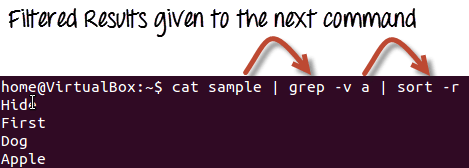
When you pipe two commands, the ‘filtered’ output of the first command is given to the next. The diagram below illustrates how a filter fits into a pipeline.
.png)
Let us understand this with the help of an example. We have the following file ‘sample’, shown with cat below.

We want to highlight only the lines that do not contain the character ‘a’, but the result should be in reverse order. For this, the following syntax can be used:
cat sample | grep -v a | sort -r
Let us look at the result, shown in the screenshot below.