
What is Database? Definition & Types
 Marcus Allen
⚡ Smart Summary
What is a Database? A database is a systematic, structured collection of data that supports electronic storage, retrieval, and management. It powers everyday systems from phone directories to social networks, and is operated through software called a Database Management System (DBMS).
What is Data?
In simple terms, data are facts about an object of interest. Your name, age, height, and weight are all data about you. Pictures, images, files, and PDFs can also count as data because each carries information that can be stored and processed.
What is a Database?
A database is a systematic collection of data. Databases support the electronic storage, retrieval, and manipulation of data, making data management easy at scale.
Consider a few familiar examples. An online telephone directory uses a database to store people, phone numbers, and contact details. An electricity provider uses a database to handle billing, customer issues, and fault history. Facebook stores members, friendships, posts, messages, ads, and far more — all of it lives inside databases. The pattern is the same across industries: organise information so applications and people can query it reliably.
Types of Databases
The most common database types are summarised below. Each is suited to a particular data shape and workload.
Distributed databases
A distributed database spreads data across multiple sites or locations. Each site keeps its own slice, while clients see one logical database. The model is common in global applications that need low latency and local availability.
Relational databases
A relational database stores data in tables with rows and columns and uses keys to relate one table to another. Often called an RDBMS, it remains the most popular DBMS family in the market. Examples include MySQL, Oracle Database, PostgreSQL, and Microsoft SQL Server.
Object-oriented databases
Object-oriented databases store data as objects, each carrying attributes and methods that define what operations are allowed on the data. They map cleanly to object-oriented programming languages and remove the need for an ORM layer.
Centralized database
A centralized database keeps every record on a single central server. Users connect from many locations to the same store, which simplifies administration but makes the server a single point of contention.
Open-source databases
Open-source databases publish their source code under a permissive licence so anyone can use, modify, and redistribute them. MySQL, PostgreSQL, SQLite, MariaDB, and MongoDB are widely deployed examples.
Cloud databases
A cloud database is optimised for virtualised, on-demand infrastructure. It is delivered as a managed service, scales storage and compute elastically, and offers high availability through built-in replication. Examples include Amazon RDS, Azure SQL Database, and Google Cloud Spanner.
Data warehouses
A data warehouse centralises historical and cumulative data from many source systems to support decision making, reporting, and forecasting. It simplifies analytics by giving the organisation a single, trusted version of the truth.
NoSQL databases
NoSQL databases handle very large, often unstructured datasets that do not fit neatly into rows and columns. Document, key-value, column-family, and graph stores each address a different access pattern and provide horizontal scalability that traditional relational databases find difficult to match.
Graph databases
A graph database uses graph theory — nodes and edges — to store and query relationships directly. It is ideal for fraud detection, recommendation engines, and social-network analysis where the connections between entities matter as much as the entities themselves.
OLTP databases
OLTP (Online Transaction Processing) databases focus on high-throughput, low-latency transactions in multi-user environments. They guarantee ACID properties and are tuned for many small reads and writes that drive operational systems such as point-of-sale and banking applications.
Personal database
A personal database stores data on a single computer for a single user or small team. Microsoft Access and SQLite are typical examples.
Multimodal database
A multimodal database supports several data models — for example, document, graph, and key-value — inside a single engine. ArangoDB and Microsoft Azure Cosmos DB are popular multimodal options.
Document/JSON database
In a document-oriented database, each record is a self-contained document, usually in JSON, BSON, or XML. A single document can hold richly nested data and varying fields, which makes the model flexible for fast-moving applications. MongoDB and Couchbase are well-known examples.
Hierarchical database
A hierarchical database uses a tree structure with parent-child relationships. Nodes represent records and branches represent fields. The Windows Registry on Windows XP and IBM IMS are classic examples of hierarchical databases.
Network database
A network DBMS supports many-to-many relationships between records, producing more complex structures than the hierarchical model. RDM Server is an example of a database management system that implements the network model.
Database Components
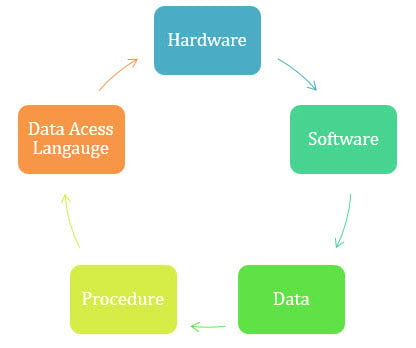
Database components.
Every database is built from five components working together:
Hardware
Hardware is the physical layer — computers, I/O devices, storage media, and networking. It provides the interface between the database and the rest of the world.
Software
Software covers everything that manages and controls the database: the DBMS itself, the operating system, the network software that lets multiple users share data, and the applications that read and write through the DBMS.
Data
Data are the raw facts, observations, numbers, symbols, and images that the database stores. Raw data alone is meaningless; the database organises and processes it into useful information.
Procedures
Procedures are the documented instructions and rules that govern how the database is designed, operated, and maintained. They tell administrators and users how to run the system reliably.
Database access language
A database access language — most often SQL — lets users and applications insert, update, delete, and query data. Users issue specific commands that the DBMS parses, plans, and executes against the underlying storage.
What is a Database Management System (DBMS)?
A Database Management System (DBMS) is the software layer that lets users define, store, retrieve, update, and secure data. A DBMS coordinates access between many users and applications, enforces integrity, and controls who can see or change what.
DBMS technology is not new — Charles Bachman’s Integrated Data Store (IDS), built at General Electric in the early 1960s, is widely credited as the first DBMS. Since then, the field has evolved through hierarchical, network, relational, object-oriented, and NoSQL models, each addressing the next generation of data workloads.
History of Database Management Systems
The milestones below trace the evolution of database technology.
- 1960s — Charles Bachman designs the first DBMS (Integrated Data Store) at General Electric.
- 1968 — IBM ships Information Management System (IMS), one of the earliest hierarchical DBMSs.
- 1970 — Edgar F. Codd publishes “A Relational Model of Data for Large Shared Data Banks”, introducing the relational model.
- 1976 — Peter Chen formalises the Entity-Relationship (ER) model.
- 1980s — The relational model becomes the dominant database paradigm and SQL is standardised.
- 1985 — Object-oriented DBMSs appear to fit the rise of OOP languages.
- 1990s — Object-relational features arrive in mainstream RDBMSs.
- 1992 — Microsoft releases the first version of Microsoft Access for personal databases.
- 1995 — Web applications begin to drive Internet-scale database use.
- 1997 — XML enters databases as both a format and a query target.
- 2009 — The term NoSQL gains traction as document, key-value, and graph stores grow rapidly.
- 2010s and beyond — Cloud-native and distributed SQL databases (Aurora, Spanner, CockroachDB) emerge.
Advantages of DBMS
A well-implemented DBMS gives organisations several practical benefits:
- Offers many techniques to store and retrieve data efficiently.
- Balances the needs of multiple applications that share the same data.
- Provides uniform administration procedures.
- Shields application programmers from storage details.
- Delivers data integrity and security through constraints and access control.
- Schedules concurrent access so only valid operations succeed.
- Reduces application development time through reusable services.
Disadvantages of DBMS
The DBMS model has trade-offs too:
- Hardware and software costs can be substantial.
- Most systems are complex, so users and administrators need training.
- Centralising data into a single database creates a high-value target for outages, corruption, or attack.
- Concurrent access requires careful design to avoid lost updates and deadlocks.
- A DBMS is not designed for heavy numerical computation; specialised tools handle that workload better.
