
What is Linux Operating System? Introduction to Linux OS
 Editorial Team
⚡ Smart Summary
Linux is an open-source operating system built around a kernel created by Linus Torvalds in 1991, valued for being free, secure, and highly customizable, and it now powers servers, phones, and desktops worldwide.

Linux is one of the most widely used operating systems in the world, quietly running servers, smartphones, and personal computers. This page introduces what Linux is, why every computer needs an operating system, how Linux began, the benefits it offers, and how it compares with Unix.
What is Linux?
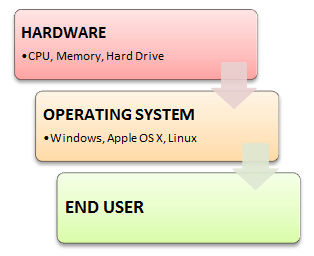
Linux is an operating system, or a kernel, distributed under an open-source license. Its functionality list is quite like Unix. The kernel is a program at the heart of the Linux operating system that takes care of fundamental tasks, such as letting hardware communicate with software.
The illustration below shows where the operating system sits between your computer hardware and the programs you use.
Why do you need an OS?
Every time you switch on your computer, you see a screen where you can perform different activities such as writing, browsing the internet, or watching a video. What is it that makes the computer hardware work like that? How does the processor on your computer know that you are asking it to run an mp3 file?
Well, it is the operating system, or the kernel, which does this work. So, to work on your computer, you need an Operating System (OS). In fact, you are using one as you read this on your computer. Now, you may have used popular operating systems like Windows or Apple OS X, but here we will learn an introduction to the Linux operating system, a Linux overview, and what benefits it offers over other OS choices.
Who created Linux?
Linux is an operating system, or a kernel, which germinated as an idea in the mind of the young and bright Linus Torvalds when he was a computer science student. He used to work on the Unix OS (proprietary software) and thought that it needed improvements.
However, when his suggestions were rejected by the designers of Unix, he thought of launching an OS that would be receptive to the changes and modifications suggested by its users.
The image below shows Linus Torvalds, who created the Linux kernel.

History of Linux
So Linus devised a kernel named Linux in 1991. However, he would need programs like a file manager, document editors, and audio-video programs to run on it, something like having a cone but no ice cream on top.
As time passed, he collaborated with other programmers in places such as MIT, and applications for Linux started to appear. So, around 1991, a working Linux operating system with some applications was officially launched, and this was the start of one of the most loved and open-source OS options available today.
The earlier versions of Linux OS were not so user-friendly, as they were used by computer programmers, and Linus Torvalds never had it in mind to commercialize his product.
This definitely curbed Linux’s popularity as the commercially oriented operating system Windows became famous. Nonetheless, the open-source aspect of the Linux operating system made it more robust.
Linux gets its due attention
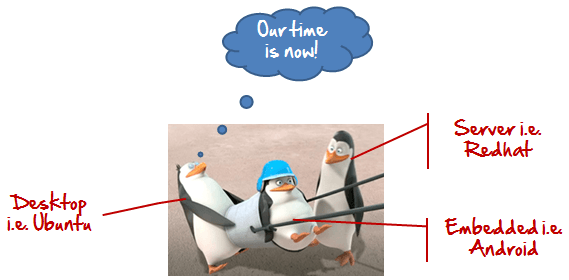
The main advantage of Linux was that programmers were able to use the Linux kernel to design their own custom operating systems. With time, a new range of user-friendly operating systems stormed the computer world. Now, Linux is one of the most popular and widely used kernels, and it is the backbone of popular operating systems like Debian, Knoppix, Ubuntu, and Fedora. Nevertheless, the list does not end here, as there are thousands of Linux versions based on the Linux kernel that offer a variety of functions to users.
The graphic below captures how Linux moved from a hobby project into the mainstream.
The Linux kernel is normally used in combination with the GNU project by Dr. Richard Stallman. All modern distributions of Linux are actually distributions of GNU/Linux.
Benefits of Linux
Linux OS now enjoys popularity at its prime, and it is famous among programmers as well as regular computer users around the world. The image below sums up the key benefits Linux offers. Its main benefits are:

- It offers a free operating system. You do not have to shell out hundreds of dollars to get the OS, unlike Windows.
- Being open-source, anyone with programming knowledge can modify it.
- It is easy to learn Linux for beginners.
- The Linux operating systems now offer millions of programs and applications to choose from, most of them free.
- Once you have Linux installed, you no longer need an antivirus. Linux is a highly secure system, and a global development community constantly looks for ways to enhance its security. With each upgrade, the OS becomes more secure and robust.
- Linux is the OS of choice for server environments due to its stability and reliability. Mega-companies like Amazon, Facebook, and Google use Linux for their servers, and a Linux-based server can run non-stop without a reboot for years on end.
Is it for me?
Users who are new to Linux usually shun it by falsely considering it a difficult and technical OS to operate. To state the truth, in the last few years Linux operating systems have become a lot more user-friendly than their counterparts, such as Windows, so trying them is the best way to know whether Linux suits you or not.
The graphic below poses the question many newcomers ask before switching.

There are thousands of the best Linux OSs available based on the Linux kernel; most of them offer state-of-the-art security and applications, all for free.
This is what Linux is all about, and now we will move on to how to install Linux and which distribution you should choose.
Then Why Linux?
Unix is called the mother of operating systems, and it laid the foundation for Linux. Unix is designed mainly for mainframes and is used in enterprises and universities, while Linux is fast becoming a household name for computer users, developers, and server environments. You may have to pay for a Unix kernel, whereas Linux is free.
However, the commands used on both operating systems are usually the same. There is not much difference between Unix and Linux. Though they might seem different, at the core they are essentially the same, since Linux is a clone of Unix. So learning one is the same as learning the other. You can explore this comparison in detail in the difference between Unix and Linux.
