
Digital Marketing Tutorial: Online Course
 Editorial Team
⚡ Smart Summary
Digital Marketing promotes products and services through online channels such as search engines, social media, email, and mobile apps. This free online course walks beginners through every core channel, from SEO fundamentals to paid advertising and analytics.
What is Digital Marketing?
Digital Marketing is a branch of marketing that mainly involves technologies like the internet, computers, and mobile phones to promote products and services online. It is a well-targeted, conversion-oriented, and interactive marketing approach to reach customers and transform them into clients. The purpose of digital marketing is to promote your business online to reach the right audience that can become your customers.
Recent studies show that Digital Marketing is the fastest growing sector in the tech industry. This course is geared to make you a digital marketing pro.
👉 Introduction to Digital Marketing
Throughout the centuries, marketing has always remained customer-centric; the way of delivering services and products has changed, but the strategies remain the same. Technology brought revolution to all fields, and marketing is no exception, moving from print media to digital media. The rapid growth of digital marketing is a direct consequence of the penetration of the internet and social media sites.

Unlike traditional marketing methods, you do not have to go door to door to convince people how good your product is; instead, the ‘Likes’ on Facebook and ‘Followers’ on Twitter (now X) do this job, as the engagement metrics shown below illustrate.

Digital Marketing revolves around the four pillars illustrated in the diagram below:

- Social Media: Interact with your customer base using social sites like Facebook and Twitter. Use it as a support channel, a launchpad for new products, and a place to announce discounts and exclusive coupons to drive sales.
- SEO: SEO or Search Engine Optimization is a technique that allows a site to get more traffic from search engines like Google, Microsoft Bing, Yahoo, etc. It is divided into two categories: off-page SEO and on-page SEO.
- Content Marketing: The goal of content marketing is to retain and attract customers by consistently creating valuable and relevant content with the intention to engage the targeted audience in order to drive profitable customer action. Content marketing is valuable for companies because the information people find online impacts their purchase decisions.
- Advertising: Online advertising has a multitude of benefits over traditional advertising, and the chief difference is targeting. Most online marketing platforms accept banner/text/rich media ad formats which are billed in three ways: CPM (Cost per Thousand impressions), CPL (Cost per Lead) and CPC (Cost per Click). In CPM, the advertiser pays for each 1000 ad views that the ad gets, while CPC is the amount of money paid by the advertiser to search engines for a single click on its advertisement that brings one visitor to its website. For every click, the advertiser pays the search engines and online publishers. Another form of advertising is Cost per Lead, in which the advertiser pays for an explicit sign-up from a consumer who is interested in the advertiser’s offer.

Zoho PageSense
Zoho PageSense is an AI-powered website optimization and personalization platform that helps digital marketers track visitor behavior, run A/B tests, and boost conversions. It offers heatmaps, session recordings, funnel analysis, and smart pop-ups to improve user engagement across your site.
How to Build a Digital Marketing Strategy
Before diving deeper into individual channels, it helps to understand how the four pillars fit together in a practical plan. Follow these steps to build a beginner-friendly digital marketing strategy:
- Define a measurable goal: Decide whether you want leads, sales, app downloads, or brand awareness, and attach a number and deadline to it.
- Identify your audience: Document who your buyers are, which platforms they use, and what problems they search for online.
- Pick two or three channels: Beginners get better results by mastering a small channel mix instead of spreading budget across every platform.
- Create a content calendar: Plan blog posts, social updates, emails, and ads at least one month ahead so campaigns stay consistent.
- Set a budget split: A common starting ratio is 60% on proven channels, 30% on growth experiments, and 10% on testing new platforms.
- Measure and adjust: Review analytics every week, stop what underperforms, and reinvest in what converts.
The table below compares the main channels you will learn in this course:
| Channel | Typical Cost | Speed of Results | Best For |
|---|---|---|---|
| SEO | Low (time-intensive) | Slow (3–6 months) | Long-term organic traffic |
| Paid Advertising (PPC) | Medium to High | Immediate | Quick sales and testing offers |
| Social Media | Low to Medium | Moderate | Brand awareness and community |
| Email Marketing | Low | Fast (with an existing list) | Retention and repeat sales |
With a strategy in place, the next sections explain each channel in depth, starting with the most durable one: search engine optimization.
👉 Search Engine Optimization – SEO Tutorial
What is SEO?
SEO is the process of improving the structure, content, and organization of your site so that search engines can index it correctly. It also involves doing promotional activities to boost your search engine rank.

Before we look into this any further, let’s first understand –
How Does a Search Engine Work?
Almost every search engine does the following: Spiders or Web Crawling, Indexing & Displaying.
-
Spiders & Crawlers: Spiders crawl over the web in search of content (hence the name spider). Once they finish scanning and identifying the relevant content, they copy the searched content and store it in a search engine’s database. While they are scanning one web page, they make note of links to other web pages from this page and later scan the linked web pages as well, and this process keeps going on for all webpages. (For example: Page A links to Page B which in turn links to Page C. Here, Pages A, B, and C will be stored, as well as any page which is linked from Page C.)
A web crawler will collect the following (not limited to) information from a web page, as shown below –

-
Indexing: Now that website information is stored in the search engine’s database, how will it know which page to put on top of the search results and which on last? Enter indexing.
Ranking is done based on keywords.
As the engines crawl and index the contents of pages around the web, they keep track of those pages in keyword-based indices. The search engines have millions and millions of smaller databases, each centred on a particular keyword term or phrase.
Next question: how does the search engine know which keyword to rank a page for? To determine this, the search engine looks into the content of the page, the page title, the page URL, and other factors.
Next question: suppose there are 20,000 webpages each catering to the same keyword, say football. How does the search engine determine which page to display as #1, #2, and so on? Enter search engine ranking factors, which consider domain age, domain trust, topicality, the number and relevance of external links pointing to the page, social signals, and many more. This will be covered in detail later in this course.
-
Displaying: The last step in search engine activity is retrieving the best-matched results for search queries, which is displaying the search result in the browser.

Role of Keywords in SEO
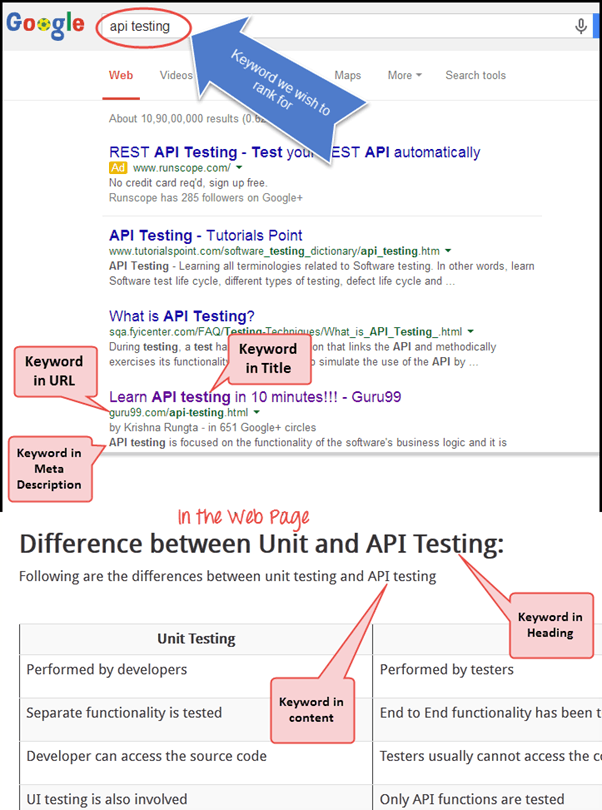
The keyword is actually the key to SEO. A keyword is what a person or user enters into a search engine to find specific information, as the example below shows.

Keywords form part of a web page’s metadata and help search engines match the page with an appropriate search query.
- Keyword Density
It is often misunderstood that including more keywords which describe your website can eventually help the search engine to bring your website to the top. In fact, more keywords can sometimes get you penalized for “spamming” or keyword stuffing. So, using keywords wisely from an SEO point of view becomes mandatory. So what is the ideal frequency of a keyword? It was traditionally believed that for best results, keyword density should be 3-7% for major keywords and 1-2% for minor keywords. (Note: modern search engines no longer reward any fixed keyword density, so treat these figures as legacy guidance and always write naturally for readers first.)
- Keywords in Special Places, Page Titles & Headings
It is imperative where your keyword exactly appears on your web page. It counts more if you have keywords in the “page title, the headings, the paragraphs” and especially in the URL. For instance, if your competitor’s web page has the same number of keywords as your webpage but you have included the keywords in your URL, then your webpage has more chances to stand out than your competitor’s.
Placing the keywords in the “Title of the page” or “Heading tags” is considered the best place to put your keywords. The reason behind this is that the search engine looks first for the keywords in your “Title tag” and then in the “Heading tag”. The standard title tag keyword length is around 70 characters max.
In order for a title tag to be most effective, it needs to be supported in other areas of each web page like the “headline”. Your headline should be the largest headline on the page, rich with primary keywords, and you can also include secondary keywords in your headline. There is no limitation on headline length, but around 7-8 words is still preferred. For keywords there are some set criteria for best results, as shown in the table below.
| Keywords | Criteria for best SEO result |
|---|---|
|
|
|
|
|
|
|
|
|
|
|
|
Word Stemming
Search engines like Google use word stemming for search queries. Word stemming allows all forms of the word — singular, plural, verb form — as well as similar words for a given search query. For example, if someone searches for “Mountain track”, it will return search results with all variations of that phrase like “Mountain tracking“, “Mountain trackers”, and so on.
Ranking and Ranking Factors
Meta-tags: One of the earliest methods to optimize a website high in results was to offer meta data to the search engines. Meta data is nothing but the data about the data found on that page.
There are two important meta-tags or meta-data:
- Meta description
- Meta Keyword
Both the Meta keyword and Meta description can contribute to your search engine ranking. The meta description tag is intended to be a brief and concise summary of your page’s content. The limitation for the meta-description is about 170-200 characters, and you should write a unique description for each page of your site. (Note: Google has not used the meta keywords tag for ranking since 2009, but a good meta description still improves click-through rates.) The meta description format would look something like this:
<meta name=”description” content= “Brief description of the contents of your page.”>
Example:
Meta-description for website "guru99"
<meta name=”description” content=”Discover free online tutorials on Guru99.com to get ahead in your career. Start taking advantage of online learning today itself” >

While the meta keywords format would look something like this
<meta name="keywords" content="keywords, keyword, keyword phrase,etc.">
Example:
Meta-keywords for website “guru99”
<meta name=”keywords” content = “free online education,SAP testing, etc.”>
Link Building
On Page & Off Page Optimization
SEO optimization is primarily classified into two sections: on page optimization and off page optimization.
Positive Off Page Optimization
Off page SEO is the process of boosting your search engine rankings by getting external links pointing back to your site. The more and better links you can get to your webpage, the better it will rank in search results.
A quality backlink is considered good from the search engine’s point of view and has the maximum effect on your off page SEO. A quality backlink has properties like:
- Incoming links from high page rank web pages
- Use of different anchor texts
- Dofollow or Nofollow links
- Getting backlinks from blogs or websites in a similar niche
- Avoiding black hat SEO
- Good Domain Authority
- High Trust
- High relevance in the subject matter of the linking and destination domains
- Site Age — shows site stability
What you should NOT do for Negative Off Page
- Link Buying: If you get caught, the penalty is huge
- Cloaking: Try to prevent cloaking (presenting a different page to the search engine than your original web page)
- Domain Hi-jacking: It is when someone takes your domain away or misuses your domain without your knowledge by changing the registration of the domain name. Never do this; it’s a criminal offence.
- Other Black Hat Techniques
Positive On Page Optimization
On page optimization directly deals with the content and structure of the website. On page optimization focuses on:
- Unique title tags and headlines
- Keyword frequency in the:
- URL
- Body texts
- Headings
- Synonyms
- Copywriting
- Adding descriptions to images
- Good internal navigation
What you should not do for Negative On Page
- Avoid the over optimization penalty (OOP) by not repeating keywords very frequently
- Linking to a bad neighbourhood: Do not link to link farms or any other site with a bad page rank
- Avoid poison words: The word “link” is considered a poison word or stop word in a title tag. There are many other poison words that you should avoid
- Avoid stealing text or images from other domains
- Avoid excessive cross linking
- Avoid re-directing users to another page through refresh meta-tags; don’t immediately send your visitor to another page unless he/she clicked on it
For the best SEO results for your site, always maintain it regularly, as you won’t rank as high in search engines if your site is slow or has broken links.
Google Panda
 |
Google Panda is a Google search results ranking algorithm; it aims to lower the rank of “low quality sites” or “thin sites” and return higher quality sites near the top of the search results. In other words, it does the verification of the “content” of websites. |
How to escape the Panda’s Claw
- Try to avoid link building with sites which are already ranked as low quality websites
- Watch out for sites that are peppered with Google AdSense
- Avoid sites with little or no moderation, especially those sites which accept your comments or blog posts quickly on their websites
Google Penguin

Another algorithm update from Google is “Google Penguin”, which penalizes those sites that breach Google’s webmaster guidelines set by the search engines. This programme is specifically designed to target those sites that practice black-hat SEO techniques like keyword stuffing, duplicate content, and bulk link building, to name a few. Penguin does not damage the site unless it is spammed with too many keywords.
How to get away from Penguin’s Pecking
- Remove all links from guest blogging networks
- Remove links from spam sites
- Remove all exact match anchor links
- Remove all optimized anchor links
- Nofollow guest post links
SEO Audit and Link Removal
SEO audit and link removal are very important for running your website successfully, as search engines modify their algorithms from time to time. For the success of your website, it is necessary to keep pace with the current guidelines and requirements of search engines. Ignoring a link audit may put your website at high risk.
For link audits and link removal, many online tools are available like Google Search Console (formerly Google Webmaster Tools), MOZ, Moz Link Explorer (formerly Open Site Explorer), Majestic SEO, etc. They will scrutinize ‘backlinks’ and provide some helpful metrics like:
- Specific URLs that link to your site
- The pages on your site that each of these URLs links to
- Anchor text used by each incoming link
- Whether each incoming link is follow or no-follow
While removing low quality links, you have to be careful, as some of them may be highly relevant to your website and come from websites on the upswing. In the future, they might become an important source of traffic.
What are the characteristics of ‘bad links’
- Links with the same anchor text coming from multiple sites
- Links from sites that are unrelated to your niche
- Links from low traffic and low PR (Page Rank) sites
- Links from article directories or sites that look like link farms
- Links from link exchanges
- Paid links
- Links from sites that are not in the Google Index
- Spammy links in blog comments
In case a site owner does not remove bad links pointing to your website, you can use Google’s disavow tool. The disavow tool will tell Google to ignore those bad links.
The disavow tool is applicable in conditions like:
- When you get a manual action
- A webmaster won’t remove the bad links to your site or charges you to remove them
- When you see links pointing to your site that you do not want to be associated with
- When you are worried about negative SEO
- You saw a link bomb attack and are afraid it might hurt your site
- You are afraid someone will submit a spam report about you
- You see your ranking dropped and you think it has to do with an algorithm Google ran, for example, the Penguin algorithm
Content Marketing Essentials
Content marketing was introduced earlier as one of the four pillars, and it deserves a closer look because it fuels both SEO and social media. Content marketing means publishing useful material — blog posts, comparison articles, videos, infographics, podcasts, and email newsletters — that answers the questions your audience is already searching for. Instead of interrupting people with ads, you earn their attention by being genuinely helpful.
Strong content supports every other channel in this course. Search engines reward pages that satisfy intent, which lifts your SEO rankings. Social networks amplify material that people want to share, which grows your reach without ad spend. Email lists stay engaged when each message delivers value rather than a sales pitch.
To start, pick one format you can produce consistently, map each piece to a keyword or customer question, and always end with a clear next step such as a sign-up form or product page. Quality and consistency beat volume: one well-researched article per week outperforms daily thin posts that Google Panda may flag as low quality.
With content working alongside search, the next channel to master is social media.
👉 Social Media Marketing: Tips and Secrets
Social network marketing is about using social media sites as marketing tools for the optimization of revenue or increasing brand exposure. Social media marketing uses strategies like SMO (Social Media Optimization), which can be done in two ways:
a) Adding social media links to content, such as sharing buttons and RSS feeds
b) Promoting sites through social media by updating tweets, blog posts, and statuses

Social Media Marketing helps a company get direct feedback from customers, and preparing with focused social media manager interview questions helps candidates discuss platforms like Twitter, Facebook, Instagram, LinkedIn, and YouTube confidently. The success of social media in marketing is due to the very “personal” interactions between users and service providers.
Facebook Marketing
Facebook features are more detailed than other social networking sites. They allow a product page to provide photos, videos, and longer description options, plus testimonials, as other followers can express their opinion on the product page for others to see. Facebook can link back to the product’s Twitter page as well as send out event reminders. This can be done by connecting to various groups or business groups in your field on Facebook, via the admin page, and by direct messages to admins for site promotion. You can also create your own page where you can upload videos or website information. For example, here we have the “Guru99” Facebook page, which has reached many e-learners through Facebook.

Next, you can also make a group or join a group of your liking. For example, if you are a computer geek searching for a Java computing group, then you can join a Java group where you can ask questions pertaining to Java or share any information related to Java with your group, as shown below.

To facilitate social media marketing and to manage the posting of messages on a regular basis on social sites, automated scheduling tools are used. Hootsuite is one such tool, which gives users an extended facility for automating and scheduling messages, monitoring conversations, and tracking results across multiple networks. For example, here it is shown how different tutorials are set and scheduled for the website Guru99.

Twitter Marketing
Twitter (rebranded as X in 2023) is a micro-blogging service that allows sending and receiving messages from customers. This can help business people contact and communicate with peer groups and with their customers. You can create your personal page on Twitter as well, and you can share your site and information related to it, as in the example below.
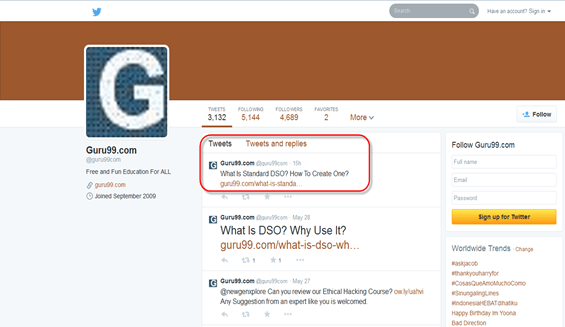
Twitter is a great tool to reach out to new customers/clients without invading their privacy.
LinkedIn Marketing
LinkedIn connects professionals from various backgrounds and provides an opportunity to expand business by connecting business professionals. Through the use of widgets, members can promote their product or website directly to their clients. The “Company Page” is one such feature on LinkedIn which acts like a business resume for your client to get a quick overview of your business, as shown below.

Your personalized webpage on LinkedIn can also be used as an open platform for discussion with peer groups or e-learners. Apart from your personalized page, there are options like joining groups, companies, or particular professional groups (doctors, real estate & infrastructure, job portals, business groups, etc.).
Research has marked LinkedIn on top for social referrals to corporate homepages:
- LinkedIn: 64% of social referrals to corporate homepages
- Facebook: 17% of social referrals to corporate homepages
- Twitter: 14% of social referrals to corporate homepages
Google+ Marketing (Discontinued)
Note: Google shut down the consumer version of Google+ in April 2019. This section is retained for historical reference, and the same community-building ideas now apply to platforms such as Facebook Groups, Reddit, and Discord.

Google+ provided various features which could be used for marketing purposes, like:
- Circles: You could create groups or join circles of your liking
- Stream: Gave instant updates on selected contacts or groups
- Photos: Upload photos
- Sparks: It allowed you to specify your area of interest every time you logged in
- Plus One: It was like a Facebook ‘Like button’, where you could express your opinion about any particular product
- Video Chat and Huddles: Queries could be solved by the video chat facility, which could be used to facilitate live customer interactions, and Huddles allowed group chats.
Apart from these, you could join communities of your interest. For example, Guru99 created a community for software testers where they could use the page for discussion of topics of common interest, as shown below.

Video Promotion
Videos are one of the quickest ways to reach your customers. Visual effects have more impact on customers than print or digital text, enabling you to explain a product more convincingly than any other medium. Marketing on YouTube turns viewers into fans and fans into customers. Also, video pages on your site have more chances to get a good rating, as there is much less competition for video pages.
One way of doing this is to embed multiple videos onto one web page to create a series of related videos. Another option is to re-purpose your videos to produce related material. This includes presentations, screenshots as podcasts and images, transcriptions, and PDF downloads.

To get maximum viewers to your video link, attach the script of your video. YouTube also provides a captioning alternative for videos.
👉 Online Paid Advertising: Ultimate Guide
Organic reach takes time, which is why most strategies pair it with paid campaigns. Pay per click advertising, or PPC, means that you pay each time a customer or user clicks on your ads. You pay up to your bid amount and not more than that. One of the most popular pay per click programs is run by Google and is called Google Ads (formerly known as AdWords).
Pay per click (PPC) marketing is collaborative, complex, and iterative. Pay per click marketing revolves around keywords. The screenshot below demonstrates what a Google ad looks like.

Several aspects are important for a successful PPC campaign:
- First understand the purpose of the PPC campaign
- Research your target audience
- Keyword research
- Perform A/B Testing
- Learn from your competitors’ ad copy before you make your own
- Keyword grouping and organization
- Keywords in the ad should include keywords of the landing page
- Ad group creation and management
-
Managing your PPC campaign
Once you have created your new campaigns, you have to make sure that they remain active and effective, and for that you have to manage your PPC campaign properly
- Continuously analyse the performance of your account
- Add PPC keywords and expand the reach of your PPC campaign
- To improve campaign relevancy, add non-converting terms as negative keywords
- Split up your ad groups into smaller and more relevant groups
- Stop the underperforming keywords
- Modify the content and calls to action (CTAs) of your landing pages to align with individual search queries in order to boost conversion rates
- Don’t send all your traffic to the same page
| Example of a Bad Ad | Example of a Good Ad |
|---|---|
|
|
Facebook Ads
Facebook provides its users a unique facility for advertising their products or services. Facebook gives options like Click to Website, Website Conversion, Page Post Engagement, Page Likes, and so on. Here we have selected the option Click to Website; when you enter the URL of your website and click on continue, it will direct you to the ad page.

Once you enter your URL on the ad page, the next step will be to upload the image for your ad that you want to display when users look at your ad. Here in the screenshot, we have uploaded an image showing “Free Live Selenium Project”.

On the same page you can set the headline for your ads. Here we have put the headline “Live Selenium Testing”. The other feature is the call to action or click button: if you want to display a button on your ad such as Shop Now, Book Now, and so on, you can select this button as per your requirement. Here we have selected the No Button option, as we don’t require a button display on our ad.

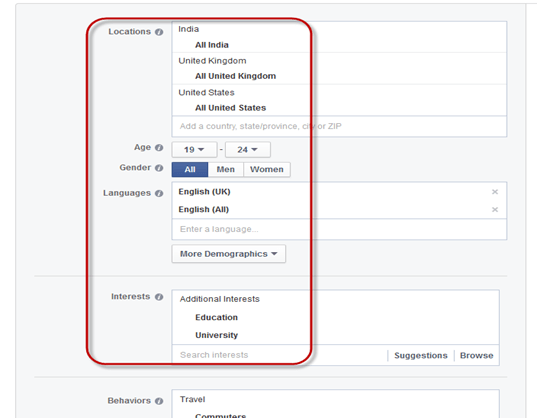
Once you have uploaded the ad image, the next step is to identify and target your audience for the ad. On the ad page you can handle your account as shown in the screenshot below, and you can target a specific audience by narrowing them down according to their location, age, gender, language, and so on. You can also bid from the same page.
Here, we chose countries like India, U.S. and U.K., and we targeted the audience between the ages of 19-24 for our ad and set the rest of the categories accordingly.
The next step is to set the limit for your ad — how much money you want to spend on your ad — and you can set the amount limit accordingly. For instance, if we set the limit at Rs 100 per day, then the ad will display on Facebook until the daily amount runs out.

Bidding and pricing is the next step, where you can select how you want to pay the advertiser — whether you want to pay for the ad by the number of clicks (Bid for clicks) or pay for impressions of your ad (Bid for impressions). After selecting either of these options, you can click on Place Order and you will move to the final step of the Facebook ad.

Once everything is set up, you will proceed to the most important part and final step of the process — yes, you guessed right, money in the bank. As soon as you are done with the payment, your ad will be reviewed and approved by the Facebook team, and soon your ad will start displaying from your account.

For desktop users, the ad will display something like this, as shown in the screenshot below:

While for mobile users, the ad will display like this, as shown below:

Twitter Ads

Twitter ads (now X Ads) are implemented right into the Twitter timeline, so they not only fit in but also do not distract from the viewer’s experience.
Twitter’s Ad Types
Twitter has exceptionally shown its potential in online marketing through promoted ads and products. Some of these ad types are emphasized here.
- Twitter ads with download options: This type of ad allows users to download apps through Twitter and is an attempt to bring lucrative gaming advertisements to Twitter.

- Ads with click to call button: Like Facebook, Twitter introduced a click-to-call button option on Twitter accounts for direct access to the advertisers. It allows an interested consumer to reach their product of interest in a single tap.
-
Promoted hashtags, promoted accounts, promoted tweets:
Promoted hashtags: Promoted hashtags can let people know about your product or topic. Clicking on a hashtag shows all tweets that include that hashtag.
Promoted Account: This can help build followers and generate awareness. Promoted accounts are priced on a CPF (cost-per-follower) basis, with advertisers only paying for new followers gained.
Promoted Tweet: A promoted tweet to any target can bring awareness and engagement and reach followers. Promoted tweets use cost-per-engagement pricing. A Twitter engagement is counted when a user clicks on a promoted tweet (a retweet, reply, favourite, or follow). The advertiser only pays for the first engagement.


Twitter Cards
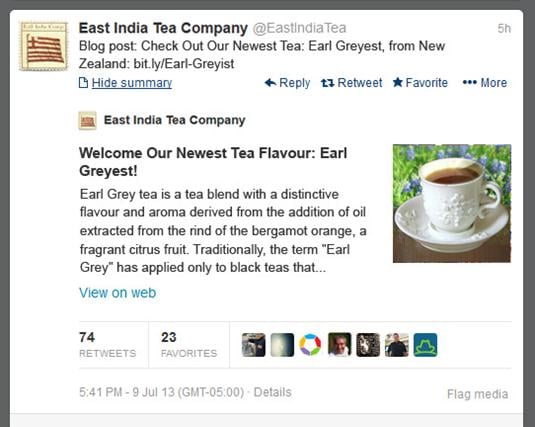
With Twitter Cards, you can attach rich photos, videos, and media experiences to tweets that drive traffic to your website, as shown in the example below.
👉 Email and Mobile App Marketing
With the spread of the internet, e-mail marketing has become a prevalent and common method to reach the maximum number of users with minimum costs. It is a form of direct marketing that uses electronic mail as a means of communication. E-mail marketing is an efficient way to stay connected with clients while at the same time promoting your business and products. With e-mail marketing, you can also track what percentage of people have shown interest in your product or service. Professional e-mail marketing is considered a better approach for an organized marketing strategy. Here are some benefits of e-mail marketing:
- Permission based list building: The creation of an email list by providing a sign-up box for prospective e-mail contacts and confirming their approval with a follow-up email
- Campaign creation: The capability to organize and structure large volumes of e-mail messages by branding, theme, and schedule
- Online reporting: Track the sending of individual email campaigns, at what rates they were opened, and which e-mails were not opened or bounced
- Rich content integration: Addition of graphics, video, audio, and text using templates and a drag-and-drop editor
- List management: The ability to organize, segment, edit, grow, and manage a database of customer or client e-mail contact information
How to implement a successful e-mail marketing campaign
There are some simple tips for effective e-mail marketing:
- To grab the attention of your readers, make sure that your subject line or title stands out. Keep the message short and to the point
- Your logo needs to be highlighted clearly at the top of the e-mail
- Stress the first two or three lines of your e-mail to make an impact
- Provide a link to the landing page on your website
- Collect e-mail addresses at offline events like trade shows, import them into your database, and send them a welcome email
- Promote offers and e-mail sign-ups through your company’s social media pages
Automate Scheduling for E-mail
An e-mail schedule can be of great help when one has to mail the same document or message to different people on a regular basis in bulk. Automation of e-mails is not restricted to sending and receiving mail but also accounts for other activities like deleting unwanted emails automatically, saving e-mail attachments into local folders, e-mail integration with text files or CSV, and so on. AWeber is one such platform where you can manage and automate your mail and schedule it accordingly. As shown in the screenshot below, we have scheduled each message or tutorial on JavaScript to be sent to subscribers by scheduling them one after the other.

There are many e-mail service providers which do not have built-in automation scheduling; for them, extensions are available that can be added on to their mailing system. For example, “Boomerang” can be used in Google Chrome or Firefox for scheduling e-mails. Mailchimp is another mail manager where you can set the date, time, batch delivery, and so on for your mail.

The important feature of Mailchimp is that it keeps a track record of subscribers and gives information like who has looked into your messages, which links they clicked, and from where they accessed the link (geo-location), as shown below.

Mobile App Marketing
While building your mobile app, there are certain things that need to be worked out:
- Growing your social media presence: Building a steady social media following on Facebook, Twitter, and other networks
- Driving engagement across the app: Focus your efforts on encouraging ongoing engagement and keep updating fresh material to prevent users from losing interest in your app
- Increasing app store ratings: Try to improve the rating of your app; this will drive a lot of traffic to your app
- A steady rise in app downloads: There is always more revenue when there are more downloads of your app, so if you have a valuable product, it automatically increases the download rate.
Promo Video for a Mobile App
As part of a viral marketing campaign, a promo video is quite essential.
- Create a promo video which is short and informative.
- Highlight all your app’s key features and point out why your app is better than its competitors
- Also, include screenshots of your app
- Once the video is ready, you have to be active in marketing or distributing that video over the web. Post it on forums, use social sites like Facebook and Twitter to reach the maximum audience, upload it to YouTube, and so on.
In the end, if you create a GREAT mobile app, people will do the marketing for you! Here, we can see the mobile app for the company Guru99 in the screenshots below.


Web Analytics
Web analytics is the study, analysis, and reporting of web data for understanding and optimizing site usage — a topic that frequently appears in lists of digital marketing interview questions for analyst roles. This technique is useful to measure how many people have visited a site, how frequently they have visited, and what route they took to reach your site. Web analytics is very useful from the administrator’s point of view, as they can figure out which areas of the site are popular and which are not, as the dashboard below shows.

Web analytics software can be used to monitor whether your site pages are working properly or not. There are various web analytics tools available in the market; some of them are Google Analytics, Adobe Analytics, Matomo (formerly Piwik), Moz, and so on. A sample report is shown below.

A good analytics tool should meet the following criteria:
- Can you re-analyze data if you decide to change something
- Can you re-analyze subsets of your logs for more focused views
- How many web pages does the solution track per month
- What is the total cost of ownership
- Does it integrate easily with other sources of data
Common Digital Marketing Mistakes to Avoid
Knowing the channels is half the battle; avoiding the traps that waste budget is the other half. Beginners most often stumble on these mistakes:
- Skipping measurement: Running campaigns without analytics or conversion tracking means you cannot tell which spend works.
- Chasing every platform: Posting thin material everywhere performs worse than excelling on two channels your audience actually uses.
- Keyword stuffing: As the Panda and Penguin sections explain, over-optimization triggers penalties instead of rankings.
- Buying links or followers: Purchased authority is detected by algorithms and erodes trust with real customers.
- Ignoring mobile users: The majority of searches and social sessions happen on phones, so slow or non-responsive pages lose conversions.
- No clear call to action: Every ad, email, and post should tell the visitor exactly what to do next.
