
How To Create Sales Order: SAP VA01
 Editorial Team
⚡ Smart Summary
A sales order in SAP is a contract between a customer and a sales organization to supply goods or services. Transaction VA01 creates it, copying data from the customer and material master and optionally from a preceding inquiry or quotation.
What is a Sales Order in SAP?
A sales order is a document in SAP Sales and Distribution that captures a customer request to receive goods or services on agreed terms. It records the sold-to and ship-to parties, materials, quantities, prices, and delivery dates. Because it copies data from the customer and material master, the order enforces consistent pricing, availability, and shipping rules.
The sales order sits at the heart of the order-to-cash cycle: it drives delivery, billing, and revenue. It can be created from scratch or with reference to a preceding inquiry or quotation, which copies the initial data forward.
Background:
A ‘Sales Order’ is a contract between a Customer and a Sales organization for supply of specified goods and/services over a specified time period. All relevant information from Customer master record and Material master record is copied to the sales order. The sales order may be created with reference to a ‘preceding document’ such as an inquiry /quotation. In such case, all the initial data from the preceding document is copied to the sales order. T-code -VA01.
How to Create Sales Order in SAP
Step 1)
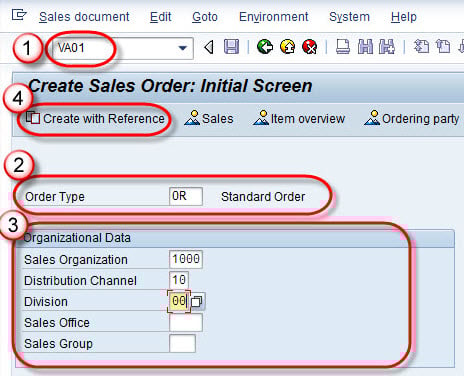
- Enter T-code VA01 in command field.
- Enter order type OR for Standard order.
- Enter Sales organization / Distribution Channel / Division in Organizational Data block.
- Click on create with reference button, for create sales order from Inquiry / Quotation.



Step 2)
- Enter quotation number in quotation tab.
- Select copy button.

Step 3)
- Enter Ship-To-Party / PO number / PO date.
- Enter Req. delivery date.
- We can change order quantity.
- Click on save
 button.
 button.
Step 4) A Message “Standard Order 2000958 has been saved ” is displayed.

Standard Sales Document Types Used in VA01
VA01 can create several standard order types. Selecting the correct type applies the right controls for pricing, delivery, and billing.
| Type | Purpose |
|---|---|
| OR | Standard sales order |
| RO | Rush order with immediate delivery |
| CS | Cash sale |
| RE | Returns order |
| CR | Credit memo request |
Best Practices for Creating Sales Orders
Accurate orders keep the order-to-cash process smooth. Apply these best practices in VA01:
- Copy from references: Create with reference to a quotation to avoid re-entering data.
- Check availability: Review the availability check before confirming delivery dates.
- Validate pricing: Confirm the pricing procedure and any manual conditions.
- Maintain master data: Keep customer and material master records complete and current.
- Review incompletion log: Clear the incompletion log before saving the order.
