
Hello World Program in C++ with Code Explanation
 Editorial Team
⚡ Smart Summary
The C++ Hello World program is the simplest way to start coding in C++: it prints the text “Hello World” to the screen. Here you will learn to write, compile, and understand your first C++ program line by line.
Hello World Program in C++
The “Hello World” program is the first but most vital step towards learning any programming language and it is certainly the simplest program you will learn with each programming language. All you need to do is display the message “Hello World” on the output screen.
Let us now look at C++ Hello World Code:
Step 1) On configuration page. Select create the cache now option.

You should see a screen something like this
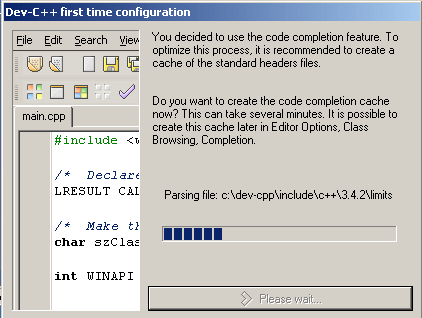
In some computers and operating systems, it asks whether to include all the libraries. If the option is selected, it will install all the libraries.
Step 2) Create a new source file.
Once the program opens, you need to create a new source file, so you can start writing your first C++ program. To do this select File > New > Source File. The path is shown in the figure below.

This will open an area where you be able to type out your code.
Step 3) Now you can write the C++ code. After that you can write the C++ code as shown in the image below:
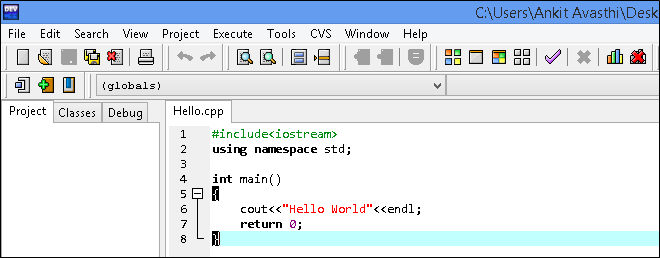
C++ Code Example:
#include<iostream>
using namespace std;

int main()
{
    cout<<"Hello World"<<endl;
    return 0;
}
Step 4) Compile your code. In this step, Click on Execute->compile & run

Step 5) Save the file. After saving you should see a black screen outputting “Hello World.”

Output

Your First Program: C++ “Hello World!” Explanation
C++ is a compiled language. The source code is compiled into object files. Object files are then combined by a linker creating an executable program.
A production C++ consists of many source code files (usually called source files).
- Curly braces, {}, express grouping in C++. Here, they indicate the start and end of the function body.
- Every C++ program has exactly one global function named main (). The program starts by executing that function. An int value is returned by main (), which it passes to the system.’ If no value is returned, then the system will receive a value 0 thus indicating successful completion. A nonzero value from the main () function indicates failure.
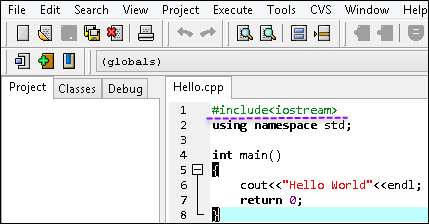
Explanation of C++ Hello World Program Code
Code line 1: The first line is #include <iostream>. It instructs the compiler to include the standard stream I/O library. Without this header inclusion the expression would not compile.
std::cout << "Hello, World"<<endl
Code line 4: int main(). This is the main function of the program. Functions are denoted by the parentheses(). Before the main function is “int”. This means that the main function will return an integer to the function or process that called it.
Don’t worry about this, for the time being, simply note that the program must return an integer before the end. The curly braces, { and }, contain the code within a function. The program terminates, at the end of the main function denoted by }
Code line 6: The operator << writes its second argument onto its first. In this case, the string literal “Hello, World!” is written onto the standard output stream std:: cout.
(Note: A string literal is a sequence of characters surrounded by double quotes. endl inserts a newline character on the same line)
Code line 7: return 0; This is the last command in the main function, the return statement. Its purpose is only to return a value to the function or process that is called the main function. Don’t worry about this other than the fact that it is required by the “int” in front of the main function definition. It should return a zero from the main function meaning the program ran successfully and exited.
cout<<"Hello World"<<endl;
Note: Cout is a stream which outputs to the stream specified. It is by default the standard output stream. Cout is very common in programs as the ultimate motive in every program is to give some output. endl; represents the end of statements in C++. The semicolon in C++ separates different statements and must be put at the end of statements in C++.
How to Compile and Run a C++ Program
Once you have written the Hello World program, you need to compile it into an executable and then run it. The exact steps depend on your compiler or IDE.
Using the g++ compiler from a terminal, run the two commands below:
g++ hello.cpp -o hello
./hello
The first command compiles hello.cpp into an executable named hello, and the second command runs it. In an IDE such as Visual Studio or Code::Blocks, you can build and run the program with a single button. When the program runs, it prints Hello World to the console.
