
C Files I/O: Create, Open, Read, Write and Close a File
 Editorial Team
⚡ Smart Summary
File handling in C stores persistent data on disk through the stdio library, which opens a file with fopen, writes with fputc, fputs, or fprintf, reads with fgetc, fgets, or fscanf, and closes it using fclose.
C File management
A File can be used to store a large volume of persistent data. Like many other languages ‘C’ provides following file management functions,
- Creation of a file
- Opening a file
- Reading a file
- Writing to a file
- Closing a file
Following are the most important file management functions available in ‘C,’
| function | purpose |
|---|---|
| fopen () | Creating a file or opening an existing file |
| fclose () | Closing a file |
| fprintf () | Writing a block of data to a file |
| fscanf () | Reading a block data from a file |
| getc () | Reads a single character from a file |
| putc () | Writes a single character to a file |
| getw () | Reads an integer from a file |
| putw () | Writing an integer to a file |
| fseek () | Sets the position of a file pointer to a specified location |
| ftell () | Returns the current position of a file pointer |
| rewind () | Sets the file pointer at the beginning of a file |
How to Create a File
Whenever you want to work with a file, the first step is to create a file. A file is nothing but space in a memory where data is stored.
To create a file in a ‘C’ program following syntax is used,
FILE *fp;
fp = fopen ("file_name", "mode");
In the above syntax, the file is a data structure which is defined in the standard library.
fopen is a standard function which is used to open a file.
- If the file is not present on the system, then it is created and then opened.
- If a file is already present on the system, then it is directly opened using this function.
fp is a file pointer which points to the type file.
Whenever you open or create a file, you have to specify what you are going to do with the file. A file in ‘C’ programming can be created or opened for reading/writing purposes. A mode is used to specify whether you want to open a file for any of the below-given purposes. Following are the different types of modes in ‘C’ programming which can be used while working with a file.
| File Mode | Description |
|---|---|
| r | Open a file for reading. If a file is in reading mode, then no data is deleted if a file is already present on a system. |
| w | Open a file for writing. If a file is in writing mode, then a new file is created if a file doesn’t exist at all. If a file is already present on a system, then all the data inside the file is truncated, and it is opened for writing purposes. |
| a | Open a file in append mode. If a file is in append mode, then the file is opened. The content within the file doesn’t change. |
| r+ | open for reading and writing from beginning |
| w+ | open for reading and writing, overwriting a file |
| a+ | open for reading and writing, appending to file |
In the given syntax, the filename and the mode are specified as strings hence they must always be enclosed within double quotes.
For example:
#include <stdio.h>
int main() {
FILE *fp;
fp  = fopen ("data.txt", "w");
}
Output:
File is created in the same folder where you have saved your code.

You can specify the path where you want to create your file
#include <stdio.h>
int main() {
FILE *fp;
fp  = fopen ("D://data.txt", "w");
}

How to Close a file
One should always close a file whenever the operations on file are over. It means the contents and links to the file are terminated. This prevents accidental damage to the file.
‘C’ provides the fclose function to perform file closing operation. The syntax of fclose is as follows,
fclose (file_pointer);
For example:
FILE *fp;
fp  = fopen ("data.txt", "r");
fclose (fp);
The fclose function takes a file pointer as an argument. The file associated with the file pointer is then closed with the help of fclose function. It returns 0 if close was successful and EOF (end of file) if there is an error has occurred while file closing.
After closing the file, the same file pointer can also be used with other files.
In ‘C’ programming, files are automatically close when the program is terminated. Closing a file manually by writing fclose function is a good programming practice.
Writing to a File
In C, when you write to a file, newline characters ‘\n’ must be explicitly added.
The stdio library offers the necessary functions to write to a file:
- fputc(char, file_pointer): It writes a character to the file pointed to by file_pointer.
- fputs(str, file_pointer): It writes a string to the file pointed to by file_pointer.
- fprintf(file_pointer, str, variable_lists): It prints a string to the file pointed to by file_pointer. The string can optionally include format specifiers and a list of variables variable_lists.
The program below shows how to perform writing to a file:
fputc() Function:
#include <stdio.h>
int main() {
        int i;
        FILE * fptr;
        char fn[50];
        char str[] = "Guru99 Rocks\n";
        fptr = fopen("fputc_test.txt", "w"); // "w" defines "writing mode"
        for (i = 0; str[i] != '\n'; i++) {
            /* write to file using fputc() function */
            fputc(str[i], fptr);
        }
        fclose(fptr);
        return 0;
    }
Output:

The above program writes a single character into the fputc_test.txt file until it reaches the next line symbol “\n” which indicates that the sentence was successfully written. The process is to take each character of the array and write it into the file.

- In the above program, we have created and opened a file called fputc_test.txt in a write mode and declare our string which will be written into the file.
- We do a character by character write operation using for loop and put each character in our file until the “\n” character is encountered then the file is closed using the fclose function.
fputs () Function:
#include <stdio.h>
int main() {
        FILE * fp;
        fp = fopen("fputs_test.txt", "w+");
        fputs("This is Guru99 Tutorial on fputs,", fp);
        fputs("We don't need to use for loop\n", fp);
        fputs("Easier than fputc function\n", fp);
        fclose(fp);
        return (0);
    }
Output:


- In the above program, we have created and opened a file called fputs_test.txt in a write mode.
- After we do a write operation using fputs() function by writing three different strings
- Then the file is closed using the fclose function.
fprintf()Function:
#include <stdio.h>
    int main() {
        FILE *fptr;
        fptr = fopen("fprintf_test.txt", "w"); // "w" defines "writing mode"
        /* write to file */
        fprintf(fptr, "Learning C with Guru99\n");
        fclose(fptr);
        return 0;
    }
Output:


- In the above program we have created and opened a file called fprintf_test.txt in a write mode.
- After a write operation is performed using fprintf() function by writing a string, then the file is closed using the fclose function.
Reading data from a File
There are three different functions dedicated to reading data from a file
- fgetc(file_pointer): It returns the next character from the file pointed to by the file pointer. When the end of the file has been reached, the EOF is sent back.
- fgets(buffer, n, file_pointer): It reads n-1 characters from the file and stores the string in a buffer in which the NULL character ‘\0’ is appended as the last character.
- fscanf(file_pointer, conversion_specifiers, variable_adresses): It is used to parse and analyze data. It reads characters from the file and assigns the input to a list of variable pointers variable_adresses using conversion specifiers. Keep in mind that as with scanf, fscanf stops reading a string when space or newline is encountered.
The following program demonstrates reading from fputs_test.txt file using fgets(),fscanf() and fgetc () functions respectively :
#include <stdio.h>
int main() {
        FILE * file_pointer;
        char buffer[30], c;

        file_pointer = fopen("fprintf_test.txt", "r");
        printf("----read a line----\n");
        fgets(buffer, 50, file_pointer);
        printf("%s\n", buffer);

        printf("----read and parse data----\n");
        file_pointer = fopen("fprintf_test.txt", "r"); //reset the pointer
        char str1[10], str2[2], str3[20], str4[2];
        fscanf(file_pointer, "%s %s %s %s", str1, str2, str3, str4);
        printf("Read String1 |%s|\n", str1);
        printf("Read String2 |%s|\n", str2);
        printf("Read String3 |%s|\n", str3);
        printf("Read String4 |%s|\n", str4);

        printf("----read the entire file----\n");

        file_pointer = fopen("fprintf_test.txt", "r"); //reset the pointer
        while ((c = getc(file_pointer)) != EOF) printf("%c", c);

        fclose(file_pointer);
        return 0;
    }
Result:
----read a line----
Learning C with Guru99

----read and parse data----
Read String1 |Learning|
Read String2 |C|
Read String3 |with|
Read String4 |Guru99|
----read the entire file----
Learning C with Guru99
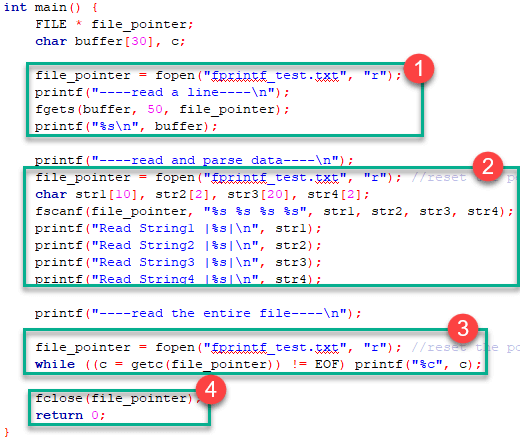
- In the above program, we have opened the file called “fprintf_test.txt” which was previously written using fprintf() function, and it contains “Learning C with Guru99” string. We read it using the fgets() function which reads line by line where the buffer size must be enough to handle the entire line.
- We reopen the file to reset the pointer file to point at the beginning of the file. Create various strings variables to handle each word separately. Print the variables to see their contents. The fscanf() is mainly used to extract and parse data from a file.
- Reopen the file to reset the pointer file to point at the beginning of the file. Read data and print it from the file character by character using getc() function until the EOF statement is encountered
- After performing a reading operation file using different variants, we again closed the file using the fclose function.
Interactive File Read and Write with getc and putc
These are the simplest file operations. Getc stands for get character, and putc stands for put character. These two functions are used to handle only a single character at a time.
Following program demonstrates the file handling functions in ‘C’ programming:
#include <stdio.h>
int main() {
        FILE * fp;
        char c;
        printf("File Handling\n");
        //open a file
        fp = fopen("demo.txt", "w");
        //writing operation
        while ((c = getchar()) != EOF) {
            putc(c, fp);
        }
        //close file
        fclose(fp);
        printf("Data Entered:\n");
        //reading
        fp = fopen("demo.txt", "r");
        while ((c = getc(fp)) != EOF) {
            printf("%c", c);
        }
        fclose(fp);
        return 0;
    }
Output:

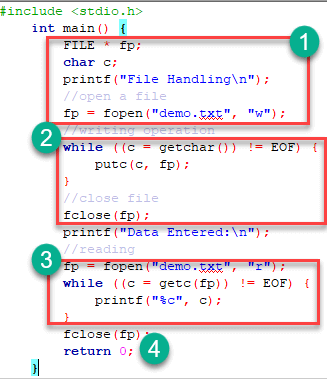
- In the above program we have created and opened a file called demo in a write mode.
- After a write operation is performed, then the file is closed using the fclose function.
- We have again opened a file which now contains data in a reading mode. A while loop will execute until the eof is found. Once the end of file is found the operation will be terminated and data will be displayed using printf function.
- After performing a reading operation file is again closed using the fclose function.
