
Storage Classes in C: Auto, Extern, Static, Register (Examples)
 Editorial Team
⚡ Smart Summary
Storage classes in C define the scope, lifetime, default value, and memory location of every variable, using four specifiers — auto, register, static, and extern — to control where data lives and how long it survives during execution.
What is Storage Class in C?
A storage class represents the visibility and a location of a variable. It tells from what part of code we can access a variable. A storage class in C is used to describe the following things:
- The variable scope.
- The location where the variable will be stored.
- The initialized value of a variable.
- A lifetime of a variable.
- Who can access a variable?
Thus a storage class is used to represent the information about a variable.
NOTE: A variable is not only associated with a data type, its value but also a storage class.
What are the Types of Storage Classes in C?
There are total four types of standard storage classes. The table below represents the storage classes in C.
| Storage class | Purpose |
| auto | It is a default storage class. |
| extern | It is a global variable. |
| static | It is a local variable which is capable of returning a value even when control is transferred to the function call. |
| register | It is a variable which is stored inside a Register. |
Auto Storage Class in C
The variables defined using auto storage class are called as local variables. Auto stands for automatic storage class. A variable is in auto storage class by default if it is not explicitly specified.
The scope of an auto variable is limited with the particular block only. Once the control goes out of the block, the access is destroyed. This means only the block in which the auto variable is declared can access it.
A keyword auto is used to define an auto storage class. By default, an auto variable contains a garbage value.
Example, auto int age;
The program below defines a function with has two local variables
int add(void) {
   int a=13;
   auto int b=48;
return a+b;}
We take another program which shows the scope level “visibility level” for auto variables in each block code which are independently to each other:
#include <stdio.h>
int main( )
{
  auto int j = 1;
  {
    auto int j= 2;
    {
      auto int j = 3;
      printf ( " %d ", j);
    }
    printf ( "\t %d ",j);
  }
  printf( "%d\n", j);}
Output:
3 2 1
Extern Storage Class in C
Extern stands for external storage class. Extern storage class is used when we have global functions or variables which are shared between two or more files.
Keyword extern is used to declaring a global variable or function in another file to provide the reference of variable or function which have been already defined in the original file.
The variables defined using an extern keyword are called as global variables. These variables are accessible throughout the program. Notice that the extern variable cannot be initialized it has already been defined in the original file.
Example, extern void display();
First File: main.c
#include <stdio.h>
extern i;
main() {
   printf("value of the external integer is = %d\n", i);
   return 0;}
Second File: original.c
#include <stdio.h>
i=48;
Result:
value of the external integer is = 48
In order to compile and run the above code, follow the below steps
Step 1) Create new project,
- Select Console Application
- Click Go

Step 2) Select C and click Next

Step 3) Click Next

Step 4) Enter details and click Next

Step 5) Click Finish

Step 6) Put the main code as shown in the previous program in the main.c file and save it

Step 7) Create a new C file [File -> new -> Empty File , save (as original.c) and add it to the current project by clicking “OK” in the dialogue box .

Step 8) Put and save the C code of the original.c file shown in the previous example without the main() function.
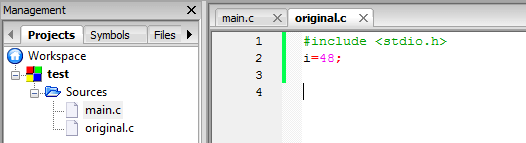
Step 9) Build and run your project. The result is shown in the next figure

Static Storage Class in C
The static variables are used within function/ file as local static variables. They can also be used as a global variable
- Static local variable is a local variable that retains and stores its value between function calls or block and remains visible only to the function or block in which it is defined.
- Static global variables are global variables visible only to the file in which it is declared.
Example: static int count = 10;
Keep in mind that static variable has a default initial value zero and is initialized only once in its lifetime.
#include <stdio.h> /* function declaration */
void next(void);
static int counter = 7; /* global variable */
main() {
 while(counter<10) {
      next();
      counter++;   }
return 0;}
void next( void ) {    /* function definition */
   static int iteration = 13; /* local static variable */
   iteration ++;
   printf("iteration=%d and counter= %d\n", iteration, counter);}
Result:
iteration=14 and counter= 7
iteration=15 and counter= 8
iteration=16 and counter= 9
Global variables are accessible throughout the file whereas static variables are accessible only to the particular part of a code.
The lifespan of a static variable is in the entire program code. A variable which is declared or initialized using static keyword always contains zero as a default value.
Register Storage Class in C
You can use the register storage class when you want to store local variables within functions or blocks in CPU registers instead of RAM to have quick access to these variables. For example, “counters” are a good candidate to be stored in the register.
Example: register int age;
The keyword register is used to declare a register storage class. The variables declared using register storage class has lifespan throughout the program.
It is similar to the auto storage class. The variable is limited to the particular block. The only difference is that the variables declared using register storage class are stored inside CPU registers instead of a memory. Register has faster access than that of the main memory.
The variables declared using register storage class has no default value. These variables are often declared at the beginning of a program.
#include <stdio.h> /* function declaration */
main() {
{register int  weight;
int *ptr=&weight ;/*it produces an error when the compilation occurs ,we cannot get a memory location when dealing with CPU register*/}
}
Output:
error: address of register variable 'weight' requested
The next table summarizes the principal features of each storage class which are commonly used in C programming
| Storage Class | Declaration | Storage | Default Initial Value | Scope | Lifetime |
| auto | Inside a function/block | Memory | Unpredictable | Within the function/block | Within the function/block |
| register | Inside a function/block | CPU Registers | Garbage | Within the function/block | Within the function/block |
| extern | Outside all functions | Memory | Zero | Entire the file and other files where the variable is declared as extern | program runtime |
| Static (local) | Inside a function/block | Memory | Zero | Within the function/block | program runtime |
| Static (global) | Outside all functions | Memory | Zero | Global | program runtime |
