
BlazeMeter: Guide to Performance Testing & Continuous Testing
 Editorial Team
⚡ Smart Summary
BlazeMeter beyond performance testing means consolidating functional, API, data, and service virtualization into one Perforce-owned, JMeter-compatible platform that runs inside CI pipelines, scales in the cloud, and uses AI to surface anomalies in test results.
When teams first look for a testing solution, they often have a specific issue they need to address. Perhaps the website crashed during a Black Friday sale, or users are complaining about slow checkout times. In these moments, performance testing is the priority. Many organizations turn to BlazeMeter because it is known for running open-source scripts at a massive scale.
However, viewing BlazeMeter strictly as a load testing tool misses the bigger picture. In my opinion, with over two decades of experience, I would say performance testing is often the gateway to maturity, meaning it is only the first step. Modern software delivery needs a strategy that covers every stage of the development lifecycle, not just the end.
To release software quickly without breaking things, I suggest the teams evolve from running occasional performance tests to building a unified, continuous testing platform. In this article, we will explore how to move beyond simple load generation. You will learn how to build a comprehensive quality strategy that covers functional testing, API monitoring, test data, and service virtualization, all within a single environment.
What Is BlazeMeter and Who Owns It Today
BlazeMeter is a cloud-based continuous testing platform that started life as a hosted JMeter service. CA Technologies acquired it in 2017, and Perforce now owns the product as part of its DevOps testing portfolio. The tool remains fully compatible with open-source frameworks like Apache JMeter 5.x, Gatling, Selenium, Playwright, and Taurus.
This pedigree matters because it means your existing scripts move into BlazeMeter without rewrites. You keep open-source flexibility while gaining enterprise-grade reporting, role-based access, and global cloud capacity. That hybrid model is why BlazeMeter sits at the center of so many continuous testing strategies in 2026.
Why Performance Testing Is the Natural Entry Point
Performance testing is the most common starting line for this simple reason: performance failure is public failure. If a functional bug appears, it might affect one user trying to use a specific feature. Hence, if a performance issue strikes, then the entire application slows down or crashes for everyone.
Because these issues are business-critical, they get immediate attention. When teams start load testing, as per my observation, they often uncover more than just server limits. A heavy load test acts like a stress test for your entire operational pipeline. It often exposes:
- Test data gaps: You realize you do not have enough unique user records to simulate real traffic.
- API instability: You find that backend services fail long before the front end does.
- Environment dependencies: You cannot test because a third-party payment gateway is offline.
- Manual bottlenecks: You spend days analyzing logs manually to find the root cause of a failure.
This discovery process forces a shift in thinking. You cannot treat performance testing as an isolated event that happens right before deployment. To fix these issues, you must shift left, moving testing earlier in the cycle. This is where a comprehensive platform becomes necessary.
Key Takeaways
- Performance issues are highly visible and often the main reason teams start looking for a testing tool.
- Load testing reveals deeper structural problems in data, environments, and APIs.
- Isolating performance testing from the rest of development creates bottlenecks.
BlazeMeter as the Go-To Performance Testing Platform
Before expanding into other areas, it is important to understand why teams choose BlazeMeter for performance testing in the first place. The platform allowed me to run open-source scripts, such as JMeter, Gatling, and Selenium, without complex infrastructure setup.
Run Large-Scale Tests with Ease
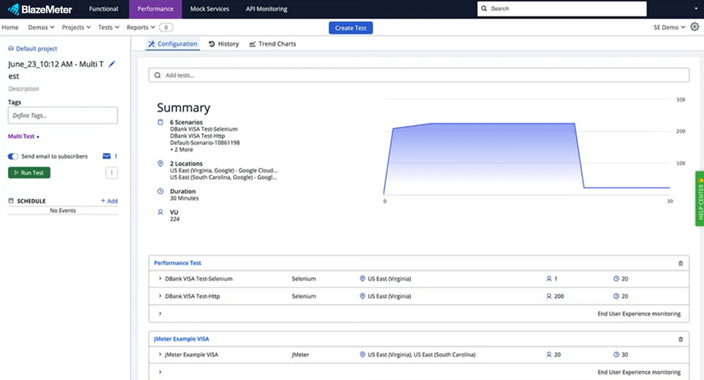
The primary capability that attracted my team is the ability to run load, stress, spike, soak, and endurance tests at scale. You can also simulate millions of virtual users from the cloud to stress-test your application limits.
For organizations with strict security needs, the platform offers flexibility. I was able to run tests from the public cloud to simulate external traffic and even use Private Locations to run tests behind our firewall. This hybrid approach lets you test internal applications without exposing them to the public.
Built for Modern DevOps Pipelines
I noticed that BlazeMeter integrates directly with Continuous Integration (CI) tools like Jenkins, GitHub Actions, GitLab, and Azure DevOps. The best part is that, instead of manually starting a test, I could configure my pipeline to trigger a performance test every time a developer commits code.
This approach treats performance testing as code. You store your test configurations in your version control system alongside your application code. This ensures that your tests evolve at the same pace as your application, preventing the “test drift” that often happens with legacy proprietary tools.
From Performance to Functional: Expanding Coverage
Once you have established a performance testing routine, the next logical step is to address functional testing. Historically, teams used separate tools for this: one for checking if the features work (functional) and another for checking if they are fast (performance). This tool sprawl leads to high costs and fragmented reporting.
Unified Functional Testing Across Web and APIs
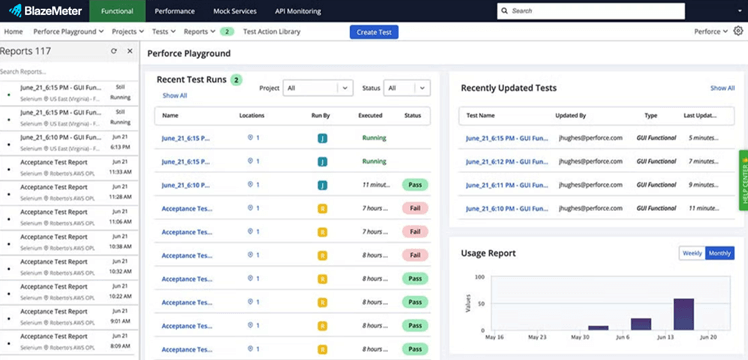
BlazeMeter allowed my team to reuse our performance test assets for functional validation. For instance, if you have already written a JMeter script to simulate a user logging in and buying a product for a load test, you can use that exact same logic to run a functional test.
This capability reduces the maintenance burden significantly. Therefore, I did not need to maintain two separate libraries of scripts for the same user flows. By running these functional tests frequently (even on every build), you catch regression bugs early.
Consistent Reporting Across Test Types
When you use different tools, correlating results is difficult. If a functional test fails in one tool and a performance test degrades in another, it takes time to determine if they share a root cause.
By consolidating these tests onto one platform, I found a single source of truth. I was able to see my functional pass/fail rates alongside my performance trends. This unified view helps you determine if a recent code change caused a feature to break or simply slowed it down. Additionally, it speeds up your troubleshooting process.
Test Data Management: Solving the Hidden Bottleneck
One of the biggest hurdles in valid testing is data. To run a realistic test, you need realistic data. You cannot test a login flow for 10,000 users if you only have 50 user accounts in your database.
Traditionally, teams copy data from production to lower environments. This process is slow, risky, and often violates privacy regulations like GDPR or HIPAA.
Creating Data Instantly
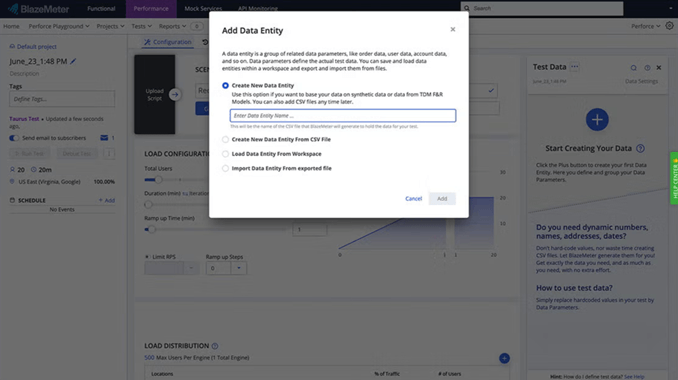
BlazeMeter solves this with integrated Test Data Management. Instead of copying production data, you can generate synthetic data that looks and behaves like real data but contains no sensitive information.
This allows you to:
- Scale effortlessly: Generate thousands of unique records for a load test instantly.
- Stay compliant: Ensure no Personally Identifiable Information (PII) ever leaves your secure production environment.
- Create specific scenarios: Generate data for edge cases, such as users with expired credit cards or specific geographic locations, which might be hard to find in production data.
By having valid data on demand, I was able to remove the “data wait” that often delays testing cycles by days or weeks.
Service Virtualization: Test Earlier, Even When Dependencies Are Not Ready
Modern applications rely on a web of dependencies such as internal microservices, third-party APIs, mainframes, and external payment gateways. If one of these is unavailable, your testing stops.
This is a classic problem in performance testing. You want to test your checkout process, but the banking API charges for every transaction, or the test environment is down for maintenance.
Mocking Services to Unblock Teams
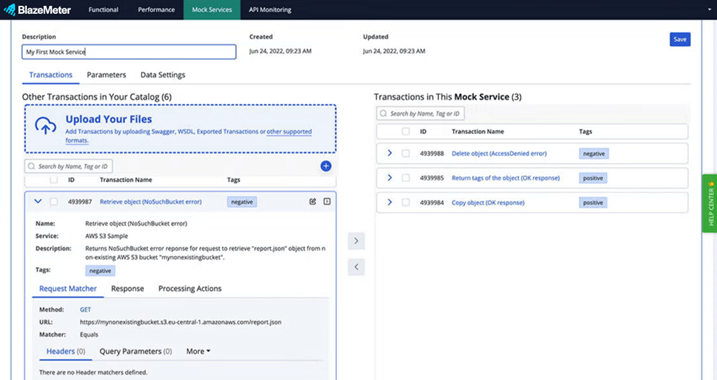
BlazeMeter Service Virtualization lets you create virtual “mocks” of these dependencies. These mocks simulate the behavior, data, and performance characteristics of the real service.
For example, I could configure a virtual payment gateway to respond in 200 milliseconds with a “success” message, or in 5 seconds with a “timeout” error. This allows you to:
- Test in parallel: Developers can test their code against a virtual API before the real API is even built.
- Control the chaos: Simulate slow networks or error responses to see how your application handles failure.
- Reduce costs: Avoid transaction fees from third-party services during high-volume load tests.
This capability is critical for distributed architectures because it ensures that one missing piece does not block your entire release pipeline.
Key Takeaways
- Dependencies like APIs and mainframes often block testing progress.
- Virtualization allows you to simulate these services to keep testing moving.
- You can simulate negative scenarios (latency, errors) that are hard to trigger in real systems.
API Testing and Monitoring: Extending Insights Into Production
In modern software architecture, APIs are the backbone of your application. If your APIs fail, your user interface fails. While performance testing checks the API under load, you also need to verify that the API functions correctly and adheres to its contract.
Continuous API Verification
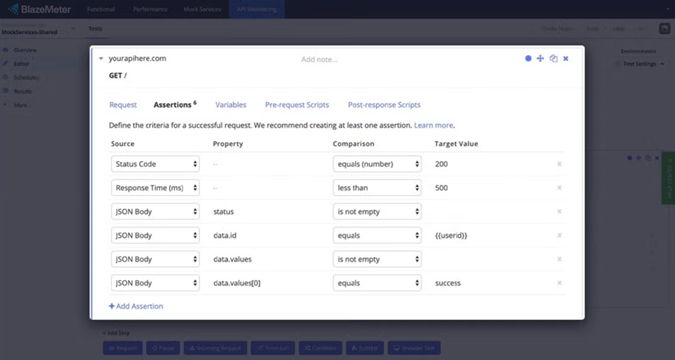
BlazeMeter extends your reach into the API layer. I could run functional API tests to validate response structures, headers, and data accuracy using this tool. Because APIs have no user interface, these tests run extremely fast, making them ideal for quick feedback loops in your CI pipeline.
Monitoring for Production Health
Testing should not stop when you deploy. BlazeMeter allows you to repurpose your testing scripts as monitoring scripts. You can run lightweight tests against your production APIs at regular intervals from global locations.
This provides continuous feedback on uptime and latency. If an API starts responding slowly or returns errors, you receive an alert immediately. This bridges the gap between pre-production testing and production observability, so you catch issues before your customers do.
AI-Assisted Reporting and Analysis: Turning Results Into Decisions
Continuous testing generates a massive amount of data. If you run hundreds of tests a day, manually reviewing pass/fail reports becomes impossible. This is where Artificial Intelligence (AI) transforms raw data into actionable decisions.
Finding the Signal in the Noise
BlazeMeter applies AI to your test results to help you identify anomalies. Instead of just showing you a graph, the platform can highlight deviations from normal behavior.
For instance, if your login transaction usually takes 200ms but suddenly jumps to 500ms after a specific commit, the system flags this degradation. It correlates failures across different test types to help you understand if a performance spike is related to a specific functional error.
This intelligence significantly reduces the Mean Time To Resolution (MTTR). Developers spend less time digging through logs and more time fixing the actual code issue.
AI-Driven Test Creation in 2026
Newer BlazeMeter releases also use generative AI to draft test cases from natural-language requirements, suggest assertions for API responses, and auto-heal flaky Selenium and Playwright locators. This trims script-authoring time and helps non-coders contribute to functional coverage, which is essential as release cadences keep accelerating.
Performance Testing as the On-Ramp to Maturity
Adopting a full continuous testing strategy does not happen overnight. It is usually a journey.
- Start with Performance: Most teams begin here to address an immediate stability risk. They use BlazeMeter to run open-source scripts at scale.
- Add Functional and API: Teams realize they can reuse those scripts for functional verification and API checks, consolidating tools.
- Integrate Test Data and Virtualization: To run tests faster and earlier, teams adopt synthetic data and virtual services to remove blockers.
- Scale with AI: As test volume grows, teams use AI-driven insights to manage the noise and maintain speed.
The advantage of using BlazeMeter is that it supports this entire journey. I did not need to buy new tools or migrate scripts when my needs became more complex. You simply unlock new capabilities within the same platform.
Why BlazeMeter Beats Point Solutions
You might wonder, “Why not just use free, separate tools for each of these steps?” While open-source tools are excellent, stitching them together into a cohesive enterprise workflow is difficult and costly.
Maintaining a DIY toolchain involves:
- Managing build servers and load generators.
- Writing custom glue code to connect tools.
- Manually correlating data between different reports.
- Dealing with security and compliance across multiple vendors.
BlazeMeter offers a unified platform that handles the infrastructure, security, and integration for you. This results in a lower Total Cost of Ownership (TCO) because your engineers focus on testing the application, not maintaining the testing tools. You get the freedom of open source (since you can still use JMeter, Selenium, etc.) with the reliability and scale of an enterprise platform. Ready to see how far your testing strategy can go? Check out BlazeMeter and start testing the right way.
