ARP Poisoning & Spoofing Attack Explained
 Editorial Team
⚡ Smart Summary
ARP Poisoning, also called ARP Spoofing, sends fake MAC addresses to a switch so an attacker can associate a forged address with a genuine IP and hijack network traffic. Static ARP entries and detection software help prevent these attacks.

What is ARP Poisoning (ARP Spoofing)
ARP is the acronym for Address Resolution Protocol. It is used to convert IP address to physical addresses [MAC address] on a switch. The host sends an ARP broadcast on the network, and the recipient computer responds with its physical address [MAC Address]. The resolved IP/MAC address is then used to communicate. ARP poisoning is sending fake MAC addresses to the switch so that it can associate the fake MAC addresses with the IP address of a genuine computer on a network and hijack the traffic.
Types of ARP Poisoning Attacks
- Man in the Middle Attacks
- Traffic Interception
- Denial of Service (DoS) attacks
How to Prevent ARP Poisoning Attacks
Static ARP entries: these can be defined in the local ARP cache and the switch configured to ignore all auto ARP reply packets. The disadvantage of this method is, it’s difficult to maintain on large networks. IP/MAC address mapping has to be distributed to all the computers on the network.
ARP poisoning detection software: these systems can be used to cross check the IP/MAC address resolution and certify them if they are authenticated. Uncertified IP/MAC address resolutions can then be blocked.
Operating System Security: this measure is dependent on the operating system been used. The following are the basic techniques used by various operating systems.
- Linux based: these work by ignoring unsolicited ARP reply packets.
- Microsoft Windows: the ARP cache behavior can be configured via the registry. The following list includes some of the software that can be used to protect networks against sniffing;
- AntiARP– provides protection against both passive and active sniffing
- Agnitum Outpost Firewall–provides protection against passive sniffing
- XArp– provides protection against both passive and active sniffing
- Mac OS: ArpGuard can be used to provide protection. It protects against both active and passive sniffing.
Hacking Activity: Configure ARP Entries in Windows
We are using Windows 7 for this exercise, but the commands should be able to work on other versions of windows as well.
Open the command prompt and enter the following command
arp –a
HERE,
- apr calls the ARP configure program located in Windows/System32 directory
- -a is the parameter to display to contents of the ARP cache
You will get results similar to the following
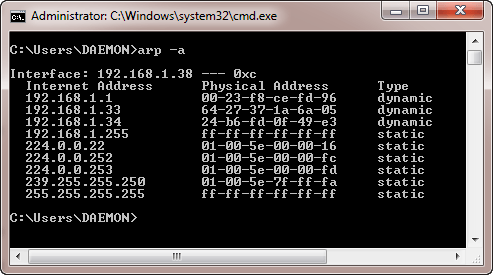
Note: dynamic entries are added and deleted automatically when using TCP/IP sessions with remote computers.
Static entries are added manually and are deleted when the computer is restarted, and the network interface card restarted or other activities that affect it.
Adding Static Entries
Open the command prompt then use the ipconfig /all command to get the IP and MAC address

The MAC address is represented using the Physical Address and the IP address is IPv4Address
Enter the following command
arp –s 192.168.1.38 60-36-DD-A6-C5-43

Note: The IP and MAC address will be different from the ones used here. This is because they are unique.
Use the following command to view the ARP cache
arp –a
You will get the following results

Note the IP address has been resolved to the MAC address we provided and it is of a static type.
Deleting an ARP Cache Entry
Use the following command to remove an entry
arp –d 192.168.1.38

P.S. ARP poisoning works by sending fake MAC addresses to the switch
What is IP and MAC Addresses
IP Address is the acronym for Internet Protocol address. An internet protocol address is used to uniquely identify a computer or device such as printers, storage disks on a computer network. There are currently two versions of IP addresses. IPv4 uses 32-bit numbers. Due to the massive growth of the internet, IPv6 has been developed, and it uses 128-bit numbers.
IPv4 addresses are formatted in four groups of numbers separated by dots. The minimum number is 0, and the maximum number is 255. An example of an IPv4 address looks like this;
127.0.0.1
IPv6 addresses are formatted in groups of six numbers separated by full colons. The group numbers are written as 4 hexadecimal digits. An example of an IPv6 address looks like this;
2001:0db8:85a3:0000:0000:8a2e:0370:7334
In order to simplify the representation of the IP addresses in text format, leading zeros are omitted, and the group of zeros is completed omitted. The above address in a simplified format is displayed as;
2001:db8:85a3:::8a2e:370:7334
MAC Address is the acronym for media access control address. MAC addresses are used to uniquely identify network interfaces for communication at the physical layer of the network. MAC addresses are usually embedded into the network card.
A MAC address is like a serial number of a phone while the IP address is like the phone number.
Exercise
We will assume you are using windows for this exercise. Open the command prompt.
Enter the command
ipconfig /all
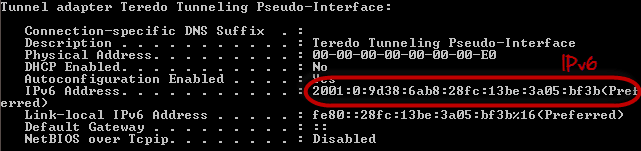
You will get detailed information about all the network connections available on your computer. The results shown below are for a broadband modem to show the MAC address and IPv4 format and wireless network to show IPv6 format.