
TCP/IP Model: Layers, Protocols & Stack
 Editorial Team
⚡ Smart Summary
TCP/IP model is the four-layer framework that defines how computers exchange data across networks, mapping the application, transport, internet, and network interface layers to protocols such as TCP, IP, HTTP, and DNS that move information reliably end to end.
What is the TCP/IP Model?
TCP/IP model helps you determine how a specific computer should be connected to the internet and how data should be transmitted between them. It helps you create a virtual network when multiple computer networks are connected together. The purpose of the TCP/IP model is to allow communication over large distances.
TCP/IP stands for Transmission Control Protocol / Internet Protocol. The TCP/IP stack is specifically designed as a model to offer a highly reliable and end-to-end byte stream over an unreliable internetwork.


TCP Characteristics
Here are the essential characteristics of the TCP/IP protocol:
- Support for a flexible TCP/IP architecture.
- Adding more systems to a network is easy.
- In the TCP/IP protocol suite, the network remains intact until the source and destination machines are functioning properly.
- TCP is a connection-oriented protocol.
- TCP offers reliability and ensures that data which arrives out of sequence is put back into order.
- TCP allows you to implement flow control, so a sender never overwhelms a receiver with data.
Four Layers of TCP/IP model
In this section, we explain the different layers and their functionalities in the TCP/IP model.
The diagram below shows the four TCP/IP layers stacked as a conceptual model, from the application layer at the top down to the network interface layer:
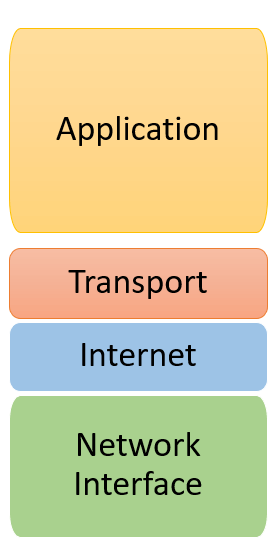
The functionality of the TCP/IP model is divided into four layers, and each includes specific protocols.
TCP/IP is a layered architecture system in which each layer is defined according to a specific function to perform. All four TCP/IP layers work collaboratively to transmit the data from one layer to another.
The following diagram maps each of the four layers to the protocols that operate within it:
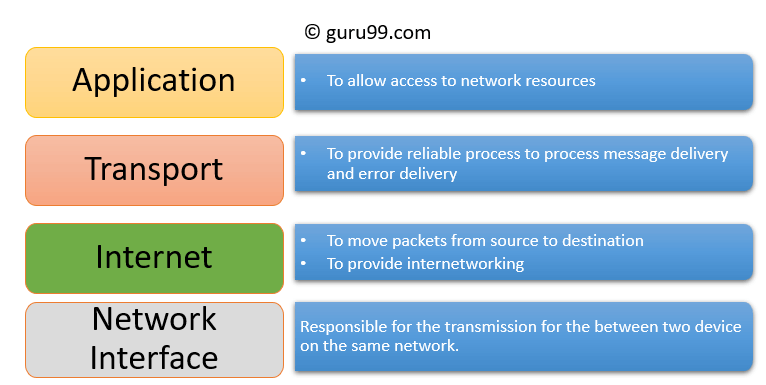
- Application Layer
- Transport Layer
- Internet Layer
- Network Interface
Application Layer
The application layer interacts with an application program, which is the highest level of the model. This layer is closest to the end-user, which means it allows users to interact with other software applications.
The application layer interacts with software applications to implement a communicating component. The interpretation of data by the application program is always outside the scope of the model.
Examples of the application layer are applications such as file transfer, email, and remote login.
The functions of the application layer are:
- The application layer helps you identify communication partners, determine resource availability, and synchronize communication.
- It allows users to log on to a remote host.
- This layer provides various e-mail services.
- It offers distributed database sources and access to global information about various objects and services.
Transport Layer
The transport layer builds on the internet layer in order to provide data transport from a process on a source machine to a process on a destination machine. It is hosted using single or multiple networks and maintains the quality-of-service functions.
It determines how much data should be sent, where, and at what rate. This layer builds on the messages received from the application layer. It helps ensure that data units are delivered error-free and in sequence.
The transport layer helps you control the reliability of a link through flow control, error control, and segmentation or de-segmentation.
The transport layer also offers an acknowledgment of successful data transmission and sends the next data segment if no errors occurred. TCP is the best-known example of the transport layer.
Important functions of the transport layer:
- It divides the message received from the application layer into segments and numbers them to make a sequence.
- The transport layer makes sure that the message is delivered to the correct process on the destination machine.
- It also makes sure that the entire message arrives without any error; otherwise it should be retransmitted.
Internet Layer
The internet layer is the second layer of the TCP/IP model. It is also known as the network layer. The main work of this layer is to send packets from any network, and from any computer, until they reach the destination irrespective of the route they take.
The internet layer offers the functional and procedural method for transferring variable-length data sequences from one node to another with the help of various networks.
Message delivery at the internet layer is not guaranteed to be reliable.
Layer-management protocols that belong to this layer are:
- Routing protocols
- Multicast group management
- Network-layer address assignment
The Network Interface Layer
The network interface layer is the bottom layer of the four-layer TCP/IP model. This layer is also called the network access layer. It defines the details of how data should be sent using the network.
It also includes how bits should be optically signaled by hardware devices that directly interface with a network medium, such as coaxial, optical fiber, or twisted-pair cables.
This layer is a combination of the data link and physical layers defined in the OSI reference model. It defines how the data should be sent physically through the network and is responsible for the transmission of data between two devices on the same network.
Differences between OSI and TCP/IP models
The illustration below compares the seven-layer OSI model with the four-layer TCP/IP model side by side:

Here are some important differences between the OSI and TCP/IP model:
| OSI Model | TCP/IP model |
|---|---|
| It is developed by ISO (International Standards Organization). | It is developed by ARPANET (Advanced Research Projects Agency Network). |
| The OSI model provides a clear distinction between interfaces, services, and protocols. | TCP/IP does not have any clear distinguishing points between services, interfaces, and protocols. |
| OSI refers to Open Systems Interconnection. | TCP refers to Transmission Control Protocol. |
| OSI uses the network layer to define routing standards and protocols. | TCP/IP uses only the internet layer. |
| OSI follows a vertical approach. | TCP/IP follows a horizontal approach. |
| OSI uses two separate layers, physical and data link, to define the functionality of the bottom layers. | TCP/IP uses only one layer (link). |
| OSI has seven layers. | TCP/IP has four layers. |
| In the OSI model, the transport layer is only connection-oriented. | A layer of the TCP/IP model is both connection-oriented and connectionless. |
| In the OSI model, the data link layer and physical layer are separate. | In TCP/IP, the physical and data link layers are combined as a single host-to-network layer. |
| Session and presentation layers are part of the OSI model. | There is no session and presentation layer in the TCP/IP model. |
| It is defined after the advent of the Internet. | It is defined before the advent of the Internet. |
| The minimum size of the OSI header is 5 bytes. | The minimum header size is 20 bytes. |
Most Common TCP/IP Protocols
Some widely used, most common TCP/IP protocols are:
TCP
Transmission Control Protocol is an internet protocol that breaks a message into TCP segments and reassembles them at the receiving side.
IP
An Internet Protocol address, also known as an IP address, is a numerical label. It is assigned to each device that is connected to a computer network which uses the IP for communication. Its routing function allows internetworking and essentially establishes the Internet. Combining IP with TCP allows a virtual connection to be developed between a source and a destination.
HTTP
The Hypertext Transfer Protocol is the foundation of the World Wide Web. It is used to transfer webpages and other resources from the HTTP server or web server to the web client or HTTP client. Whenever you use a web browser such as Google Chrome or Firefox, you are using a web client. HTTP helps transfer the web pages that you request from the remote servers.
SMTP
SMTP stands for Simple Mail Transfer Protocol. This protocol supports e-mail and helps you send data to another e-mail address.
SNMP
SNMP stands for Simple Network Management Protocol. It is a framework used for managing the devices on the internet by using the TCP/IP protocol.
DNS
DNS stands for Domain Name System. An IP address is used to identify the connection of a host to the internet uniquely; however, users prefer to use names instead of addresses, and DNS provides that mapping.
TELNET
TELNET stands for Terminal Network. It establishes a connection between the local and the remote computer in such a manner that you can simulate your local system at the remote system.
FTP
FTP stands for File Transfer Protocol. It is a mostly used standard protocol for transmitting files from one machine to another.
Advantages of the TCP/IP model
Here are the pros and benefits of using the TCP/IP model:
- It helps you set up a connection between different types of computers.
- It operates independently of the operating system.
- It supports a number of routing protocols.
- It enables internetworking between organizations.
- It has a highly scalable client-server architecture.
Disadvantages of the TCP/IP model
Here are a few drawbacks of using the TCP/IP model:
- TCP/IP is a complicated model to set up and manage.
- The overhead of TCP/IP is higher than IPX (Internetwork Packet Exchange).
- In this model, the transport layer does not guarantee delivery of packets.
- Replacing a protocol in TCP/IP is not easy.
- It has no clear separation of its services, interfaces, and protocols.
