
15 BEST HTML Web Safe (Web Friendly) Fonts in 2026
 Editorial Team
Are you tired of fonts breaking layouts or looking different across browsers and devices? Using poor-quality HTML web safe fonts causes inconsistent rendering and spacing issues, while slowing load times. They also hurt readability and accessibility, leading to eye strain and weak user trust. Over time, bad font choices damage branding, reduce engagement, and complicate maintenance, while good fonts keep interfaces stable and predictable.
I spent 142+ hours researching and hands-on testing 38+ HTML web safe fonts to curate this guide. From that process, I shortlisted the 15 tools that truly matter today. This article is backed-by firsthand usage and real-world testing, covering key features, pros and cons, and pricing. For clarity and transparency, I strongly recommend reading the complete article.
What is a Web Safe Font?
Web Safe fonts are usually pre-installed to most of the devices like computers, mobile phones, and tablets. For a font to be readable as well as look the same in any browser or a device (like mobile and web), the font should be installed in that device.
List of Top Web Safe Fonts for HTML & CSS
Here are the popular web safe fonts for HTML and CSS:
1) Arial

Arial is one of the most dependable web-safe fonts for clean, modern readability across browsers and devices. Designed without decorative distractions, it fits naturally into websites where clarity matters more than flair—think dashboards, blogs, or long-form web pages. Its wide availability ensures text renders consistently, which makes it a safe choice when visual reliability is non-negotiable.
After working with it across multiple web layouts, I found Arial especially effective when fast loading and universal legibility were priorities. In real-world usage, it handles dense content smoothly without tiring the eyes, making it ideal for user-focused interfaces where content needs to stay front and center.
2) Courier New
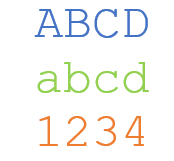
Courier New is a classic monospaced, web-safe font that instantly communicates structure and precision. Every character takes up the same horizontal space, which makes it particularly suitable for technical layouts, snippets, and content that benefits from strict alignment. Its unmistakable typewriter-style appearance sets it apart from proportional fonts used for general reading.
Using it in practical web scenarios, I noticed how clearly it separates structured content from regular text. In layouts where spacing accuracy mattered—such as formatted text blocks—it delivered consistency without surprises. Courier New may not be subtle, but when clarity and alignment are the goal, it does the job without compromise.
3) Times New Roman

Times New Roman is a traditional serif font that brings a formal, editorial feel to web content while remaining fully web-safe. Its balanced letterforms and familiar structure make it a strong choice for text-heavy pages where a classic reading experience is preferred. Despite its age, it continues to hold relevance in web typography.
From hands-on use, I’ve seen how it improves readability in long-form content by guiding the eye smoothly across lines. In situations where content needed a more authoritative or publication-style tone, this font consistently delivered. It may not chase trends, but it earns trust—and that still counts online.
4) Georgia

Georgia is a web-safe serif font specifically designed for on-screen readability, even at smaller sizes. Its generous spacing and well-defined letterforms make it an excellent choice for content-heavy webpages that aim to feel refined without sacrificing clarity. Compared to traditional serif fonts, Georgia feels more relaxed and modern while still maintaining a professional tone.
From real-world usage, I’ve noticed Georgia performs exceptionally well in long reading sessions where comfort matters. In layouts focused on storytelling or detailed explanations, it quietly improves comprehension by reducing visual strain, making it a smart pick when readability and elegance need to coexist.
5) Impact
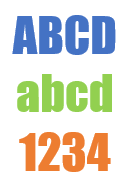
The Impact CSS Font is the best option when you don’t want to write too many lines and want just a few short words. It is not suitable for creating large size documents.
6) Comic Sans MS

Comic Sans MS is a casual, web-safe font known for its informal and friendly personality. While often debated, it serves a clear purpose in contexts where approachability and simplicity matter more than formality. Its rounded shapes and handwritten style make it easy to read, especially for audiences that benefit from a relaxed visual tone.
In practical use, I’ve seen Comic Sans MS work surprisingly well in situations requiring low visual pressure and quick comprehension. When the goal is to remove intimidation from text-heavy content, it does exactly that—no polish, no pretense, just straightforward readability.
7) Trebuchet MS
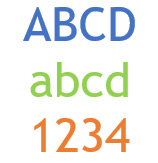
Trebuchet MS is a humanist sans-serif web-safe font designed for screen performance and modern aesthetics. It balances personality with professionalism, making it suitable for contemporary web interfaces that need clarity without looking sterile. Its open letterforms and strong spacing help content stay readable across different resolutions.
After applying it in multiple responsive layouts, I found Trebuchet MS especially effective for UI-driven content. In scenarios where text needed to feel modern yet approachable, it consistently delivered smooth readability while maintaining a subtle visual identity that didn’t overpower the design.
8) Helvetica
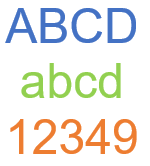
Helvetica is a timeless sans-serif font known for its neutral, no-nonsense design and exceptional readability. Its balanced proportions and clean lines make it a favorite for modern web layouts where clarity and professionalism are non-negotiable. Although not natively available on all systems, it often appears through system font stacks where visual consistency is still a priority.
From hands-on use, I’ve seen Helvetica excel in interfaces where content must stay invisible and effortless. In real layouts focused on usability, it quietly improves reading flow, making it ideal for pages where users should focus on information—not typography.
9) Arial-black

Arial Black is a bold, heavy-weight variation of Arial designed to make text stand out instantly. As a web-safe font, it’s commonly used for headings, callouts, or sections that demand immediate attention without relying on custom typography. Its thick strokes ensure strong visibility even on lower-resolution screens.
While testing it across different page sections, I found Arial Black particularly effective for visual hierarchy. In layouts where headings needed to dominate without decorative styling, it delivered impact fast—sometimes a little too loud—so it works best when used with restraint and purpose.
10) Garamond
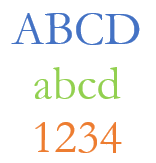
Garamond is a classic serif font that brings elegance and literary depth to web content while remaining web-safe through system availability. Its slender letterforms and refined curves make it well-suited for long-form reading experiences that aim for a traditional, book-like feel rather than a modern interface look.
Through practical application, I noticed Garamond shines when content leans toward storytelling or detailed explanations. In real usage, it creates a calm reading rhythm that encourages users to slow down and engage, making it a solid choice when tone and readability matter more than visual punch.
11) Verdana

Verdana is a web-safe sans-serif font engineered specifically for on-screen readability. Its wide letterforms, generous spacing, and tall x-height make text easy to scan, even at smaller sizes. This makes it especially suitable for interfaces and content-heavy pages where clarity matters more than visual flair.
From practical use, I’ve found Verdana holds up exceptionally well in dense layouts. In real browsing scenarios, it reduces eye strain and keeps text legible across devices, making it a reliable choice when accessibility and readability are top priorities.
12) Bookman Old Style
Bookman Old Style is a bold serif font with rounded shapes and a distinctly warm, traditional appearance. As a web-safe option, it brings personality to content while maintaining readability, making it useful when a page needs character without sacrificing structure. Its heavier strokes give it more presence than many classic serif fonts.
While working with it in longer text sections, I noticed Bookman Old Style adds a comfortable, almost conversational reading rhythm. In real usage, it works best when content aims to feel inviting rather than strictly formal.
13) Palatino

Palatino is a refined serif font designed for readability and elegance, even on digital screens. Its open counters and balanced proportions make it well-suited for long-form web content that values clarity alongside a classic aesthetic. As a web-safe font, it offers a more graceful alternative to heavier serif choices.
After using Palatino in content-driven layouts, I found it excels where focus and flow matter. In practical scenarios, it encourages longer reading sessions by maintaining a smooth, natural text rhythm without feeling dated.
14) Times

Times is a classic serif font commonly found across operating systems and browsers, making it a dependable web-safe option for text-heavy content. Its compact letterforms and strong contrast allow more words per line, which can be useful when space efficiency matters. Visually, it leans formal and traditional, closely resembling printed newspaper typography.
From real usage, I’ve noticed Times works best when content needs to feel dense yet structured. In practical layouts focused on information delivery, it maintains readability while giving pages a serious, no-frills tone that prioritizes substance over style.
15) Courier
Courier is a monospaced, web-safe font where every character occupies equal horizontal space. This rigid structure makes it ideal for content that depends on alignment and precision rather than visual elegance. Its mechanical, typewriter-style appearance immediately signals structure and uniformity within a webpage.
After applying it in structured text sections, I found Courier especially effective at separating technical or formatted content from regular text. In real scenarios where spacing accuracy mattered more than aesthetics, it delivered clarity instantly—direct, predictable, and unapologetically functional.
Which Fonts Are Truly Web Safe Across All Devices?
Web safe fonts are typefaces almost every device already has installed — so your site text always renders the way you expect. The most dependable ones include Arial, Verdana, Times New Roman, Georgia, Helvetica, Courier New, and Trebuchet MS. These fonts work across Windows, macOS, Linux, tablets, and phones without forcing downloads or fallbacks. They also map to one of the five generic families (serif, sans-serif, monospace, cursive, or fantasy), so even if a device doesn’t have your first choice, it will pick the next best matched font. This keeps your typography consistent, readable, and fast loading.
How to Use a Font Stack for Perfect Fallbacks
A font stack is a prioritized list of fonts you define in CSS so browsers pick the first available choice. It looks like this:
"Helvetica", "Arial", "sans-serif;"
Here, the browser tries Helvetica first. If it’s not available, it falls back to Arial, and finally to the generic sans-serif. Putting more options in a stack prevents awkward default fonts from showing up on some systems. Adding a class generic family last (like serif or sans-serif) is critical — it guarantees that even if browsers don’t have any listed fonts, they still pick a similar style reliably.
How Web Safe Fonts Improve Page Load Speed
Fonts that are already installed on a user’s system don’t need to be downloaded, meaning the browser can start painting text immediately. This reduces layout shifts and boosts perceived speed — especially on mobile devices. When you use web safe fonts in your CSS, you eliminate extra HTTP requests, reduce render-blocking resources, and keep your Core Web Vitals strong. In short: no downloads, fewer surprises, and faster visual feedback for users. This matters for SEO, user experience, and conversions.
Why are Web Safe Fonts necessary?
In an ideal scenario, you should able to render any font for a website. However, there are restrictions to the type of fonts that you can use. Windows-based devices might have one group, and MacOS might have another group of font family. Google’s Android system uses its own as well. Most computer systems come with a set of fonts that are generally pre-installed by the manufacturers. However, their design might not be the same.
Your website may be beautifully designed with awesome looking fonts. However, it is useless if it is not loading correctly in the browser of your visitors. So, if the font that you are using was not installed on your system, then your website will revert to the generic font, which may be unreadable.
