
How to View Facebook Stories Anonymously: 10 Methods
 Editorial Team
Being a social media giant, Facebook always offers exciting features to keep its users engaged. One of its recently added features, Stories, has become widely popular among all age groups. Like Instagram stories, you can share beautiful moments with friends and family in a short video clip, image, or text.

mSpy is a famous spy tool that lets you see Facebook stories without revealing yourself. The mSpy anonymous Facebook viewer is safe to use and set up very easily on any mobile device.
Facebook stories last for 24 hours on the platform and show you who viewed it in that period. However, you may have the curiosity to see someone’s story but do not want to reveal your identity. Moreover, you may want to get to know your new colleague while maintaining professional boundaries.
Find Someone’s Facebook Story Anonymously
In this article, you will find legitimate methods to view Facebook stories anonymously without compromising privacy and ethical boundaries.
How to View Facebook Stories Anonymously?
Anonymous viewing of Facebook stories is possible through different in-app options and third-party tools. You can install the browser extension or PC software to access all Facebook features covertly.
Method 1: Third party Facebook Story Viewer Tool
Anonymous story viewing has become convenient with third party applications that display stories, posts, friends, Facebook messenger messages, and more. Down below, discover a few reliable tools offering the best service in the market. You can review them to choose the one that aligns with your preferences and needs.
1) mSpy
Anonymous Facebook Story Viewer Online
mSpy is the parental-monitoring tool that surfaces a minor child’s Facebook activity, including stories they’ve viewed, posts they’ve made, and messages exchanged — under lawful parental oversight on a device the parent owns. iOS works without jailbreak through iCloud-credentials integration; Android requires a one-time installer with accessibility permission. Not an “anonymous story viewer” in the third-party-tool sense — this is direct parental visibility under a different legal framing. Recommended only for the parental use case.

Supported Phones: Android, iPhone, iPad
Live Demo: Yes
24/7 Support: Yes – Offers a toll-free helpline as well
Refund Policy: 14-Days Money-Back Guarantee
Key feature: Full Facebook activity reporting for parental monitoring of a minor child, including stories viewed, posts created, messages sent and received, contacts added, and time-of-day activity — without jailbreaking iPhone or rooting Android.
Here are steps to view any Facebook story anonymously via mSpy:
Step 1) Sign up on the mSpy site and subscribe to a plan of your choice.

Step 2) Deploy the software on the target device following instructions sent to your email.

Step 3) Log in using your mSpy account credential and move to the control panel.

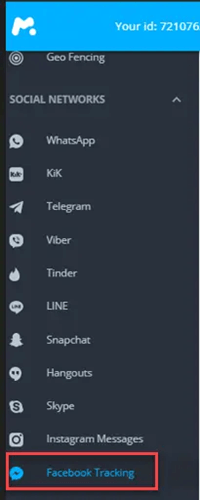
Step 4) Add the device and navigate to the Facebook tab to view Facebook stories anonymously.
14-Days Money-Back Guarantee
2) SpyX
Best for Complete & Undetectable Facebook Story Viewing
SpyX is a powerful Facebook story viewer designed for completely anonymous access. It allows you to view Facebook Stories and secret conversations without ever alerting the user. SpyX can retrieve deleted messages, capture disappearing media, and even monitor encrypted chats—all without needing physical access to the device.

With SpyX, you can also track real-time Messenger activity, check browser history, view shared links, and monitor GPS locations. It even supports other platforms like Instagram, Snapchat, and WhatsApp, offering seamless cross-app visibility. Best of all, SpyX operates in 100% stealth mode—no app icons or alerts appear on the target device, ensuring total discretion.
15-Days Money-Back Guarantee
3) Spokeo
Best facebook viewer app
Spokeo is the strongest people-search tool for finding a Facebook profile from a name, email, or phone number — useful when you want to verify a profile’s authenticity before deciding whether to view their stories. It indexes 120+ social networks alongside US public records, so a single Facebook handle often resolves to a name, an email, and linked accounts. The $0.95 trial is enough for spot verification; the $19.95/month plan opens unlimited lookups. Doesn’t view stories directly; surfaces public-profile context that helps with safer interactions.

Key feature: Reverse search across 120+ social networks plus full US public records by name, email, phone, address, or username, with linked-account discovery and breach-data flags on each result.
7-Days Trial for $0.95
4) xMobi
Facebook Stories Viewer
xMobi is a Facebook Spy App that lets you see Facebook stories without revealing yourself. You can see deleted media and messages, including chats and pictures or videos. You can monitor calls, SMS, GPS location, web browser history, and more.

xMobi has an Facebook tracker that gives access to IG Stories, GPS location, shared links, and direct messages. These features allow parents to monitor their children’s online activities without the kid’s knowledge.
This Facebook story viewer can also recover deleted messages, record the screen, and block websites remotely. The best part of this app is that no icon would show on the monitored device.
14-Days Money-Back Guarantee
Note: Secretly tracking someone’s mobile activities is a privacy breach and could be illegal. You should obtain explicit permission unless the person being monitored is your child.
Method 2: Turn on the Airplane Mode
According to the prevailing consensus among users, the internet is necessary to view Facebook stories. However, it is not entirely true, especially if you have the Facebook mobile app. In this method, you are required to turn on the Airplane mode while logged in to your FB account.
When you disconnect the internet, Facebook stops registering your activities on the app. Consequently, you will not be counted as a Facebook stories viewer since you will see the version saved in your phone cache. The technique also works on the computer program but has a better success rate on mobile.
Here are steps to see Facebook stories anonymously using Airplane mode:
Step 1) Open the FB app on your Android or iOS phone and make sure you are logged in to your account. Navigate to the person’s profile or swipe left on the stories to find the one you want to view.

Step 2) Turn on the Airplane mode from the taskbar while you keep the Facebook app open.

Step 3) Tap on the story to play it.

Method 3: Try Half Swipe FB Story Viewer Method
The Half swipe method to view the Facebook story anonymously is a little technical and requires some effort. You can avoid getting registered as a Facebook viewer by ending the story halfway through.
In this process, you will tap on a story and swipe to the next one without letting it go. It is the best way to see the story if it is just an image. For video, you will have to play it, as this method will only show the thumbnail.
Here are steps to view stories on Facebook with half swipe:
Step 1) Go to the Facebook application on your mobile phone. Tap and hold the story.

Step 2) Without lifting your finger, swipe right or left.

Ensure you do not let the story end and swipe as quickly as possible.
Method 4: Block the Other User
Blocking the user can also fix the problem of appearing as a viewer of their story. You might have watched someone’s story accidentally, and now you do not want them to know. In that case, this method can help you hide it, but it has a few consequences.
First, you should be willing to block the user temporarily, and second, it will also remove them from your Facebook friend list. After 24 hours, you can unblock and add them back.
Here are steps to remove Facebook story view by blocking:
Step 1) Visit the profile after viewing their story and tap the three dots icon.

Step 2) Locate and select Block from the list.

Step 3) Tap on Block again to confirm your action.

Method 5: Watch Highlights After Story Expires
Some people may find the above methods too technical or not prefer these approaches. Alternatively, you can rely on highlights, which is the best way to view Facebook stories anonymously. Story Highlights is a feature that lets you save and put your memories on display.
Once the story expires, it can be added to the profile so people can see it when they visit your page. Although the Facebook Highlights also shows the viewer’s list, you can still access it without letting the user know. It is possible, as the name list disappears after 24 hours and only tells the number of viewers.
Here are steps to view Facebook story highlights anonymously:
Step 1) Visit the person’s profile whose story you want to see.

Step 2) Scroll to the Story Highlights section and tap on one. (Remember, you should only play the story if it is older than 24 hours.)

Method 6: Use An Alternate Facebook Account
Consider accessing the story through an alternate account to hide your identity. You can do this by using your friend’s ID or creating a new account on Facebook.
The latter option will only work for the publicly available stories. Moreover, you should be careful when choosing a name for the new profile, as it could potentially lead to identity theft.
Borrowing the account of a mutual friend is a great way to view the Facebook story anonymously without any risk. It allows you to see the stories which are not publicly shared.
Method 7: Deactivate Your Facebook Account
Facebook users can avoid getting caught for watching stories by deactivating their accounts. While it may seem extreme, executing this method produces positive outcomes. It ensures your profile does not show up in the Facebook viewer list.
Here are steps to deactivate your Facebook account:
Step 1) Access the menu by tapping three lines in your Facebook app.

Step 2) Hit the Settings & privacy tab and then open Settings.

Step 3) Look for the Account Center and tap on it to see more.

Step 4) Go to Personal details and then Account Ownership and Control.

Step 5) Hit the Deactivate or Deletion tab and select the account.

Step 6) Make sure you choose the “Deactivate account” option. Tap on Continue.

After a day, you can reactivate your account by entering the Facebook username and password.
Method 8: Watch At The Last Minute
One of the easiest ways to avoid identity reveal is by watching the story at the last minute. It does not require you to execute any technique or lose access to your account.
All you need to do is track the story and watch it just before it disappears. You can find the expiry time from a mutual friend or use the half-swipe method.
Method 9: Ask a Friend to Share the Screenshot
Asking a friend to take a screenshot is another solution to view stories anonymously. Whether it is a video or just an image, they can capture it using their phone. Once they record the story, you can ask them to share it through a messaging app.
Method 10: Use FB Story Viewer Chrome Extensions
Utilizing the Google Chrome extension is another way to view Facebook stories anonymously. Several third-party apps are available that you can review to find the right option.
Depending on the extension you acquire, it can let you watch or download Facebook stories anonymously. The Facebook Story Seen Hider Chrome addon provides an excellent service that makes life easy.
Here are steps to watch Facebook stories anonymously via extension:
Step 1) Download and install the Facebook Story Seen Hider extension from the Google Chrome web store.

Step 2) Login and navigate to the Facebook page where the story is showing.
Step 3) Click on the extension to activate Anonymous mode.

How to Check Facebook Story Views?
When you upload a story on your Facebook account, you can see the names of people who watch it. Here are steps to check Facebook story views:
Step 1) Open the Facebook app and tap on your story in the stories section at the top.

Step 2) Locate and click on the “X viewers” option to see the list. (‘X’ represents the variable number of viewers)

Viewer’s list of publicly shared stories will only contain your friends’ names. All the views from unknown accounts are shown as “X Other Viewers.”
How to Download Facebook Stories Anonymously?
Downloading a Facebook story without them knowing is a challenging task. There are a few ways that let you view someone’s story and download it anonymously. One of these solutions requires you to turn on the Airplane mode and play the story to retrieve its unique link. Then, use a Facebook video and story downloader like mSpy and save it on your local storage.
Ethical Implications of Viewing Facebook Stories Anonymously
Seeing Facebook stories anonymously could raise ethical concerns about privacy, consent, and respectful online behavior. Here are some considerations:
- Privacy Concerns: Watching someone’s story anonymously could be considered a violation of their privacy. Unless you know they have no intention to track who views their story, you should respect others’ privacy.
- Legal Implications: Almost every state has a privacy law restricting you from tracking someone’s personal activities through third-party spy tools or creating a fake account.
- Personal Responsibility: Being a responsible human, you should never anonymously see others’ Facebook stories unless necessary.
How to View a Facebook Story Without the User Knowing
Facebook deliberately shows the story author who has watched each story — the viewer list is the platform’s core engagement mechanic. There is no Facebook-supported way to defeat that visibility on a personal profile story. The methods below are the only ones that work currently, ranked by reliability.
- Use a second Facebook account (“finsta”) the target won’t recognise. Create the account with a different email, a name they don’t know, and no friend connections. For public-profile and public-Page stories, browse without sending any friend request. Your view appears in the author’s list under a name they cannot connect to you. This is the only method that delivers consistent anonymity.
- Browse public Pages in a logged-out browser. Public business and creator Pages often allow story viewing in an incognito window without an account. Visit the Page URL directly. Personal profiles require a login and cannot be viewed this way.
- Use a Page-story viewer site for public Pages. A handful of third-party viewer sites proxy public Facebook Page stories — coverage rotates as Meta blocks them at the API level, and none of them work on personal profiles. Avoid sites that ask you to install extensions or “verify you’re human” through download offers.
- Screen-record a quick preview before fully opening. Limited window remains: enable phone screen recording, open the Stories tab quickly, and capture the thumbnail preview before tapping in fully. Works inconsistently — the view sometimes registers anyway.
The methods that no longer work today: airplane mode tricks, partial swipes, fake accounts with the target’s name (Meta removes these within hours of detection), and most “anonymous Facebook story viewer” websites listed on older listicles. Save the time and use a second account instead.
Why Most Anonymous Facebook Story Viewer Sites Have Stopped Working
Meta tightened its public Graph API access multiple times in recent years, leaving only a few reliable Facebook story viewer tool options still working today. The API endpoints that third-party viewers relied on to fetch story content without an authenticated user are now restricted to verified business apps that complete Meta’s app review. Most consumer-grade viewer sites cannot pass the review because their use case — letting someone watch another user’s story anonymously — explicitly violates Facebook’s Platform Terms.
The sites that still appear in search results today fall into three groups: working but intermittent (they break for stretches when Meta updates the API and come back when developers patch around it), permanently broken (the domain still exists but every request returns a generic error), and outright scams (survey-trap landing pages that show a fake loading bar to coerce users into “completing offers”). The category churns weekly. Before trusting any specific viewer site, test it on a known public Page that has an active story — if nothing loads, no upgrade is going to fix it.
Anonymous Story Viewing vs Story Saving: They’re Different Problems
“Anonymously viewing” a Facebook story and “downloading” a Facebook story are two separate problems with different solutions and different ethics.
- Anonymous viewing is about not appearing in the author’s viewer list. Achievable for public Pages through logged-out browsing or a third-party viewer site. Not achievable for personal profile stories — the only path is a second account the target doesn’t recognise.
- Story saving (downloading) is about keeping a local copy of a story for offline viewing or archival. Several legitimate tools (Storiesdown, Inflact, Picuki for Instagram-equivalent) handle this for public content. Many free tools advertise both anonymous viewing and downloading, but only the download function consistently works reliably today.
Two practical points worth keeping in mind: downloading a story for personal viewing is generally legal but redistributing it usually isn’t, and viewing someone’s story anonymously is — for healthy adult relationships — almost always a signal that you should consider blocking, muting, or simply not looking instead. A workable, lawful workflow does exist; it just isn’t the magical solution most search results suggest.
Verdict
For most users today, the only consistently reliable method to view a Facebook story anonymously is a second Facebook account the target won’t recognise — no third-party tool works reliably on personal profiles. For public-Page stories, an incognito browser session works without an account. For verifying an unknown profile before engagement, use Spokeo or mSpy (for lawful parental visibility) to confirm authenticity or maintain oversight first. Top picks (links from existing page):
- mSpy — Parental-monitoring tool that surfaces a minor child’s Facebook activity under lawful oversight on a parent-owned device.
- Spokeo — Reverse search across 120+ social networks plus US public records by name, email, or phone.
- SpyX — Cross-platform monitoring with stealth mode for Facebook, Instagram, and Messenger activity.
FAQS
mSpy is a famous spy tool that lets you see Facebook stories without revealing yourself. The mSpy anonymous Facebook viewer is safe to use and set up very easily on any mobile device.
