
System Call in OS (Operating System): What is, Types and Examples
 Editorial Team
⚡ Smart Summary
System call is the controlled interface a process uses to request kernel services such as file access, process control, and device communication, safely switching the CPU from user mode to privileged kernel mode.
What is System Call in Operating System?
A system call is a mechanism that provides the interface between a process and the operating system. It is a programmatic method in which a computer program requests a service from the kernel of the OS.
System call offers the services of the operating system to the user programs via API (Application Programming Interface). System calls are the only entry points for the kernel system.

System Calls in Operating System
Example of System Call
For example, to write a program that reads data from one file and copies it into another, the program first needs the names of the two files: the input and output files.
In an interactive system, this type of program execution requires some system calls by the OS.
- The first call is to write a prompting message on the screen.
- The second is to read, from the keyboard, the characters that define the two files.
How System Call Works?
Here are the steps for a system call in OS:
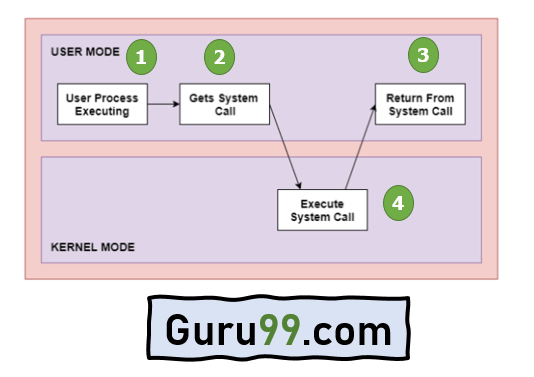

Architecture of the System Call
As you can see in the system call diagram above:
Step 1) The processes execute in user mode until a system call interrupts them.
Step 2) After that, the system call is executed in kernel mode on a priority basis.
Step 3) Once system call execution is over, control returns to user mode.
Step 4) The execution of user processes resumes, moving between user mode and kernel mode as required.
Why do you need System Calls in OS?
The following are situations which need system calls in OS:
- Reading and writing from files demand system calls.
- If a file system wants to create or delete files, system calls are required.
- System calls are used for the creation and management of new processes.
- Network connections need system calls for sending and receiving packets.
- Access to hardware devices like a scanner or printer needs a system call.
Types of System Calls
Here are the five types of system calls in OS:
- Process Control
- File Management
- Device Management
- Information Maintenance
- Communication
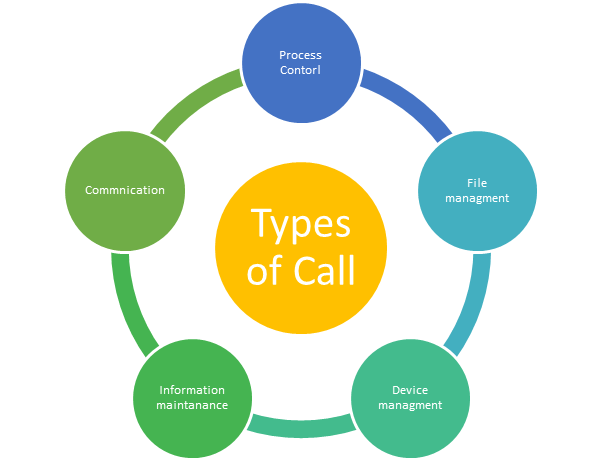
Types of System Calls in OS
Process Control
These system calls perform the task of process creation, process termination, etc.
Functions:
- End and Abort
- Load and Execute
- Create Process and Terminate Process
- Wait and Signal Event
- Allocate and free memory
File Management
File management system calls handle file manipulation jobs like creating a file, reading, and writing, etc.
Functions:
- Create a file
- Delete file
- Open and close file
- Read, write, and reposition
- Get and set file attributes
Device Management
Device management does the job of device manipulation like reading from device buffers, writing into device buffers, etc.
Functions:
- Request and release device
- Logically attach or detach devices
- Get and set device attributes
Information Maintenance
It handles information and its transfer between the OS and the user program.
Functions:
- Get or set time and date
- Get process and device attributes
Communication
These types of system calls are specially used for inter-process communication.
Functions:
- Create and delete communication connections
- Send and receive messages
- Help the OS transfer status information
- Attach or detach remote devices
Rules for passing Parameters for System Call
Here are the general rules for passing parameters to the system call:
- Parameters should be pushed onto or popped off the stack by the operating system.
- Parameters can be passed in registers.
- When there are more parameters than registers, they should be stored in a block, and the block address should be passed in a register.
Important System Calls Used in OS
wait()
In some systems, a process must wait for another to finish. This occurs when a parent process creates a child, and the parent stays suspended until the child completes.
The parent’s suspension occurs automatically with a wait() system call. When the child ends execution, control moves back to the parent.
fork()
Processes use this system call to create processes that are a copy of themselves. With the help of fork(), a parent process creates a child process, and the parent is suspended until the child process executes.
exec()
This system call runs an executable file within an already running process, replacing the older one. The original process identifier remains since no new process is built, but the stack, data, heap, etc., are replaced by the new process.
kill()
The kill() system call is used by the OS to send a termination signal to a process, urging it to exit. However, a kill system call does not necessarily mean killing the process and can have various meanings.
exit()
The exit() system call is used to terminate program execution. Especially in a multi-threaded environment, this call defines that the thread execution is complete. The OS reclaims the resources used by the process after the exit() call.
