
SAP PP01: How to maintain OM Infotypes
 Editorial Team
⚡ Smart Summary
SAP PP01 is the transaction used to maintain Organizational Management infotypes in Expert Mode. It lets users select an object through the Object Manager and edit infotypes such as Description (IT1000) and Relationships (IT1001) for any object type.
Once you have created different OM Objects, you will need to maintain Infotypes related to it.
Lets look into SAP-HR OM Infotype Maintenance —
Methods to Maintain Organizational Management Infotypes
There are two Methods to Maintain SAP – Organizational Management Infotypes
1. Using Organization and Staffing Transaction
2. Using the Expert Mode.
In this tutorial we will look into the Expert Mode
The Expert Mode is an interface that is ideal for maintaining details. Individual objects are selected using the Object Manager. Infotypes for that particular object can now be maintained.
Transaction code PP01 can be used to maintain all object types. Due to authorization restrictions, you may not have access to PP01. Instead, you will have to use one of the following transactions, which restrict access to one particular object type:
- PO10 Organizational Unit
- PO03 Job
- PO13 Position
- PO01 Work Center
The PP01 screen is shown below. Screens for PO10, PO03, PO13 & PO01 are very similar
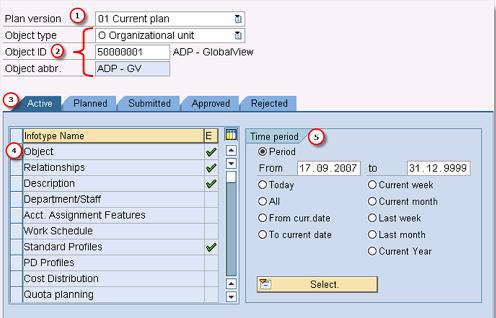
- Plan Version: It is important to ensure that you are working in the correct plan version at all times (for this you can also default the plan version in the user parameter
- Object Information: The object type, ID and abbreviation are displayed so the user can ensure that the right object is being edited.
- Status: Select the status of the infotype you want to maintain using the tab pages (select Active which has status = 1).
- Infotype: Select the infotype you want to maintain.
- Validity Period: Start and end dates specify the period during which the object exists in the plan version selected.
Important OM Infotypes
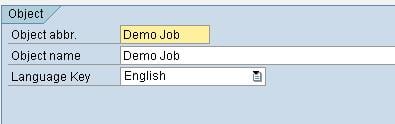
1. IT1000 – Description: It gives an Object’s Abbreviation and Name
2. IT1001 – Relationships:
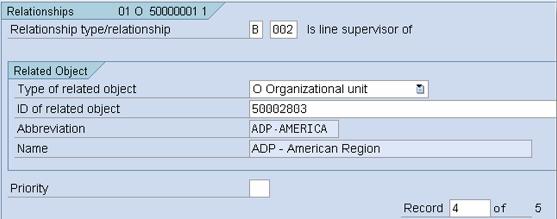
- There are many different relationship types that you can create between object types
- Each individual relationship represents a subtype of the Relationships infotype (IT1001).
- Not all relationships apply to every object.
- Relationship records can manually be created using the Expert Mode interface, but they are also automatically created when using other interfaces (e.g. Organization and Staffing, Simple Maintenance).
- When creating a relationship, the inverse relationship is usually automatically created by the system.
