
Relational Algebra in DBMS with Examples
 Editorial Team
⚡ Smart Summary
Relational Algebra in DBMS is a procedural query language that takes relations as input and produces new relations as output. It groups operators into unary, set, and binary categories, providing the theoretical foundation that SQL engines translate into executable query plans.

What is Relational Algebra?
Relational Algebra is a procedural query language that accepts instances of relations as input and returns new instances of relations as output. It applies a fixed set of operators recursively on one or more relations, and the result of each operator is itself a relation that can be fed into the next operation. SQL engines lean on this algebra to plan and execute queries.
Basic Relational Algebra Operations
Relational algebra operators fall into three groups.
Unary Relational Operations
- SELECT (σ)
- PROJECT (π)
- RENAME (ρ)
Operations from Set Theory
- UNION (∪)
- INTERSECTION (∩)
- DIFFERENCE (−)
- CARTESIAN PRODUCT (×)
Binary Relational Operations
- JOIN
- DIVISION
The sections below walk through each operator with worked examples.
SELECT (σ)
The SELECT operation chooses a subset of tuples that satisfy a given predicate. The sigma symbol σ denotes it:
σp(r)where σ is the operator, p is the propositional condition, and r is the relation (table). SELECT preserves the schema and discards rows that fail the predicate.
Example 1
σ topic = "Database" (Tutorials)Selects tuples from Tutorials where the topic equals “Database”.
Example 2
σ topic = "Database" AND author = "guru99" (Tutorials)Selects tuples from Tutorials where the topic is “Database” and the author is guru99.
Example 3
σ sales > 50000 (Customers)Selects tuples from Customers whose sales value is greater than 50,000.
Projection (π)
The projection operator removes every attribute from the input relation except those listed, producing a vertical subset. Projection also eliminates duplicate rows that result from dropping attributes. The pi symbol π denotes it.
Example: consider the following table.
| CustomerID | CustomerName | Status |
|---|---|---|
| 1 | Active | |
| 2 | Amazon | Active |
| 3 | Apple | Inactive |
| 4 | Alibaba | Active |
Projecting on CustomerName and Status:
π CustomerName, Status (Customers)| CustomerName | Status |
|---|---|
| Active | |
| Amazon | Active |
| Apple | Inactive |
| Alibaba | Active |
Rename (ρ)
The rename operator is a unary operation that gives a new name to an attribute (or to an entire relation). For example, ρ(a/b) R renames attribute b of relation R to a. Rename is particularly useful when you need to perform a self-join or join two relations that share attribute names.
Union Operation (∪)
The UNION operator, denoted by ∪, returns every tuple that appears in either relation A or relation B, automatically removing duplicates.
Result ← A ∪ BFor a union to be valid:
- A and B must have the same number of attributes (same arity).
- The corresponding attribute domains must be compatible.
- Duplicate tuples are removed automatically.
Example. Consider these two tables:
| Table A | Table B | |||
|---|---|---|---|---|
| column 1 | column 2 | column 1 | column 2 | |
| 1 | 1 | 1 | 1 | |
| 1 | 2 | 1 | 3 | |
A ∪ B gives:
| column 1 | column 2 |
|---|---|
| 1 | 1 |
| 1 | 2 |
| 1 | 3 |
Set Difference (−)
The minus symbol denotes set difference. The result of A − B is a relation containing all tuples that are in A but not in B.
- A and B must be union-compatible.
- Attribute names and domains must align.
Example: A − B
| column 1 | column 2 |
|---|---|
| 1 | 2 |
Intersection (∩)
The intersection operator, denoted by ∩, defines a relation containing every tuple that appears in both A and B. A and B must be union-compatible.

Visual definition of intersection.
Example: A ∩ B
| column 1 | column 2 |
|---|---|
| 1 | 1 |
Cartesian Product (×) in DBMS
The Cartesian product combines every tuple of one relation with every tuple of another, merging their columns. On its own the result is rarely useful, but combined with a SELECT predicate it becomes the foundation of JOIN. It is also called the cross product or cross join.
Example: σ column 2 = ‘1’ (A × B)
The expression returns every row of A × B whose column 2 value is 1.
| column 1 | column 2 |
|---|---|
| 1 | 1 |
| 1 | 1 |
Join Operations
A join is a Cartesian product followed by a selection predicate. Joins are denoted by the ⋈ symbol and let you combine related tuples from different relations in a meaningful way.
Types of join:
- Inner joins: Theta join, Equi join, Natural join.
- Outer joins: Left, Right, and Full Outer joins.
Inner Join
In an inner join, only tuples that satisfy the matching criteria are included; the rest are discarded.
Theta Join
The general form of JOIN is the Theta join, denoted by θ. Theta join can use any comparison condition in its selection criteria.
A ⋈θ BFor example:
A ⋈ A.column 2 > B.column 2 (B)| column 1 | column 2 |
|---|---|
| 1 | 2 |
Equi Join
When a Theta join uses only equality conditions, it becomes an Equi join.
A ⋈ A.column 2 = B.column 2 (B)| column 1 | column 2 |
|---|---|
| 1 | 1 |
Equi join is one of the most heavily used join styles, and the RDBMS query optimizer typically pours significant effort into making it efficient.
Natural Join (⋈)
A Natural join requires a common attribute (column) between the relations. The shared attribute must have the same name and domain. The result contains one copy of the matching column.
Consider these two tables.
| Table C | |
|---|---|
| Num | Square |
| 2 | 4 |
| 3 | 9 |
| Table D | |
|---|---|
| Num | Cube |
| 2 | 8 |
| 3 | 27 |
C ⋈ D produces:
| Num | Square | Cube |
|---|---|---|
| 2 | 4 | 8 |
| 3 | 9 | 27 |
Outer Join
An outer join keeps tuples that satisfy the matching criteria and tuples that do not, filling missing columns with NULL.
Left Outer Join (A ⟕ B)
The left outer join keeps every tuple in the left relation. If a row in A has no matching row in B, the attributes contributed by B are filled with NULL.
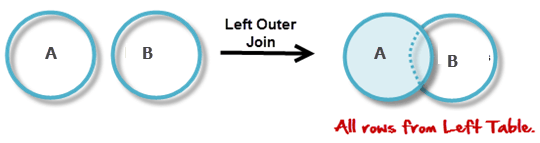
Consider the following tables:
| Table A | |
|---|---|
| Num | Square |
| 2 | 4 |
| 3 | 9 |
| 4 | 16 |
| Table B | |
|---|---|
| Num | Cube |
| 2 | 8 |
| 3 | 18 |
| 5 | 75 |
A ⟕ B gives:
| Num | Square | Cube |
|---|---|---|
| 2 | 4 | 8 |
| 3 | 9 | 18 |
| 4 | 16 | NULL |
Right Outer Join (A ⟖ B)
The right outer join keeps every tuple in the right relation. If a row in B has no matching row in A, the columns contributed by A are filled with NULL.
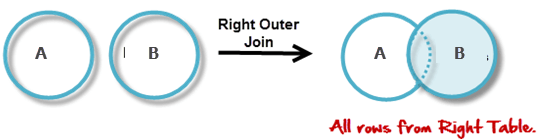
A ⟖ B gives:
| Num | Cube | Square |
|---|---|---|
| 2 | 8 | 4 |
| 3 | 18 | 9 |
| 5 | 75 | NULL |
Full Outer Join (A ⟗ B)
The full outer join keeps every tuple from both relations, regardless of whether the join condition matched. Missing values on either side become NULL.
A ⟗ B gives:
| Num | Square | Cube |
|---|---|---|
| 2 | 4 | 8 |
| 3 | 9 | 18 |
| 4 | 16 | NULL |
| 5 | NULL | 75 |
Operator Reference Summary
Use this reference table to recall what each operator does at a glance.
| Operation (Symbol) | Purpose |
|---|---|
| SELECT (σ) | Selects a subset of tuples that satisfy a given predicate. |
| PROJECT (π) | Keeps only the listed attributes and removes duplicate rows. |
| UNION (∪) | Returns every tuple appearing in either A or B without duplicates. |
| SET DIFFERENCE (−) | Returns tuples in A that are not in B. |
| INTERSECTION (∩) | Returns tuples appearing in both A and B. |
| CARTESIAN PRODUCT (×) | Combines every tuple of A with every tuple of B. |
| INNER JOIN | Keeps only tuples that match the join condition. |
| THETA JOIN (θ) | General-form join using any comparison predicate. |
| EQUI JOIN | Theta join that uses only equality comparisons. |
| NATURAL JOIN (⋈) | Joins relations on attributes that share the same name and domain. |
| LEFT OUTER JOIN (⟕) | Keeps every tuple from the left relation, fills right with NULL. |
| RIGHT OUTER JOIN (⟖) | Keeps every tuple from the right relation, fills left with NULL. |
| FULL OUTER JOIN (⟗) | Keeps every tuple from both relations, filling missing values with NULL. |
