
Python List sort() with Examples
 Editorial Team
⚡ Smart Summary
Python list sort() arranges the elements of a list in place, ascending by default or descending through the reverse parameter, while an optional key function sorts by custom criteria such as length, tuple fields, or user-defined functions.
What is the sort() method in Python?
The sort() function in Python helps sort a list into ascending or descending order. It can be used for sorting a numeric list, tuples, and a string list. It does not create a separate list but modifies or sorts the original.
Syntax of Sort method in Python
The sort function has the following syntax:
List.sort(key=…, reverse=…)
The sort function has two optional parameters, namely:
- Key:- This is used to sort a function based on a sorting criterion.
- Reverse: – it takes the value as either true or false. If true, this custom function sorts the list in descending order.
Sorting a list in ascending order using the Sort method in Python
In Python, the sort function, by default, sorts any list in ascending order. A list in ascending order has the lowest value on the left-hand side, and the highest value comes on the right-hand side.
Example:
Python code:
base_list=["Google","Reliance","Guru99","Content","Syntax"]
base_list.sort()
print("the base list after sorting is",base_list)
Output:
the base list after sorting is ['Content', 'Google', 'Guru99', 'Reliance', 'Syntax']
Code Explanation:
- The above list is a randomly defined string list.
- The sort function of Python helps in sorting the random list in ascending order, with the lowest length of the word on the left-hand side and the highest length of the word on the right-hand side.
Sorting a list in descending order
The sort function also allows a list to be sorted in descending order. It can be defined as the order where the list starts with the highest value and ends with the lowest value.
The reverse parameter of the sort function is assigned as true to get a list sorted in descending order.
Let us look at the below example:
Python code:
base_list=[100,600,400,8000,50]
base_list.sort()
print("the base list after sorting is",base_list)
# Reverse Order
base_list.sort(reverse=True)
print("the base list after REVERSE sorting is",base_list)
Output:
the base list after sorting is [50, 100, 400, 600, 8000]
the base list after REVERSE sorting is [8000, 600, 400, 100, 50]
Note: Ensure that the assignment of the word “True” to the reverse parameter starts with uppercase “T” to avoid any run time errors.
Sorting a list of tuples using the Sort method in Python
Python Tuples are collections of immutable elements that follow an ordered sequence. Python’s sort function can be used to sort a list of tuples using a customized function and lambda expression.
A customized function can be created without a name and represented by a lambda expression. Following is the syntax for Lambda expression:
Syntax:
Lambda arguments: expression
The above syntax is equivalent to the below python code:
def name (arguments):
return expression
Here is an example of a tuple and customized function to illustrate how a sort function with key parameters helps sort the elements in a tuple:
Python code:
base_list = [('Alto', 2020, 500),('MSFT', 2022, 300),('Guru99', 2019, 1070)]
def get_key(base_list):
    return base_list[2]
base_list.sort(key=get_key,reverse=True)
print("The change in base list is as follows",base_list)
Output:
The change in the base list is as follows [('Guru99', 2019, 1070), ('Alto', 2020, 500), ('MSFT', 2022, 300)]
Code Explanation:
- The reverse parameter is defined as true to sort the tuple in descending order.
- The customized function takes the second element of the tuple.
- This is utilized as the key of the sort function.
Let us look at the below example that makes use of lambda expression:
Python code:
base_list = [('Alto', 2020, 500),
('MSFT', 2022, 300),
('Guru99', 2019, 1070)]
base_list.sort(key=lambda base_list:base_list[2],reverse=True)
print("The change in base list is as follows",base_list)
Output:
The change in the base list is as follows [('Guru99', 2019, 1070), ('Alto', 2020, 500), ('MSFT', 2022, 300)]
Explanation:
- The lambda expression helps you to sort the elements of the tuple from high to low with the key as the second element of the tuple.
- The program will check the highest value of the second element of the tuple.
Sorting list items using Len as key parameter
Len is a built-in function that determines the length of the item. The length determined can be used for the indexing in the sort function. To do this, we assign Len to the Python sort function’s key parameter.
The following Python code illustrates how to use the Len function with the sort function.
Python Code:
base_list=["Alto", "Guru99", "Python", "Google", "Java"]
base_list.sort(key=len)
print("The sorted list based on length:",base_list)
Output:
The sorted list based on length: ['Alto', 'Java', 'Guru99', 'Python', 'Google']
Code Explanation:
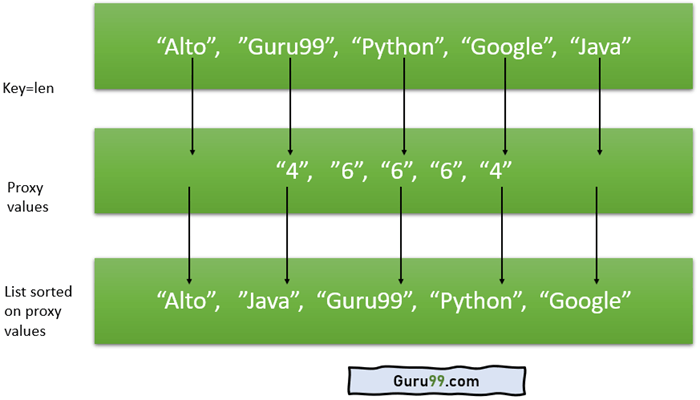
- The length of the element becomes an index for the key parameter to arrange the list in ascending order.
- The Len function estimates the length of each element present in the base list.
- It keeps the shortest element on the left-hand side and the largest element on the right-hand side.
- Here, the words alto and java have lengths of 4, which are arranged first in the list, followed by Guru99, which has a length of 6.
This example illustrates the concept of the reverse parameter in the sort function as shown below:
Python Code:
base_list=["Alto", "Guru99", "Python", "Google", "Java"]
base_list.sort(key=len,reverse=True)
print("The sorted list based on length:",base_list)
Output:
The sorted list based on length: ['Guru99', 'Python', 'Google', 'Alto', 'Java']
Sorting list items using user-defined function as a key parameter
You can also use a user-defined function as a key parameter to sort a list. Here is an example:
Python Code:
base_list = [{'Example':'Python','year':1991},{'Example':'Alto','year':2014},{'Example':'Guru99', 'year':1995},
{'Example':'Google','year':1985},{'Example':'Apple','year':2007},{'Example':'Emails','year':2010},]
def get_year(element):
    return element['year']
base_list.sort(key=get_year)
print("The base list after sorting using explicit criteria",base_list)
Output:
The base list after sorting using explicit criteria [{'Example': 'Google', 'year': 1985}, {'Example': 'Python', 'year': 1991}, {'Example': 'Guru99', 'year': 1995}, {'Example': 'Apple', 'year': 2007}, {'Example': 'Emails', 'year': 2010}, {'Example': 'Alto', 'year': 2014}]
Code Explanation:
- A user-defined function is created to return the year
- The key parameter takes a user-defined function as a criterion.
- Sort function will arrange the list in ascending order based on the value of the element “year”.
Difference between the sort method and sorted method in Python
After working through the examples above, it helps to compare the two sorting tools directly. Before the differences are summarized, let us understand the syntax of the Sorted method.
Python Syntax:
sorted (list_name, reverse=…., key=..)
Code Explanation:
- The sorted function sorts the list into either ascending order or descending order.
- The function accepts three parameters, out of which two parameters are of an optional type and one parameter is of the required type.
- Parameter list_name is required when using the Sorted method.
- The Sorted method can take any type of iterable list as input.
- Key parameters and reverse parameters are optional parameters under the sorted method in Python.
Here is an example of using the sort and sorted function in Python:
Python code:
#Use of the Sorted method
Base_list=[11,10,9,8,7,6]
print("the original list is",Base_list)
New_list=sorted(Base_list)
print("the New list using sorted method is",New_list)
#Use of the Sort method
Base_list=[11,10,9,8,7,6]
print("the original list is",Base_list)
New_list=Base_list.sort()
print("the New list using sort method is",New_list)
Output:
the original list is [11, 10, 9, 8, 7, 6]
the new list using the sorted method is [6, 7, 8, 9, 10, 11]
the original list is [11, 10, 9, 8, 7, 6]
the new list using the sort method is None
Code Explanation:
- The original list is passed as a required parameter for the sorted function.
- The Sorted method returns a new list besides the original list.
- Since no additional parameters are passed to the sorted method, the new list is by default sorted in ascending order.
- The sort function does not make any new list.
The following are the points on key similarities and differences:
| Sorted function | Sort function |
|---|---|
| Sorted function in Python is a built-in function that takes list_name as a required parameter. | Sort function does not take the original list as a parameter. |
| Sorted method returns a new list | Sort function does not return a new list |
| Sorted function should be used for iterable lists | The sort function should be used for non-iterable lists. |
| It does not modify the original list and allows us to retain original data. | The sort function modifies the original function and hence occupy less memory space |
When to utilize the sorted method or the sort method?
Let us take an example that requires race data to be sorted. The program uses the bib number and time taken in seconds to finish the race.
Python code:
from collections import namedtuple
Base = namedtuple('Runner', 'bibnumber duration')
blist = []
blist.append(Base('8567', 1500))
blist.append(Base('5234', 1420))
blist.append(Base('2344', 1600))
blist.append(Base('2342', 1490))
blist.append(Base('23444', 1620))
blist.append(Base('6674', 1906))
print("original list",blist)
blist.sort(key=lambda x: getattr(x, 'duration'))
top_five_result = blist[:5]
print("Results using sort function",top_five_result)
r_blist=sorted(blist,key=lambda x: getattr(x, 'duration'))
top_five_result = r_blist[:5]
print("Results using sorted function",top_five_result)
Output:
original list [Runner(bibnumber='8567', duration=1500), Runner(bibnumber='5234', duration=1420), Runner(bibnumber='2344', duration=1600), Runner(bibnumber='2342', duration=1490), Runner(bibnumber='23444', duration=1620), Runner(bibnumber='6674', duration=1906)]

Results using sort function [Runner(bibnumber='5234', duration=1420), Runner(bibnumber='2342', duration=1490), Runner(bibnumber='8567', duration=1500), Runner(bibnumber='2344', duration=1600), Runner(bibnumber='23444', duration=1620)]

Results using sorted function [Runner(bibnumber='5234', duration=1420), Runner(bibnumber='2342', duration=1490), Runner(bibnumber='8567', duration=1500), Runner(bibnumber='2344', duration=1600), Runner(bibnumber='23444', duration=1620)]
Code Explanation:
- The base list is sorted using both the sort function and sorted function.
- The base list is lost when the sort function is applied.
- The sort function should not be applied to the original data set. It should be used when there is a copy version of the original data set.
- The Sorted function retains the original list. It does not override it.
- This offers better traceability and effective data management.
