
PostgreSQL Join Types: Inner, Outer, Left, Right
 Editorial Team
⚡ Smart Summary
PostgreSQL Joins retrieve and combine rows from two or more tables using a shared key, and include inner joins such as theta, EQUI, and natural, plus outer joins covering left, right, and full results.
What are Joins in PostgreSQL?
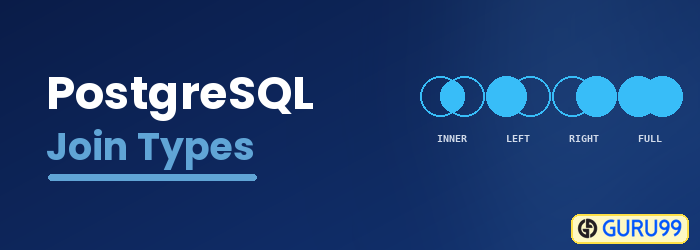
PostgreSQL Joins are used for retrieving data from more than one table. With Joins, it is possible for us to combine the SELECT and JOIN statements into a single statement. A JOIN condition is added to the statement, and all rows that meet the conditions are returned. The values from different tables are combined based on common columns. The common column is mostly a primary key in the first table and a foreign key of the second table.
PostgreSQL Join Types
There are two types of Joins in PostgreSQL:
- Inner Joins
- Outer Joins
PostgreSQL Inner Join
There are 3 types of Inner Joins in PostgreSQL:
- Theta join
- Natural join
- EQUI join
Theta Join
A theta join allows one to join two tables based on the condition that is represented by theta. Theta joins can work with all comparison operators. In most cases, the theta join is referred to as inner join.
The theta join is the most basic type of JOIN. It will return all rows from the tables where the JOIN condition is satisfied.
Syntax:
SELECT columns
FROM table-1
INNER JOIN table-2
ON table-1.column = table-2.column;
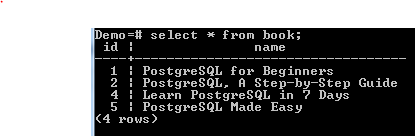
Consider the following tables of the Demo database:
Book:
Price:
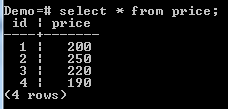
We want to see the name of each book and the corresponding Price. We can run the following command:
SELECT Book.name, Price.price
FROM Book
INNER JOIN Price
ON Book.id = Price.id;
This will return the following:
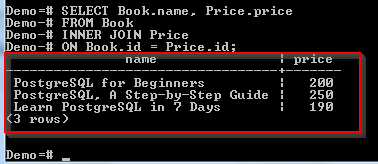
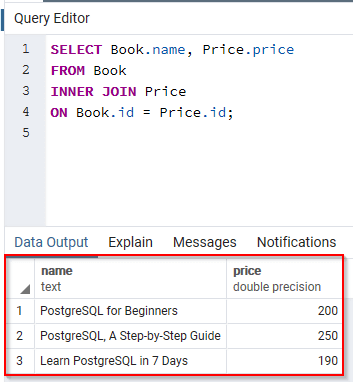
Only 3 rows satisfied the join condition.
EQUI Join
The EQUI join provides us with a way of joining two tables based on primary key/foreign key relationship. For example:
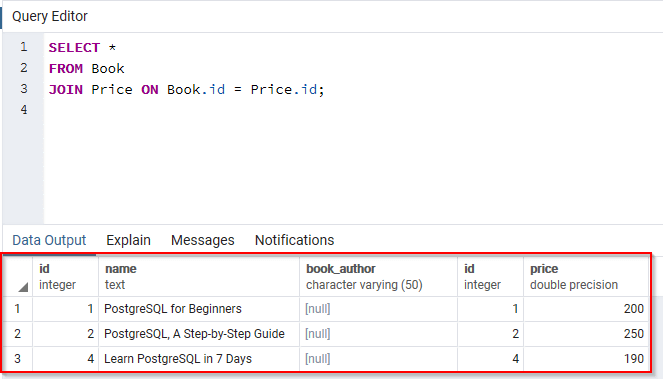
SELECT *
FROM Book
JOIN Price ON Book.id = Price.id;
This will return the following:
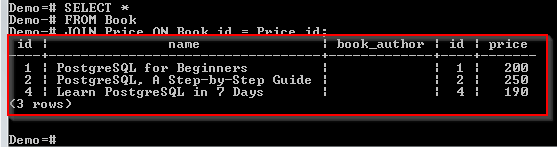
Records have been returned from both tables based on the common columns, that is, the id column.
Natural Join
This type of join provides us with another way of writing an EQUI join. We can improve our previous example by adding the NATURAL keyword as shown below:
SELECT *
FROM Book
NATURAL JOIN Price;
This will return the following:
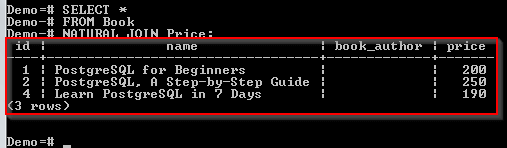
Only one id column has been returned. The NATURAL JOIN was able to note that the id column is common in the two tables. Only one was returned.
PostgreSQL Outer Join
There are 3 types of Outer Joins in PostgreSQL:
- Left Outer Join
- Right Outer Join
- Full Outer Join
PostgreSQL Left Outer Join
The LEFT OUTER JOIN will return all rows in the table on the left-hand side and only the rows in the right-hand side table where the join condition has been satisfied.
Syntax:
SELECT columns
FROM table-1
LEFT OUTER JOIN table-2
ON table-1.column = table-2.column;
We need to see the name of each book and the corresponding Price. We can run the following command:
SELECT Book.name, Price.price
FROM Book
LEFT JOIN Price
ON Book.id = Price.id;
This returns the following:

All the 4 rows in the Book table have been returned. Only 3 rows from the Price table met the join condition. Hence they were returned. The last book has no corresponding price value.
PostgreSQL Right Outer Join
The RIGHT OUTER JOIN returns all rows in the table on the right-hand side and rows in the table on the left-hand side where the join condition has been satisfied.
Syntax:
SELECT columns
FROM table-1
RIGHT OUTER JOIN table-2
ON table-1.column = table-2.column;
For example:
SELECT Book.name, Price.price
FROM Book
RIGHT JOIN Price
ON Book.id = Price.id;
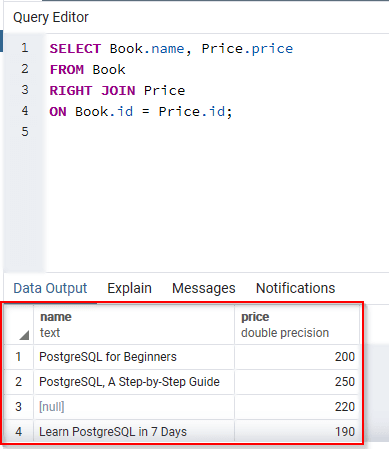
This returns the following:
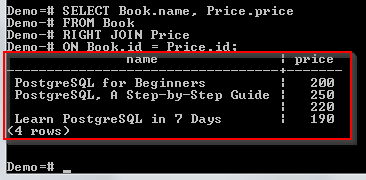
All the rows in the Price table have been returned. Only the rows in the Book table that met the join condition were returned. The 3rd row has no value for name since no match was found.
Full Outer Join in PostgreSQL
This type of JOIN will return all rows in the table on the left-hand side and all rows in the table on the right-hand side with nulls where the join condition is not satisfied.
Syntax:
SELECT columns
FROM table-1
FULL OUTER JOIN table-2
ON table-1.column = table-2.column;
For example:
SELECT Book.name, Price.price
FROM Book
FULL OUTER JOIN Price
ON Book.id = Price.id;
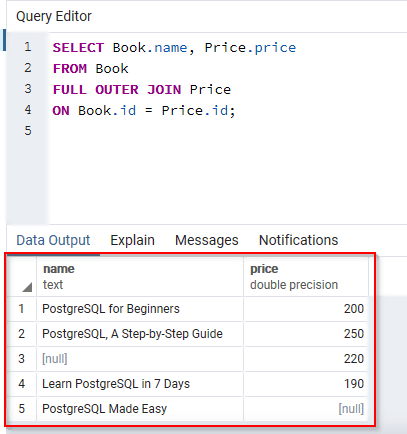
This returns the following:

All rows from all tables have been returned, with nulls where no match was found.
Using pgAdmin
The above tasks can be accomplished in pgAdmin as follows. The following sections walk through each join type step by step.
pgAdmin Inner Join
The steps below show how to run each inner join variant in pgAdmin.
How To Use Theta Join in PostgreSQL using pgAdmin
Below are the steps to use Theta Join in PostgreSQL using pgAdmin:
Step 1) Login to your pgAdmin account
Open pgAdmin and Login using your credentials
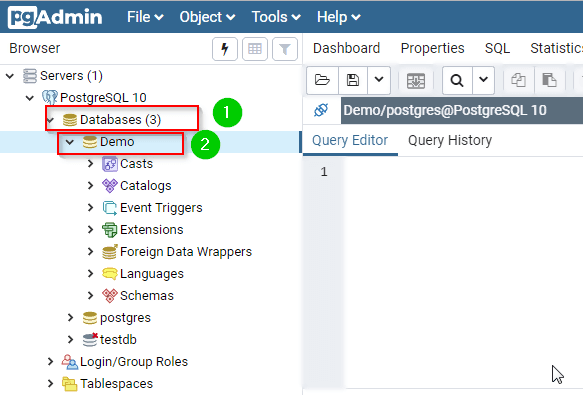
Step 2) Create Demo database
- From the navigation bar on the left- Click Databases.
- Click Demo.

Step 3) Type the query
Type the below query in the query editor:
SELECT Book.name, Price.price
FROM Book
INNER JOIN Price
ON Book.id = Price.id;
Step 4) Execute the query
Click the Execute button

It should return the following:
EQUI Join
Step 1) Login to your pgAdmin account.
Step 2)
- From the navigation bar on the left- Click Databases.
- Click Demo.
Step 3) Type the query in the query editor:
SELECT *
FROM Book
JOIN Price ON Book.id = Price.id;
Step 4) Click the Execute button.

It should return the following:
Natural Join
Step 1) Login to your pgAdmin account.
Step 2)
- From the navigation bar on the left- Click Databases.
- Click Demo.

Step 3) Type the query in the query editor:
SELECT *
FROM Book
NATURAL JOIN Price;
Step 4) Click the Execute button.

It should return the following:

pgAdmin Simple Inner Join
Step 1) Login to your pgAdmin account.
Step 2)
- From the navigation bar on the left- Click Databases.
- Click Demo.

Step 3) Type the query in the query editor:
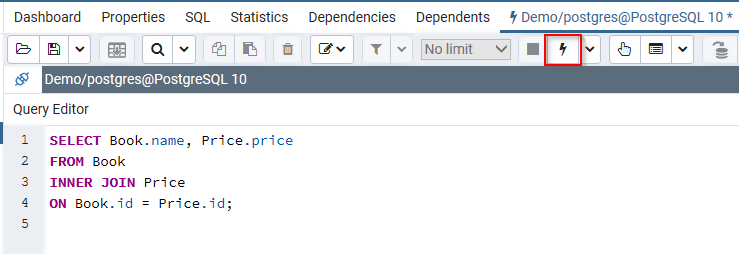
SELECT Book.name, Price.price
FROM Book
INNER JOIN Price
ON Book.id = Price.id;
Step 4) Click the Execute button.
It should return the following:

pgAdmin Outer Join
Next, run the three outer join variants in pgAdmin using the steps below.
Left Outer Join
Step 1) Login to your pgAdmin account.
Step 2)
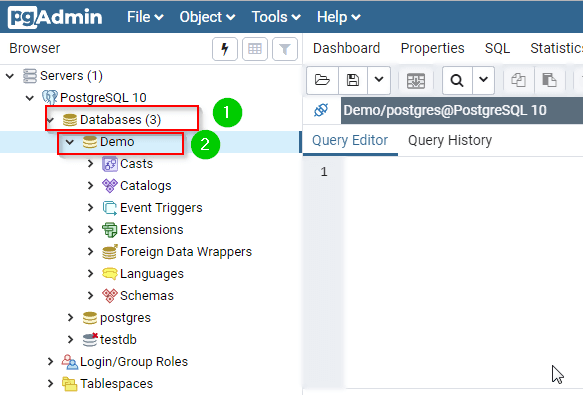
- From the navigation bar on the left- Click Databases.
- Click Demo.
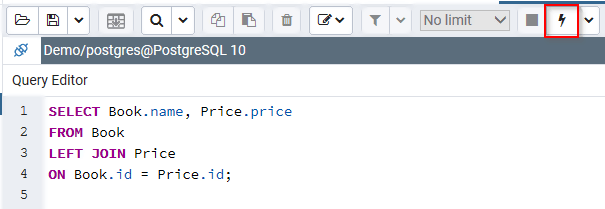
Step 3) Type the query in the query editor:
SELECT Book.name, Price.price
FROM Book
LEFT JOIN Price
ON Book.id = Price.id;
Step 4) Click the Execute button.
It should return the following:

Right Outer Join
Step 1) Login to your pgAdmin account.
Step 2)
- From the navigation bar on the left- Click Databases.
- Click Demo.

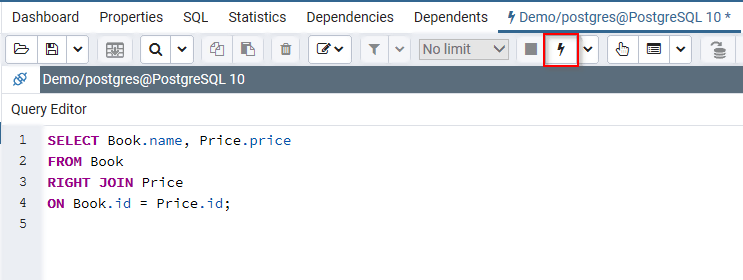
Step 3) Type the query in the query editor:
SELECT Book.name, Price.price
FROM Book
RIGHT JOIN Price
ON Book.id = Price.id;
Step 4) Click the Execute button.
It should return the following:
Full Outer Join
Step 1) Login to your pgAdmin account.
Step 2)
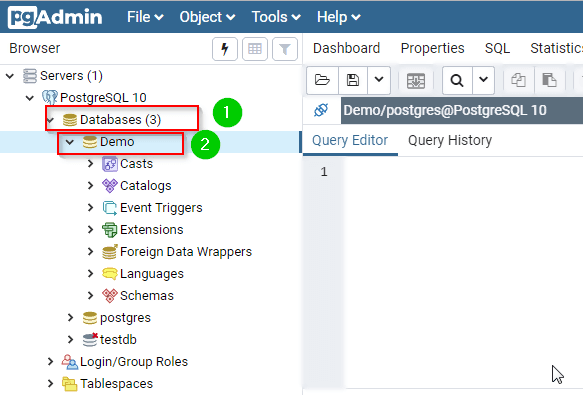
- From the navigation bar on the left- Click Databases.
- Click Demo.
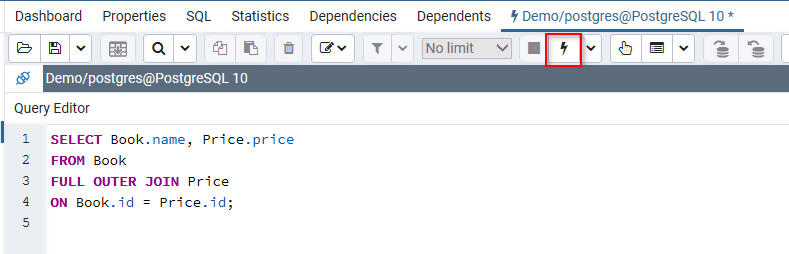
Step 3) Type the query in the query editor:
SELECT Book.name, Price.price
FROM Book
FULL OUTER JOIN Price
ON Book.id = Price.id;
Step 4) Click the Execute button.
It should return the following:
Download the Database used in this Tutorial
