
PHP Security Function: strip_tags, filter_var, Md5 and sha1
 Fiona Brown
⚡ Smart Summary
PHP Security protects web applications from attackers and careless input by validating, sanitizing, and safely storing data. This walkthrough covers the main threats, then shows strip_tags, filter_var, escaping, and modern password hashing with password_hash to defend against XSS, SQL injection, and stolen credentials.
Potential security threats
There are basically two groups of people that can attack your system:
- Hackers – with the intent to gain access to unauthorized data or disrupt the application
- Users – they may innocently enter wrong parameters in forms, which can have negative effects on a website or web application.
The following are the kinds of attacks that we need to look out for.
SQL Injection – this type of attack appends harmful code to SQL statements.
This is done using either user input forms or URLs that use variables.
The appended code comments out the condition in the WHERE clause of an SQL statement. The appended code can also:
- insert a condition that will always be true
- delete data from a table
- update data in a table
This type of attack is usually used to gain unauthorized access to an application.
Cross-site scripting (XSS) – this type of attack inserts harmful code, usually JavaScript. This is done using user input forms such as contact us and comment forms. This is done to:
- Retrieve sensitive information such as cookie data
- Redirect the user to a different URL.
Other threats can include PHP code injection, shell injection, email injection, and script source code disclosure.
PHP Application Security Best Practices
Let us now look at some of the PHP security best practices that we must consider when developing our applications.
PHP strip_tags
The strip_tags function removes HTML, JavaScript, or PHP tags from a string.
This function is useful when we have to protect our application against attacks such as cross-site scripting.
Let us consider an application that accepts comments from users.
<?php

$user_input = "Your site rocks";

echo "<h4>My Commenting System</h4>";

echo $user_input;

?>
Assuming you have saved comments.php in the phptuts folder, browse to the URL http://localhost/phptuts/comments.php

Let us assume you receive the following as the user input: <script>alert(‘Your site sucks!’);</script>
<?php

$user_input = "<script>alert(0);</script>";

echo "<h4>My Commenting System</h4>";

echo $user_input;

?>
Browse to the URL http://localhost/phptuts/comments.php
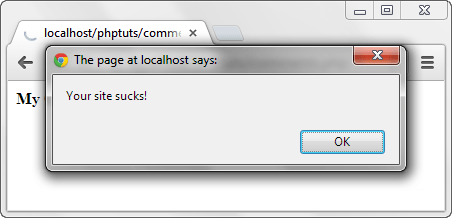
Let us now secure our application from such attacks using the strip_tags function.
<?php

$user_input = "<script>alert(0);</script>";

echo strip_tags($user_input);

?>
Browse to the URL http://localhost/phptuts/comments.php

PHP filter_var function
The filter_var function is used to validate and sanitize data.
Validation checks if the data is of the right type. A numeric validation check on a string returns a false result.
Sanitization is removing illegal characters from a string.
Check this link for the complete reference: filter_var
The code below is for the commenting system. It uses the filter_var function and the FILTER_SANITIZE_STRIPPED constant to strip tags.
<?php

$user_input = "<script>alert(0);</script>";

echo filter_var($user_input, FILTER_SANITIZE_STRIPPED);

?>
Output:
alert('Your site sucks!');
Note: FILTER_SANITIZE_STRIPPED (an alias of FILTER_SANITIZE_STRING) is deprecated as of PHP 8.1. For new code, use strip_tags() or, for safe display, htmlspecialchars().
PHP mysqli_real_escape_string
The mysqli_real_escape_string function is used to help protect an application against SQL injection.
Let us suppose that we have the following SQL statement for validating the user id and password.
<?php
SELECT uid,pwd,role FROM users WHERE uid = 'admin' AND password = 'pass';
?>
A malicious user can enter ‘ OR 1 = 1 — in the user id text box and 1234 in the password text box. Let us code the authentication module.
<?php

$uid = "0$uid1$pwd';";

echo $sql;

?>
The end result will be:
SELECT uid,pwd,role FROM users WHERE uid = '' OR 1 = 1 -- ' AND password = '1234';
HERE,
- “WHERE uid = ”” tests for an empty user id
- “‘ OR 1 = 1” is a condition that will always be true
- “–” comments out the part that tests for the password.
The above query will return all the users. Let us now use the mysqli_real_escape_string function to secure our login module. Note that in real code this function takes the database connection as its first argument.
<?php

$uid = mysqli_real_escape_string($conn, "0$uid1$pwd';";

echo $sql;

?>
The above code will output:
SELECT uid,pwd,role FROM users WHERE uid = '\' OR 1 = 1 -- ' AND password = '1234';
Note: the second single quote has been escaped, so it will be treated as part of the user id and the password will not be commented out.
Best practice: escaping helps, but parameterized prepared statements in mysqli or PDO are the recommended defense against SQL injection, because the data is never mixed into the query text.
PHP Md5 and PHP sha1
MD5 is the acronym for Message Digest 5, and SHA1 is the acronym for Secure Hash Algorithm 1. They are both one-way hashing functions.
The code below shows the implementation of md5 and sha1.
<?php
echo "MD5 Hash: " . md5("password");
echo "SHA1 Hash: " . sha1("password");
?>
Assuming you have saved the file hashes.php in the phptuts folder, browse to the URL.

Important: MD5 and SHA1 are fast, unsalted hashes and are no longer considered safe for storing passwords, because they can be cracked quickly with modern hardware and rainbow tables. Use them only for non-security checksums, and use the method below for passwords.
How to Securely Hash Passwords in PHP
For password storage, PHP provides password_hash and password_verify. These apply a slow, salted algorithm (bcrypt by default), so each hash is unique and expensive to crack, even if your database is stolen.
<?php
// Hash a password before storing it in the database
$hash = password_hash("mypassword", PASSWORD_DEFAULT);

// Verify the password when the user logs in
if (password_verify("mypassword", $hash)) {
    echo "Password is valid";
} else {
    echo "Invalid password";
}
?>
- password_hash() generates a salted hash to store in the database; PASSWORD_DEFAULT keeps you on the current recommended algorithm.
- password_verify() checks a login attempt against the stored hash without ever decrypting it.
Because the salt and algorithm are stored inside the hash, you never manage them yourself, which makes this the correct, future-proof way to handle passwords in PHP.
