
ORDER BY in MySQL: ASC & DESC Query with Example
 Editorial Team
⚡ Smart Summary
ORDER BY in MySQL sorts query result sets in ascending or descending sequence through the ASC and DESC keywords. The sections below explain the syntax, single-column and multi-column sorting, NULL placement, and worked examples executed against the myflixdb sample database.
What is ORDER BY in MySQL?
MySQL ORDER BY is a clause used with the SELECT query to sort data in an orderly manner. The MySQL ORDER BY clause sorts the query result set in either ascending or descending order, on one column or on several columns at once.
When the SELECT command is used on its own, rows are returned in the order the storage engine happens to read them, which is not a guaranteed order. Sorting is simply re-arranging those rows in a specified sequence. It can be performed on numeric, string, and date data types alike.
MySQL ORDER BY Syntax
Before looking at examples, it helps to see where the clause sits inside a full SELECT statement.
SELECT statement... [WHERE condition | GROUP BY `field_name(s)` HAVING condition] ORDER BY `field_name(s)` [ASC | DESC];
HERE
- “SELECT statement…” is the regular select query.
- ” | “ represents alternatives.
- “[WHERE condition | GROUP BY `field_name(s)` HAVING condition]” is the optional condition used to filter the query result set.
- “ORDER BY” performs the query result set sorting.
- “[ASC | DESC]” is the keyword used to sort the result set in either ascending or descending order. Note that ASC is the default.
What are DESC and ASC Keywords?
ASC and DESC are the two sort directions that ORDER BY accepts. The table below compares them across the data types you will sort most often.
 ASC is the short form for ascending ASC is the short form for ascending |
 MySQL DESC is the short form for descending MySQL DESC is the short form for descending |
|---|---|
| It is used to sort the query results in a top to bottom style. | It is used to sort the query results in a bottom to top style. |
| When working on date data types, the earliest date is shown on top of the list. | When working on date data types, the latest date is shown on top of the list. |
| When working with numeric data types, the lowest values are shown on top of the list. | When working with numeric data types, the highest values are shown at the top of the query result set. |
| When working with string data types, the query result set is sorted from those starting with the letter A going up to the letter Z. | When working with string data types, the query result set is sorted from those starting with the letter Z going down to the letter A. |
Both the SQL DESC and ASC keywords are used in conjunction with the SELECT statement and the MySQL ORDER BY clause.
DESC and ASC Syntax
The SQL DESC sort keyword has the following basic syntax.
SELECT {fieldName(s) | *} FROM tableName(s) [WHERE condition] ORDER BY fieldname(s) ASC | DESC [LIMIT N];
HERE
- SELECT {fieldName(s) | *} FROM tableName(s) is the statement containing the fields and table(s) from which to get the result set.
- [WHERE condition] is optional but can be used to filter the data according to the given condition.
- ORDER BY fieldname(s) is mandatory and names the field on which the sorting is performed. The MySQL DESC keyword specifies that the sorting is in descending order.
- [LIMIT N] is optional but can be used to limit the number of rows returned from the query result set.
Why Use DESC and ASC in MySQL?
Knowing the syntax is only half the picture. The reason ORDER BY exists is that a result set which is easy for a database to produce is not always easy for a person to read.
Suppose you print a payments history for a video library member so that the front desk can answer queries quickly. It is far more logical to have the payments printed in descending chronological order, starting with the most recent payment and working back to the earliest one. DESC in SQL is the keyword that becomes handy in such a situation, because the list can be sorted on the payment date.
Now suppose the marketing department wants a list of movies by category, so that members can see which titles the library holds before renting. Sorting the category names and movie titles in ascending order lets members look information up quickly, exactly as they would in an index. The ASC keyword serves that purpose.
In short, ORDER BY turns a raw result set into a report. The keyword you choose depends on the question the reader is asking: what happened most recently calls for DESC, while where do I find this item calls for ASC.
MySQL ORDER BY Example
All the examples that follow run against the myflixdb sample database. Start with the unsorted members table, which is returned in its default order.
SELECT * FROM members;
Executing the above script in MySQL Workbench against the myflixdb gives us the following results shown below.
| membership_number | full_names | gender | date_of_birth | physical_address | postal_address | contact_number | |
|---|---|---|---|---|---|---|---|
| 1 | Janet Jones | Female | 21-07-1980 | First Street Plot No 4 | Private Bag | 0759 253 542 | janetjones@yagoo.cm |
| 2 | Janet Smith Jones | Female | 23-06-1980 | Melrose 123 | NULL | NULL | jj@fstreet.com |
| 3 | Robert Phil | Male | 12-07-1989 | 3rd Street 34 | NULL | 12345 | rm@tstreet.com |
| 4 | Gloria Williams | Female | 14-02-1984 | 2nd Street 23 | NULL | NULL | NULL |
| 5 | Leonard Hofstadter | Male | NULL | Woodcrest | NULL | 845738767 | NULL |
| 6 | Sheldon Cooper | Male | NULL | Woodcrest | NULL | 976736763 | NULL |
| 7 | Rajesh Koothrappali | Male | NULL | Woodcrest | NULL | 938867763 | NULL |
| 8 | Leslie Winkle | Male | 14-02-1984 | Woodcrest | NULL | 987636553 | NULL |
| 9 | Howard Wolowitz | Male | 24-08-1981 | SouthPark | P.O. Box 4563 | 987786553 | NULL |
Sorting in Descending Order with DESC
Suppose the marketing department wants the member details arranged in decreasing order of date of birth. This helps the team send birthday greetings in a timely fashion. The list is produced by the query below.
SELECT * FROM members ORDER BY date_of_birth DESC;
Executing the above script in MySQL Workbench against the myflixdb gives us the following results shown below.

Sorting in Ascending Order with ASC
The same query in ascending order simply swaps the keyword.
SELECT * FROM members ORDER BY date_of_birth ASC;
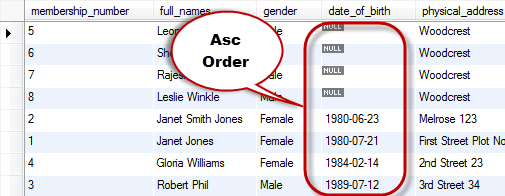
Note: NULL means no value at all, which is not the same as zero or an empty string. Observe in both screenshots how the NULL dates are grouped together: MySQL treats NULL as lower than any other value, so NULL rows appear first under ASC and last under DESC.
How to Sort by Multiple Columns in MySQL
Sorting on a single column answers simple questions. Reports usually need a second level of ordering, and ORDER BY accepts a comma-separated list of fields for exactly that purpose.
Consider the following SQL sort script that lists all the member records without any explicit direction.
SELECT * FROM `members`;
Executing the above script gives the following results shown below.
| membership_number | full_names | gender | date_of_birth | physical_address | postal_address | contact_number | |
|---|---|---|---|---|---|---|---|
| 1 | Janet Jones | Female | 21-07-1980 | First Street Plot No 4 | Private Bag | 0759 253 542 | janetjones@yagoo.cm |
| 2 | Janet Smith Jones | Female | 23-06-1980 | Melrose 123 | NULL | NULL | jj@fstreet.com |
| 3 | Robert Phil | Male | 12-07-1989 | 3rd Street 34 | NULL | 12345 | rm@tstreet.com |
| 4 | Gloria Williams | Female | 14-02-1984 | 2nd Street 23 | NULL | NULL | NULL |
| 5 | Leonard Hofstadter | Male | NULL | Woodcrest | NULL | 845738767 | NULL |
| 6 | Sheldon Cooper | Male | NULL | Woodcrest | NULL | 976736763 | NULL |
| 7 | Rajesh Koothrappali | Male | NULL | Woodcrest | NULL | 938867763 | NULL |
| 8 | Leslie Winkle | Male | 14-02-1984 | Woodcrest | NULL | 987636553 | NULL |
| 9 | Howard Wolowitz | Male | 24-08-1981 | SouthPark | P.O. Box 4563 | 987786553 | NULL |
Sorting a Single Column by Default Order
Suppose we want a list that sorts the query result set using the gender field. The script below does that without naming a direction.
SELECT * FROM `members` ORDER BY `gender`;
| membership_number | full_names | gender | date_of_birth | physical_address | postal_address | contact_number | |
|---|---|---|---|---|---|---|---|
| 1 | Janet Jones | Female | 21-07-1980 | First Street Plot No 4 | Private Bag | 0759 253 542 | janetjones@yagoo.cm |
| 2 | Janet Smith Jones | Female | 23-06-1980 | Melrose 123 | NULL | NULL | jj@fstreet.com |
| 4 | Gloria Williams | Female | 14-02-1984 | 2nd Street 23 | NULL | NULL | NULL |
| 3 | Robert Phil | Male | 12-07-1989 | 3rd Street 34 | NULL | 12345 | rm@tstreet.com |
| 5 | Leonard Hofstadter | Male | NULL | Woodcrest | NULL | 845738767 | NULL |
| 6 | Sheldon Cooper | Male | NULL | Woodcrest | NULL | 976736763 | NULL |
| 7 | Rajesh Koothrappali | Male | NULL | Woodcrest | NULL | 938867763 | NULL |
| 8 | Leslie Winkle | Male | 14-02-1984 | Woodcrest | NULL | 987636553 | NULL |
| 9 | Howard Wolowitz | Male | 24-08-1981 | SouthPark | P.O. Box 4563 | 987786553 | NULL |
“Female” members are displayed first, followed by “Male” members. This is because when the ORDER BY clause is used without specifying the ASC or MySQL DESC keyword, MySQL sorts the query result set in ascending order by default.
Sorting Two Columns in Opposite Directions
Let us now look at an example that performs the sorting using two columns. The first column is sorted in ascending order by default, while the second column is sorted in descending order.
SELECT * FROM `members` ORDER BY `gender`, `date_of_birth` DESC;
Executing the above script in MySQL Workbench against the myflixdb gives the following results.
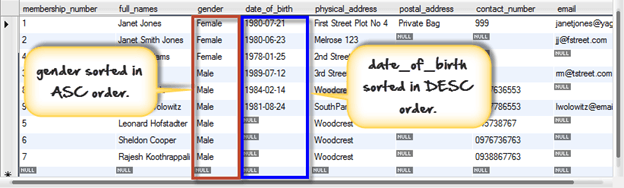
The gender column was sorted in ascending order by default, while the date of birth column was sorted in descending order explicitly. Each direction keyword applies only to the column it follows.
How to Combine ORDER BY with WHERE, LIMIT, and GROUP BY
ORDER BY is rarely the only clause in a production query. MySQL always evaluates the clauses in a fixed sequence, and knowing that sequence explains why the results look the way they do.
- FROM reads the rows from the table.
- WHERE discards the rows that fail the condition.
- GROUP BY collapses the surviving rows into groups, and HAVING filters those groups.
- ORDER BY sequences whatever rows remain.
- LIMIT slices the requested number of rows off the sorted list.
Because ORDER BY runs after WHERE and GROUP BY but before LIMIT, a query such as “the five youngest members from Woodcrest” is expressed in one statement.
SELECT full_names, date_of_birth FROM members
WHERE physical_address = 'Woodcrest'
ORDER BY date_of_birth DESC
LIMIT 5;
The same ordering applies to grouped results. Aggregate values produced by aggregate functions such as COUNT can be sorted, so the busiest category rises to the top of the report.
SELECT gender, COUNT(*) AS members_count FROM members
GROUP BY gender
ORDER BY members_count DESC;
Tip: ORDER BY can sort by a column alias, by an expression, or even by column position such as ORDER BY 3. Sorting by position is fragile, because inserting a new column into the SELECT list silently changes the sort key. Name the column instead.
One performance point is worth remembering. When the sorted column carries an index, MySQL can read the rows in index order and skip the sort altogether. Without an index, large tables force an in-memory or on-disk filesort, which is the usual reason a report query becomes slow.
