
Python XML File – How to Read, Write & Parse
 Editorial Team
⚡ Smart Summary
Python XML processing lets you read, write, and parse XML documents using the built-in minidom and ElementTree modules. The minidom class loads a file into memory as a DOM, while ElementTree offers a faster, more Pythonic tree API.
The sections below cover parsing, writing, and reading XML files in Python.
What is XML?
XML stands for eXtensible Markup Language. It was designed to store and transport small to medium amounts of data and is widely used for sharing structured information.
Python enables you to parse and modify XML documents. In order to parse an XML document, you need to have the entire XML document in memory. In this tutorial, we will see how we can use the XML minidom class in Python to load and parse XML files.
How to Parse XML using minidom
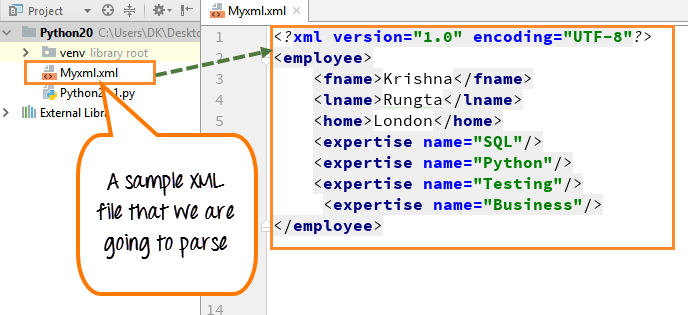
We have created a sample XML file that we are going to parse.
Step 1) Create Sample XML file
Inside the file, we can see the first name, last name, home, and the area of expertise (SQL, Python, Testing and Business).
Step 2) Use the parse function to load and parse the XML file
Once we have parsed the document, we will print out the “node name” of the root of the document and the “firstchild tagname”. Tagname and nodename are the standard properties of the XML file.
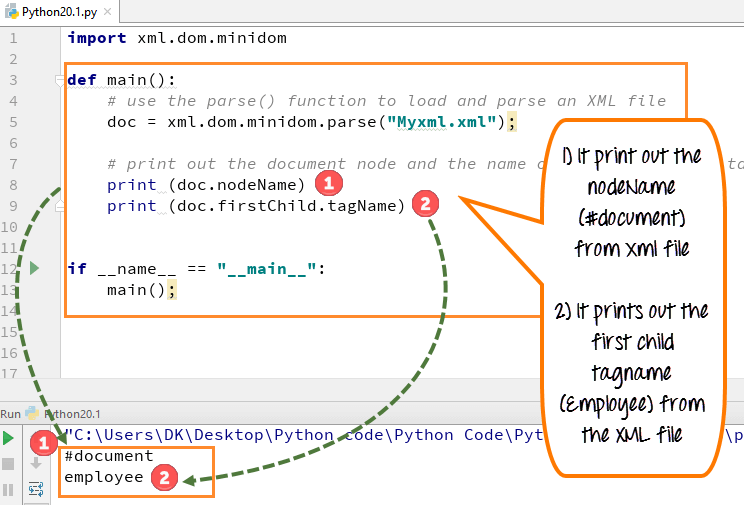
- Import the xml.dom.minidom module and declare the file that has to be parsed (myxml.xml)
- This file carries some basic information about an employee like first name, last name, home, expertise, etc.
- We use the parse function on the XML minidom to load and parse the XML file
- We have a variable doc, and doc gets the result of the parse function
- We want to print the nodename and child tagname from the file, so we declare it in the print function
- Run the code- It prints out the nodename (#document) from the XML file and the first child tagname (employee) from the XML file
Note: Nodename and child tagname are the standard names or properties of an XML dom.
Step 3) Call the list of XML tags from the XML document and print it
Next, we can also call the list of XML tags from the XML document and print it. Here we printed out the set of skills like SQL, Python, Testing and Business.

- Declare the variable expertise, from which we are going to extract all the expertise names the employee has
- Use the dom standard function called “getElementsByTagName”
- This will get all the elements named skill
- Declare a loop over each one of the skill tags
- Run the code- It will give a list of four skills
How to Write XML Node
We can create a new attribute by using the “createElement” function and then append this new attribute or tag to the existing XML tags. We added a new tag “BigData” in our XML file.
- You have to write code to add the new attribute (BigData) to the existing XML tag
- Then, you have to print out the XML tag with the new attribute appended to the existing XML tag
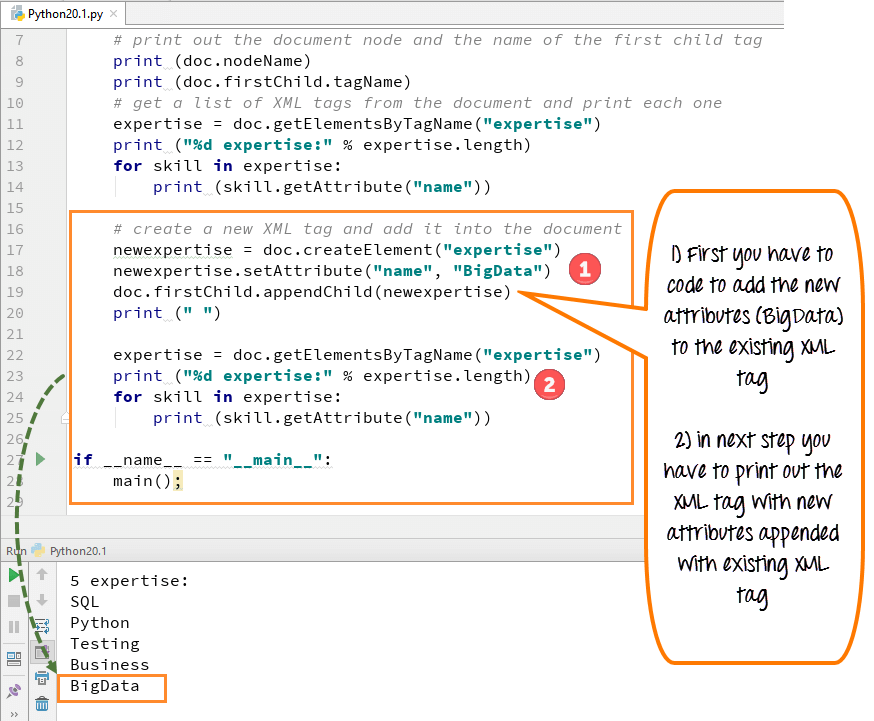
- To add a new XML tag and add it to the document, we use the code “doc.createElement”
- This code will create a new skill tag for our new attribute “BigData”
- Add this skill tag into the document’s first child (employee)
- Run the code- the new tag “BigData” will appear with the other list of expertise
XML Parser Example
Python 2 Example
import xml.dom.minidom

def main():
# use the parse() function to load and parse an XML file
   doc = xml.dom.minidom.parse("Myxml.xml");

# print out the document node and the name of the first child tag
   print doc.nodeName
   print doc.firstChild.tagName

# get a list of XML tags from the document and print each one
   expertise = doc.getElementsByTagName("expertise")
   print "%d expertise:" % expertise.length
   for skill in expertise:
     print skill.getAttribute("name")

#Write a new XML tag and add it into the document
   newexpertise = doc.createElement("expertise")
   newexpertise.setAttribute("name", "BigData")
   doc.firstChild.appendChild(newexpertise)
   print " "

   expertise = doc.getElementsByTagName("expertise")
   print "%d expertise:" % expertise.length
   for skill in expertise:
     print skill.getAttribute("name")

if name == "__main__":
  main();
Python 3 Example
import xml.dom.minidom

def main():
    # use the parse() function to load and parse an XML file
    doc = xml.dom.minidom.parse("Myxml.xml");

    # print out the document node and the name of the first child tag
    print (doc.nodeName)
    print (doc.firstChild.tagName)
    # get a list of XML tags from the document and print each one
    expertise = doc.getElementsByTagName("expertise")
    print ("%d expertise:" % expertise.length)
    for skill in expertise:
        print (skill.getAttribute("name"))

    # Write a new XML tag and add it into the document
    newexpertise = doc.createElement("expertise")
    newexpertise.setAttribute("name", "BigData")
    doc.firstChild.appendChild(newexpertise)
    print (" ")

    expertise = doc.getElementsByTagName("expertise")
    print ("%d expertise:" % expertise.length)
    for skill in expertise:
        print (skill.getAttribute("name"))

if __name__ == "__main__":
    main();
How to Parse XML using ElementTree
ElementTree is an API for manipulating XML. ElementTree is an easy way to process XML files.
We are using the following XML document as the sample data:
<data>
   <items>
      <item name="expertise1">SQL</item>
      <item name="expertise2">Python</item>
   </items>
</data>
Reading XML using ElementTree:
We must first import the xml.etree.ElementTree module.
import xml.etree.ElementTree as ET
Now let us fetch the root element:
root = tree.getroot()
Following is the complete code for reading the above XML data:
import xml.etree.ElementTree as ET
tree = ET.parse('items.xml')
root = tree.getroot()

# all items data
print('Expertise Data:')

for elem in root:
   for subelem in elem:
      print(subelem.text)
Output:
Expertise Data:
SQL
Python
