
5 BEST Instagram Highlight Downloaders (2026)
 Hannah Roberts
Instagram highlight downloader tools often promise quick access, but in reality, many users end up dealing with broken downloads, poor image quality, confusing interfaces, and tools that suddenly stop working. Some platforms hide limits behind paywalls or flood you with ads, wasting time when you just need something reliable. This leads to frustration, missed content, and inconsistent results. What most people overlook are the small but critical features that separate average tools from dependable ones. Once those are clear, the process becomes smoother, faster, and far more predictable, giving you control instead of guesswork.
I spent over 180 hours researching and testing 21 different options, digging into performance, ease of use, and reliability under real conditions. After rigorous testing, I shortlisted 5 Best Instagram Highlight Downloaders based on firsthand evaluation, key features, pros and cons, and backed by consistent results. If you want a clear path through the noise, the breakdown ahead will help you choose with confidence. Read more…
Best Instagram Highlight Downloaders: Top Picks!
| Tool Name | Best For | Top Features | Free/Trial Plans | Link |
|---|---|---|---|---|
| By Click Downloader | Multi-platform bulk downloads | multi-site support, HD downloads, batch mode | Free version available; Paid version ~$4.99 (one-time), no trial | Learn More |
| 4K Stogram | Bulk Instagram highlights backup | bulk download, private accounts, original quality | 100% Free to access | Learn More |
| Inflact | Cloud-based highlight downloads | bulk saving, cloud storage, anonymous access | Paid plans start ~$3/month; No free trial (limited free tool) | Learn More |
| SnapDownloader | High-quality video & highlight downloads | 1080p downloads, fast speed, format selection | Free trial 48 hours; Paid starts ~$19.99 lifetime | Learn More |
| SnapInsta | Free instant highlight downloads | no watermark, instant download, no login | 100% Free; No trial needed | Learn More |
1) By Click Downloader
By Click Downloader is a versatile tool designed for downloading Instagram highlights with ease. It supports downloading not only highlights but also videos and photos from Instagram, enabling users to save content for offline use. The tool stands out for its simple interface and fast processing speed, making it reliable for those who need to quickly grab media from Instagram without the hassle.
In my experience, it handles batch downloads smoothly, saving me significant time when I need multiple pieces of content. For instance, if you’re running a campaign and need to collect all Instagram highlight reels from a specific account, By Click Downloader automates the process, ensuring you get every video or image in a matter of minutes.

Features:
- One-Click Capture: ByClickdownloader detects supported video pages directly in your browser. You can start downloads immediately without copying links repeatedly. This reduces friction during quick saving sessions.
- Playlist Downloads: This feature grabs full YouTube playlists in one action. Users can select specific items, format, and quality before saving. It saves time on large collections.
- Channel Backup: By clicking the download button, you can download entire channels instead of single videos. This helps users archive tutorials, lessons, or creator libraries faster. It cuts repetitive manual steps.
- Format Choice: You can save content as MP4, MP3, WAV, AVI, and more. This makes it easier to match files to offline watching, editing, or audio-only use.
- Quality Control: This specific functionality lets users choose HD, normal, or custom quality. It helps balance file size and playback quality based on storage needs.
- Parallel Downloads: Users can download multiple videos at the same time. I have noticed this is useful when building offline folders quickly. It avoids waiting through one-by-one transfers.
- Media Extras: Byclickdownloader supports subtitles and automatically adds MP3 title and artist details. In my experience, this makes saved media easier to organize later. It reduces cleanup work.
- Download Tracking: This feature keeps active downloads visible while files are processed. I often rely on this when saving longer videos. It makes stalled or unfinished jobs easier to spot.
Pros
Cons
Pricing:
By Click Downloader offers a free version plus a one-time Premium plan (currently 50% off); no free trial is mentioned.
| Plan | Pricing |
|---|---|
| Free | $0 (free download) |
| Premium (1 PC) | $19.99 one-time (50% off, limited time) |
| Premium (3 PCs) | $9.99 add-on (50% off, limited time) |
2) 4K Stogram
4K Stogram is a visual downloader designed for Instagram content. It allows users to easily download posts, stories, highlights, and even entire Instagram profiles in just a few clicks. It supports bulk downloading, making it perfect for users looking to save multiple pieces of content quickly and efficiently. Its reliability lies in its consistent performance, even when downloading high volumes of data at once.
In my experience, 4K Stogram seamlessly handled large batches of Instagram highlights without any significant delays. A typical use case for this tool might involve downloading an entire collection of Instagram highlights before a website migration or backup, ensuring that nothing is lost in the process.

Features:
- Account Tracking: 4K Stogram lets users subscribe to Instagram accounts and download posts automatically. That makes ongoing monitoring easier when you follow creators, clients, or brand examples.
- Hashtag Capture: This feature pulls posts from hashtags and locations, not just usernames. It helps users collect themed content faster for research, inspiration, or campaign reference.
- Story Saving: You can save Stories and Highlights before they disappear from Instagram. This gives beginners a simple way to keep temporary content for later review.
- Private Backups: 4K Stogram can download content from private accounts you already follow. In my experience, this is useful for preserving access to limited-visibility posts.
- Date Filtering: Users can download posts from a selected date range inside the app. That reduces cleanup work when you only need content from one campaign period.
- Metadata Storage: This specific functionality saves captions and comments with downloaded posts. I have noticed this helps when content needs context, not just the image.
- Reel Downloads: It can grab individual posts, carousel posts, videos, and watermark-free Reels. That flexibility helps users avoid switching tools for different Instagram post formats.
- Subscription Export: Using this feature, you can export and import subscriptions and download records. I often rely on this when moving setups between devices or reinstalls.
Pros
Cons
Pricing:
4K Stogram is available as a free download with no paid plans.
3) Inflact
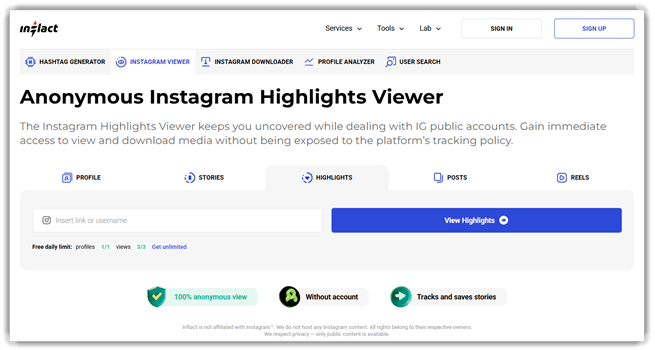
Inflact is a versatile Instagram highlight downloader that allows users to easily download Instagram highlights and stories to their devices. It supports high-quality video and photo downloads with no need for an Instagram account or app installation. With its simple and intuitive interface, it’s widely used for its speed and reliability, making it a go-to for both personal and professional use.
I’ve used it in various situations, such as saving highlights for quick archiving or preparing content for social media presentations. It’s a practical solution when you need to download multiple stories quickly before a major content update or campaign.
Features:
- Link Downloads: Inflact lets users paste a public Instagram link and save photos, videos, or Reels quickly. This reduces screenshot work and preserves the original file quality without added watermarks.
- Profile Capture: You can pull content from a public profile in one session. This helps when you need several posts, videos, or profile assets without opening each item manually.
- Story Saving: This feature grabs current Stories and Highlights from public accounts anonymously. It helps users keep time-sensitive content before it disappears from Instagram after the viewing window closes.
- Cloud Storage: Inflact can send selected downloads to its cloud instead of your device. I have noticed this is useful when collecting reference material without cluttering local folders.
- Anonymous Viewing: Users can view public Stories, Reels, and profiles without logging in. This is practical for research tasks where you want to observe content without leaving visible activity.
- Hashtag Research: Inflact generates hashtag sets from keywords and shows related performance data. In my experience, this speeds up caption planning when you need discoverability without guessing which tags fit.
- Profile Search: This specific functionality filters Instagram accounts by bio terms, location, niche, followers, or post count. It helps users build targeted creator lists for outreach, research, or market scanning.
- Content Tracking: Inflact also supports tracking new content from monitored accounts into cloud storage. I often rely on features like this when ongoing competitor watching would otherwise become repetitive manual checking.
Pros
Cons
Pricing:
Inflact offers a free plan (3 downloads/day) and a Premium paid plan at $7.8/month; a 7-day PRO access trial is available for $3.
| Plan | Pricing |
|---|---|
| Free | $0.00/month |
| Premium | $7.80/month |
4) SnapDownloader
SnapDownloader is a robust tool designed to download Instagram highlights with ease. It supports high-quality video and image downloads, ensuring that you can retrieve content without losing resolution. The tool stands out for its user-friendly interface and its ability to handle large batches of downloads efficiently.
In my experience, SnapDownloader has consistently delivered fast and reliable downloads, even for longer highlight stories. For example, when managing multiple Instagram highlights for a content review, it handled the task smoothly, saving time and effort that would otherwise be spent on manual downloads.

Features:
- Multi-Site Capture: SnapDownloader supports downloads from more than 900 websites. That gives beginners one workflow for many platforms instead of switching tools.
- Resolution Control: SnapDownloader lets users save videos up to 8K resolution. This helps when you need sharper playback for large screens or offline archiving.
- Format Conversion: You can download content as video or audio in formats like MP4, MP3, AVI, WMA, and AAC. That makes files easier to reuse across phones, TVs, and laptops.
- Built-In Trimmer: This feature cuts a video before downloading the final file. I have noticed this saves time when users only need one clip.
- Playlist Downloads: SnapDownloader can grab entire YouTube playlists and channels in a few steps. It helps users collect lessons, interviews, or reference material without repeating manual downloads.
- Batch Queue: Users can queue multiple videos and let them download together. In my experience, this is far better for clearing a long watchlist efficiently.
- Scheduled Jobs: SnapDownloader can schedule downloads for a specific date and time. This helps users manage bandwidth better and avoid starting large downloads manually.
- Proxy Access: This specific functionality lets users set up a proxy inside the app. I often rely on this when region blocks get in the way.
Pros
Cons
Pricing:
SnapDownloader has no free plan but offers a 48-hour free trial (no credit card required), with paid plans starting at $7.99/month. Money-back guarantees apply (30 days for annual/lifetime, 24 hours for monthly).
| Plan | Pricing |
|---|---|
| Annual | $29.99 USD/year |
| Monthly | $7.99 USD/month |
| Personal (Lifetime) | $39.99 USD one-time (1 device) |
5) SnapInsta
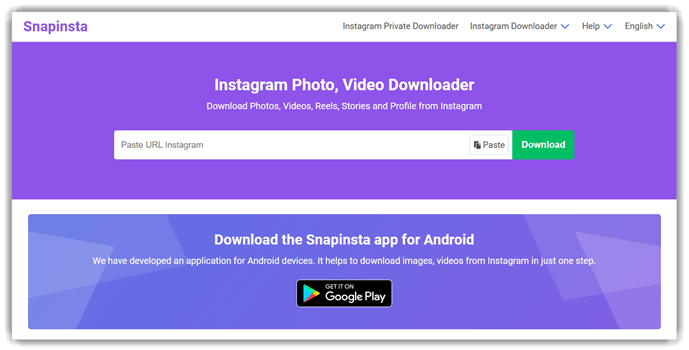
Snapinsta is a reliable Instagram highlight downloader that lets you easily save stories and highlights. It supports downloading content in a variety of formats, making it versatile for users looking to save and organize Instagram highlights without needing an account. Known for its simple interface and fast processing, it stands out for its ease of use and quick results.
In my experience, Snapinsta handles multiple downloads without issue, ensuring smooth performance even with large volumes of highlights. For instance, if you’re reviewing a batch of Instagram highlights before archiving them, Snapinsta streamlines the process, allowing you to download everything in just a few clicks.
Features:
- Paste Link: Snapinsta lets users paste an Instagram post URL and fetch downloadable media quickly. This reduces extra steps and works well for simple, repeatable saving tasks.
- Media Types: The tool supports photos, videos, Reels, Stories, and profile content from Instagram. That helps beginners use one workflow instead of switching between separate download tools.
- Quality Choice: Snapinsta offers multiple resolution options before saving supported images or videos. Users can pick smaller files or sharper copies, depending on storage and reuse needs.
- Profile Saving: Users can download content from an Instagram profile, not only single posts. I have noticed this is useful when collecting several assets in one pass.
- Private Downloads: A separate private downloader handles content from private Instagram accounts with instructions. This gives users a clearer path when standard public post links do not work.
- No Login: Snapinsta does not require an Instagram login on its main downloader flow. In my experience, that removes friction and lowers hesitation for first-time users.
- Cross-Device Use: The service works in a browser on phones and computers, with Android app support. It helps users save content wherever they already manage Instagram links.
- Anonymous Use: Snapinsta says it does not collect user data or keep download history. I often rely on that kind of setup for quick one-off downloads.
Pros
Cons
Pricing:
Snapinsta is completely free to use with no paid plans, no subscription tiers, and no free trial. It offers unlimited free downloads.
Link: https://snapinsta.to/en2
Comparison between Top Instagram Highlight Downloaders
| Tool | By Click Downloader | 4K Stogram | Inflact | SnapDownloader |
| Easy to Use | ✔️ | ✔️ | ✔️ | ✔️ |
| Supports Multiple Formats | ✔️ | ✔️ | ✔️ | ✔️ |
| Fast Download Speed | ✔️ | ✔️ | ✔️ | ✔️ |
| Regular Updates | ✔️ | ✔️ | ✔️ | ✔️ |
| Secure & Compliant | ✔️ | ✔️ | ✔️ | ✔️ |
What is an Instagram Highlight Downloader?
An Instagram Highlight Downloader is a tool that allows users to download Instagram highlights from any public profile. This feature enables users to save stories that have been added to a user’s highlights, which can be saved and shared. The tool offers an easy and convenient way to access stories for offline viewing or archiving purposes. These downloaders are particularly useful for content creators, marketers, and individuals who want to preserve memorable moments without worrying about them disappearing after 24 hours.
How Do Instagram Highlight Downloaders Work?
Instagram Highlight Downloaders work by accessing the Instagram platform’s public content and saving highlights from profiles. These tools typically require the Instagram username or profile link to fetch and download the highlights. The downloaded files can be saved in various formats, such as MP4 or images. Since Instagram’s official API does not allow downloading, these downloaders utilize third-party services to retrieve the content. However, it is important to respect privacy and copyright when using these tools, ensuring that they are used responsibly.
How Do Instagram Highlight Downloaders Compare with Alternatives?
Instagram Highlight Downloaders stand apart from other content-saving tools by focusing specifically on Instagram highlights. Unlike general video or photo downloaders, these tools are designed to handle Instagram’s unique format. Key differences include:
- Focused functionality: Specifically built for Instagram highlights.
- Support for Instagram’s video format: Optimized for saving Instagram videos and stories.
- Simplicity: These tools typically offer a more straightforward process compared to general downloaders.
What Are the Benefits of Using an Instagram Highlight Downloader?
Using an Instagram Highlight Downloader offers several benefits, such as allowing you to preserve stories before they expire and backing up content that you may want to revisit later. For marketers, these downloaders are also useful for collecting data and analyzing the content of competitors. It can also serve as an easy way to save memories, especially if you are following a public figure or influencer and want to store their content for personal use.
How Can You Troubleshoot Instagram Highlight Downloader Issues?
If you encounter issues with Instagram Highlight Downloaders, here are some common solutions:
- Downloading errors: Clear your browser cache and try again. Ensure the tool supports the latest Instagram formats.
- Slow download speed: Use a high-speed internet connection, or try downloading fewer highlights at once.
- Incompatibility: Switch to a different browser or device. Some tools are optimized for specific systems.
- Privacy concerns: Use well-reviewed, trusted downloaders to ensure your data is safe.
How Do Instagram Highlight Downloaders Work with Automation?
Some advanced Instagram Highlight Downloaders integrate with automation tools, making it easy to schedule or batch download highlights. These tools can automatically fetch content at set intervals, saving time for users who want to collect highlights regularly. Some downloaders also integrate with other automation tools like Zapier, enabling automatic downloading to cloud storage like Google Drive or Dropbox.
Are Instagram Highlight Downloaders Safe to Use?
Most Instagram Highlight Downloaders are safe to use, but it is important to choose a reputable tool. Ensure that the tool does not require unnecessary permissions or ask for personal data. Always verify that the tool is not malware-ridden or phishing for personal details. Using trusted, well-known downloaders ensures that you avoid risks to your privacy or security.
What Are the Future Trends in Instagram Highlight Downloaders?
In the future, Instagram Highlight Downloaders are likely to evolve with the increasing demand for better quality, faster downloads, and deeper integration with other platforms. Expect more AI-powered features, such as automatic tagging and categorization of highlights, as well as cloud syncing for storing highlights across multiple devices. Integration with Instagram’s API could also be expanded, allowing for even smoother downloads.
How Do We Select the Best Instagram Highlight Downloaders?
At Guru99, we ensure that our testers select only the best Instagram Highlight Downloaders by thoroughly evaluating features and performance. Our team considers multiple factors to ensure you get the most effective tool. Key considerations include:
- Ease of use: We evaluate how user-friendly each tool is, ensuring that both beginners and advanced users can operate them with ease.
- Quality of download: Our experts check the download quality for both images and videos, ensuring HD quality.
- Speed and efficiency: We test how quickly and efficiently the downloader can retrieve highlights.
- Device compatibility: The team assesses whether the downloader works seamlessly across devices.
- Privacy: We ensure that the tool does not collect unnecessary personal data.
Verdict
After testing several Instagram highlight downloaders, I found a few that consistently delivered reliable performance, clean downloads, and a smoother overall experience. These three clearly stood above the rest.
- By Click Downloader: I appreciated its simplicity and fast batch downloads. It handled highlights without errors and felt surprisingly efficient for both beginners and frequent users.
- 4K Stogram: What stood out was its ability to download entire profiles, including highlights, with excellent organization. I found it especially useful for managing large volumes of content.
- Inflact: I liked how accessible it was directly from the browser. It worked smoothly without installation and delivered quick, reliable highlight downloads during my testing.
